tedit development and design discussion
-
@danfro ok, works great. All tested, it creats folders. Great. Passphrase ok too
-
@domubpkm And I got something else for testing. I added an option to share notes from tedit to other apps. Can be tested from this pipeline (is including the subfolder additions): https://gitlab.com/Danfro/tedit/-/jobs/14249888806/artifacts/file/build/aarch64-linux-gnu/app/tedit.danfro_3.6.1_arm64.click
And now when importing a file via content hub into tedit, the file list page is not show (if that setting is enabled to start with that view). That doesn't make sense, when importing we want to see our imported file.
-
@danfro great . Too bad it can't directly share the content of a file with a contact in the 'messaging app', that would have saved me from having to select - copy - paste sometimes. Could the 'share with' mode also apply when using the 'read only' mode?
-
@domubpkm to handle imported files differently in messaging app, would be a task to solve there. tedit can only hand over a file to messaging app. What that does with the file is defined there. tedit has no control over that.
I added the share option to read only mode page too. I simply didn't think of that yet.

(Build here: https://gitlab.com/Danfro/tedit/-/jobs/14268879889/artifacts/file/build/aarch64-linux-gnu/app/tedit.danfro_3.6.1_arm64.click) -
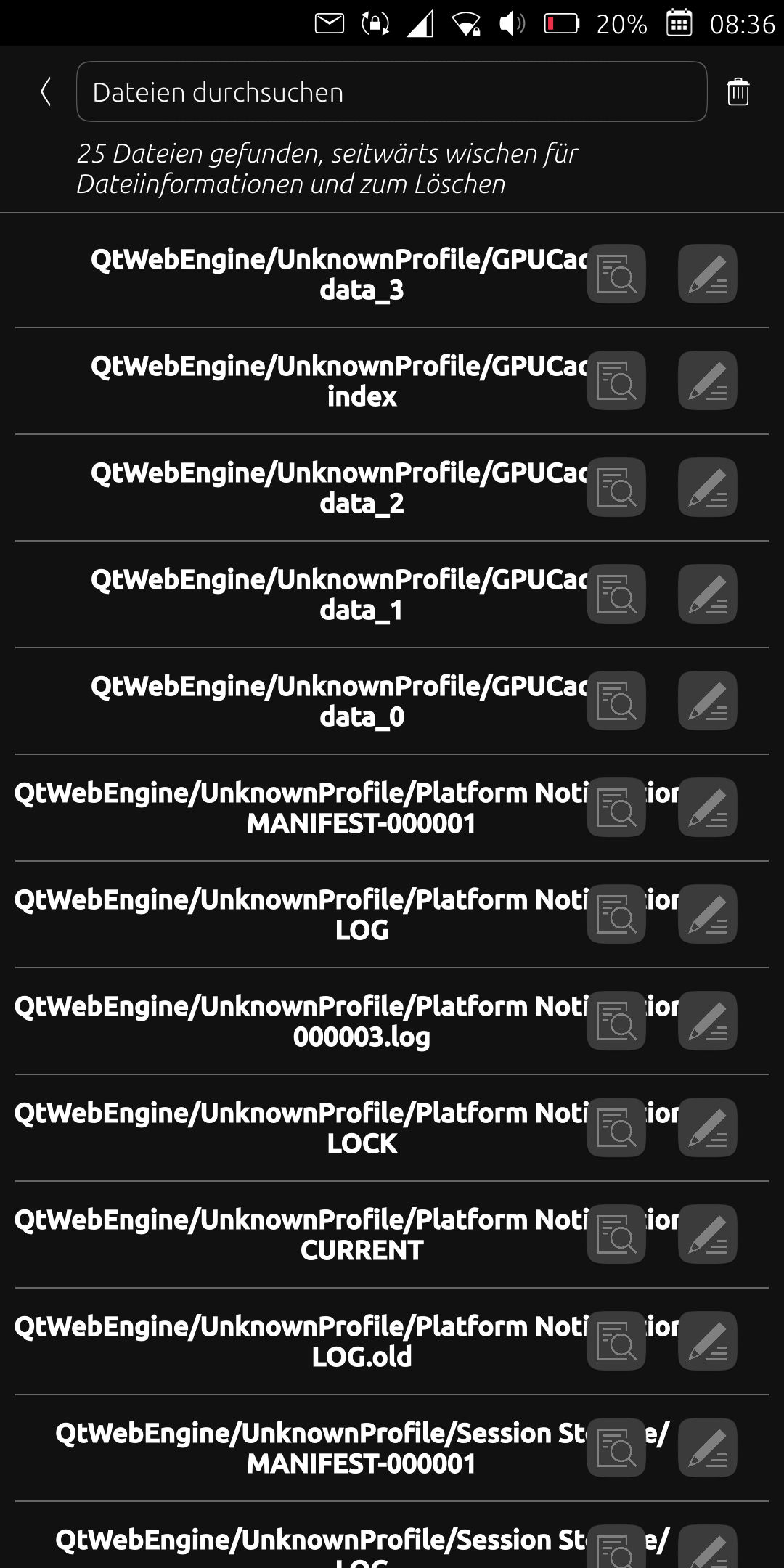
After I updated the app today, many files are listed under the "QtWebEngineUnknownProfile/..." path. Unfortunately, this is very confusing and I only want to see the files I created. What can I do about it? Simply delete the relevant files? Thanks
-
@ma Could you please share a screenshot? I don't have that here. Also some logs might help from logviewer app.
-
-
Also the files are not sorted by name anymore.
-
@ma not being sorted alphabetically I can confirm. I overlooked that when testing.
-
@ma I am not sure how this can happen. Since this is not the default saved folder.
That looks like a cache folder. Are the file names duplicates of your actual files? Then maybe clearing the cache could help (available in tedit settings). -
Hmm. I have an idea. The first version of read only mode used a file cache. That might have used the same folder for caching as the notes folder.
Now read only mode uses an in-memory cache and doesn't creaty any files.
If my guess is true, there should be a folder under "/home/phablet/.local/share/tedit.danfro" with qtwebengine in it. After deleting that e.g. in file manager you shoukd be fine. Just be careful not to delete your notes, only that subfolder.
-
@danfro Yes it works. Thanks for the quick response.
-
@danfro Is there a way to sort the files by name again? And how are the sorted by now?
-
@ma I am afraid, but I can't say right now why sorting is broken. I will investigate and try to fix that. For sure alphabetical order is easier to use.
Using the search is likely the best option to get along for the moment.
-
@danfro Okay, thanks.
-
@danfro I hadn't even paid attention to the broken sorting mode ! Perhaps this is an opportunity to implement different sorting modes internal to tedit or for tedit to conform to the sorting mode defined for Files?
-
@domubpkm you are not wrong here.

So (you and others): how many files do you have in tedit? Thinking about performance. Sorting in qml is likely easier but c++ is more performant for larger number of files?
a) less than 100 files
b) 100 to 500 files
c) 500 to 1000 files
d) 1000+ files -
@danfro a is my answer

-
@danfro b) This suggests that having a file count indicator might be good too
-
@domubpkm like the already existing text at the top of the file list saying how many files where found?



Hello! It looks like you're interested in this conversation, but you don't have an account yet.
Getting fed up of having to scroll through the same posts each visit? When you register for an account, you'll always come back to exactly where you were before, and choose to be notified of new replies (either via email, or push notification). You'll also be able to save bookmarks and upvote posts to show your appreciation to other community members.
With your input, this post could be even better 💗
Register Login