QTCreator Error
-
So I have created a project then run
clickable ide qtcreator
and I am getting an error that in the ide that the project could not be loadederror: No "" CMake configuration found. Available configuration: "Release". Make sure that CMAKE_BUILD_TYPE variable matches the "Build type" field. -
@ublurk said in QTCreator Error:
So I have created a project then run
clickable ide qtcreator
and I am getting an error that in the ide that the project could not be loadederror: No "" CMake configuration found. Available configuration: "Release". Make sure that CMAKE_BUILD_TYPE variable matches the "Build type" field.Did you launched qtcreator in the project folder ? is it a clickable project ?
-
@lduboeuf it a clickable project and it is launched from the project folder.
-
@ublurk said in QTCreator Error:
@lduboeuf it a clickable project and it is launched from the project folder.
ok, i see, it fails to recognize the project configuration. You sometimes need to re-run cmake or re-scan the project. Did you answer "Y" to the "Do you want Clickable to setup a QtCreator project for you? [Y/n]: Y" What kind of project it is , QML or cpp ?
I've just tried with a "fresh" QML project, and it works the first time. ( clickable 8.0.1 )
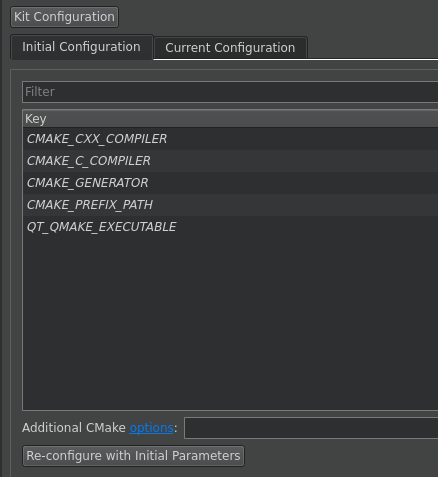
But sometimes you need to tune the project, especially if you ranclickable desktopbefore on the project. In that case aclickable cleanshould do the trick.Or see Build configuration. Eg. toggle the "initial configuration" then click on "re-configure with initial Parameters"
-
 L Lakotaubp moved this topic from New Contributors on

Hello! It looks like you're interested in this conversation, but you don't have an account yet.
Getting fed up of having to scroll through the same posts each visit? When you register for an account, you'll always come back to exactly where you were before, and choose to be notified of new replies (either via email, or push notification). You'll also be able to save bookmarks and upvote posts to show your appreciation to other community members.
With your input, this post could be even better 💗
Register Login