UBports Robot Logo UBports Forum
    • Categories
    • Recent
    • Tags
    • Popular
    • Users
    • Groups
    • Search
    • Register
    • Login
    1. Home
    2. tusch001
    T
    Offline
    • Profile
    • Following 0
    • Followers 0
    • Topics 7
    • Posts 10
    • Groups 0

    tusch001

    @tusch001

    1
    Reputation
    5
    Profile views
    10
    Posts
    0
    Followers
    0
    Following
    Joined
    Last Online

    tusch001 Unfollow Follow

    Best posts made by tusch001

    • How to: Touch Input for Volla Tablet with Volla Pen Tire (no pressure sensitivity - only touch)

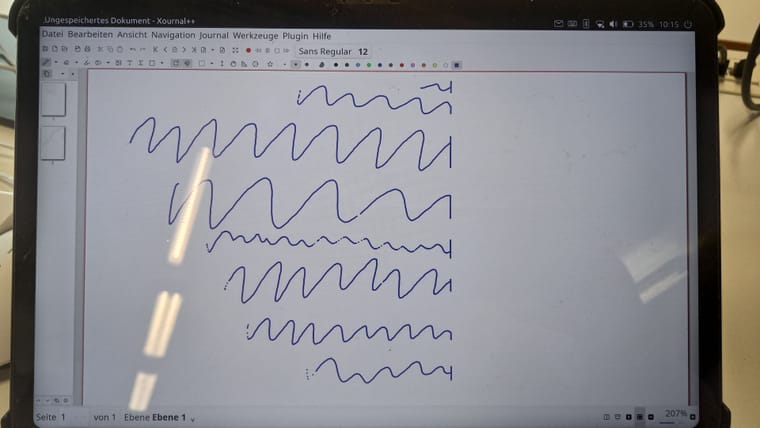
      It took me a while: Now there is touch sensitivity for the Volla Tablet. It can be used for clicking, mouse movements, even basic handwriting.

      Disclaimer:

      1. This instruction is for the Volla Tablet with Volla Pen Tiro. I have not tested this on any other device.

      2. This fix only works for touch events and is a work-around until MIR support for pen input is fixed. Pressure sensitivity may come with MIR version 2.0 (roadmap this year) or never at all. Whenever there will be true pressure sensitivity the udev rules below have to be reverted / adjusted.

      3. There is a bug in the libertine container (https://forums.ubports.com/topic/12135/input-events-in-right-third-of-screen-in-landscape-mode-are-not-registered-only-in-libertine-container😞 If you want to use landscape orientation (as is normal when using the keyboard) there is no input in the right third of the screen which is annoying. The container works fine in portrait mode. In the above mentioned post you can also get an idea how handwriting looks like with touch input.

      4. We have to write directly to the system partition, so installed libraries or udev rules might be overwritten with any update.

      This instruction is working on ubuntu touch 24.01 stable with update version 437 (March 2026).

      If you can live with the above - here is how to get the pen working. I will give detailed instructions, maybe other hardware / stylus combination may work in similar ways:

      Make the system partition writeable:

      sudo mount -o remount,rw /
      

      Install the following packages:

      sudo apt install evtest
      sudo snap install libinput
      

      find the input device: look for stylus, .... The Tiro Pen uses himax-stylus, make a note of the device identifier, e.g. himax-stylus. If there is no stylus: sorry, your journey ends here.

      sudo snap run libinput.list-devices | grep Device
      # for the Volla Pen Tiro:
      # Device:        himax-stylus
      

      output info regarding your stylus - replace himax-stylus with your pen. Also: it should have a line with Capabilities and Calibration. Note the event number (line starts with Kernel:)

      sudo snap run libinput.list-devices | sed -n '/himax-stylus,+20p'
      # Kernel:     /dev/input/event8
      

      Are events registered? Replace with your event number, quit with Ctrl + c

      sudo snap run libinput.debug-events --device /dev/input/event8   # Touch the screen with the pen
      sudo evtest /dev/input/event8   # Pressure sensitity support? Press lighter and harder with the pen: do ABS_PRESSURE values change? 
      

      If /dev/input/event8 exposes ABS_PRESSURE, and the device is (back) in tablet mode (ID_INPUT_TABLET=1, Capabilities: tablet), then the hardware/kernel side may already be capable of real pen pressure. In the Linux input model, ABS_DISTANCE is hover distance, while ABS_PRESSURE is the pressure axis; BTN_TOOL_PEN/ BTN_TOUCH describe pen presence and contact.

      The output of

      udevadm info -q property -n /dev/input/event8 | grep '^ID_INPUT'   # replace with nur event number
      

      shows which mode the stylus is currently in:

      • ID_INPUT_TABLET=1 (default): the pressure sensitive mode (if the stylus has the capability)
      • ID_INPUT_TOUCHSCREEN=1: touch mode

      ID_INPUT_TABLET=1: The driver actually reports pressure but MIR graphical surface is not reacting to it. No way to fix this. Let's switch to touch sensitivity (ID_INPUT_TOUCHSCREEN) so at least we get some events registered.

      Let's use udev rules to remap the events: create a new rule

      sudo nano /etc/udev/rules.d/99-himax-stylus-as-touch.rules
      

      Redirecting input: Use your own stylus identifier from above, it is necessary to distinct this event from touch (hand) input and mouse events.

      ACTION=="add|change", SUBSYSTEM=="input", KERNEL=="event[0-9]*", ATTRS{name}=="himax-stylus", \
        ENV{ID_INPUT}:="1", ENV{ID_INPUT_TABLET}:="", ENV{ID_INPUT_TOUCHSCREEN}:="1"
      

      Apply the rule: reload udev and retrigger the device

      sudo udevadm control --reload
      sudo udevadm trigger /sys/class/input/event8   # replace with nur event number
      

      Then verify:

      udevadm info -q property -n /dev/input/event8 | grep '^ID_INPUT'
      # it should list ID_INPUT_TOUCHSCREEN=1
      

      you may need to restart the system. if it still says ID_INPUT_TABLET check your input. Test your pen with swiping from top or the left / right screen border.

      To revert the rules: delete / comment the lines in the rules file and reboot.
      If later on you want to test pressure sensitivity you can also switch to tablet mode with

      ACTION=="add|change", SUBSYSTEM=="input", KERNEL=="event[0-9]*", ATTRS{name}=="himax-stylus", \
        ENV{ID_INPUT}:="1", ENV{ID_INPUT_TABLET}:="1", ENV{ID_INPUT_TOUCHSCREEN}:=""
      

      and reload / retrigger:

      sudo udevadm control --reload
      sudo udevadm trigger /sys/class/input/event8   # replace with nur event number
      

      I will write an instruction how to setup xournal++ app for handwriting later in another post.
      posted in Support
      T
      tusch001

    Latest posts made by tusch001

    • How to: Touch Input for Volla Tablet with Volla Pen Tire (no pressure sensitivity - only touch)

      It took me a while: Now there is touch sensitivity for the Volla Tablet. It can be used for clicking, mouse movements, even basic handwriting.

      Disclaimer:

      1. This instruction is for the Volla Tablet with Volla Pen Tiro. I have not tested this on any other device.

      2. This fix only works for touch events and is a work-around until MIR support for pen input is fixed. Pressure sensitivity may come with MIR version 2.0 (roadmap this year) or never at all. Whenever there will be true pressure sensitivity the udev rules below have to be reverted / adjusted.

      3. There is a bug in the libertine container (https://forums.ubports.com/topic/12135/input-events-in-right-third-of-screen-in-landscape-mode-are-not-registered-only-in-libertine-container😞 If you want to use landscape orientation (as is normal when using the keyboard) there is no input in the right third of the screen which is annoying. The container works fine in portrait mode. In the above mentioned post you can also get an idea how handwriting looks like with touch input.

      4. We have to write directly to the system partition, so installed libraries or udev rules might be overwritten with any update.

      This instruction is working on ubuntu touch 24.01 stable with update version 437 (March 2026).

      If you can live with the above - here is how to get the pen working. I will give detailed instructions, maybe other hardware / stylus combination may work in similar ways:

      Make the system partition writeable:

      sudo mount -o remount,rw /
      

      Install the following packages:

      sudo apt install evtest
      sudo snap install libinput
      

      find the input device: look for stylus, .... The Tiro Pen uses himax-stylus, make a note of the device identifier, e.g. himax-stylus. If there is no stylus: sorry, your journey ends here.

      sudo snap run libinput.list-devices | grep Device
      # for the Volla Pen Tiro:
      # Device:        himax-stylus
      

      output info regarding your stylus - replace himax-stylus with your pen. Also: it should have a line with Capabilities and Calibration. Note the event number (line starts with Kernel:)

      sudo snap run libinput.list-devices | sed -n '/himax-stylus,+20p'
      # Kernel:     /dev/input/event8
      

      Are events registered? Replace with your event number, quit with Ctrl + c

      sudo snap run libinput.debug-events --device /dev/input/event8   # Touch the screen with the pen
      sudo evtest /dev/input/event8   # Pressure sensitity support? Press lighter and harder with the pen: do ABS_PRESSURE values change? 
      

      If /dev/input/event8 exposes ABS_PRESSURE, and the device is (back) in tablet mode (ID_INPUT_TABLET=1, Capabilities: tablet), then the hardware/kernel side may already be capable of real pen pressure. In the Linux input model, ABS_DISTANCE is hover distance, while ABS_PRESSURE is the pressure axis; BTN_TOOL_PEN/ BTN_TOUCH describe pen presence and contact.

      The output of

      udevadm info -q property -n /dev/input/event8 | grep '^ID_INPUT'   # replace with nur event number
      

      shows which mode the stylus is currently in:

      • ID_INPUT_TABLET=1 (default): the pressure sensitive mode (if the stylus has the capability)
      • ID_INPUT_TOUCHSCREEN=1: touch mode

      ID_INPUT_TABLET=1: The driver actually reports pressure but MIR graphical surface is not reacting to it. No way to fix this. Let's switch to touch sensitivity (ID_INPUT_TOUCHSCREEN) so at least we get some events registered.

      Let's use udev rules to remap the events: create a new rule

      sudo nano /etc/udev/rules.d/99-himax-stylus-as-touch.rules
      

      Redirecting input: Use your own stylus identifier from above, it is necessary to distinct this event from touch (hand) input and mouse events.

      ACTION=="add|change", SUBSYSTEM=="input", KERNEL=="event[0-9]*", ATTRS{name}=="himax-stylus", \
        ENV{ID_INPUT}:="1", ENV{ID_INPUT_TABLET}:="", ENV{ID_INPUT_TOUCHSCREEN}:="1"
      

      Apply the rule: reload udev and retrigger the device

      sudo udevadm control --reload
      sudo udevadm trigger /sys/class/input/event8   # replace with nur event number
      

      Then verify:

      udevadm info -q property -n /dev/input/event8 | grep '^ID_INPUT'
      # it should list ID_INPUT_TOUCHSCREEN=1
      

      you may need to restart the system. if it still says ID_INPUT_TABLET check your input. Test your pen with swiping from top or the left / right screen border.

      To revert the rules: delete / comment the lines in the rules file and reboot.
      If later on you want to test pressure sensitivity you can also switch to tablet mode with

      ACTION=="add|change", SUBSYSTEM=="input", KERNEL=="event[0-9]*", ATTRS{name}=="himax-stylus", \
        ENV{ID_INPUT}:="1", ENV{ID_INPUT_TABLET}:="1", ENV{ID_INPUT_TOUCHSCREEN}:=""
      

      and reload / retrigger:

      sudo udevadm control --reload
      sudo udevadm trigger /sys/class/input/event8   # replace with nur event number
      

      I will write an instruction how to setup xournal++ app for handwriting later in another post.

      posted in Support
      T
      tusch001
    • RE: input events in right third of screen in landscape mode are not registered (only in libertine container)

      @projectmoon

      Snaps or direct installation work. No input problems there. But unfortunately then the DPI is so off, that menus are by far too small. The only fix for the DPI related problems, was to install the apps into containers and use libertine-tweak-tools for adjusting the DPI.
      It's a trade off. Also: not all apps have snap versions.

      posted in Libertine
      T
      tusch001
    • input events in right third of screen in landscape mode are not registered (only in libertine container)

      On the Volla Tablet landscape mode is the preferred way to use, esp. when connected to a keyboard.

      When using apps in a libertine container (Firefox ESR, Xournal++, IntelliJ IDEA, ...) touch events are not registered on the right side of the screen. The picture shows where the stylus stops working (the stylus is also registered as touch event as is the mouse, it is the only way to get the stylus working. I will later write an instruction how to get the stylus working). When moving the mouse / stylus too far right, it stops at the line which is approx the width of the screen when in portrait mode.
      When I try to select text in firefox with the mouse or click a button, the coordinates are off, both in x and y direction.

      In portrait mode inside the container and outside the container the apps register input events as they should.

      Is there a way to fix the screen orientation in the desktop-starter? I don't know, but I assume that the problem is related to the screen orientation. Is there a way to confirm my assumption? I'm welcome for any suggestions to fix this.

      Thx.

      Libertine Container landscape.jpg

      posted in Libertine
      T
      tusch001
    • wrong key mapping Volla Tablet + Volla Keyboard German version

      I bought the official keyboard to the Volla Tablet. I have the German Keyboard Layout.
      My system settings are on German language / german keyboard.
      Nearly all keys are mapped correctly (The German z / y are correct, most German mappings of special keys above the numbers are correct.)

      Yet there is one annoying fact:
      On the keyboard markings it says that <, > and | are on the 3rd level (Alt-GR or right Alt key) of y, xresp. c.
      But when I use right Alt + y, right Alt + x resp. right Alt + c the mapped keys are », « resp. ¢.
      Other third level keys as µ, @ or € are working fine. There are more third level keys but I don't know their correct mapping.

      This is a Volla Keyboard specific problem. My external bluetooth keyboard maps all keys correctly.

      My guess is that this happens because there is the physical key missing on the smaller volla keyboard which is normally present in large keyboards for these three keys and the mapping automatically uses the next numbered key.

      • Is there a temporary fix e.g. by remapping these keys?
      • Shall I file a bug report somewhere or is this forum enought?

      Thanks so far.

      Some information, fwiw:

      cat /proc/bus/input/devices

      I: Bus=0019 Vendor=0001 Product=0001 Version=0001
      N: Name="mtk-pmic-keys"
      P: Phys=
      S: Sysfs=/devices/platform/soc/10026000.pwrap/10026000.pwrap:mt6366/mtk-pmic-keys/input/input0
      U: Uniq=
      H: Handlers=kbd event0 
      B: PROP=0
      B: EV=3
      B: KEY=10000000000000 0
      
      I: Bus=0019 Vendor=0000 Product=0000 Version=0000
      N: Name="mtk-kpd"
      P: Phys=
      S: Sysfs=/devices/platform/soc/10010000.kp/input/input1
      U: Uniq=                                                                                                                                      
      H: Handlers=kbd event1                                                                                                                        
      B: PROP=0                                                                                                                                     
      B: EV=3                                                                                                                                       
      B: KEY=c000000000000 0                                                                                                                        
                                                                                                                                                    
      I: Bus=0000 Vendor=0000 Product=0000 Version=0000                                                                                             
      N: Name="mtk-tpd"                                                                                                                             
      P: Phys=                                                                                                                                      
      S: Sysfs=/devices/virtual/input/input7                                                                                                        
      U: Uniq=                                                                                                                                      
      H: Handlers=kbd event7                                                                                                                        
      B: PROP=2                                                                                                                                     
      B: EV=b                                                                                                                                       
      B: KEY=10 0 0 0 400 0 2000000 40000800 10004000000000 0
      B: ABS=665800000000000
      
      I: Bus=0000 Vendor=0000 Product=0000 Version=0000
      N: Name="himax-stylus"
      P: Phys=
      S: Sysfs=/devices/virtual/input/input8
      U: Uniq=
      H: Handlers=event8 
      B: PROP=2
      B: EV=b
      B: KEY=1c03 0 0 0 0 0
      B: ABS=f000003
      
      I: Bus=0019 Vendor=0001 Product=0001 Version=0100
      N: Name="soc:odm:gpio-keys"
      P: Phys=gpio-keys/input0
      S: Sysfs=/devices/platform/soc/soc:odm/soc:odm:gpio-keys/input/input9
      U: Uniq=
      H: Handlers=event9 
      B: PROP=0
      B: EV=21
      B: SW=1
      
      I: Bus=0019 Vendor=0000 Product=0000 Version=0000
      N: Name="mt6789-mt6366 Headset Jack"
      P: Phys=ALSA
      S: Sysfs=/devices/platform/soc/soc:sound/sound/card0/input10
      U: Uniq=
      H: Handlers=kbd event10 
      B: PROP=0
      B: EV=23
      B: KEY=40 0 0 0 0 0 0 1000000000 c000000000000 0
      B: SW=d4
      
      I: Bus=0003 Vendor=258e Product=0066 Version=0111
      N: Name="Volla Systeme GmbH"
      P: Phys=usb-musb-hdrc-1.1/input0
      S: Sysfs=/devices/platform/soc/mt_usb/musb-hdrc/usb2/2-1/2-1.1/2-1.1:1.0/0003:258E:0066.0007/input/input17
      U: Uniq=
      H: Handlers=sysrq kbd leds event2 
      B: PROP=0
      B: EV=120013
      B: KEY=1000000000007 ff9f207ac14057ff febeffdfffefffff fffffffffffffffe
      B: MSC=10
      B: LED=7
      
      I: Bus=0003 Vendor=258e Product=0066 Version=0111
      N: Name="Volla Systeme GmbH Mouse"
      P: Phys=usb-musb-hdrc-1.1/input1
      S: Sysfs=/devices/platform/soc/mt_usb/musb-hdrc/usb2/2-1/2-1.1/2-1.1:1.1/0003:258E:0066.0008/input/input18
      U: Uniq=
      H: Handlers=event3 
      B: PROP=0
      B: EV=17
      B: KEY=70000 0 0 0 0
      B: REL=903
      B: MSC=10
      
      I: Bus=0003 Vendor=258e Product=0066 Version=0111
      N: Name="Volla Systeme GmbH System Control"
      P: Phys=usb-musb-hdrc-1.1/input1
      S: Sysfs=/devices/platform/soc/mt_usb/musb-hdrc/usb2/2-1/2-1.1/2-1.1:1.1/0003:258E:0066.0008/input/input19
      U: Uniq=
      H: Handlers=kbd event4 
      B: PROP=0
      B: EV=13
      B: KEY=c000 10000000000000 0
      B: MSC=10
      
      I: Bus=0003 Vendor=258e Product=0066 Version=0111
      N: Name="Volla Systeme GmbH Consumer Control"
      P: Phys=usb-musb-hdrc-1.1/input1
      S: Sysfs=/devices/platform/soc/mt_usb/musb-hdrc/usb2/2-1/2-1.1/2-1.1:1.1/0003:258E:0066.0008/input/input20
      U: Uniq=
      H: Handlers=kbd event5 
      B: PROP=0
      B: EV=13
      B: KEY=20000000000 0 0 1000302000000 3038d8011001 1e000000000000 0
      B: MSC=10
      
      I: Bus=0003 Vendor=258e Product=0066 Version=0111
      N: Name="Volla Systeme GmbH Touchpad"
      P: Phys=usb-musb-hdrc-1.1/input1
      S: Sysfs=/devices/platform/soc/mt_usb/musb-hdrc/usb2/2-1/2-1.1/2-1.1:1.1/0003:258E:0066.0008/input/input21
      U: Uniq=
      H: Handlers=event6 
      B: PROP=5
      B: EV=1b
      B: KEY=e520 10000 0 0 0 0
      B: ABS=2e0800000000003
      B: MSC=20
      

      also there is the output of sudo snap run libinput.list-devices (after installing the snap package):

      Device:           mtk-kpd
      Kernel:           /dev/input/event1
      Group:            1
      Seat:             seat0, default
      Capabilities:     keyboard 
      Tap-to-click:     n/a
      Tap-and-drag:     n/a
      Tap drag lock:    n/a
      Left-handed:      n/a
      Nat.scrolling:    n/a
      Middle emulation: n/a
      Calibration:      n/a
      Scroll methods:   none
      Click methods:    none
      Disable-w-typing: n/a
      Accel profiles:   n/a
      Rotation:         n/a
      
      Device:           mtk-pmic-keys
      Kernel:           /dev/input/event0
      Group:            2
      Seat:             seat0, default
      Capabilities:     keyboard 
      Tap-to-click:     n/a
      Tap-and-drag:     n/a
      Tap drag lock:    n/a
      Left-handed:      n/a
      Nat.scrolling:    n/a
      Middle emulation: n/a
      Calibration:      n/a
      Scroll methods:   none
      Click methods:    none
      Disable-w-typing: n/a
      Accel profiles:   n/a
      Rotation:         n/a
      
      Device:           Volla Systeme GmbH
      Kernel:           /dev/input/event2
      Group:            3
      Seat:             seat0, default
      Capabilities:     keyboard 
      Tap-to-click:     n/a
      Tap-and-drag:     n/a
      Tap drag lock:    n/a
      Left-handed:      n/a
      Nat.scrolling:    n/a
      Middle emulation: n/a
      Calibration:      n/a
      Scroll methods:   none
      Click methods:    none
      Disable-w-typing: n/a
      Accel profiles:   n/a
      Rotation:         n/a
      
      Device:           Volla Systeme GmbH Mouse
      Kernel:           /dev/input/event3
      Group:            3
      Seat:             seat0, default
      Capabilities:     pointer 
      Tap-to-click:     n/a
      Tap-and-drag:     n/a
      Tap drag lock:    n/a
      Left-handed:      disabled
      Nat.scrolling:    disabled
      Middle emulation: disabled
      Calibration:      n/a
      Scroll methods:   button
      Click methods:    none
      Disable-w-typing: n/a
      Accel profiles:   flat *adaptive
      Rotation:         n/a
      
      Device:           Volla Systeme GmbH System Control
      Kernel:           /dev/input/event4
      Group:            3
      Seat:             seat0, default
      Capabilities:     keyboard 
      Tap-to-click:     n/a
      Tap-and-drag:     n/a
      Tap drag lock:    n/a
      Left-handed:      n/a
      Nat.scrolling:    n/a
      Middle emulation: n/a
      Calibration:      n/a
      Scroll methods:   none
      Click methods:    none
      Disable-w-typing: n/a
      Accel profiles:   n/a
      Rotation:         n/a
      
      Device:           Volla Systeme GmbH Consumer Control
      Kernel:           /dev/input/event5
      Group:            3
      Seat:             seat0, default
      Capabilities:     keyboard 
      Tap-to-click:     n/a
      Tap-and-drag:     n/a
      Tap drag lock:    n/a
      Left-handed:      n/a
      Nat.scrolling:    n/a
      Middle emulation: n/a
      Calibration:      n/a
      Scroll methods:   none
      Click methods:    none
      Disable-w-typing: n/a
      Accel profiles:   n/a
      Rotation:         n/a
      
      Device:           Volla Systeme GmbH Touchpad
      Kernel:           /dev/input/event6
      Group:            3
      Seat:             seat0, default
      Size:             96x51mm
      Capabilities:     pointer gesture
      Tap-to-click:     disabled
      Tap-and-drag:     enabled
      Tap drag lock:    disabled
      Left-handed:      disabled
      Nat.scrolling:    disabled
      Middle emulation: disabled
      Calibration:      n/a
      Scroll methods:   *two-finger edge 
      Click methods:    *button-areas clickfinger 
      Disable-w-typing: enabled
      Accel profiles:   flat *adaptive
      Rotation:         n/a
      
      Device:           soc:odm:gpio-keys
      Kernel:           /dev/input/event9
      Group:            4
      Seat:             seat0, default
      Capabilities:     switch
      Tap-to-click:     n/a
      Tap-and-drag:     n/a
      Tap drag lock:    n/a
      Left-handed:      n/a
      Nat.scrolling:    n/a
      Middle emulation: n/a
      Calibration:      n/a
      Scroll methods:   none
      Click methods:    none
      Disable-w-typing: n/a
      Accel profiles:   n/a
      Rotation:         n/a
      
      Device:           mt6789-mt6366 Headset Jack
      Kernel:           /dev/input/event10
      Group:            5
      Seat:             seat0, default
      Capabilities:     keyboard 
      Tap-to-click:     n/a
      Tap-and-drag:     n/a
      Tap drag lock:    n/a
      Left-handed:      n/a
      Nat.scrolling:    n/a
      Middle emulation: n/a
      Calibration:      n/a
      Scroll methods:   none
      Click methods:    none
      Disable-w-typing: n/a
      Accel profiles:   n/a
      Rotation:         n/a
      
      Device:           mtk-tpd
      Kernel:           /dev/input/event7
      Group:            6
      Seat:             seat0, default
      Capabilities:     keyboard touch 
      Tap-to-click:     n/a
      Tap-and-drag:     n/a
      Tap drag lock:    n/a
      Left-handed:      n/a
      Nat.scrolling:    n/a
      Middle emulation: n/a
      Calibration:      identity matrix
      Scroll methods:   none
      Click methods:    none
      Disable-w-typing: n/a
      Accel profiles:   n/a
      Rotation:         n/a
      
      Device:           himax-stylus
      Kernel:           /dev/input/event8
      Group:            7
      Seat:             seat0, default
      Size:             80x128mm
      Capabilities:     touch 
      Tap-to-click:     n/a
      Tap-and-drag:     n/a
      Tap drag lock:    n/a
      Left-handed:      n/a
      Nat.scrolling:    n/a
      Middle emulation: n/a
      Calibration:      identity matrix
      Scroll methods:   none
      Click methods:    none
      Disable-w-typing: n/a
      Accel profiles:   n/a
      Rotation:         n/a
      
      Device:           ProtoArc XK01 Plus Keyboard
      Kernel:           /dev/input/event11
      Group:            8
      Seat:             seat0, default
      Capabilities:     keyboard 
      Tap-to-click:     n/a
      Tap-and-drag:     n/a
      Tap drag lock:    n/a
      Left-handed:      n/a
      Nat.scrolling:    n/a
      Middle emulation: n/a
      Calibration:      n/a
      Scroll methods:   none
      Click methods:    none
      Disable-w-typing: n/a
      Accel profiles:   n/a
      Rotation:         n/a
      
      Device:           ProtoArc XK01 Plus Consumer Control
      Kernel:           /dev/input/event12
      Group:            8
      Seat:             seat0, default
      Capabilities:     keyboard pointer 
      Tap-to-click:     n/a
      Tap-and-drag:     n/a
      Tap drag lock:    n/a
      Left-handed:      n/a
      Nat.scrolling:    disabled
      Middle emulation: n/a
      Calibration:      n/a
      Scroll methods:   none
      Click methods:    none
      Disable-w-typing: n/a
      Accel profiles:   n/a
      Rotation:         n/a
      
      posted in Support
      T
      tusch001
    • RE: no audio output on Volla X (focal / 20.04 RC and Dev)

      @whoever fixed this - Thank you

      Audio works in Dev Version 673.

      posted in 20.04 Focal Fossa
      T
      tusch001
    • with enabled wifi the phone should automatically connect to network after reboot

      (Minor annoyance only but) after reboot / starting the phone:

      Although Wifi is on the phone does not automatically connect to known networks (e.g. at home). I always have to toggle the wifi button off and on again for the phone to find the network.
      Phone: VollaX
      Channel: RC and Dev

      posted in 20.04 Focal Fossa
      T
      tusch001
    • no audio output on Volla X (focal / 20.04 RC and Dev)

      Device: Volla X
      Channel: Focal 20.04 RC (2) and DEV (653)
      Build Description: lineage_halium_arm64-userdebug 10 QQ3A.200805.001 254 test-keys
      Kernel: 4.9.190+ (arm64)

      I get no audio output, none at all

      • no ringtone with calls, no audio within calls
      • no audio in music / video playback

      logviewer app: pulseaudio-trust-stored says

      Error during initialization and startup: Dynamic exception type: std::system_error
      std::exception::what: No such file or directory
      

      This post is a repeat from Github due to recommendation to report isues here.
      Over there another user reports the same on a Poco X3 Pro.

      Thanks

      posted in 20.04 Focal Fossa
      T
      tusch001
    • RE: Where is the best place to report issues with 20.04?

      edit: I opened an issue here https://forums.ubports.com/category/114/20-04-focal-fossa
      for further discussions

      @kimo
      On RC (2) and Dev (647 to 653). None of the dev versions are working.
      Phone: VollaX
      I posted it on github (https://github.com/ubports/ubuntu-touch/issues/2114)
      Seems I'm not the only one having problems, at least one other repky there.
      The only information I have is the error in the Logcat app from pulseaudio-trust-stored that a directory or file is missing.

      Thanks for helping.

      posted in 20.04 Focal Fossa
      T
      tusch001
    • Where is the best place to report issues with 20.04?

      Just switched from version 16 to focal and encoutered a severe issue (no audio output at all).
      I'm not sure, where to report this.
      This forum?
      Github? (https://github.com/ubports/ubuntu-touch). There doesn't seem to be much activity over there.

      Did I miss an important place?

      Thanks

      posted in 20.04 Focal Fossa
      T
      tusch001