UBports Robot Logo UBports Forum
    • Categories
    • Recent
    • Tags
    • Popular
    • Users
    • Groups
    • Search
    • Register
    • Login

    [Guide] Code completion on Qt Creator for Ubuntu.Components

    Scheduled Pinned Locked Moved App Development
    28 Posts 8 Posters 10.5k Views 6 Watching
    Loading More Posts
    • Oldest to Newest
    • Newest to Oldest
    • Most Votes
      Reply
      • Reply as topic
      Log in to reply
      This topic has been deleted. Only users with topic management privileges can see it.
      • lduboeufL Offline
        lduboeuf
        last edited by lduboeuf

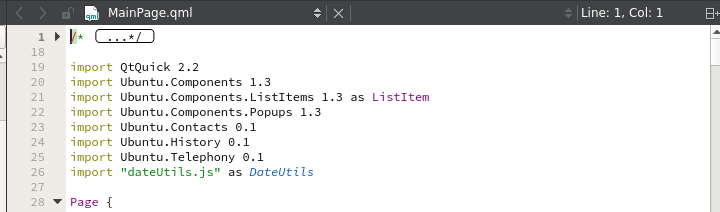
        Capture d’écran de 2020-01-10 12-12-29.png

        Oh, now it should be easier to dig into components 🙂 . ( here using qtcreator in docker container with installed qml components https://github.com/lduboeuf/ut-qtcreator )

        https://youtu.be/LEpMFWy9FVM

        1 Reply Last reply Reply Quote 0
        • IsaacI Offline
          Isaac
          last edited by

          Hi guys!

          Is it possible to get Ubuntu.Components recognized by QtCreator on Windows?

          1 Reply Last reply Reply Quote 0
          • lduboeufL Offline
            lduboeuf
            last edited by

            @Isaac said in [Guide] Code completion on Qt Creator for Ubuntu.Components:

            Is it possible to get Ubuntu.Components recognized by QtCreator on Windows?

            The copy components from docker solution should work ?

            1 Reply Last reply Reply Quote 0
            • B Offline
              boky
              last edited by

              Hello. What to do in this case?

              ./ut-qtcreator.sh     
              access control disabled, clients can connect from any host
              QStandardPaths: XDG_RUNTIME_DIR not set, defaulting to '/tmp/runtime-zorg'
              libGL error: MESA-LOADER: failed to retrieve device information
              libGL error: image driver extension not found
              libGL error: failed to load driver: radeon
              libGL error: failed to open drm device: No such file or directory
              libGL error: failed to load driver: r600
              process 1: The last reference on a connection was dropped without closing the connection. This is a bug in an application. See dbus_connection_unref() documentation for details.
              Most likely, the application was supposed to call dbus_connection_close(), since this is a private connection.
              QXcbConnection: XCB error: 2 (BadValue), sequence: 538, resource id: 1283, major code: 130 (Unknown), minor code: 3
              QXcbConnection: XCB error: 2 (BadValue), sequence: 541, resource id: 1283, major code: 130 (Unknown), minor code: 3
              QXcbConnection: XCB error: 2 (BadValue), sequence: 548, resource id: 1283, major code: 130 (Unknown), minor code: 3
              
              
              lduboeufL 1 Reply Last reply Reply Quote 0
              • lduboeufL Offline
                lduboeuf @boky
                last edited by

                @boky are you using the project from the "add module" branch ?. I've noticed an issue with Morph qml dependencies. Try to comment the last line from the Dockerfile

                B 1 Reply Last reply Reply Quote 0
                • B Offline
                  boky @lduboeuf
                  last edited by boky

                  @lduboeuf

                  FROM clickable/ubuntu-sdk:16.04-amd64
                  
                  RUN apt-get update && apt-get install -y git qtcreator libxrender1 gdb
                  
                  #CMD ["/usr/bin/qtcreator"]
                  
                  ./ut-qtcreator.sh
                  access control disabled, clients can connect from any host


                  tired of installing. Download every time)))
                  displayed when unpacking

                  debconf: delaying package configuration, since apt-utils is not installed


                  although the package itself is installed

                  lduboeufL 1 Reply Last reply Reply Quote 0
                  • lduboeufL Offline
                    lduboeuf @boky
                    last edited by lduboeuf

                    @boky oh i was wrong, not that line, but the one that try to install Morph.Web ( qmlplugin... )
                    I've updated the branch so you can rebuild the image
                    After re-read your post it seems that you're not trying the add_module branch.
                    So here i've no idea.

                    What OS are you working on ?.
                    Is your clickable up to date ?

                    1 Reply Last reply Reply Quote 0
                    • B Offline
                      boky
                      last edited by boky

                      This post is deleted!
                      1 Reply Last reply Reply Quote 0
                      • D Offline
                        doniks @lduboeuf
                        last edited by

                        @lduboeuf said in [Guide] Code completion on Qt Creator for Ubuntu.Components:

                        • A more generic solution using clickable image:

                        I'm trying this approach. The path variable should include the qml dir

                        cd ~/docs/devel
                        mkdir qml-module-ubuntu-components
                        cd qml-module-ubuntu-components/
                        docker cp silly_bose:/usr/lib/x86_64-linux-gnu/qt5/qml .
                        export QML_IMPORT_PATH=~/docs/devel/qml-module-ubuntu-components/ 
                        qtcreator # -> doesn't work
                        export QML_IMPORT_PATH=~/docs/devel/qml-module-ubuntu-components/qml
                        qtcreator # -> this works
                        

                        So, you should set the variable such that you find this one:

                        ls -dl $QML_IMPORT_PATH/Ubuntu
                        
                        1 Reply Last reply Reply Quote 0
                        • D Offline
                          doniks
                          last edited by doniks

                          mhm, so while this works now to resolve import Ubuntu.Components 1.3 in a .qml file, but it still does not find #include <QtQml> or #include <QDebug> in a .cpp file. any idea?

                          lduboeufL 1 Reply Last reply Reply Quote 0
                          • lduboeufL Offline
                            lduboeuf @doniks
                            last edited by

                            @doniks are you working with a clickable template? I guess QtCreator does not find Qt libs, you should check in settings Qt paths

                            D 1 Reply Last reply Reply Quote 0
                            • D Offline
                              doniks @lduboeuf
                              last edited by

                              @lduboeuf yes. the whatsitcalled qml with c++ plugin template

                              1 Reply Last reply Reply Quote 0
                              • lduboeufL Offline
                                lduboeuf
                                last edited by

                                have you installed locally QtQuickControl 2 ?
                                sudo apt install qtquickcontrols2-5-dev

                                you can see if any issue with paths in kits

                                D 1 Reply Last reply Reply Quote 0
                                • lduboeufL Offline
                                  lduboeuf
                                  last edited by

                                  Video showing the WIP of having qtcreator running above clickable image :

                                  full code completion for all UT components and qml modules , and can launch directly the app, you can debug the c++ part also.
                                  The demo covers python and c++ clickable template, and address-book-app

                                  https://youtu.be/Exmgbb0VdC4

                                  AbuabdellahA 1 Reply Last reply Reply Quote 1
                                  • AbuabdellahA Offline
                                    Abuabdellah @lduboeuf
                                    last edited by

                                    @lduboeuf

                                    is there a wiki to get code completion on ubuntu 19.10?

                                    lduboeufL 1 Reply Last reply Reply Quote 0
                                    • lduboeufL Offline
                                      lduboeuf @Abuabdellah
                                      last edited by

                                      @Abuabdellah i don't know if Ubuntu.Components are installable on 19.10 but you can wait for the clickable ide qtcreator feature or try the 1st post Guide solutions

                                      AbuabdellahA 1 Reply Last reply Reply Quote 1
                                      • AbuabdellahA Offline
                                        Abuabdellah @lduboeuf
                                        last edited by

                                        thank you @lduboeuf

                                        I didn't see html5 components on the image! isn't there or it is included in other image?

                                        root@ea8e2a8bedfb:/# ls usr/lib/x86_64-linux-gnu/qt5/
                                        bin  libexec  mkspecs  plugins  qml  qt.conf
                                        
                                        lduboeufL 2 Replies Last reply Reply Quote 0
                                        • lduboeufL Offline
                                          lduboeuf @Abuabdellah
                                          last edited by

                                          @Abuabdellah Well html5 components is peobably elsewhere, here you are looking to qt qml one

                                          1 Reply Last reply Reply Quote 0
                                          • lduboeufL Offline
                                            lduboeuf @Abuabdellah
                                            last edited by lduboeuf

                                            @Abuabdellah look here /usr/share/ubuntu-html5...
                                            dpkg -L ubuntu-html5-ui-toolkit

                                            AbuabdellahA 1 Reply Last reply Reply Quote 1
                                            • AbuabdellahA Offline
                                              Abuabdellah @lduboeuf
                                              last edited by

                                              thank you @lduboeuf

                                              1 Reply Last reply Reply Quote 0

                                              Hello! It looks like you're interested in this conversation, but you don't have an account yet.

                                              Getting fed up of having to scroll through the same posts each visit? When you register for an account, you'll always come back to exactly where you were before, and choose to be notified of new replies (either via email, or push notification). You'll also be able to save bookmarks and upvote posts to show your appreciation to other community members.

                                              With your input, this post could be even better 💗

                                              Register Login
                                              • First post
                                                Last post