[HowTo][Convergence]Use a simulated miracast sink for testing convergence
-
modules:composer.user_said_in, @luksus, [HowTo][Convergence]Use a simulated miracast sink for testing convergence
It seems that the wireless display mode is broken on 16.04 for FP2.
I reflashed it with 15.04 and there my "display" shows up.Sounds like it justifies a bug report
By the way, you can add the LG 1500pf/g/Largo projectors to the confirmed working devices :-).
Sounds like worth documenting, maybe in a new page about wireless displays here: https://docs.ubports.com/en/latest/userguide/dailyuse/index.html
hint, hint

-
Nexus 5 with SlimPort: on 16.04 RC icons are wery big

I back to 15.04 to try Convergence mode.
-
How to enable desktop mode like on 15.04?
-
@ierihon Use the UT Tweak Tool. Or plug a slimport cable to the tv.
-
@malditobastardo said in [HowTo][Convergence]Use a simulated miracast sink for testing convergence:
@ierihon Use the UT Tweak Tool. Or plug a slimport cable to the tv.
Thanks. I know these app, but is not suitable: DPI not changed
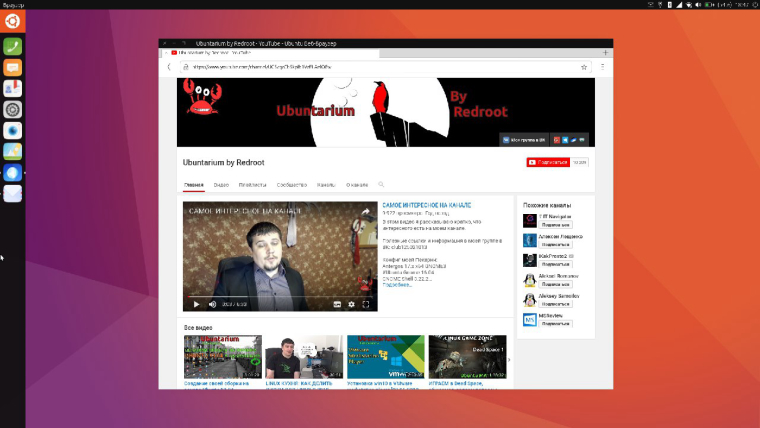
On 15.04 when i connect SlimPort on external screen icons looks good.
On 16.04 RC - icons are big, like on phone:
(
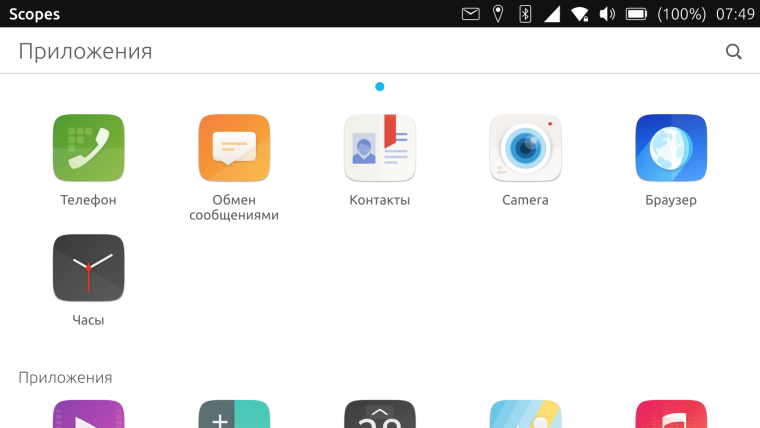
P.S. With these app i can change icon size, but it also not suitable. On 15.04 stable convergence mode work better.
-
@ierihon In Desktop mode?
-
@malditobastardo said in [HowTo][Convergence]Use a simulated miracast sink for testing convergence:
@ierihon In Desktop mode?
Yes, in Desktop mode (Screenshot of 15.04 Stable).
-
Just out of curiosity I ordered a HAMA (German company) Miracast stick to play around with my M10FHD
Good thing: Display is detected
Bad Thing: On connecting it fails after some time its going through connecting, preparing for display, ready to display and then fails / disconnects on the tablet...Using dev114
Any directions to extend testing or provide more logs/traces?
FWIW:
iw phy does NOT report P2P-device for my M10
HAMA device is HAMA83210-ADFC46br
Thomas -
@flohack said in [HowTo][Convergence]Use a simulated miracast sink for testing convergence:
@doniks Miracast is per definition not possible over "normal" WiFi, thats why most people had only success with the Microsoft Miracast stick. That seems to be still the most compatible one...
BR
FYI, a miracast presentation. Some of it went over my head, but might have some helpful technical details https://www.youtube.com/watch?v=53v11JTf4U8
-
@doniks For the Google Chrome we think it would be possible to start a thread which is as long as this tread here about the Miracast:
https://forums.ubports.com/topic/7807/google-chromecast-installation-on-ubuntu-touch
For the Miracast, it has been evaluated how it works on Ubuntu Touch.
Unfortunately, we already have a Chromecast adapter. It is worth buying a Miracast and sell the Chromecast on ebay?

Hello! It looks like you're interested in this conversation, but you don't have an account yet.
Getting fed up of having to scroll through the same posts each visit? When you register for an account, you'll always come back to exactly where you were before, and choose to be notified of new replies (either via email, or push notification). You'll also be able to save bookmarks and upvote posts to show your appreciation to other community members.
With your input, this post could be even better 💗
Register Login