UBports Robot Logo UBports Forum
    • Categories
    • Recent
    • Tags
    • Popular
    • Users
    • Groups
    • Search
    • Register
    • Login

    POCO X3 NFC (surya) fimware version

    Scheduled Pinned Locked Moved Solved Support
    13 Posts 4 Posters 3.1k Views 1 Watching
    Loading More Posts
    • Oldest to Newest
    • Newest to Oldest
    • Most Votes
      Reply
      • Reply as topic
      Log in to reply
      This topic has been deleted. Only users with topic management privileges can see it.
      • Eric HE Offline
        Eric H
        last edited by

        Hello,

        I would like to install Ubuntu Touch on my POCO X3 NFC (surya).
        But in the documentation, there is a preparatory step:

        Make sure to have MIUI Build V12.0.9.0.QJGMIXM installed
        Download Here: https://xiaomifirmwareupdater.com/miui/surya/stable/V12.0.9.0.QJGMIXM/

        But my phone is an EU region one. And the V12.0.9.0.QJGEUXM does not exist at https://xiaomifirmwareupdater.com/archive/miui/surya/

        What is the best option ?

        • Trying to install Ubuntu Touch with the current firmware: 12.0.8.0(QJGEUXM) ?

        • or is it possible to updating, first, to a global region firmware (V12.0.9.0.QJGMIXM) ?

        Thanks

        • Ubuntu Touch for Xiaomi POCO X3 NFC Telegram group
        • Ubuntu Touch installation guide for Xiaomi POCO X3 NFC / X3
        LakotaubpL 1 Reply Last reply Reply Quote 0
        • LakotaubpL Offline
          Lakotaubp @Eric H
          last edited by

          @eheintzmannIf you do not get a quickish answer here I would contact the porter of the device using the wrong build could end up with a brick.

          Eric HE 1 Reply Last reply Reply Quote 1
          • Eric HE Offline
            Eric H @Lakotaubp
            last edited by

            @Lakotaubp Thanks ! How to find the porter ?

            • Ubuntu Touch for Xiaomi POCO X3 NFC Telegram group
            • Ubuntu Touch installation guide for Xiaomi POCO X3 NFC / X3
            KenedaK 1 Reply Last reply Reply Quote 0
            • KenedaK Offline
              Keneda @Eric H
              last edited by

              @eheintzmann
              On the device page you gave us : https://devices.ubuntu-touch.io/device/surya/

              Scroll down to the "contributor" section.

              2015-2023 : Meizu MX4 ☠️⚰️✝️
              2023-2024 : Nexus 5 ☠️⚰️✝️
              2024-***** : FPOS Fairphone 5
              🇲🇫🇬🇧

              Eric HE 1 Reply Last reply Reply Quote 2
              • Eric HE Offline
                Eric H @Keneda
                last edited by Eric H

                @Keneda Thanks !

                @Ungeskriptet @ywmaa Please can you help me ?

                • Ubuntu Touch for Xiaomi POCO X3 NFC Telegram group
                • Ubuntu Touch installation guide for Xiaomi POCO X3 NFC / X3
                Eric HE 1 Reply Last reply Reply Quote 0
                • Eric HE Offline
                  Eric H @Eric H
                  last edited by

                  If that can help, here is a screenshot:
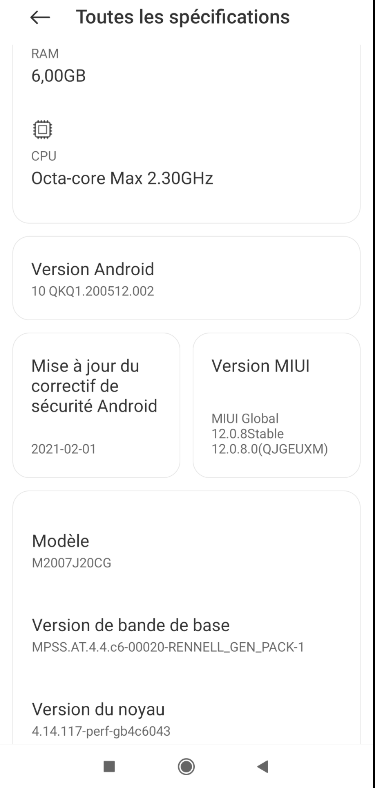
                  ca5a8d09-97e3-4d69-adf3-47d8ab1348c1-image.png

                  • Ubuntu Touch for Xiaomi POCO X3 NFC Telegram group
                  • Ubuntu Touch installation guide for Xiaomi POCO X3 NFC / X3
                  Eric HE 1 Reply Last reply Reply Quote 0
                  • Eric HE Offline
                    Eric H @Eric H
                    last edited by

                    As suggested on the «Ubuntu Touch for POCO X3 NFC» chat room, I flashed the Global V12.0.9.0.QJGMIXM ROM.
                    The device has not been bricked, and I was able to install Ubuntu Touch successfully.

                    Thanks

                    • Ubuntu Touch for Xiaomi POCO X3 NFC Telegram group
                    • Ubuntu Touch installation guide for Xiaomi POCO X3 NFC / X3
                    K 1 Reply Last reply Reply Quote 0
                    • Eric HE Eric H has marked this topic as solved on
                    • K Offline
                      kroonen @Eric H
                      last edited by kroonen

                      @eheintzmann

                      Hi.

                      I also want to flash my eu version of my POCO X3 NFC. I'm already on 13.0.4

                      I see you can download the recovery version or the fastboot. Which one did you take?

                      How dit you flash the image? With the xiaomi tool? Or with TWRP method?

                      https://www.huaweicentral.com/install-miui-rom-on-xiaomi-mi-redmi-and-poco-devices-manual/

                      Eric HE 1 Reply Last reply Reply Quote 0
                      • Eric HE Offline
                        Eric H @kroonen
                        last edited by Eric H

                        @kroonen

                        Hi,

                        I downloaded the fastboot version at https://xiaomifirmwareupdater.com/miui/surya/stable/V12.0.9.0.QJGMIXM
                        I flashed the image with Xiaomi Flash Tool (https://xiaomiflashtool.com). Be careful, by default this tool re-lock the device.

                        • Ubuntu Touch for Xiaomi POCO X3 NFC Telegram group
                        • Ubuntu Touch installation guide for Xiaomi POCO X3 NFC / X3
                        K 1 Reply Last reply Reply Quote 0
                        • K Offline
                          kroonen @Eric H
                          last edited by

                          @eheintzmann

                          I Tried but I got strange errors. After also running the unlock bootloader tool, I got there that I needed to wait 168 hours to verfiy the xiaomi account for developers.

                          I just wait 8 days and then run again the tool , hoping it will work

                          Eric HE 2 Replies Last reply Reply Quote 0
                          • Eric HE Offline
                            Eric H @kroonen
                            last edited by Eric H

                            @kroonen
                            Yes, I've got the same delay of 168 hours, at the first time I tried to unlock my phone.
                            Second time, I had first enabled the developer mode, and I had linked my device with my Xiaomi account.
                            Only after these actions, I've been able to unlock with Xiaomi Flash Tool.

                            https://wiki.lineageos.org/devices/surya/install#unlocking-the-bootloader

                            • Ubuntu Touch for Xiaomi POCO X3 NFC Telegram group
                            • Ubuntu Touch installation guide for Xiaomi POCO X3 NFC / X3
                            1 Reply Last reply Reply Quote 0
                            • Eric HE Offline
                              Eric H @kroonen
                              last edited by

                              @kroonen said in POCO X3 NFC (surya) fimware version:

                              I just wait 8 days and then run again the tool , hoping it will work

                              Please let us know if it works, now.

                              • Ubuntu Touch for Xiaomi POCO X3 NFC Telegram group
                              • Ubuntu Touch installation guide for Xiaomi POCO X3 NFC / X3
                              K 1 Reply Last reply Reply Quote 0
                              • K Offline
                                kroonen @Eric H
                                last edited by

                                @eheintzmann

                                Yes now it works. Is ubuntu tocuh 20.04 not yet available for the poco x3 nfc?

                                1 Reply Last reply Reply Quote 0

                                Hello! It looks like you're interested in this conversation, but you don't have an account yet.

                                Getting fed up of having to scroll through the same posts each visit? When you register for an account, you'll always come back to exactly where you were before, and choose to be notified of new replies (either via email, or push notification). You'll also be able to save bookmarks and upvote posts to show your appreciation to other community members.

                                With your input, this post could be even better 💗

                                Register Login
                                • First post
                                  Last post