[How to] Run Docker on your device
-
Hello again!
I've been working on bringing Docker to Ubuntu Touch, with success! Although not completely finished, I'd like to share what is possible today.
This requires a device with
snapdinstalled, specifically Ubuntu Touch 24.04-1.2 and up.This required changes to the Docker Snap, with a PR on GitHub that has received two heart reactions by the maintainers, so the chances of this PR landing upstream are high. For those interested in what was necessary: https://github.com/canonical/docker-snap/pull/327
I've shared a preliminary build of this Docker Snap on Google Drive and my private NextCloud instance, until the PR is merged upstream. Download links are below.A Pull Request with automatic firewall detection has been merged upstream, so I have removed links to my private builds. Instead follow the instructions in How to to get a working Snap on your device.
Kernel support
For Docker to work your device's kernel requires a certain set of features enabled. I've tried to list them here: https://gist.github.com/fredldotme/5dffc8bfa410cfa8f541276407154494
Also, if the device uses
CONFIG_ANDROID_PARANOID_NETWORKin it's configuration, it might be beneficial to disable that also since otherwise containers won't be able to connect to the internet.How to
-
Ensure you are running 24.04-1.2, which adds support for the Docker Snap in confined mode
-
Install the Snap on your device:
sudo snap install docker --edge -
Test whether Docker works:
sudo docker run hello-world -
For running Docker without
sudo, set up your user appropriately:
sudo addgroup --extrausers docker sudo adduser $USER docker newgrp docker sudo snap disable docker sudo snap enable docker- You're done!
If you feel really adventurous you can now even install the Clickable Snap (
sudo snap install clickable) and develop your Ubuntu Touch apps directly on your Ubuntu Touch device. How awesome is that?
-
-
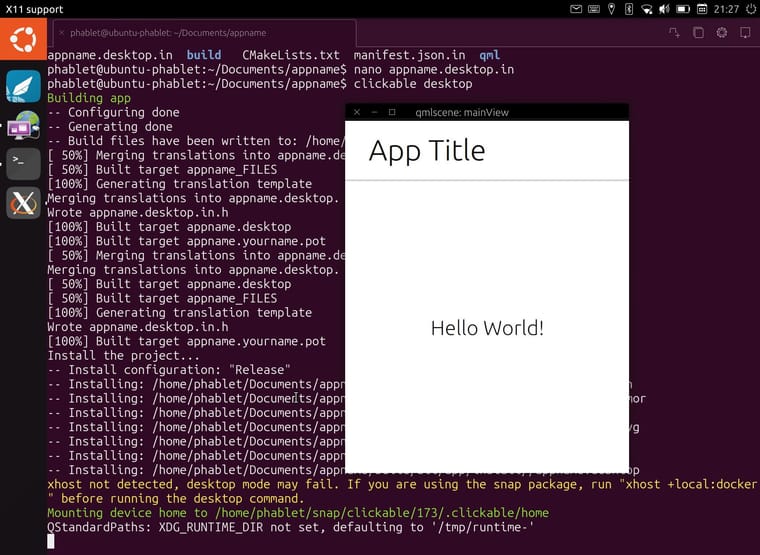
And here a little success story on combining the Clickable Snap & the Docker Snap, allowing to build AND test a click package directly on the device (in this case a JingPad). Photo courtesy of Sander:
-
 F fredldotme has marked this topic as solved on
-
F fredldotme marked this topic as a regular topic on
-
 A arubislander pinned this topic on
-
Hello again.
Some things happened since I posted the original post above. I've gone ahead and added automatic detection for xtables vs nftables to the Docker Snap, which was received quite positively by the maintainers. Here's the PR for those who are interested: https://github.com/canonical/docker-snap/pull/329
You can install the Snap via:
sudo snap install docker --channel=edge/pr-329If you've already installed the test package from the Downloads link above, you will have to instead run:
sudo snap refresh docker --channel=edge/pr-329 --amendWhen this lands it will first land in the
edgechannel before promotion to a more "stable" channel, so keep that in mind once you see the PR merged. -
I tried running the Docker snap before, but I got hit by overlayfs not being present. Will your version of the snap work in that situation? Or is it dependent on the device having overlayfs?
-
@projectmoon overlayfs not being available is a kernel problem, for which you should contact your device maintainer.
-
For those wanting to try
clickablewith the newdockersnap, or wanting to build other images on your devices, I noticed a serious performance hit in creating clickable images with the new Docker 29.0.0 which is due to thecontainerd-snapshotterfeature. You can disable it easily though, restoring snapshot creation to a previous codepath. You'll just have to edit your/var/snap/docker/current/config/daemon.jsonconfiguration:$ cat /var/snap/docker/current/config/daemon.json { "log-level": "error", "features": { "containerd-snapshotter": false } }Make sure to restart your Docker daemon afterwards:
sudo snap restart docker -
Good news, the xtables-enabled Docker Snap is now available in the
edgechannel. I've updated the How to section with the new install commands. If you want to refresh:sudo snap refresh docker --edge --devmode -
On Fairphone 4 i also have to do a:
sudo chmod 666 /var/run/docker.sockand according to https://clickable-ut.dev/en/latest/install.htmlsudo snap connect clickable:ssh-keysandsudo snap connect clickable:etc-gitconfigare needed after installing clickable, too.P.S.: *.click package compilation works

-
Good news: Now that Ubuntu Touch 24.04-1.2 is out, you are able to install Docker without
--devmode! -
System unpinned this topic on
Hello! It looks like you're interested in this conversation, but you don't have an account yet.
Getting fed up of having to scroll through the same posts each visit? When you register for an account, you'll always come back to exactly where you were before, and choose to be notified of new replies (either via email, or push notification). You'll also be able to save bookmarks and upvote posts to show your appreciation to other community members.
With your input, this post could be even better 💗
Register Login