Experiments on getting location using the satStat app in Waydroid
-
@wgarcia
Thank you very much for the test.
Sorry for going off-topic.
Interesting...
I can't explain this difference between the hosted system (Waydroid) and my host system (UT).
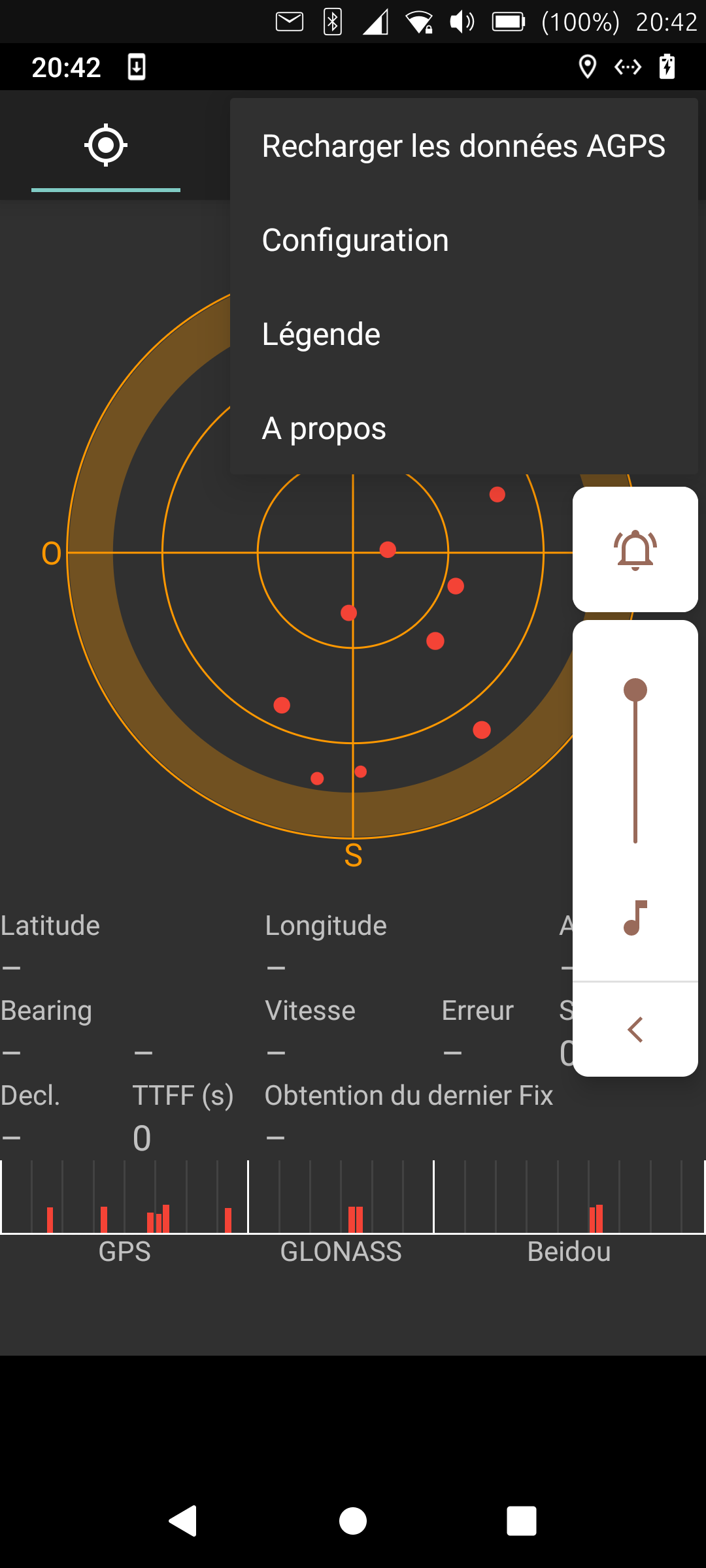
In my french system i have this menu.
-
@Vlad-Nirky I press on "Recharger ..."
But I have to amend very much my first tests. I tested this several times after my first tests and the results were worse and more in line with the usual lag of getting a position.
This morning I went out jogging and after following the above sequence I couldn't get any position at all. I went through places with tall buildings on both sides but also through open spaces.
I doubt very much that waydroid can get any Agps result in these devices. As far as I understand, Agps gets information from cell towers, and waydroid does not see any cell signal to do that.
Having said this, I have to say that I have also a Volla Phone 22, and that one gets position immediately in waydroid, even under a ceiling. I don't know what is going on there, but it looks very different from what I see in the FP5.
-
@wgarcia
Thanks again.
Interresting too.
I guess the first time aGPS uses WIFI or mobile data to get informations from internet.- Traditional (standalone) GPS:
A GPS receiver (such as in a smartphone) picks up signals from at least four satellites to triangulate its position. This can take anywhere from a few seconds to a few minutes, especially during a cold start, because it must:
Download the ephemeris (the exact position of each satellite)
Estimate its approximate position
- With aGPS:
aGPS improves this process by downloading this data via the network, instead of waiting for it to arrive slowly from the satellites.
It can use:
 The cellular network (GSM antennas)
 An Internet connection (Wi-Fi, mobile data)
aGPS provides:
The approximate position of the phone (via the antenna)
The exact time
Satellite ephemeris via dedicated servers
- Traditional (standalone) GPS:
-
@Vlad-Nirky Thanks, very informative.
But waydroid does not have any WIFI access or mobile data. There is something that fakes WIFI, the LineageOS thinks that the network is being accessed through WIFI and not through the bridge with the UT host, but it doesn't seem to be working for me in the waydroid/LineageOS being used currently in the FP5 ( I think 13). And I doubt that even with the fake WIFI working, this will help Agps to get anything.
-
@wgarcia
Maybe the wifi is only the path to access datas (satellite ephemeris), so it could work through the bridge.
My tests seem to show a significant improvement in connection time.
But it's hard to be certain (there could be persistence or caches). -
@Vlad-Nirky Worth keep testing.
In the Settings section of satStat, in the section that says something like "Updating from AGPS", do you have anything marked? There is: WIFI, BLUETOOTH, ETHERNET, VPN
-
@wgarcia
No... All unchecked.
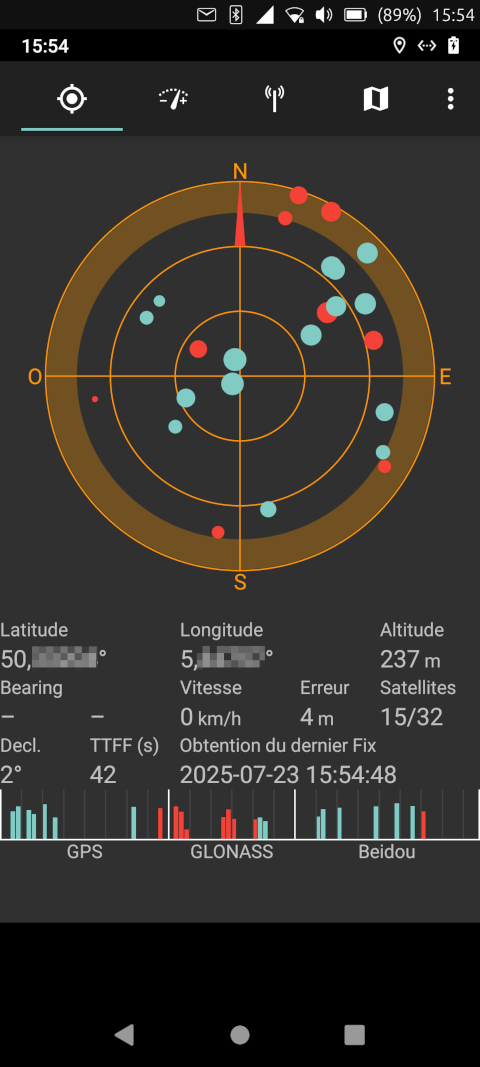
And, more strange, in UT GPS is off and in waydroid in two seconds it locates me at the right place.
In UT, uNav says waiting for GPS and GPS toolkit says noFix.
Really confusing.
Any chance that satStat could access directly to hardware???
Sorry for my belgian cow english... -
Next try, during the dog walk, i have kept UT GPS off (UNav can't determine the location) and follow my postion on the satStat map. It has been precisely updated.
So waydroid can use the phone GPS even if UT says it's off.
Is UT GPS switch off only a logical switch that prevents app to use it?
This could explain a part of battery consumption.
Is the satStat app in waydroid access hardware directly and use it as if it was on Android? -
Another test I did tonight.
The GPS on UT was disabled 60 km from here.
Waydroid satStat shows the correct position.
I launched GPS Toolkit on UT.
I enabled the GPS.
It found the correct position in less than two seconds.
Perhaps it depends on the device.
Mine is Redmi Note 9 Pro running Focal -
@wgarcia
Hi !
Sorry, I'm not sure to understand what you mean.This aGPS function (Xtra download) only download ephemeral, like tell Vlad.
So it is a pure GPS function and it don't use WiFi or Bluetooth or scanning near cell tower.For the test please disable all GPS improvement system : So in Android settings : Improve Location Accuracy = off and Wi-Fi scanning and Bluetooth scanning = off and not in High Accuracy mode.
So you need to put you Android in Device only GPS to be sure to disable all other functions.
It just download a satellite map at this moment. And we just need Internet data (mobile data or Wi-Fi) just one time a day. You can download the data in your home and use GPS after.
We use SatStat to download aGPS (the first option in the menu).
So you can do the experiment as you share at the top of the topic, or like this :
I prefer this way, because we are sure that it don't use other function that ask an external server to give the location.- Open Waydroid
- Disable GPS in Waydroid
- Start SatStat
- Download aGPS in SatStat (the first item (Recharger les données AGPS in French) like in the Vlad picture)
- Wait 30 seconds and after Turn off Wi-Fi and Mobile data
- Close SatStat
- Go outside
- Enable GPS in Android
- Start SatStat and look, verify that it found GPS (at the bottom) and look at the TTFF : Time To First Fix. It should be quicker than 1 minute.
Is it possible for you to test it ?
Thanks a lot

Hello! It looks like you're interested in this conversation, but you don't have an account yet.
Getting fed up of having to scroll through the same posts each visit? When you register for an account, you'll always come back to exactly where you were before, and choose to be notified of new replies (either via email, or push notification). You'll also be able to save bookmarks and upvote posts to show your appreciation to other community members.
With your input, this post could be even better 💗
Register Login