Merezhyvo browser
-
@Moem
The settings are on the right-hand side (the cogwheel).
The paper airplane is a shortcut to WhatsApp and Telegram Messenger.
Perhaps this feature could be hidden in the settings... -
@Moem said in Merezhyvo browser:
I'm sorry but I think I don't understand this browser. Where are the settings? Why is there a paper airplane to the left of the URL bar that leads to WhatsApp which I don't use?
sure, I am happy to help you to figure it out
You can find settings under the very last top button, this one
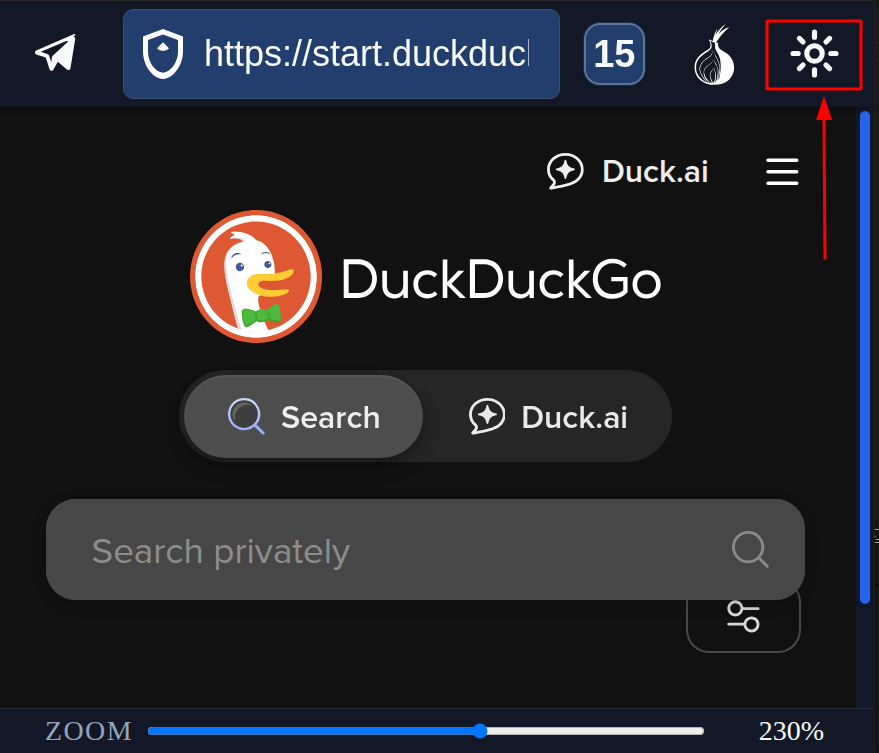
the airplane button opens a messenger panel with web versions of WhatsApp, Messenger, Telegram.
In Settings you can re-order them. If you use Telegram and don't use WhatsUp, you can set up Telegram to be on the first tab.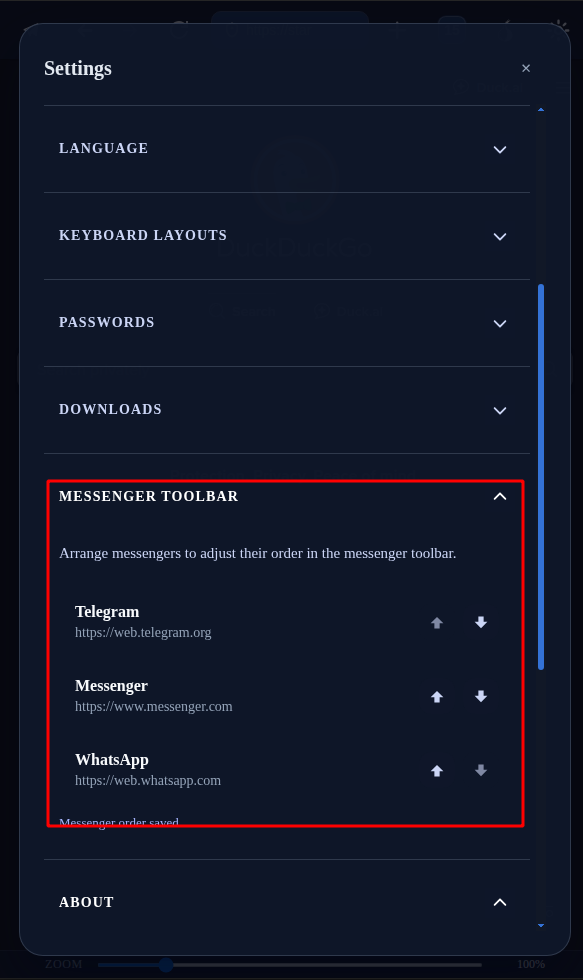
-
@naz.R Thank you, that does help! I never tapped on the sun because I thought it meant day mode / night mode. Now that I can find the settings, they seem quite sensible.
(Except for the messengers icon, which I'm never going to use, so I would probably switch that off if possible. But that's just me. Apparently other people use it.)That said, I'm very happy that UT is getting some up to date browsers, which was long overdue... and so I'm grateful for this new option too.
-
@Moem said in Merezhyvo browser:
I'm very happy that UT is getting some up to date browsers, which was long overdue... and so I'm grateful for this new option too
Exactly !
-
@Moem said in Merezhyvo browser:
@naz.R Thank you, that does help! I never tapped on the sun because I thought it meant day mode / night mode. Now that I can find the settings, they seem quite sensible.
(Except for the messengers icon, which I'm never going to use, so I would probably switch that off if possible. But that's just me. Apparently other people use it.)That said, I'm very happy that UT is getting some up to date browsers, which was long overdue... and so I'm grateful for this new option too.
and you just gave me an idea to add a new option into messengers settings to hide this messengers button in case if someone don't use it.
Will add it in the next release.
I am happy again that you like the browser now
-
@naz.R said in Merezhyvo browser:
you just gave me an idea to add a new option into messengers settings to hide this messengers button in case if someone don't use it.
Will add it in the next release.Oh wow, that's great, thank you so much for your efforts!
-
created a simple site for Merezhyvo.
https://merezhyvo.site/Later I am going to add /help page there with instructions and explanations what is where and what it does do.
-
@naz.R Please define MVP so that the term is clear.
-
@domubpkm said in Merezhyvo browser:
@naz.R Please define MVP so that the term is clear.
MVP is "Minimum Viable Product": The simplest version of a new product with just enough features to satisfy early customers and provide feedback for future development.
-
@naz.R thank you.
-
Merezhyvo v.0.4.6 has been released.
New:
- Added a Light theme.
- Added a Security shield icon and site security popup on the messenger panel.
- Added an option to hide the messenger panel if you don’t use it.
- Added an option to set a default zoom for web pages.
Updated:
- Improved tracker & ad blocking.
- Added blocking modes: Basic and Strict.
Fixed:
- Fixed an issue where it was not possible to insert a new line in textareas when typing with the on-screen keyboard.
-
New release in the OpenStore.
0.4.7 - 2026-01-03
New:- Custom in-app JavaScript dialogs for alert() and confirm() (better usability on small screens).
- Separate storage partitions for Tor vs non-Tor browsing (no cookie/site-data crossover).
- DNS switcher (Secure DNS / DNS-over-HTTPS) with multiple providers and custom endpoint support.
Improved:
- Better pressed-state visibility for on-screen keyboard keys in the Light theme.
Fixed:
- Fixed caret visibility issues when typing in internal pages, browser dialogs, and the address bar.
Many thanks to @domubpkm for the testing.
You really put a lot of effort into it and it helped me a lot. -
This post is deleted! -
Merezhyvo v0.4.8 is available in the OpenStore now.
New:
- Emoji panel on the on-screen keyboard.
Changed:
- Added missing « » characters to the OSK symbol layout.
- Security popup now shows a counter for blocked third-party cookies.
Fixed:
- Fixed a bug that prevented renaming bookmark folders.
- Fixed a freeze/hang when wiping Tor data while turning Tor off and closing all open tabs.
-
Merezhyvo v0.4.9 is in OpenStore now.
New:
- Customisable Start Page.
- Built-in Coupons engine for online shopping: a small floating button appears on supported stores to help you find available coupons and save money — with no tracking and no impact on your privacy.
- Automatic cleanup of outdated temporary files to avoid cluttering the system.
Fixed:
- Fixed an issue that prevented opening links in new tabs.
- Minor UI fixes and polish.
-
v0.5.1 is live now.
New / Improved:
- Redesigned context menu (fully reworked for a cleaner, more consistent UX).
- New Help section explaining tab action buttons: Pin, Add to Favorites, Clear & Close, Close.
- Copy URL button added to the address bar.
- Background media playback: YouTube and other media sites can keep playing when the tab is not active.
- Tor updated to the latest bundled version.
Fixes:
- Fixed several bugs of savings and coupons functionality
- On-screen keyboard Enter handling improved: better distinction between newline vs submit in input fields.
- Fixed Google Drive downloads (confirmation / popup flow now works correctly).
- Text selection & copy now works in mobile mode (currently for regular page text only; not yet for form fields).
Other:
- Various small UI tweaks and polish.
-
@naz.R Connexion to gitlab now possible too, thanks for that !
-
v0.5.2 is in OpenStore now.
Fixes:
- Text selection & copy now works in form fields.
- Downloads wok in Tor mode.
- Downloads fixes in Regular mode.
- Emoji issues fixes.
-
hello,
i tried this new webbrowser. thanks for the works !
but, i don't found the button to back to the previous page... an essential feature
pearaps it is a display problem ? (i have a small sceen on my xperia X) -
@DJac Long press in the page and you get at the bottom :




Hello! It looks like you're interested in this conversation, but you don't have an account yet.
Getting fed up of having to scroll through the same posts each visit? When you register for an account, you'll always come back to exactly where you were before, and choose to be notified of new replies (either via email, or push notification). You'll also be able to save bookmarks and upvote posts to show your appreciation to other community members.
With your input, this post could be even better 💗
Register Login