Unable To Scan WI-FI Networks (24.04.1-1) on redmi note 9 (merlin)
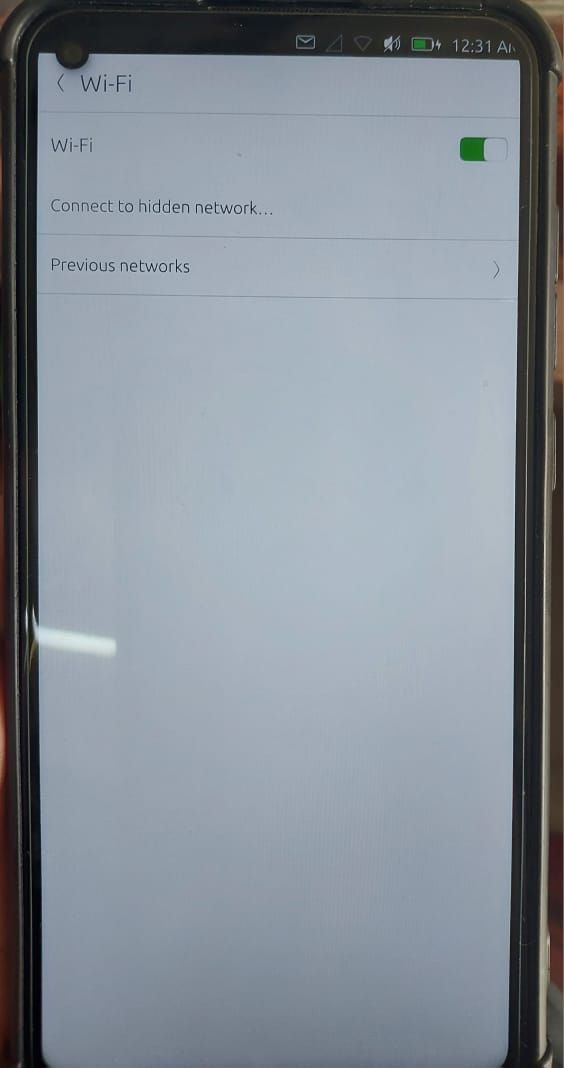
-
Same problem even with ubuntu touch20.04.
Do you have the solution ? -
hello
you can trigger a rescan from command line using
sudo iw dev wlan0 scannote that if it succeeds, there a big amount of information generated (redirect output to a file in this case), if not the output should fit on the phone screen, post the capture here !
-
@gpatel-fr said in Unable To Scan WI-FI Networks (24.04.1-1) on redmi note 9 (merlin):
sudo iw dev wlan0 scan
command failed: No such device (-19)
-
-
are you sure that you habe correct android version under UT?
-
No i'm not sure to have the good android version. How can i check it ?
-
@lolo
What is the Model of your phone printed at the back?
https://devices.ubuntu-touch.io/device/merlin/ -
@lolo
If it's global
https://xiaomirom.com/en/download/redmi-10x-4g-note-9-merlin-stable-V12.5.4.0.RJOMIXM/
Choose the Fastboot ROM
But there are specific ROM for models for India, Indonesia, Russia, Turkey, EEA, Global, China. -
Something broke in stable at some point preventing wifi scanning on Redmi note 9 pro and Redmi 9 (from my testing). Use the ubports installer to reflash and select 24.04/daily and wifi will be working OK

-
@Ruesaga
I have two Xiaomi Redmi Note 9 Pro.
One for tests (and back up) and one for my daily use. (20.04 several OTA, and actually one on 24.04-1.x Stable and the other under 24.04-2.x)
I have flashed with ubport installer more than 30 times each one.
Starting from the right Android Stock ROM, I never had any problem with any parts of those phones. All is working well.
As UT is talking with Halium (10 in my case) and Halium is talking to previous Android parts left in place during install, the previous Android MUST be the right one. Not near, not another.
Now, I can only refer to my experience...
My FAI device, the mobile network from Orange. -
@Vlad-Nirky Thank you for this response, Its interesting to hear. I have a similar set up too, one note 9 pro for daily use and one for a back up and testing
I installed the stock roms but versions 12.0.2.0 and I think I also tried 12.0.1.0 so now I'm interested in trying the stock rom you mention above. Compatibility I've been finding is good other than the odd sound issues and slow switch from home wifi to mobile data when I leave the house, sometimes i have to toggle data off and back on, so I'm interested if changing the stock rom improves those areas. I will try this on my backup when I have the time -
@Ruesaga
I find that these phones work really well with UT. My preferred ROM for the 9 Pro is the joyeuse_global_images_V12.0.1.0.QJZMIXM_20201107.0000.00_10.0_global_eb964f842a
But recommended is 12.0.3

-
@Vlad-Nirky Désolé de repondre si tardivement.
Donc avant d'installer UT (en testant toutes les versions stables) j'avais comme version MIUI global 12.5.6 stable 12.5.6.0(RJOEUXM). Et jamais de wifi ni de positionnement GPS.
Je suis revenu sous android avec cette meme version. Dois-je en changer avant de retenter UT ? -
@lolo
I would say that the ROM depends on the Redmi Note 9 Pro model.
The model is usually printed on the back of the phone under Redmi.
This phone has had many variations depending on where it is sold. (Global, Turkey, India, etc.)
The global model is M2003J6B2G and need joyeuse_global_images_V12.0.3.0.QJZMIXM_20210419.0000.00_10.0_global_0801ff7d09You can get info with
adb shell getprop | grep incremental
adb shell getprop ro.product.nameIn fastboot mode (Power and Volume down until Xiaomi rabbit)
fastboot getvar productTell us wich model and which phone you have and I'll try to find the right ROM to install before install UT.
-
Bonjour,
J'ai installer UT 24.04/daily comme le suggère Ruesaga, et effectivement, le wifi fonctionne.
Je vais tenter de prendre un peu plus de temps la semaine prochaine pour tester plus en détail mon redmi avec ubuntu touch.
Merci pour votre aide.

Hello! It looks like you're interested in this conversation, but you don't have an account yet.
Getting fed up of having to scroll through the same posts each visit? When you register for an account, you'll always come back to exactly where you were before, and choose to be notified of new replies (either via email, or push notification). You'll also be able to save bookmarks and upvote posts to show your appreciation to other community members.
With your input, this post could be even better 💗
Register Login