Signal UT: Signal-Desktop for Ubuntu Touch
-
Well no problem really, I was'nt getting you wrong!

Actually it is possible to do a small edit through the terminal to make sure the app does not crash, I will explain in post bellow.
But if the OSK still does not work I'm not sure it will be very usefull. And the OSK problem in 24.04-2x seem to concern all XWayland apps (including uWold and Chromium for UT)
-
@Ida_ ah, ok. Not iedal, but sometjing. I get less than a second. I am not that quick in reading.

-
Or if you want to use commands in the terminal you can try to paste this in the terminal, it should fix the crash in 24.04-2.x branch (but will not solve the OSK problem):
sudo sed -i "s/\[ \"\$?\" -ne \"0\" \]/\[ \"0\" -ne \"0\" \]/g" /opt/click.ubuntu.com/signalut.pparent/current/launcher.sh sudo sed -i "s/\[ \"\$?\" -eq \"0\" \]/\[ \"0\" -eq \"0\" \]/g" /opt/click.ubuntu.com/signalut.pparent/current/utils/filedialog-deamon.sh -
@pparent thanks a lot for the quick response. Just some feedback in case others try that:
yes, the app now opens, but...
- I can't close it, when swiping into the drawer, it becomes a transparent window which I can't swipe to close
- I couldn't reboot with the power button since that was somehow blocked
I hope that makes some sense to you.
-
I couldn't reboot with the power button since that was somehow blocked
I really don't think this can have anything to do with running Signal UT, including the patch I've shared above. I don't see how the app could have an impact on the effect of your power button. Especially because it's confined.
I can't close it, when swiping into the drawer, it becomes a transparent window which I can't swipe to close
I see that happening from time to time, including with other apps. I think it's more a Lomiri bug. Anyway you can just start another time the app, and kill the launcher indicator, it should kill the remaining transparent window.
-
@pparent my description was maybe not clear enough. The power button itself works. It brings up the power menu, but pressing the buttons failed. But I can't reproduce it right now (after a reboot). So who knows...
-
-
I had SignalUT working okay but then had other issues (with primary Molly, Waydroid) causing me to uninstall (click trash icon in OpenStore) and reinstall several times.
Now, it seems SignalUT won't start (it just hangs indefinitely). I'd like to cleanly uninstall, reinstall and then link to my (now working) Molly Foss within Waydroid.
Is there a more brute force method to cleanly uninstall everything (than trash can icon in OpenStore)? Thanks in advance for your thoughts and suggestions.
-
I had SignalUT working okay but then had other issues (with primary Molly, Waydroid) causing me to uninstall (click trash icon in OpenStore) and reinstall several times.
Now, it seems SignalUT won't start (it just hangs indefinitely). I'd like to cleanly uninstall, reinstall and then link to my (now working) Molly Foss within Waydroid.
Is there a more brute force method to cleanly uninstall everything (than trash can icon in OpenStore)? Thanks in advance for your thoughts and suggestions.
Use UT Tweak Tool, then clear all 3 data locations from that.
-
@projectmoon - Awesome! Thank you so much!!
Once I found the settings in the hamburger icon, this worked!
-
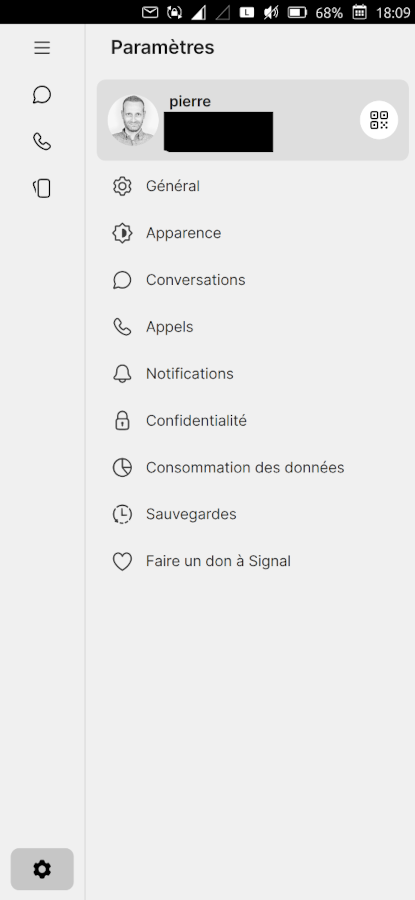
I've published version 0.8.3-2 with the following improvements.
- Make the left menu responsive
- Fix a problem with uploading a document other than image (contentHub)
Note: no Signal-Desktop version bump for this revision, because building broke with my current scripts for 8.4.0 and 8.5.0, I'll have to look into it later.
Don't hesitate to tell me if everything works well for you.
-
@pparent thanks for the update! Does mean "make the left memenge responsive" one can for example change the appearence? Fir this is still not possible...
-
What do you mean "change the appearence"? It simply means that you can display and navigate properly in the menu in vertical mode, as shown in the screenshot.
The combobox still do not work, it is a problem with XWayland and Lomiri.
-
@pparent sorry for beeing unclear. I appreciate using the navigation, but when I click for example on " appearence" there is only "system" available. But thats normal, isn't it?
-
It's not that there is only "system", it is that the combobox, ( or "<select>" in html ) does not work. i.e the element that allows you to chose, does not display well, but it is sadly the case in most XWayland apps, in UT and I can't do much about it right now.
-
@pparent copy that. thanks!
-
I'm not sure how relevant this is to the development of this extremely useful native app. But I think it's at least interesting.
-
@Moem Very nice, could be very cool if Signal Destkop, hence Signal UT, would become a primary client, with no need to link it to an iOS or Android device!
Thank's for sharing!
-
Up to now I didn't find a way to insert a picture from gallery or filemanager into a signal chat - latest UBT with my FP4...
-
You need to open file directly from Signal app, by clicking on the "+" in the bottom right hand corner of a chat, and then select the gallery app, to select the file to import.
It's true that there is currently something that should not be: Signal appears in the application grid in content Hub, as an option to export an image to, it should not, this does not work that way, only the other way around import the picture from the signal app. I will correct that in next revision.




Hello! It looks like you're interested in this conversation, but you don't have an account yet.
Getting fed up of having to scroll through the same posts each visit? When you register for an account, you'll always come back to exactly where you were before, and choose to be notified of new replies (either via email, or push notification). You'll also be able to save bookmarks and upvote posts to show your appreciation to other community members.
With your input, this post could be even better 💗
Register Login