No questions, just thank you.
Thank you for everything you do, all of you, thank you for every small and big contribution.
No questions, just thank you.
Thank you for everything you do, all of you, thank you for every small and big contribution.
Hi! I've been daily driving Ubuntu Touch since around March.
Bluetooth:
It has been working really well for months now. My car is too old, so I haven't tried any bluetooth stuff there, but it works well for connecting compatible smart watches, music listening on my stereo and through headphones. Calls work very well through my headphones.
GPS:
It works, but with the usual UT limitations because there is no A-GPS. Getting first fix, or getting a fix after not having used gps for a while takes some time, up to an hour, and you need to be outside or close to a window to get the fix.
IDLE:
Some power saving functions have been implemented, but app suspension seems incomplete at the moment, at least on 20.04 devel. I get around 1,5 days of battery time on moderate use, but have to charge each evening if I use the phone a lot.
NFC
I haven't tried it yet, but it seems there are few apps for UT that actually use NFC. I would not expect using NFC to connect to a radio to work.
Other notable stuff:
Calls: Works fine, including VoLTE.
SMS/MMS: I have sometimes not received every MMS sent to me.
Waydroid: Works well.
Connection to PC: Works well both for Linux and Windows for me.
Wifi/network: Sometimes disconnects from wifi, and I have to manually reconnect. If I lose Wifi connection, I have to manually turn on mobile data.
It is also worth to note that the FP5 has no stable release channel yet. Development is very active on this phone right now, and new and improved things turn up often. I am very happy with my FP5, but some workarounds are needed now and then.
Edit: I just want to add that this is my experience with the phone, with my particular installation. Refer to the device page to see a more general list.
@klh I tried reporting it with my limited knowledge of the components involved, I may have used some wrong words to describe the problem and/or reported it in the wrong place. https://gitlab.com/ubports/development/core/packaging/qt6-base/-/work_items/2
Thank you guys for making Cinny work on UT, and for sharing these bridge tutorials! This has solved so much for me!
@moem All though the app doesn't run 100% on 2.x at the moment, I use it to check messages whenever my Signal bridge is a bit under the weather. It always starts after a couple of tries. (No OSK, but very useful to check if there are any important messages waiting.)
I am so grateful for all the effort you put into this, @pparent , thank you!
I'm running RC1 on an FP5, and here are some of my impressions and issues:
New Morph: It freezes from time to time (maybe a couple of times a day). Very good page rendering most of the time, things work as expected in a modern browser, sometimes even better on some sites than freshly updated Firefox on a desktop.
Snaps: I'm sort of confused by the whole thing. I love it as an experimental feature, and I've had fun playing around with Snaps in 2.x, but at this stage I think we need more guardrails for casual users. I've tried a bunch of Snaps, a lot of them marked in the Open Store as mobile friendly and convergent (a description inherited from Snapcraft, maybe?), and they rarely launch, and when they do there is no keyboard, reading/writing files is a problem, copy+paste is not working etc. I really appreciate the effort being put into getting Snaps to work and I want it to continue, but including it without properly sorting the apps by usability in the store is just really confusing, despite the warning that pops up.
The OSK sometimes overflows on the sides. This issue comes and goes, usually it disappears if I switch from Norwegian to English and back to Norwegian. Like in the picture. I have not seen this issue before in 1.3, it appeared a few days ago in 2.x and it happens in RC1. 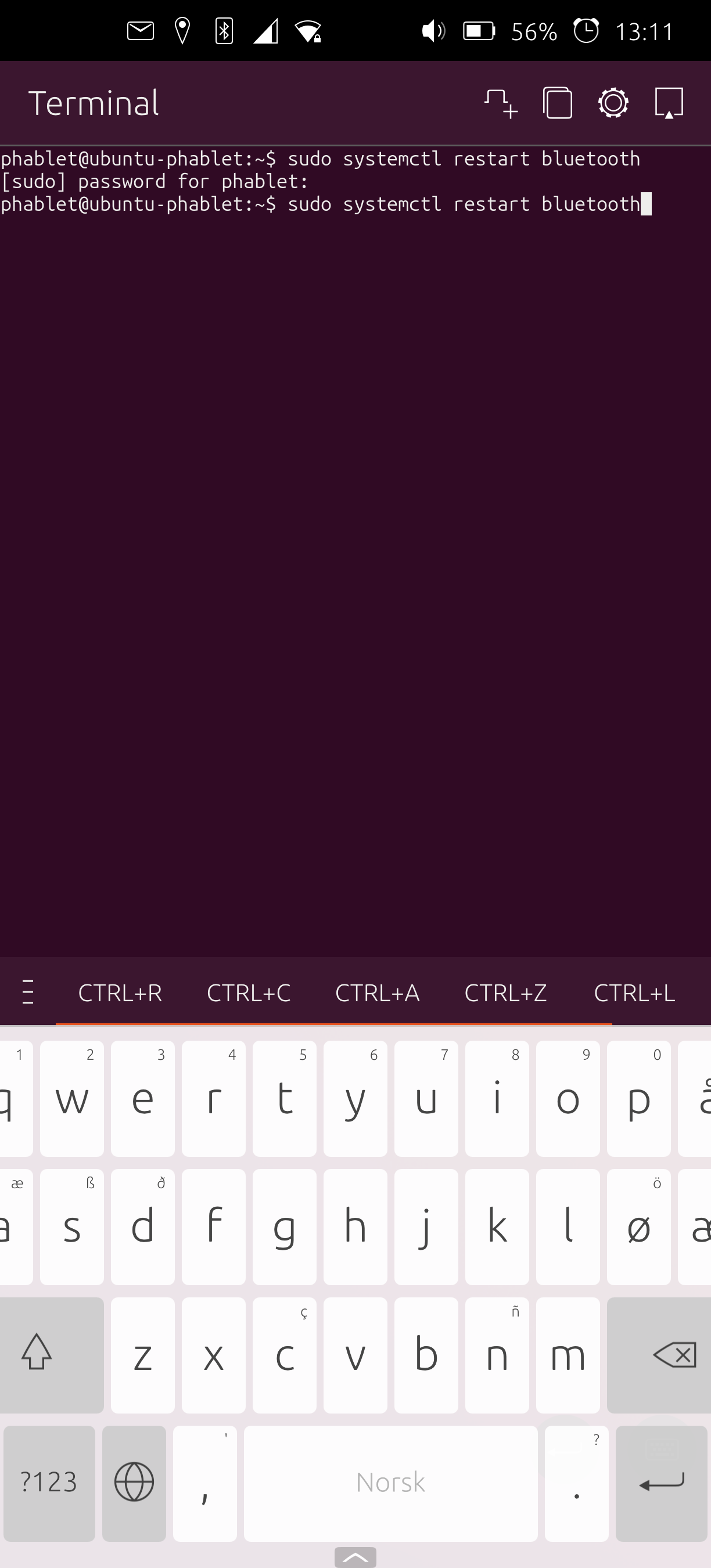
No OSK in the x11 apps.
Finicky Bluetooth. Since switching to the RC, I have not been able to connect my Pebble properly, but some other devices connect more easily than in 1.3.
I'm nominating Podcat and RockWork! These two apps contribute hugely to my enjoyment of UT.
Which means of course that I nominate the devs Joan CiberSheep for their wonderful work on bringing the fun back to podcasts in UT, and Muhammad for his tireless and creative ways of bringing Pebble compatibility to UT. And for all of his bluetooth magic!
I'm a happy user of the files indicator! PodCat and PodPhoenix uses them to track ongoing and finished downloads, and it is very useful to see that the downloads are finished before I leave wifi in the morning. So to me this is a very useful feature, and definately not a bug.
That being said, I would also love some kind of icon/easier way for managing the function of a connected USB.
My goodness! Thank you so much for your suggestions and clarifications! I reinstalled, and I'm officially in love with this port. Hoping to make this my daily driver someday.
This is an awesome initiative! I really love the idea, and how you see the potential in every community member to help with this project.
The one thing that gets me again and again is the keyboard crashing while I'm in an ongoing chat/SMS-exchange. That one really gets my pulse going.
@klh Wow! Cool that you tried. For me it seems to happen mostly on first use shortly after a reboot so far, but it did happen one time many hours after the last reboot too.
I'm running RC1 on an FP5, and here are some of my impressions and issues:
New Morph: It freezes from time to time (maybe a couple of times a day). Very good page rendering most of the time, things work as expected in a modern browser, sometimes even better on some sites than freshly updated Firefox on a desktop.
Snaps: I'm sort of confused by the whole thing. I love it as an experimental feature, and I've had fun playing around with Snaps in 2.x, but at this stage I think we need more guardrails for casual users. I've tried a bunch of Snaps, a lot of them marked in the Open Store as mobile friendly and convergent (a description inherited from Snapcraft, maybe?), and they rarely launch, and when they do there is no keyboard, reading/writing files is a problem, copy+paste is not working etc. I really appreciate the effort being put into getting Snaps to work and I want it to continue, but including it without properly sorting the apps by usability in the store is just really confusing, despite the warning that pops up.
The OSK sometimes overflows on the sides. This issue comes and goes, usually it disappears if I switch from Norwegian to English and back to Norwegian. Like in the picture. I have not seen this issue before in 1.3, it appeared a few days ago in 2.x and it happens in RC1.
No OSK in the x11 apps.
Finicky Bluetooth. Since switching to the RC, I have not been able to connect my Pebble properly, but some other devices connect more easily than in 1.3.
@pparent Switching windows or locking/unlocking does not trigger the keyboard here either. Here is the output, in case it is relevant: https://pastebin.com/CG7sJg7T
@pparent I tried your little experiment with Maps Exporter. The app launched in an x11 window, and the OSK was gone! This was a fresh install for me as I don't use Google Maps, but I verified that the OSK worked first when I launched it as a click the usual way by pressing the icon.
I really really hope we can find a solution to this that can be included in 2.0.
Also I'm wondering if on existing XWayland apps ( like uWolf, or Min browser or Signal UT ) refocusing on the window ( by switching to another windows and going back, or by locking and unlocking the phone ) could possibly allow to have the OSK appear again in 24.04-2.x , in any way shape or form?
I've tried leaving Signal UT open right after clicking the message box while locking and opening the screen again, this does not trigger the OSK. I have also tried switching between Signal UT and various apps like Morph, Cinny, Music Recognition, but no OSK unfortunately.
@pparent I'm very happy it is so stable now, though. Good to be able to at least check messages reliably.
Here you go: https://pastebin.com/d6UWtj5G
@klh I tried reporting it with my limited knowledge of the components involved, I may have used some wrong words to describe the problem and/or reported it in the wrong place. https://gitlab.com/ubports/development/core/packaging/qt6-base/-/work_items/2
@pparent I'm a 2.x user!
Ping or message me if you need me to test anything specific or send any logs.
@aimar I sync notes between my phone and my computer this way. Syncthing from the open store to syncthing on a Xubuntu computer. Works well, but I have to manually run Syncthing from time to time to do the sync, as I don't want to try running it continously on the phone.
@danfro In reality I always get it to work for maximum half a minute at a time before it closes, and without a working keyboard, but long enough to check messages.