Script to clean Teleports without logging out
-
This time I have made a script to delete files from Teleports as their folders/files take up a lot of space. I always used to do it with UT Tweak Tool but the drawback is that you have to reconfigure the Telegram account.
CleanTeleports.sh
First, use the Morph browser or Teleports to download (just click) CleanTeleports.sh from here or create a file with the following code:
#!/bin/bash

du -hd 0 ~/.local/share/teleports.ubports/teleports.ubports/files/
du -hd 0 ~/.local/share/teleports.ubports/teleports.ubports/database/thumbnails/
du -hd 0 ~/.local/share/teleports.ubports/teleports.ubports/database/profile_photos/
du -hd 0 ~/.local/share/teleports.ubports/teleports.ubports/database/db.sqlite
read -p "Please close the Teleports application, is it closed? y/N " answer
if [ "$answer" == "y" ] || [ "$answer" == "Y" ] ; then
    seconds=10; date1=$((`date +%s` + $seconds));
    while [ "$date1" -gt `date +%s` ]; do
        echo -ne "The files will be deleted within $(date -u --date @$(($date1 - `date +%s` )) +%s) seconds..\r";
    done
    sleep 1; echo -e "\nDeleting..."
    rm -rv ~/.local/share/teleports.ubports/teleports.ubports/files
    rm -rv ~/.local/share/teleports.ubports/teleports.ubports/database/thumbnails/
    rm -rv ~/.local/share/teleports.ubports/teleports.ubports/database/profile_photos/
    rm -v ~/.local/share/teleports.ubports/teleports.ubports/database/db.sqlite
    du -hd 0 ~/.local/share/teleports.ubports/teleports.ubports/files/
    du -hd 0 ~/.local/share/teleports.ubports/teleports.ubports/database/thumbnails/
    du -hd 0 ~/.local/share/teleports.ubports/teleports.ubports/database/profile_photos/
    du -hd 0 ~/.local/share/teleports.ubports/teleports.ubports/database/db.sqlite
    else
    echo "Script cancelled, it is necessary to manually close the Teleports application."
fi
Now we have to give run permissions to the CleanTeleports.sh file and run it, I assume it is in the Downloads folder. Open the terminal and run the following:
cd Downloads
chmod +x CleanTeleports.sh
./CleanTeleports.sh
It then tells us the size of the folders and the db.sqlite database.
If we want to delete these folders and the database, we will have to close Teleports if it is not already closed and tell it that we have already closed it by typing "y" and enter. If we don't want to clean up, we press anything other than "y" or "Y" or close the terminal.
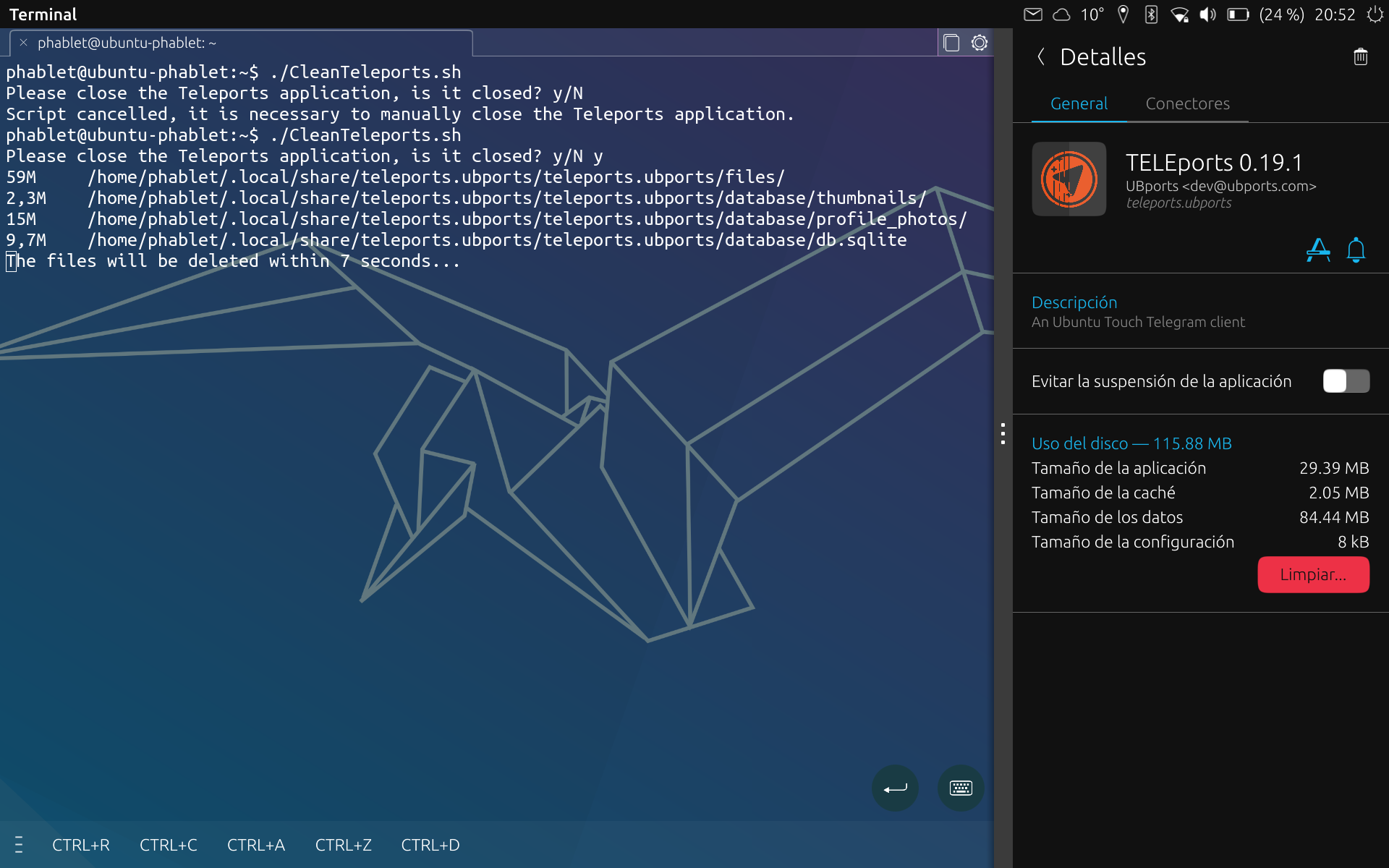
I hope you find it as useful as I do, as I still use Krillin on a daily basis and he has always been the "little guy in the house", little space
 .
.Caution: Please note that running this script will delete some Teleports files and it might take a while to start up the first time because of this as they will be created again.
In Spanish -> https://elcondonrotodegnu.wordpress.com/2024/03/31/limpiar-teleports-sin-cerrar-sesion/
-
I actually recently checked for duplicate files in my Nextcloud server and found thousands of teleports images since I have a few backup of its app data
 And those were just images! (thumbnails, profile pic, cache, etc)
 -
@kugiigi You may have to exclude some folders or all Teleports from the backup.
-
@Bolly I actually stopped backing up teleports. It doesn't make sense anyway since all data are in the cloud. They were just old backups I did years ago. I think I included everything in the app data folder


Hello! It looks like you're interested in this conversation, but you don't have an account yet.
Getting fed up of having to scroll through the same posts each visit? When you register for an account, you'll always come back to exactly where you were before, and choose to be notified of new replies (either via email, or push notification). You'll also be able to save bookmarks and upvote posts to show your appreciation to other community members.
With your input, this post could be even better 💗
Register Login