Fcitx-ub: a new keyboard for ubuntu touch
-

It brings more advanced word complete/fuzzy match and other features fcitx have to replace the current Maliit keyboard.
Notice it is highly beta at the moment, and require using quite several privileged/non-intended-for-click-to-use APIs to do its job. It is far from thoroughly test, and may break in all kinds of ways on all kinds of occasions, or upon system updates. If stability and reliable usability is what you prefer, you should keep using system keyboard.
-
Can you show screenshots or a video?
I'm curious about this
-
Congrats ! this is a great idea !
I tested it on my FP5 (24.04-1.1 stable) and it installed and restored the system keyboard. Needed to restart the phone but that's not important. Tested it with the terminal and a few browsers.
Good points:
- I find it more pleasing to the eye that the system one.
- It worked as well with alternate browsers (uWolf, Min) who have special methods to handle the keyboard.
- with the terminal it does not interfer with the special input methods (double clic on the screen, special area
Minor points:
-
opening Min (an alternate browser) and Morph both with a blank initial screen, entering 'https:' and clicking on the blank screen generated a mad flickering of the keyboard and a Js error in the browser code (I took a screenshot but for some reason it's unreadable).
-
when setting / unsetting it as system keyboard there is some delay after clicking the button with no apparent feedback.
-
I (and I think most people) expected it to respect the system preferences for the language, nope, it's necessary to setup the keyboard in its own config screen. Yes, it's actually a high expection
 This config screen is not totally obvious by the way. I managed after a few mistakes to select the French Azerty as the default and it displayed finally - in Qwerty . I clicked on the 'AZ' key and it was Azerty finally.
 -
after restoring the system OSK I set it again as the default, and I got back the qwerty with the french Azerty left selected, and this time clicking on AZ did not change the disposition, it stayed Qwerty.
-
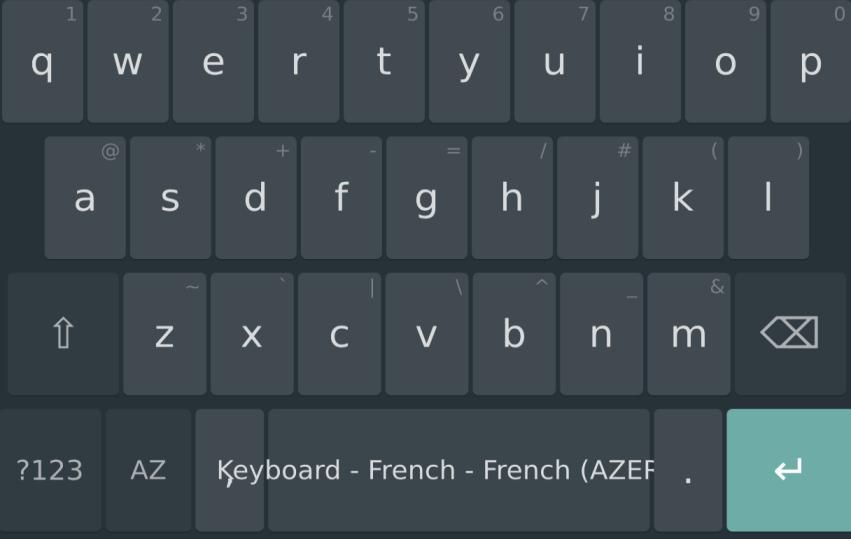
still with the French Azerty, the text 'Keyboard - French - French (AZER) spills over the key ',' at the left (see screenshot)
-
@gpatel-fr Sorry for not documenting this. I think only restarting the fcitx daemon in the app should be able to install/restore. Reboot is not necessary.
Thanks for you detailed review and feedback!
Regarding your minor points:
- Could you provide more information? I can't replicate this on my phone.
- This is true. It is some background systemd daemon. In my debug version there will be shell output which I think is not desirable for user. This may take longer time on a more limited hardware running ubuntu touch. Let me think.... UX is always hard.
- This is a valid point. I should make the setting menu more obvious. If you are familiar with fcitx configuration then it should be intuitive as I replicate it. Could you elaborate more on AZ showing in qwerty? Is it that after adding AZ it is still qwerty first (which can be changed in settings), or that it says already using AZ (as the bot right change input method key shows), but still qwerty?
- I am not sure I follow. However, could you try also restart fcitx? (not the app, the restart button inside) This keyboard is implemented as a Maliit plugin, and you might always need restart for a new set of keyboard to be loaded by Maliit.
- True. Shall fix it in next release.
For making the setting in system preference, I am afraid it is beyond my current knowledge. Even on android, all keyboards have their own config menu instead of showing up in android keyboard settings. Of course since ubuntu touch is still ubuntu I can hack the system deeper to put the setting there but this will be strongly against open-store policy I guess.
BTW, I would be truly grateful if you are willing to create issues. I am a stupid forgetting person living a chaotic life I lose track of everything easily

-
@Averiz very nice to see alternative keyboards. Is there a way to adjust the height of the keyboard?
-
@projectmoon It is now set to 30% of screen height. Please create issues if you want it adjustable and hopefully it will come in some future release.
-
@Averiz said in Fcitx-ub: a new keyboard for ubuntu touch:
Could you provide more information? I can't replicate this on my phone.
Yes, I could not repro it with Morph. However I can repro it every time with Min (min.pparent is a minimalist Chromium browser with OSK added with a hack, like for LibreWolf). I'd guess that's the only browser that can start with a truly blank page. I tried it again with the default system keyboard and the problem don't exist.
@Averiz said in Fcitx-ub: a new keyboard for ubuntu touch:
longer time on a more limited hardware
I
well, the FP5 with 8 Mb ram is one of the more powerful phones running UT. I just tested it again and it's taking about 5-6 seconds without any feedback before the display changes. Not a big problem, a bit disturbing.@Averiz said in Fcitx-ub: a new keyboard for ubuntu touch:
could you try also restart fcitx?
the 'AZ' button now refuses to do anything. I selected an Azerty keyboard that displays in Qwerty

@Averiz said in Fcitx-ub: a new keyboard for ubuntu touch:
if you are willing to create issues
will do, I think that I will let the fcitx keyboard enabled and will test a bit more before doing so, though.
-
@gpatel-fr said in Fcitx-ub: a new keyboard for ubuntu touch:
Yes, I could not repro it with Morph. However I can repro it every time with Min (min.pparent is a minimalist Chromium browser with OSK added with a hack, like for LibreWolf). I'd guess that's the only browser that can start with a truly blank page. I tried it again with the default system keyboard and the problem don't exist.
I see, interesting.
@gpatel-fr said in Fcitx-ub: a new keyboard for ubuntu touch:
well, the FP5 with 8 Mb ram is one of the more powerful phones running UT
This is surprising. My oneplus n10 takes much less time. Anyway I'll design a UI for this.
@gpatel-fr said in Fcitx-ub: a new keyboard for ubuntu touch:
the 'AZ' button now refuses to do anything. I selected an Azerty keyboard that displays in Qwerty
I see.. Indeed I didn't test for french keyboards. The next main step of development will be testing for different languages. However this won't happen before next next weekends I am afraid....
-
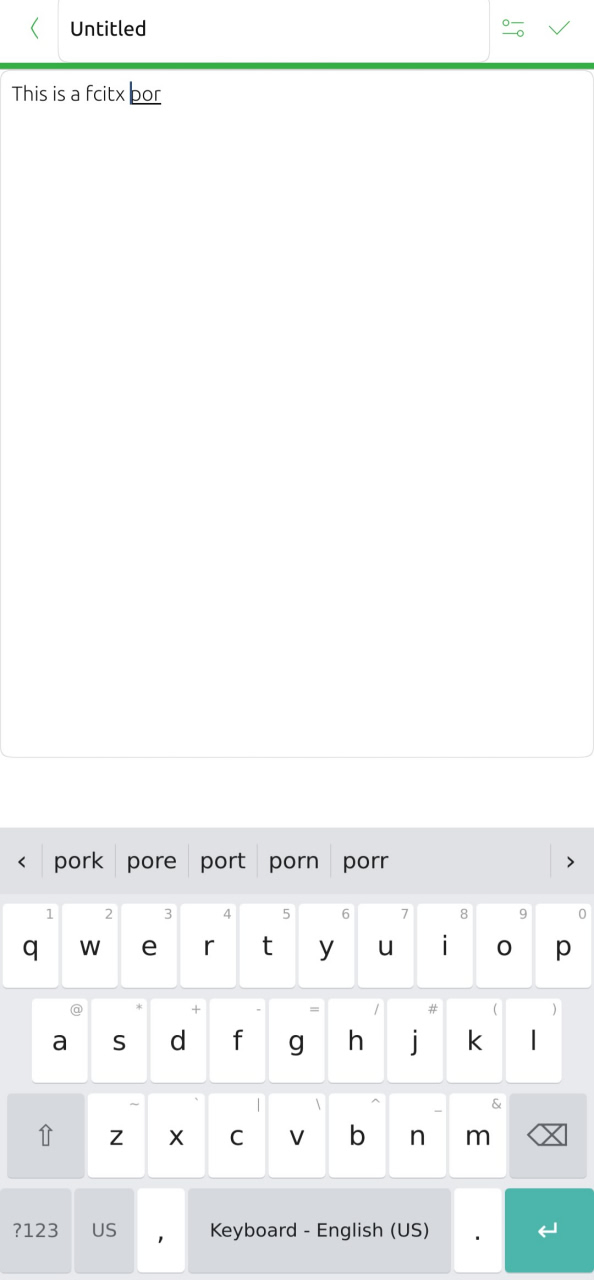
@kugiigi The screenshot and screen recording feature of my phone both suddenly stopped working for some reason....
Anyway I managed to get a screenshot
-
even with Min, it seems to happen only if prediction is turned off in fcitx-ub configuration.
Hello! It looks like you're interested in this conversation, but you don't have an account yet.
Getting fed up of having to scroll through the same posts each visit? When you register for an account, you'll always come back to exactly where you were before, and choose to be notified of new replies (either via email, or push notification). You'll also be able to save bookmarks and upvote posts to show your appreciation to other community members.
With your input, this post could be even better 💗
Register Login