UBports Robot Logo UBports Forum
    • Categories
    • Recent
    • Tags
    • Popular
    • Users
    • Groups
    • Search
    • Register
    • Login

    Development testers for Anbox

    Scheduled Pinned Locked Moved OS
    222 Posts 72 Posters 285.0k Views 16 Watching
    Loading More Posts
    • Oldest to Newest
    • Newest to Oldest
    • Most Votes
      Reply
      • Reply as topic
      Log in to reply
      This topic has been deleted. Only users with topic management privileges can see it.
      • T Offline
        TartanSpartan @joe
        last edited by TartanSpartan

        @joe I agree. I would like to draw everyone's attention to this issue, and as I say, we need a way to start from fresh with Anbox without having to reinstall Ubuntu Touch. This is especially important for when Anbox is entirely stable and becomes a part of the system image for a future UT OTA.

        https://github.com/ubports/anbox/issues/24

        Sister issue regarding the importance of being warned or even blocked from installing problematic apps, as desktop snap-based Anbox implementations already do:

        https://github.com/ubports/anbox/issues/25

        I'm also wondering if Anbox can be destabilised if users try to install APKs beyond a certain storage level? Like, if we install several apps which are each ~100MB, and this is from a starting point of say 1.5GB free storage space left, is there a point at which things start to break? And I mean before running to to 0MB left.

        1 Reply Last reply Reply Quote -1
        • te-onlineT Offline
          te-online @gb
          last edited by

          @gb I had to enlarge the system partition on my Nexus 5 to install everything, if I remember correctly. Maybe that's your issue? I think I followed this script https://github.com/plasma-mobile/plasma-phone-dev-setup/blob/master/usr/bin/resize-root-partition with minor adjustments, but caution I don't remember since it's been a while – do it on your own risk 😉

          1 Reply Last reply Reply Quote 0
          • P Offline
            pawlinski @padraic
            last edited by

            @padraic said in Development testers for Anbox:

            anyone successfully get frieza working? I tried but am told that

            phablet@ubuntu-phablet:~$ anbox-tool install
            Anbox kernel is not installed! Please flash this first!
            

            Pretty sure I went through the procedures correctly but maybe I missed something. If I don't hear back from anyone I'll try again in a couple of days and open an issue if it still doesn't work.

            I have the same problem

            U 1 Reply Last reply Reply Quote 0
            • P Offline
              pawlinski @gb
              last edited by

              @gb

              @gb said in Development testers for Anbox:

              Hi,

              I´m testing it in M10 FHD (frieza).
              I just installed ubports from scratch (16.04 dev) and try the instructions post by Marius.

              Doing "sudo apt-get upgrade", I´m facing:
              "E: You don't have enough free space in /var/cache/apt/archives/."

              How can this be possible? I just installed the system and there is no space left?
              Do I have to install the hole thing into a Libertine container?

              You can try (it has helped me):

              sudo mount -o rw,remount /

              sudo rm -r /var/cache/apt

              sudo tune2fs -m 0 /dev/loop0

              sudo apt update

              sudo apt install anbox-ubuntu-touch

              sudo rm -r /var/cache/apt

              sudo mount -o r,remount /

              1 Reply Last reply Reply Quote 5
              • H Offline
                honigwald
                last edited by honigwald

                @pawlinski I'm having the same issue. Installation was successful after cleaning the cache several times. but when I try to install anbox-tools I get the same error as @padraic .

                phablet@ubuntu-phablet:~$ anbox-tool status
                Kernel: NOT OK
                System: NOT FOUND
                Enabled: NO
                Running: NO

                G 1 Reply Last reply Reply Quote 0
                • G Offline
                  gmelchett @honigwald
                  last edited by

                  @honigwald What does sudo anbox-tool status say? On my Nexus 5, sudo vs no sudo shows different status.

                  H 1 Reply Last reply Reply Quote 0
                  • H Offline
                    honigwald @gmelchett
                    last edited by honigwald

                    @gmelchett Hi. This is the Output I get.
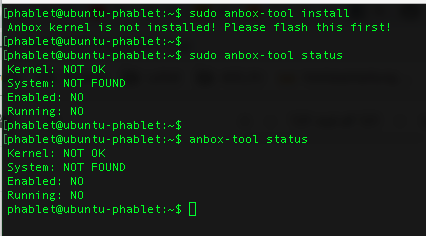
                    0_1540939338796_Screen Shot 2018-10-30 at 23.41.55.png

                    Until now, I've resized /dev/loop0 to 3GB and reinstalled everything without success.

                    Btw.: I'm using BQ M10 FHD

                    1 Reply Last reply Reply Quote 0
                    • U Offline
                      ursfan @pawlinski
                      last edited by

                      @pawlinski Have you installed the boot.img for frieza with fastboot?

                      P 1 Reply Last reply Reply Quote 0
                      • IngoI Offline
                        Ingo
                        last edited by

                        Just tried anbox for the first time on my Fairphone 2. Installed a few apps (pulling APKs from my android device using this description).

                        As expected, my bike sharing app doesn't work as it uses google services.
                        But spotify works 😉

                        1 Reply Last reply Reply Quote 0
                        • P Offline
                          pawlinski @ursfan
                          last edited by

                          @ursfan Yes.

                          U 1 Reply Last reply Reply Quote 0
                          • Y Offline
                            Yougo
                            last edited by

                            Hi, has anyone tried to install anbox on a bq M10 HD yet?

                            i have , but anbox-tool is telling me i need to flash the kernel, but i did that?!

                            i followed instructions from here: https://docs.ubports.com/en/latest/userguide/dailyuse/anbox.html

                            might there be some step missing? or is the anbox-boot-cooler.img not functional?

                            arubislanderA 1 Reply Last reply Reply Quote 0
                            • arubislanderA Offline
                              arubislander @Yougo
                              last edited by

                              @yougo: Just stating the obvious, but it is a mistake that I made initially when trying anbox on my M10FHD: Did you use the correct name for the boot partition when flashing the boot image (boot instead of bootimg)?

                              🇦🇼 🇳🇱 🇺🇸 🇪🇸
                              Happily running Ubuntu Touch
                              JingPad (24.04-1.x daily)
                              OnePlus Nord N10 5G (24.04-2.x daily)
                              PinePhone OG (20.04)
                              Meizu Pro 5 (16.04 DEV)

                              H 1 Reply Last reply Reply Quote 0
                              • M Offline
                                marc_aurel
                                last edited by

                                Exciting progress. I sucessfully installed Anbox on my FP2. For installing additional apks; I tried to install adb android-tools-adb:

                                phablet@ubuntu-phablet:~$ sudo apt install android-tools-adb
                                Reading package lists... Done
                                Building dependency tree       
                                Reading state information... Done
                                The following NEW packages will be installed:
                                    android-tools-adb
                                0 upgraded, 1 newly installed, 0 to remove and 108 not upgraded.
                                Need to get 64.1 kB of archives.
                                After this operation, 152 kB of additional disk space will be used.
                                E: You don't have enough free space in /var/cache/apt/archives/.
                                

                                This is confusing, because the system info says, that there is more than 23 GB free space on my FP2.

                                Some idea to resolve this issue?

                                1 Reply Last reply Reply Quote 0
                                • IngoI Offline
                                  Ingo
                                  last edited by

                                  Using pawlinskis approach from https://forums.ubports.com/post/14023

                                  sudo mount -o rw,remount /
                                  sudo rm -r /var/cache/apt
                                  sudo tune2fs -m 0 /dev/loop0
                                  sudo apt update
                                  sudo apt install android-tools-adb
                                  sudo mount -o ro,remount /

                                  The system image has just 2 GB and the commands above free some of that space. The 23 GB free storage you mentioned is the part of the storage reserved for user data.

                                  M 1 Reply Last reply Reply Quote 1
                                  • H Offline
                                    haveaniceday
                                    last edited by haveaniceday

                                    @honigwald I have the same problem. BQ Aquaris FHD (frieza).
                                    Flashed the the kernel as shown at docs.ubports.com, but anbox-tool status says:

                                    phablet@ubuntu-phablet:~$ anbox-tool status
                                    Kernel: NOT OK
                                    System: NOT FOUND
                                    Enabled: NO
                                    Running: NO
                                    

                                    Prior to installing I grew the ubuntu.img / system.img to have enough space for apt on /.
                                    Somehow the kernel does not get installed... Anyone has solved this?

                                    Maybe this is relevant: I bought the Android version of the tablet - then installed UBports UT. Maybe this changes the boot partition / image?

                                    1 Reply Last reply Reply Quote 0
                                    • H Offline
                                      haveaniceday @arubislander
                                      last edited by

                                      @arubislander So did I. Maybe boot is incorrect?

                                      1 Reply Last reply Reply Quote 0
                                      • H Offline
                                        haveaniceday
                                        last edited by

                                        I just used ubports-installer to flash 16.04/rc onto the frieza, then resized the partition, then installed anbox using the doc.ubports.com tutorial. No success 😞
                                        @mariogrip How did you do it?

                                        1 Reply Last reply Reply Quote 0
                                        • J Offline
                                          Johanno
                                          last edited by

                                          Hi,
                                          I've tried it on BQ m10 FHD and it does not seem to work.
                                          I've flashed the Kernel and installed anbox-tool but i can't install it, because it says the Kernel isn't installed.

                                          phablet@ubuntu-phablet:~$ anbox-tool install
                                          Anbox kernel is not installed! Please flash this first!
                                          
                                          phablet@ubuntu-phablet:~$ anbox-tool status
                                          Kernel: NOT OK
                                          System: NOT FOUND
                                          Enabled: NO
                                          Running: NO
                                          

                                          I tried reflashing it a couple of times, without success.

                                          1 Reply Last reply Reply Quote 1
                                          • D Offline
                                            delijati
                                            last edited by

                                            Can someone point me to the used kernel source for bacon anbox. The one in github seams not to have the "anbox" changes.

                                            1 Reply Last reply Reply Quote 0
                                            • IngoI Offline
                                              Ingo
                                              last edited by Ingo

                                              Maybe this is useful feedback 😉

                                              These are the apps that work for me with anbox on Fairphone 2

                                              • CatLog
                                              • Onleihe
                                              • Spotify
                                              • Threema (Polling instead of Push notifications)
                                              • WhatsApp (probably also polling)
                                              • my banking app

                                              But please take note: I haven't tested those in depth and am not using them on my daily driver, so maybe some problems went unnoticed so far.

                                              What didn't work

                                              • AdAway (needs root)
                                              • Bücherhallen (doesn't run without gapps; managing wish list works)
                                              • car2go (doesn't run without gapps)
                                              • DB Navigator (crashes immediately on start)
                                              • Drive Now (doesn't run without gapps)
                                              • Firefox (looks as if it works, but web pages are rendered entirely black)
                                              • iButtons (simply doesn't start)
                                              • Real Drum (simply doesn't start)
                                              • Stadtrad (doesn't run without gapps)
                                              • vlc (upper third of screen remains black, the app window seems shifted down and lower part is not visible)

                                              R 1 Reply Last reply Reply Quote 0

                                              Hello! It looks like you're interested in this conversation, but you don't have an account yet.

                                              Getting fed up of having to scroll through the same posts each visit? When you register for an account, you'll always come back to exactly where you were before, and choose to be notified of new replies (either via email, or push notification). You'll also be able to save bookmarks and upvote posts to show your appreciation to other community members.

                                              With your input, this post could be even better 💗

                                              Register Login
                                              • First post
                                                Last post