UBports Robot Logo UBports Forum
    • Categories
    • Recent
    • Tags
    • Popular
    • Users
    • Groups
    • Search
    • Register
    • Login

    Bricked nexus 5 , adb doesnt recognize device, tried windows and peppermint.

    Scheduled Pinned Locked Moved Support
    12 Posts 3 Posters 1.6k Views 1 Watching
    Loading More Posts
    • Oldest to Newest
    • Newest to Oldest
    • Most Votes
      Reply
      • Reply as topic
      Log in to reply
      This topic has been deleted. Only users with topic management privileges can see it.
      • advocatuxA Offline
        advocatux @Churchthecat
        last edited by

        @Churchthecat hi, install the latest official Android stock ROM for Nexus 5 (https://developers.google.com/android/images#hammerhead) so you can start from a clean and known state.

        So, I would follow these steps:

        • Update the device to the latest official stock ROM
        • Optional: Back up your data in that device
        • Check that the device is not encrypted (do a factory reset if needed)
        • Turn on developer mode & usb debugging
        • Install the latest UBports installer on your computer
        • Check out that you have adb and fastboot tools on your computer
        • Be sure you have a good usb cable
        • Start the installer and then plug the phone
        • Follow the on-screen instructions
        • Have patience. The installation takes a while
        • Enjoy your new UT device 🎉

        N.B. Sometimes some installer version - package type combination works better than others

        1 Reply Last reply Reply Quote 0
        • C Offline
          Churchthecat
          last edited by

          yea I would like to do that but since I cant get adb to work how will i do that? cant transfer files or do command at all? tried the universal drivers , tried the LG drivers and installing googles from android studio

          advocatuxA 1 Reply Last reply Reply Quote 0
          • advocatuxA Offline
            advocatux @Churchthecat
            last edited by

            @Churchthecat please follow the install instructions that you can find in that link I posted above.

            You don't need adb to put your phone in bootloader, you just need to use fastboot.

            C 1 Reply Last reply Reply Quote 0
            • C Offline
              Churchthecat @advocatux
              last edited by

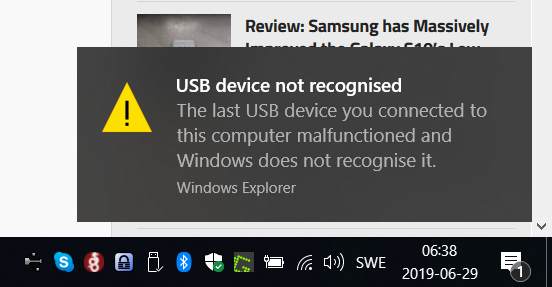
              @advocatux thanks but!2019-06-29 06_38_01-.png

              fastboot just waiting for device...

              advocatuxA 1 Reply Last reply Reply Quote 0
              • advocatuxA Offline
                advocatux @Churchthecat
                last edited by

                @Churchthecat I don't know about Windows but the usual advice I see in the Install group is to get rid of all the conflicting USB drivers and use the '15 seconds method' (https://forum.xda-developers.com/showthread.php?t=2588979).

                C 1 Reply Last reply Reply Quote 0
                • C Offline
                  Churchthecat @advocatux
                  last edited by

                  @advocatux still no luck, same error.

                  C 1 Reply Last reply Reply Quote 0
                  • C Offline
                    Churchthecat @Churchthecat
                    last edited by

                    hold on, no error with the 5th cable I tried....

                    advocatuxA 1 Reply Last reply Reply Quote 0
                    • advocatuxA Offline
                      advocatux @Churchthecat
                      last edited by advocatux

                      @Churchthecat I was going to suggest: "try another USB cable while waiting for someone who knows more about Windows than me" 😄

                      1 Reply Last reply Reply Quote 0
                      • C Offline
                        Churchthecat
                        last edited by

                        Hehe thanks 🙂 flashed factory image got bootloop, got twrp loaded at least. so it will work soon. Thanks again 🙂

                        advocatuxA 1 Reply Last reply Reply Quote 1
                        • advocatuxA Offline
                          advocatux @Churchthecat
                          last edited by

                          @Churchthecat you're welcome!

                          1 Reply Last reply Reply Quote 0
                          • M Offline
                            malditobastardo
                            last edited by

                            Cables, cables, cables. We should make a troubleshooting sticky

                            1 Reply Last reply Reply Quote 0

                            Hello! It looks like you're interested in this conversation, but you don't have an account yet.

                            Getting fed up of having to scroll through the same posts each visit? When you register for an account, you'll always come back to exactly where you were before, and choose to be notified of new replies (either via email, or push notification). You'll also be able to save bookmarks and upvote posts to show your appreciation to other community members.

                            With your input, this post could be even better 💗

                            Register Login
                            • First post
                              Last post