How to use Spotify on Ubuntu Touch
-
Here you are going to have a how to install Spotify connect on your device and use a webapp to play all music you want from Spotify, only for premium accounts
Step 1: Create a libertine container
First of all we have to create a libertine container, so we are going to Settings > Libertine > Click on plus button on top right
Wait until container be totally created, click on Container > top right on Settings > Container information > Operation details (view) and waint until finnish
Step 2: Install curl on container
First connect over ssh to mobile, for this you have to enable via "Tweak Tools" app (more info) and put you ssh key on it, then: ssh pablet@yourip
See containers name: libertine-container-manager list and connect to container: libertine-container-manager exec -i xenial -c "/bin/bash"
So now we can install curl: apt install curlStep 3: Install mopidy
We continue connected to container after "Step 2" (and all steps from here to the end are connected in libertine container) so we execute:wget -q -O - https://apt.mopidy.com/mopidy.gpg | apt-key add - wget -q -O /etc/apt/sources.list.d/mopidy.list https://apt.mopidy.com/stretch.list apt update apt install mopidy apt-get install mopidy-spotifyStep 4: Configure mopidy to connect to Spotify
Go to this link https://www.mopidy.com/authenticate/ and at bottom you have the connection to Spotify click on it and get the params client_id and client_secret
Using you favorite shell editor (apt install vim-tiny) edit the file: vim.tiny /etc/mopidy/mopidy.conf
And add at the end this lines with your data[spotify] username = ...your username... password = ...your password... client_id = ...client_id... client_secret = ...client_secret...Step 5: Edit desktop icon
On file /usr/share/applications/mopidy.desktop modify line 8 to this:Exec=mopidy --config /etc/mopidy/mopidy.confStep 6: Install dashboard
Finally we have to install a web dashboard to play our music, for that we need pip so install all with that commands:apt install python-pip pip install --upgrade setuptools pip install Mopidy-IrisStep 7: Run spotify
Now we have Spotify installed, so how we can play music, it's easy, go to Main Scope on Ubuntu touch, touch from bottom to up to open Desktop applications from libertine, open Mopidy and let it run (it never end loading because runs on backgroung) open Morph and go to http://127.0.0.1:6680 you see something like screenshot so go and select Iris
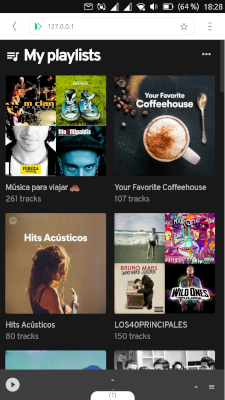
Note: If you care of battery consumption, don't worry about that, you can clos modipy app and stops running. Even that i was listenning music several ours and i don't detect more battery lose than normally.
-
Amazing work!
I wanted to try mopidy on the raspberry pi. Unfortunately I haven't found the time yet.As I read it with mopidy, you can control it with any mpd client. Maybe you can test my client to see if it works?
https://open-store.io/app/umpd.stefanweng
I would be very curious if it works

-
I tried now but i can't do anything beacuse of you can play over MPD but you can browser songs or playlists.
-
Thank you so much for the test. I have to test what I have to change to make it work.
Meizu MX4 16.04 | Nexus 5 16.04
-
Now if we could just get Tidal to work in the Morph browser (switched from Spotify after a recent change to their player made it unusable for me)....
-
Thank you very much for editing this installation with Libertine, this makes it possible for all of us to enjoy Spotify more and learn how it's done,
regards...
-
@stefwe I finally test again, and if you select on browser a playlist to play then you see all songs on umpd
-
Thank you for testing and reporting this. Maybe there is a way to display the available playlists and more in umpd. Must have a look at that.
-
Hi everybody!
I would like to start by saying that I am grateful for this method of using Spotify on UBports, since making Spotify work was my greatest concern when switching from Android.
I have one problem though: I can't seem to enable write privileges in Iris. By default, it only has read access to your Spotify playlists, etc. When I try to enable write access in Iris' settings it just doesn't work. I press "Log In" under "Authorization" in the settings, proceed to login with Spotify and then I just reach a white page. Has anyone been able to enable the setting?
EDIT: I found a workaround! Installing the "Demo Browser" from the Open Store, using it to enable write privileges and then exporting the authorization from the Demo Browser Iris client to the Morph one (Iris settings > "Share configuration" > "Spotify authorization") I successfully enabled the write access
-
@hadrianweb thank you for this how-to. it works perfectly for me.
I just like to mention that I had to install wget, too. And it is not needed to use ssh. You can all do it in the terminal on your ub touch device.
Again, thank you!
-
Followed the instructions recently, still works like a charm!
-
Sweet...!
Has anybody tried this method with a bq aquaris e4.5 ? -
@hadrianweb How did you get mopidy keep on playing with the display off? I am trying to use spotify using librespot or spotifyd but the audio becomes teriibly choppy when the display goes off.
-
Yeah, it also works well with screen off
-
This post is deleted! -
Sorry it don't work. See this Screenshot:
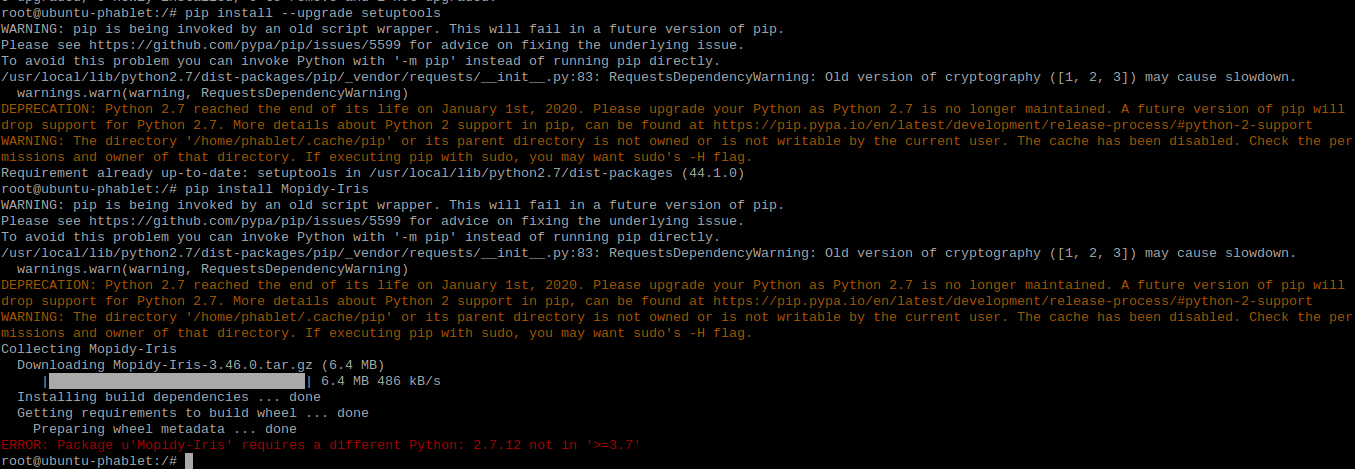
Any Ideas?
-
If I remember correct, you need to use newer python library with Mopidy. Xenial has too old..
I installed Mopidy with Ubuntu Bionic 18.04 - chroot and it is working fine.
-
@HendriXXX Thanks for your reply! But what exactly do I have to do now? What commands do I have to enter?
-
I have the same problem; I followed the instructions, but mopidy won't run on my xenial-based libertine container. I tried running
phablet@ubuntu-phablet:~$ libertine-container-manager create -i lxc-experiment -t lxc -d bionicto get a container based on a newer distribution, but that doesn't work:
libertine-container-manager:76: ERROR: create(): System kernel does not support lxc type containers. Please either use chroot or omit the -t option.Not sure how to proceed; note that I'm making my first baby steps with ubuntu touch, so it's well possible that I messed up some initial step, making the guide non-appicable in the first place.
-
I have installed again from zero making all the steps on guide and works well on xenial container



Hello! It looks like you're interested in this conversation, but you don't have an account yet.
Getting fed up of having to scroll through the same posts each visit? When you register for an account, you'll always come back to exactly where you were before, and choose to be notified of new replies (either via email, or push notification). You'll also be able to save bookmarks and upvote posts to show your appreciation to other community members.
With your input, this post could be even better 💗
Register Login