UBports Robot Logo UBports Forum
    • 版面
    • 最新
    • 標籤
    • 熱門
    • 使用者
    • 群組
    • 搜尋
    • 註冊
    • 登入

    Smartwatch sync app

    已排程 已置頂 已鎖定 已移動 App Development
    107 貼文 22 Posters 58.6k 瀏覽 10 Watching
    正在載入更多貼文
    • 從舊到新
    • 從新到舊
    • 最多點贊
      回覆
      • 在新貼文中回覆
      登入後回覆
      此主題已被刪除。只有擁有主題管理權限的使用者可以查看。
      • LakotaubpL 離線
        Lakotaubp @martijntje
        最後由 編輯

        @martijntje Can you state which phone you are using please, it might help.

        M 1 條回覆 最後回覆 回覆 引用 0
        • M 離線
          martijntje @Lakotaubp
          最後由 編輯

          Of course! I should have included that in my post. It's a Nexus 5.

          jihoJ 1 條回覆 最後回覆 回覆 引用 0
          • jihoJ 離線
            jiho @martijntje
            最後由 jiho 編輯

            @martijntje Thanks for trying out the app.
            The pairing is currently broken it that version of the app. You can pair the watch via the system settings and then try again. That should add the watch as an "already known device".

            With the BlueZ update in the devel channel I was able to rebuild the back end and let the pairing process (and automatic reconnect) be handled by system settings.

            This should make the whole process smoother and overall faster (I hope). In case you think of using the development channel (or wait until the change hits stable), feel free to try out this new version: https://gitlab.com/jiiho1/uwatch/-/jobs/2982595472/artifacts/download?file_type=archive

            However, there currently is a drawback: It seems that with this new version, BlueZ is not able to fetch all necessary services from the watch. Because of that the battery level can't be read and you will most likely get an "impossible" value back.

            E 1 條回覆 最後回覆 回覆 引用 0
            • E 離線
              Equareo @jiho
              最後由 編輯

              @jiho Hi, do you have a new download link? The old one expired. I tried building it from source, but I'm too noob to figure out the apparmor settings. unconfined doesn't work XD

              jihoJ 1 條回覆 最後回覆 回覆 引用 0
              • jihoJ 離線
                jiho @Equareo
                最後由 編輯

                @equareo Sure, here you go 🙂 https://gitlab.com/jiiho1/uwatch/-/jobs/2982616820/artifacts/download?file_type=archive

                E 1 條回覆 最後回覆 回覆 引用 1
                • E 離線
                  Equareo @jiho
                  最後由 Equareo 編輯

                  Thank you 😄

                  Edit: I'm on Edge with the Fairphone 4 and infinitime 1.11.0. It's connected, but i'm not getting any stats. Bluetooth settings says it's a mouse :brain:

                  jihoJ 1 條回覆 最後回覆 回覆 引用 0
                  • jihoJ 離線
                    jiho @Equareo
                    最後由 jiho 編輯

                    @equareo It should not matter if it is interpreted as a mouse :D... after the first connect, it will try to sync the firmware version of the watch (restart the app if the sync does not work at first). You can manually sync by swiping down.

                    E 1 條回覆 最後回覆 回覆 引用 0
                    • E 離線
                      Equareo @jiho
                      最後由 Equareo 編輯

                      @jiho Nope, not getting it to work. Maybe because i'm running the firmware that came out three days ago, or maybe i'm just too on the edge XD
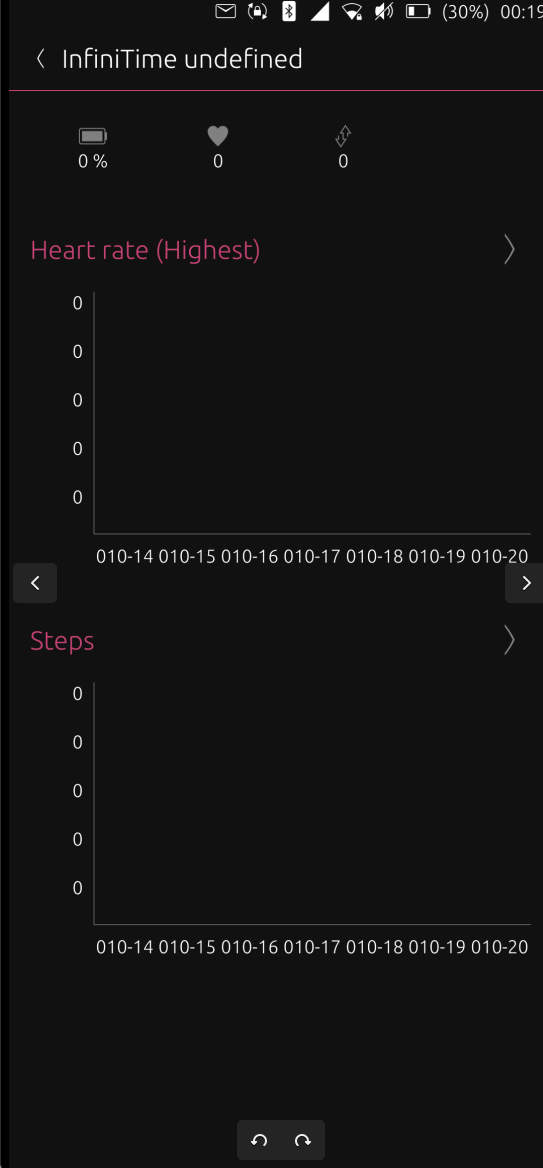
                      Screenshot from 2022-10-20 00-24-32.png This is as far as i get. Refresh doesn't do anything.

                      jihoJ 1 條回覆 最後回覆 回覆 引用 0
                      • jihoJ 離線
                        jiho @Equareo
                        最後由 編輯

                        @equareo Could you please try this one: https://gitlab.com/jiiho1/uwatch/-/jobs/3199676376/artifacts/download?file_type=archive

                        I added a progress bar to display the initial sync (firmware version should then automatically update). Before that, could you delete the app data via UT Tweak Tool to get a clean state?

                        Only after the firmware version synced successfully will you be able to sync the rest of the data. (Battery status is currently broken as BlueZ can't fetch that attribute)

                        E 1 條回覆 最後回覆 回覆 引用 1
                        • E 離線
                          Equareo @jiho
                          最後由 編輯

                          @jiho After deleting the app through the UT Tweak tool, and then reinstalling it just works. I haven't upgraded the system or done anything else fancy, so no idea why it didn't work the first time :confused_face: Thank you so much for the help 🙂

                          arubislanderA 1 條回覆 最後回覆 回覆 引用 0
                          • arubislanderA 離線
                            arubislander @Equareo
                            最後由 編輯

                            @equareo The edge channel is not the best place to be on for Ubuntu Touch. It is an outlier and for highly experimental stuff, and sometimes lags behind, when the stuff gets into the main channels.

                            If you want to be on the cusp of development and help test new features as they drop, the devel channel is the place you want to be.

                            🇦🇼 🇳🇱 🇺🇸 🇪🇸
                            Happily running Ubuntu Touch
                            JingPad (24.04-1.x daily)
                            OnePlus Nord N10 5G (24.04-2.x daily)
                            PinePhone OG (20.04)
                            Meizu Pro 5 (16.04 DEV)
                            Google Pixel 3a

                            1 條回覆 最後回覆 回覆 引用 2
                            • jihoJ 離線
                              jiho
                              最後由 編輯

                              I just added automatic sync to the app and I'd like to get some feedback, if anyone is interested. To sync in the background, disable suspension with UTTT.

                              Build: https://gitlab.com/jiiho1/uwatch/-/jobs/3214702902/artifacts/download?file_type=archive

                              If everything works as expected, then I'd like to submit it as a beta app to the app store. 🙂

                              sandworm88S 1 條回覆 最後回覆 回覆 引用 3
                              • sandworm88S 離線
                                sandworm88 @jiho
                                最後由 編輯

                                @jiho Last version dont see the watches.
                                Just click '+', open bt settings, connect to Infinitime device, go back - and nothing!

                                Redmi Note 9 Pro latest stable xenial (daily driver).
                                Poco F1 focal devel (for experiments)
                                Lenovo Tab M10 X605F/L latest stable xenial (for bedside table)

                                jihoJ 1 條回覆 最後回覆 回覆 引用 0
                                • jihoJ 離線
                                  jiho @sandworm88
                                  最後由 編輯

                                  @sandworm88 I'm sorry, I should have added it to the first post also.
                                  With the updated BlueZ version in the Dev (and I think RC) channel, I stopped using gattool, as it made things a lot more difficult.

                                  Instead I'm using bluetoothctl. Unfortunately the current BlueZ version in stable is not able to use GATT commands to fetch the information. This includes paired devices.

                                  arubislanderA 1 條回覆 最後回覆 回覆 引用 0
                                  • arubislanderA 離線
                                    arubislander @jiho
                                    最後由 編輯

                                    @jiho it was decided at the last moment to revert the bluez stack to the one in stable, as the new one caused too much breakage.
                                    How will this decision impact your app?

                                    🇦🇼 🇳🇱 🇺🇸 🇪🇸
                                    Happily running Ubuntu Touch
                                    JingPad (24.04-1.x daily)
                                    OnePlus Nord N10 5G (24.04-2.x daily)
                                    PinePhone OG (20.04)
                                    Meizu Pro 5 (16.04 DEV)
                                    Google Pixel 3a

                                    jihoJ 1 條回覆 最後回覆 回覆 引用 0
                                    • jihoJ 離線
                                      jiho @arubislander
                                      最後由 編輯

                                      @arubislander Even though I understand the decision, I was hoping the updated version would stay.

                                      In the long run probably/hopefully not at all. I expect that we'll have a new version in focal which would make it work as I'd expect it to.

                                      For xenial I can bring back support for gattool to at least make it work again, but it is old and already deprecated. There would also be a bunch of limitations by how it works.

                                      1 條回覆 最後回覆 回覆 引用 0
                                      • sandworm88S 離線
                                        sandworm88
                                        最後由 sandworm88 編輯

                                        Welll, so what package I can use in my stock stable OTA-23 phone?
                                        I'd just tested two latest builds. One does not work, next does not install.
                                        Too bad you'd deleted old builds which work.

                                        Redmi Note 9 Pro latest stable xenial (daily driver).
                                        Poco F1 focal devel (for experiments)
                                        Lenovo Tab M10 X605F/L latest stable xenial (for bedside table)

                                        jihoJ 1 條回覆 最後回覆 回覆 引用 0
                                        • jihoJ 離線
                                          jiho @sandworm88
                                          最後由 編輯

                                          @sandworm88 As I wrote in my last post, I can bring back gattool support. But the functionality will be limited.

                                          If you take a look at the CI builds, then you'll notice that one (the working one) is a build from the branch for xenial. The other one (not functional one) is for focal and therefore won't work at all on xenial.

                                          sandworm88S 1 條回覆 最後回覆 回覆 引用 0
                                          • sandworm88S 離線
                                            sandworm88 @jiho
                                            最後由 sandworm88 編輯

                                            @jiho Just installed https://gitlab.com/jiiho1/uwatch/-/pipelines/699847107/builds . No luck.
                                            Please make and keep in repo the last working version for stable OTA. It can be feature freezed. It can do less. But it will do.

                                            Redmi Note 9 Pro latest stable xenial (daily driver).
                                            Poco F1 focal devel (for experiments)
                                            Lenovo Tab M10 X605F/L latest stable xenial (for bedside table)

                                            jihoJ 1 條回覆 最後回覆 回覆 引用 0
                                            • jihoJ 離線
                                              jiho @sandworm88
                                              最後由 jiho 編輯

                                              @sandworm88 Here you go, that version should work again in xenial: https://gitlab.com/jiiho1/uwatch/-/jobs/3377320141/artifacts/download?file_type=archive

                                              After pairing the watch via system settings, disconnect it and disable auto connect. Gatttool can't enter existing connections. The app will connect to the watch automatically.


                                              sandworm88S 1 條回覆 最後回覆 回覆 引用 0
                                              • 第一個貼文
                                                最後的貼文