I just tried the installer on a FP3+ tonight, and it worked 
Before my install with the UBports-installer, I had tried to install using this guide: https://forums.ubports.com/topic/5373/fairphone-3-fp3-port
That was not successful, and left the phone without any working OS. In this state, I tried the new Ubports-installer, and all my troubles was gone ! Great work ! Thanks !
K
Offline
Best posts made by Kjetil
-
RE: Call for testing FP3 (also for FP3+) config for UBports-installer
-
RE: Stuck on boot screen after upgrade
It worked! I could reflash, and all my data was still there inclusive Anbox
-
RE: Recover Authenticator NG settings from recovery mode
Reply to myselves and all others in same situation:
- open adb shell to the phone with the new installation
- Go to the Authenticator NG folder: cd ~/.config/authenticator-ng.dobey
- Rename the current config file, in case you want it back later: mv authenticator.conf [newname]
- exit ADB
- Push your saved authenticator.conf to the reight location on the new installation: adb push [local path/authenticator.conf] /home/phablet/.config/authenticator-ng.dobey
Latest posts made by Kjetil
-
Use phone as modem with gnome-calls
Hi,
I would like to connect my Fairphone 4 with usb to my computer, using it as modem for gnome-calls.
I have no idéa how to activate the phone as a modem. When I connect my Ubuntu phone with my Ubuntu Pc, gnome-calls just looks like this: (No modem available). Any suggestions?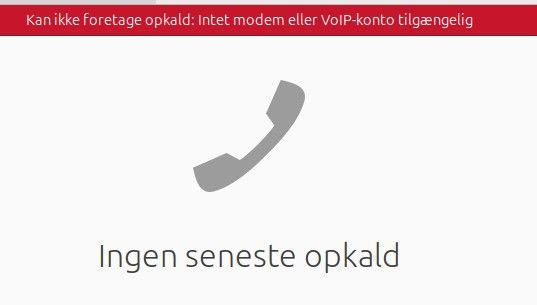
-
Poor sound quality in phonecalls
I have used Ubtouch for several years, but I have a reoccuring problem that keeps coming back: Sometimes people complain in phonecalls that they have difficulties to understand. The sound quality becomes choppy or at least far away from 'crystal clear'. I can hear them well. It can start after a minute or two, or it could come anytime. I'm not on the move, but sitting in the same spot during the entire call. Rebooting the phone sometimes helps. In the past I have thought it could be because of second hand or old phones, but now I have a Fairphone 4 with a fresh install. Where should I start troubleshooting?
-
RE: Using Ubuntu laptop as hands free for my Ubuntu phone
@wally I think you mean the "UB connect" program that is listed as "KDE connect compatible" ? It have some features that works with GSConnect/KDE Connect, but hands free calling is not one of them. It's a good start though.
-
RE: Using Ubuntu laptop as hands free for my Ubuntu phone
@libremax Thanks for pointing me to MirVNC. That is a neat option that resolves the issue with remote control the phone and writing SMS. I can not copy paste from the VNC window to my computer.
Sound does not work either. I have tried to connect my phone via Bluetooth, and the phone proclaims that the computer now is the audio device, but that seems to be more in theory than in practice. I cant get any sound from my phone out on my computer. Any idéas?
The goal is to use my computer as handsfree for my phone. -
Using Ubuntu laptop as hands free for my Ubuntu phone
I would like to connect my Ubuntu phone and Ubuntu laptop, to make calls using my computer headset.
There are programs like HFP for Linux (https://nohands.sourceforge.net/) that might give me this hands free experience, but that is an unmaintained program with a lot of dependency issues when trying to install on 24.04, and not designed for Ubtouch as such. It would be really nice to make calls, write SMS, access address book etc from my laptop when my phone is connected. I'm also using GSConnect, but that has a limited feature set. It's not so important whether the connection is through USB or Bluetooth, as long as the functionality can be achieved.
Are there other options?
-
RE: Recover Authenticator NG settings from recovery mode
Reply to myselves and all others in same situation:
- open adb shell to the phone with the new installation
- Go to the Authenticator NG folder: cd ~/.config/authenticator-ng.dobey
- Rename the current config file, in case you want it back later: mv authenticator.conf [newname]
- exit ADB
- Push your saved authenticator.conf to the reight location on the new installation: adb push [local path/authenticator.conf] /home/phablet/.config/authenticator-ng.dobey
-
Recover Authenticator NG settings from recovery mode
I have a broken phone, where I have retrieved all data via recovery mode and ADB.
I want to reinstall my phone and restore Authenticator NG settings from the data I have saved. How do I do that ? Can I just copy paste from a folder in the old dataset to a location in the new instal? -
RE: Black screen on FP3+
I succesfully got into recovery mode and can now use ADB. The file manager can see the phone attached as "FP3", but comes with an error "Can not open the MTP-unit 001,013" when I try to browse it.
-
Black screen on FP3+
I have had low space left on my FP3, but not cleaned it up. Suddenly I could no longer open many programs, and finally, I could no longer boot it. I get the Fairphone flashscreen, and then it goes black. I can see that something is running behind the sceenes, because if I attach the phone with USB to my laptop, I can se that it is active in Nautilus file browser. I can not browse the device though.
How can I save my data from the phone? -
RE: Waydroid on OTA-2
@mihael Thank you for response !
Unfortunately, my waidroid was uninstalled, and I could no loger install it with "Waydroid helper". I then did:
sudo mount -o remount,rw /
sudo apt install waydroid
and finally your last step:
sudo waydroid initand reboot.
It works !