Hii everyone 
Thanks for the continuing efforts bringing UT to new highs !
What are the pros and cons between a device relying on an old version of Halium and another device relying on a more recent version of Halium ?
Thanks guys
Hii everyone
Thanks for the continuing efforts bringing UT to new highs !
What are the pros and cons between a device relying on an old version of Halium and another device relying on a more recent version of Halium ?
Thanks guys
Helloo
If it's possible, are you thinking of implementing RCS to send and receive messages ?
Thank you for the answer and the amazing work !
Hi everyone  ,
,
Thanks for the Q&A and all the work for UT !
I have a few questions :
I believe Linux mobile has a bright future considering Google is making a lot of moves toward more lockdown on Android and therefore creating problems for customs FOSS android ROM / AOSP forks. Peace 
Hello everyone  ,
,
I'd love to upgrade to Noble but I'm having doubt, so I have a few questions :
Thanks a lot for the impressive work . I believe Linux mobile has a bright future considering Google is making a lot of move toward more lockdown on Android and therefore creating problems for customs FOSS android ROM / AOSP forks.
Hii everyone  , thanks for doing those Q&A, big thanks for all the works in UT, i have 2 questions that are related
Hi everyone  ,
,
Thanks for a all contributors and for answering questions.
From my understanding, in an encrypted device, the phone is really secure after turning it off and before the first decryption/unlocking (BFU), after the device is first unlocked/decrypted (AFU) it is not as secure even if it is locked again because the encryption keys are stored in RAM. For extra security, would it be possible and hard to implement an option in the encryption settings to make the phone like in BFU every time the phone is locked ? Even if it takes longer to unlock each time of course
@ikoz Thanks for your message, i will try to tincker with it 
@Lakotaubp yes that's it, it's possible on waydroid but not on UT. I like that in waydroid because I have a Pixel 3a XL and the audio jack is not on the on the same side as the usb port so it's very useful when listening to music or watching a video, but when I go back to UT everything is upside down... I wasn't aware of that problem when I chose the Pixel ^^
thanks but I know that, i think you misunderstood my question. If you consider that the normal position of the screen is 0 degree (with the bottom of the screen being the usb charging port) then the actual possible rotations are 90 and 270 degrees but you can't do 180 degrees, I don't know how to explain it better
Hii everyone, thanks for answering my previous questions, I keep getting new ones :
@UBportsNews Hi, first thanks to everyone who work on this amazing OS, a few questions :
Thanks for your answers
@developerbayman
Making a little script and make it autorun on startup could be a workaround to avoid doing the mount --bind command every time I reboot the phone but I don't know how to do this.
Still, for each file that I want to copy into the shared folder I have to do the chown command again and again, that's the most problematic thing
@uwahl Ok thanks for this information :). It's good to know that the test_gps utility is not reliable.
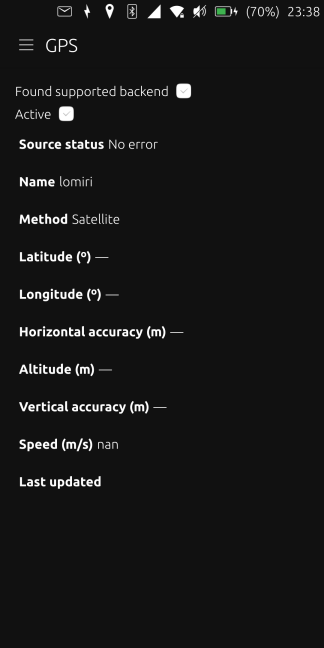
Unfortunatly for me all the apps (Pure Maps, uNav, SensorsStatus, Gps Toolkit) don't give me any fix.
I hope someone can bring me a solution 
Hi everyone
I've tried to setup a shared folder between UT and waydroid so I can easily and quickly share files without using the terminal. I want to be able to use easily this share folder in the graphical app Files of Ubuntu Touch.
I've kinda followed this link : https://docs.waydro.id/faq/setting-up-a-shared-folder
So i have first created two directories : ~/shared and ~/.local/share/waydroid/data/media/0/shared
Then I have done the commands :
sudo mount --bind ~/shared ~/.local/share/waydroid/data/media/0/shared
sudo chown phablet:phablet shared
phablet@ubuntu-phablet:~$ ls -l | grep shared
drwxrwxr-x 2 phablet phablet  4096 juin   7 01:04 shared
phablet@ubuntu-phablet:~$
It only works for one file, then the permissions automatically change to 1023 and I'm not authorised to continue sharing files :
phablet@ubuntu-phablet:~$ ls -l | grep shared
drwxrwxr-x 2    1023    1023  4096 juin   9 23:14 shared
phablet@ubuntu-phablet:~$
So I have to do the chown command again for every file...
Furthermore, if I check the id command then I don't see which user is 1023 :
phablet@ubuntu-phablet:~$ id
uid=32011(phablet) gid=32011(phablet) groups=32011(phablet),4(adm),5(tty),20(dialout),24(cdrom),27(sudo),30(dip),44(video),46(plugdev),105(systemd-journal),1001(radio),1002(bluetooth),1003(android_graphics),1004(android_input),1005(audio),1013(android_media),1015(sdcard_rw),1021(gps),2001(android_cache),3002(android_net3),3003(android_net),3004(android_net2),9997(android_nvram)
phablet@ubuntu-phablet:~$
And finally if I reboot UT I have to also re-do the mount --bind command...
I would like to make this shared folder persistent without having to re-do those commands every time, any ideas ?
Thanks
@uwahl thanks for your answer, I don't understand what are you suggesting me ?
And How can I know if there is an issue with the test_gps command ? and what can I do about it ?
Thanks
@ikoz thanks for the help, i've run test_gps but i got :
phablet@ubuntu-phablet:~$ test_gps
*** setup signal handler
*** get gps interface
*** GPS interface not found :(
 Bye!
phablet@ubuntu-phablet:~$
From what i've read in other threads, I thinks it doesn't mean that my hardware is broken, some users have the same output but when they try to go back to stock android it works great, it's a problem with UT I think...
Hi everyone  ,
,
Since I made the jump to UT, on the Pixel 3a XL some months ago, one of my big problems is the GPS. I cannot manage to make it work. It briefly worked 3 or 4 times some weeks ago but never again. I read many Ubports forum pages about users having problems with it, I tried to do what was advised (Never lock the screen so it always stays on, don't interrupt the app on Tweaks for uNav and PureMaps, put it on the window still with no big building around for 1 hour) but nothing, I cannot get a fix
PS : I have tried the sensor status app and it seems to think the system is ok but it cannot find a satellite with the gps
Any Ideas ?
Thanks in advance !