UBports Robot Logo UBports Forum
    • Categories
    • Recent
    • Tags
    • Popular
    • Users
    • Groups
    • Search
    • Register
    • Login
    1. Home
    2. fredldotme
    3. Best
    Offline
    • Profile
    • Following 0
    • Followers 11
    • Topics 10
    • Posts 212
    • Groups 0

    Posts

    Recent Best Controversial
    • Sony Xperia X (suzu/F5121 & F5122)

      This is a port of Ubuntu Touch for the Sony Xperia X (suzu/F5121 & F5122).

      Sources:
      Kernel:
      https://github.com/fredldotme/device-kernel-loire

      Device:
      https://github.com/fredldotme/device-sony-common
      https://github.com/fredldotme/device-sony-loire
      https://github.com/fredldotme/device-sony-suzu

      Halium:
      https://github.com/Halium/halium-devices/blob/halium-7.1/manifests/sony_suzu.xml

      Status:

      Working:

      • Audio
      • Calling
      • SMS
      • Wifi (sometimes requires a reboot)
      • Wifi hotspot
      • Bluetooth (sometimes requires a reboot)
      • GPS
      • Vibration
      • Orientation sensor
      • LED
      • USB/MTP
      • USB/ADB
      • Video decoding
      • Photo camera
      • MicroSD support
      • Flash light
      • Anbox
      • Libertine

      Missing:

      • Video recording

      Install:

      • Make sure to upgrade your device to the latest stock Android 8.0 before continuing:

        • Windows: https://developer.sony.com/develop/open-devices/get-started/flash-tool/
        • Linux: http://www.flashtool.net/downloads_linux.php (run with GTK_IM_MODULE=ibus ./FlashTool) and https://xperifirm.com/tutorial/install-xperifirm-linux/
      • OEM unlock your device: https://developer.sony.com/develop/open-devices/get-started/unlock-bootloader/

      • Boot your device into fastboot mode by shutting it down and keeping the Volume Up button pressed while plugging in a USB cable between your phone and PC. The LED should be on and blue.

      • In case of flashing issues please wipe system, data & cache partitions using TWRP

      • Flash the OEM binaries from: https://developer.sony.com/file/download/software-binaries-for-aosp-nougat-android-7-1-kernel-4-4-loire/ using fastboot flash oem SW_binaries_for_Xperia_AOSP_N_MR1_5.7_r1_v08_loire.img

      • Run the UBports Installer (0.4.5-beta or onwards): https://github.com/ubports/ubports-installer/releases/tag/0.4.5-beta

      posted in Sony Xperia X (F5121 & F5122)
      fredldotmeF
      fredldotme
    • Ubuntu Touch on Sony Xperia X

      Now that the port has reached a certain state I'd like to present the status of this project to a wider audience,

      Current status:

      • Full AppArmor support
      • Adequate Mir performance
      • Full ofono/rild support
      • Passing most hybris tests

      Known issues:

      • Unable to enumerate rotation status and updates
      • Calling doesn't work
      • Audio doesn't work
      • Camera doesn't work
      • Click package support incomplete

      The full build instructions are available on the Halium project management issue page.

      Halium port project management, HAL port specific issues:
      https://github.com/Halium/projectmanagement/issues/98

      posted in Porting
      fredldotmeF
      fredldotme
    • [How to] Run Docker on your device

      Hello again!

      I've been working on bringing Docker to Ubuntu Touch, with success! Although not completely finished, I'd like to share what is possible today.

      This requires a device with snapd installed, so either Ubuntu Touch 20.04 with Snapz0r (untested) or Ubuntu Touch 24.04-1.0 and up.

      This required changes to the Docker Snap, with a PR on GitHub that has received two heart reactions by the maintainers, so the chances of this PR landing upstream are high. For those interested in what was necessary: https://github.com/canonical/docker-snap/pull/327

      I've shared a preliminary build of this Docker Snap on Google Drive and my private NextCloud instance, until the PR is merged upstream. Download links are below.

      A Pull Request with automatic firewall detection has been merged upstream, so I have removed links to my private builds. Instead follow the instructions in How to to get a working Snap on your device.

      For this Snap to work on all devices, one will currently have to install it in "devmode", a mode which disables confinement for this particular Snap. This effectively means that it will run with the same privileges as an apt-installed Docker package. For confinement to work this will require additional work in snapd which I'm currently waiting for input on: https://forum.snapcraft.io/t/getting-docker-snap-to-run-on-ubuntu-touch-with-k4-19-5-4/49243

      Kernel support

      For Docker to work your device's kernel requires a certain set of features enabled. I've tried to list them here: https://gist.github.com/fredldotme/5dffc8bfa410cfa8f541276407154494

      Also, if the device uses CONFIG_ANDROID_PARANOID_NETWORK in it's configuration, it might be beneficial to disable that also since otherwise containers won't be able to connect to the internet.

      How to

      1. Install the Snap on your device: sudo snap install docker --edge --devmode

      2. Test whether Docker works: sudo docker run hello-world

      3. For running Docker without sudo, set up your user appropriately:

      sudo addgroup --extrausers docker
      sudo adduser $USER docker
      newgrp docker
      sudo snap disable docker
      sudo snap enable docker
      
      1. You're done!

      If you feel really adventurous you can now even install the Clickable Snap (sudo snap install clickable) and develop your Ubuntu Touch apps directly on your Ubuntu Touch device. How awesome is that? 🙂

      posted in Support
      fredldotmeF
      fredldotme
    • Progress on kernel updates

      Hello there! 👋

      I am using the Fairphone 4 as my daily driver at the moment, and I want to ensure good security of the device. Henceforth I am updating the kernel from 4.19.157 to the last stable release 4.19.325 from December 2024. While no major update this will ensure added patches to known CVEs.

      Please be aware that this is a tedious process, taking incremental patches from upstream kernel.org, applying them, checking conflicts, building them and testing them on the device. It will take some time until we reach 4.19.325, so please be patient.

      If you think that's a worthwhile thing to do, please leave a donation (I could really need it). Links below in my signature.

      posted in Fairphone 4
      fredldotmeF
      fredldotme
    • RE: Ubuntu Touch on Sony Xperia X

      Calling now works (with caveats). For the time being you need a test version of telepathy-ofono on your device to enable calling:

      sudo ubports-qa install xenial_-_haliumfixup
      
      posted in Porting
      fredldotmeF
      fredldotme
    • RE: Bounty for Pixel 3a/Halium 9 stability

      Good news! Over the last few days we enabled initial support for SMS & MMS on the Pixel 3a & 3a XL on US carriers. A bunch of other fixes made it into the current release candidate to perfect it but this is the big one.

      SMS work reliably on 4G now and MMS partially work (lacking proper Group MMS support right now). The phone doesn't trip off the carrier with its incomplete IMS support too.

      If you want to make sure you can reliably receive MMS please make sure your APN settings are compatible, either by changing the settings or, if the system-settings GUI doesn't work, by editing the /var/lib/ofono/<number>/gprs file manually, or by disabling the Internet APN completely. Staying off WIFI is also reported to work reliably.

      posted in Google Pixel 3a/3a XL
      fredldotmeF
      fredldotme
    • RE: [How to] Run Docker on your device

      And here a little success story on combining the Clickable Snap & the Docker Snap, allowing to build AND test a click package directly on the device (in this case a JingPad). Photo courtesy of Sander:

      photo_2025-11-05_21-28-47.jpg

      posted in Support
      fredldotmeF
      fredldotme
    • RE: Progress on Encryption with Waydroid

      Even better news: The wipe won't be needed.

      Existing v1 policies continue working and should even be compatible with Waydroid once they're stored in the filesystem keyring. Even if they're not, that's not a blocker for v2 to land early, as existing users can enjoy their devices with the same feature set as before.

      I'll go ahead and merge this.

      posted in Fairphone 4
      fredldotmeF
      fredldotme
    • [Testing] NFC for Halium 9 ports

      EDIT April 3rd 2021: NFC support is now in the devel channel and will be released with OTA-17
      Please use this thread as a place to exchange ideas regarding our NFC implementation.

      Original post:

      Hey! I have something new to play around with for people on Halium 9 builds of Ubuntu Touch: you can now test your device for NFC functionality!
      The only prerequisite is that your device needs to be on the devel-based rootfs, not the edge one.

      To install:

      sudo ubports-qa install xenial_-_android9_-_nfcd
      sudo mount -o remount,rw /
      sudo apt install nfcd nfcd-tools nfcd-binder-plugin nfcd-repowerd-plugin
      

      To get console output from nfcd:

      sudo stop nfcd
      sudo /usr/sbin/nfcd -p /usr/lib/nfcd/plugins -v
      

      App developers can try the QtNFC integration module to develop apps based on this technology. This requires the following change to be made to the rootfs before it can be used by (currently only unconfined) apps:

      sudo mount -o remount,rw /
      sudo apt install qml-module-qtnfc
      

      The API documentation is located here: https://doc-snapshots.qt.io/qt5-5.9/qtnfc-qmlmodule.html

      Please use this thread to share your experience with NFC enablement and even ask for help.

      posted in Porting
      fredldotmeF
      fredldotme
    • [How to] Access your encrypted data from the recovery

      Hello all!

      I've created a little script to aid in the recovery of data, should one choose to enable encryption on their device.

      It's available here: https://gist.github.com/fredldotme/7bc4e5aee515d8b74a7b091599e67382
      Save the script as chroot-into-system on your PC.

      The guide assumes you have adb installed on your PC. The steps are as followed:

      1. Boot your device into recovery mode
      2. Mount your system partition by going to "Advanced" -> "Mount/unmount system"
      3. Open a terminal on your PC and switch to the directory you saved the script in
      4. Push the script to your device: adb push chroot-into-system /tmp/
      5. Run an adb shell
      6. Execute the script: sh /tmp/chroot-into-system
      7. Now it's time to unlock the home directory: fscrypt unlock /home/phablet
      8. Enter your PIN or password and hit enter
      9. The home directory contents should now be decrypted and visible

      Please try it on your device and let me know of any issues.

      posted in Support
      fredldotmeF
      fredldotme
    • Progress on Encryption with Waydroid

      Hello there!

      As many of you might know, 24.04-1.0 on the Fairphone 4 launched with filesystem encryption that conflicted with Waydroid. In the meantime I've successfully been able to bring fscrypt policy v2 support to the Fairphone 4 kernel, meaning that this issue will soon be a thing of the past.

      I announce this here to educate people who already encrypted their devices. Phones with v1 policies will have to be wiped (or reset back to normal via some advanced Terminal/adb/ssh trickery) because only one type of policy version can be supported at a time.

      Should you be interested in encryption while being able to use Waydroid, then wait for a while. I will push the changes once I feel comfortable I am not badly surprising users who didn't get the memo yet.

      posted in Fairphone 4
      fredldotmeF
      fredldotme
    • RE: Ubuntu Touch on Sony Xperia X

      As we are approaching full support the build and flash instructions on https://github.com/Halium/projectmanagement/issues/98 have been updated.
      This should get you a working image with audio support.

      Remaining issues:

      • Media player support (videos in Morph Browser work fine)
      • Camera
      posted in Porting
      fredldotmeF
      fredldotme
    • RE: Progress on kernel updates

      Some hours, 4 cans of XL energy drink, and some patience later and I upgraded the kernel to 4.19.198. That's 41 patch versions fresher than before!

      I will do these updates in stages. First I'll update until I feel comfortable with it, test it for a day, then merge it into the release branch. Also I've been able to catch some discrepancies I wouldn't have been able to catch otherwise if I just merged the latest upstream git into our kernel. Leaves me some peace of mind.

      posted in Fairphone 4
      fredldotmeF
      fredldotme
    • RE: Ubuntu Touch Q&A 115 Is This Saturday At 19:00 UTC

      @attah I'd be more than happy to work together and keep the name SeaPrint for sure. It needs some massive changes to building the thing and its dependencies though, so I thought at first that a hard-fork would be justified. Let's have a chat here in DMs if you want. 🙂

      posted in News
      fredldotmeF
      fredldotme
    • Google Pixel 3a (sargo)

      This is a port of Ubuntu Touch for the Google Pixel 3a (sargo).

      Sources:
      Kernel:
      https://github.com/fredldotme/android_kernel_google_bonito

      Device:
      https://github.com/fredldotme/android_device_google_bonito

      Status:

      Working:

      • Audio
      • Calling
      • Wifi
      • Wifi hotspot
      • Bluetooth
      • Vibration
      • Sensors
      • Video decoding
      • Photo camera & video recording
      • Gallery previews
      • Flash light
      • Fingerprint reader
      • GPS
      • USB/MTP
      • USB/ADB

      Missing:

      • Anbox
      • Libertine

      Known issues:

      • During installation finding the device in recovery mode takes some time. Use the "Try again" button frequently until it is found by the UBports Installer.
      • Under active investigation: Sometimes the device loses data signal without indication. In this case the device needs a reboot.
      • Even though GPS should work it might take a long time to get a GPS fix on location requests.
      • Bluetooth calls miss working microphone routing.
      • WIFI usage drains the battery.

      Install:

      • Make sure to revert to factory image PQ3B.190801.002 before continuing: https://developers.google.com/android/images#sargo

      • Install using the UBports installer (version 0.6.0-beta and up): https://github.com/ubports/ubports-installer/releases/tag/0.6.0-beta

      posted in Google Pixel 3a/3a XL
      fredldotmeF
      fredldotme
    • RE: Ubuntu Touch on Sony Xperia X

      I've assembled an image for those who are interested in testing and contributing to Ubuntu Touch.

      Downloads:
      Current: https://drive.google.com/open?id=1a3JtU2TIFg7E53z2pHoveOtOj7LYxJyW
      ~~https://drive.google.com/open?id=1Pmp3sfOs3g5mAb4_W4780-pX4KPliy2F~~
      ~~https://drive.google.com/open?id=1ZmdXFDPDCDkYmVnHC1uf2dYZ8MH6bxwK~~
      ~~https://drive.google.com/open?id=1Ql84ucDlatauuXpqBU-k-jKzdqotYAaB~~
      ~~https://drive.google.com/open?id=1OJjTosp7jFaYhEYYkB9Mxf3lA0HPIXY6~~

      Instructions (tested on Ubuntu 18.04):

      • Linux PC with adb and fastboot properly set up
      • Recent UBPorts rootfs image from the edge devel channel (tested with build #88):
        https://ci.ubports.com/job/xenial-rootfs-armhf/lastSuccessfulBuild/artifact/out/ubports-touch.rootfs-xenial-armhf.tar.gz
      • TWRP Recovery (tested with version 3.2.3-0)
      • Android 7.1 (Kernel 4.4) Loire OEM binaries
      • Flash script: halium-install

      After successfully flashing the recovery image the OEM binaries need to be flashed onto the oem partition:

      unzip SW_binaries_for_Xperia_AOSP_N_MR1_5.7_r1_v08_loire.zip
      fastboot flash oem SW_binaries_for_Xperia_AOSP_N_MR1_5.7_r1_v08_loire.img
      

      System images:

      ./halium-install -p ut ubports-touch.rootfs-xenial-armhf.tar.gz system.img
      adb reboot bootloader
      fastboot flash boot halium-boot.img
      fastboot reboot
      

      Post-installation steps

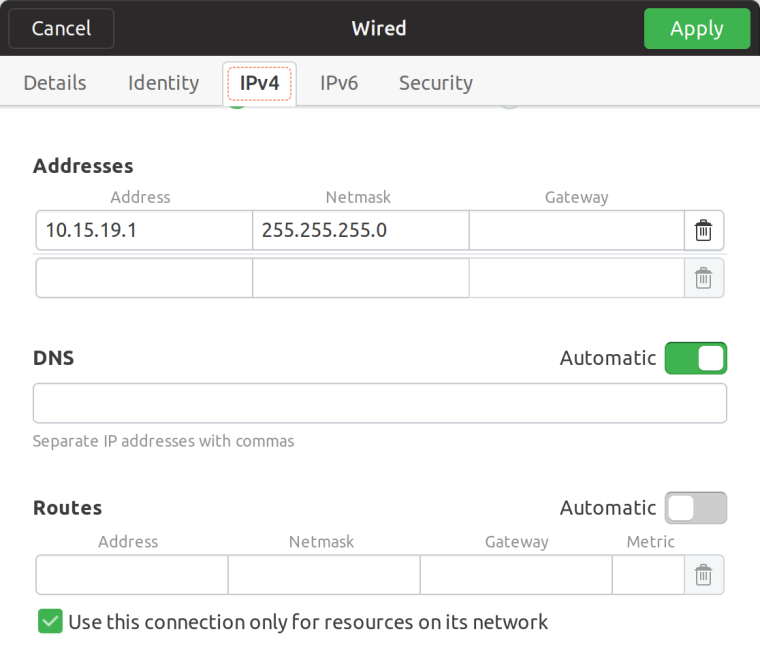
      Either make sure to properly set up the USB-Ethernet connection OR enter the commands in the Terminal app.

      USB Ethernet:

      0_1540657764809_Bildschirmfoto von 2018-10-27 18-28-39.png

      SSH shell connection:

      ssh phablet@10.15.19.82
      

      Enable audio in calls

      # Mount rootfs read-write
      sudo mount -o remount,rw /
      
      # Install updated packages
      # When asked to override maintainer files just answer with Y
      sudo ubports-qa install xenial_-_haliumfixup
      sudo apt install pulseaudio-modules-droid-24 pulseaudio-modules-droid-glue-24
      
      # Mount rootfs read-only and reboot
      sync && sudo mount -o remount,ro / && sudo reboot
      
      posted in Porting
      fredldotmeF
      fredldotme
    • RE: Progress on kernel updates

      I've updated the kernel to 4.19.242 now locally, will test further and merge this ASAP.

      posted in Fairphone 4
      fredldotmeF
      fredldotme
    • RE: Bounty for Pixel 3a/Halium 9 stability

      As the maintainer of the Pixel 3a port I support this. I would really like to see more involvement from US developers to fix the remaining cellular issues. I would also throw in $100 into the mix.

      posted in Google Pixel 3a/3a XL
      fredldotmeF
      fredldotme
    • RE: Ubuntu Touch on Sony Xperia X

      @chriswyatt Thanks for testing! I've noticed audio to be flaky as well and I assumed it had to do with not-yet-committed changes. Luckily that's not the case, so that's good for finding the bug.

      Currently calling doesn't work for any Halium 7.1 based port using the default ofono shipped in Ubuntu Touch, so it might take some time until calling is fully fleshed out.

      I've found a fix for the screen sometimes taking seconds to turn on, which is what I'll incorporate soon. In addition to sound I'll also take another look at the camera.

      posted in Porting
      fredldotmeF
      fredldotme
    • RE: Ubuntu Touch on Sony Xperia X

      I've prepared a new image to test with working Audio.

      Same installation instructions apply, you need halium-install to flash the current rootfs.

      posted in Porting
      fredldotmeF
      fredldotme