Xiaomi Redmi 4X (santoni)
-
Please help me i tried everything always stuck at mi logo, i formated the data and flashed it and still stuck at mi logo never booted to ubuntu. please someone provide step by step process
-
@4htet Keyboard not popping up at Google page is probably a UBports error, the same issue is on Oneplus 3.
And read-only file system, you can try
sudo mount -o rw,remount /to remount the rootfs as root.But your language issue is weird, it could be a UBports issue unless someone tested it on official supported device.
-
@bisaalz Format your /data partition as ext4.
-
Same for me, format data as ext4 does not help. I am unable get any logs,
dmesg -won PC does not show anything,/sys/fs/pstore/console-ramoopsfile does not exist. I am unable to boot your recovery,sudo fastboot boot recovery.imgshow only mi logo. I tried to downgrade firmware, compile system by my own, many recovery images. But I am unable to boot this (and recovery from that post too). Some people on XDA have similar problem. I was using lastest MIUI 11.2 before. -
@Danct12 maybe we should update blobs, I am not sure what else to do.
-
@danqo6 Perhaps you could try to flash a LOS 14.1 rom first and see if LOS loads.
-
@danqo6 , from the fastboot mode, check first:
$ fastboot devices
330915847d15 fastbootthen download and use: Latest TWRP
$ fastboot boot twrp-3.3.1-0-santoni.img
Sending 'boot.img' (24844 KB) OKAY [ 0.783s]
Booting OKAY [ 0.715s]
Finished. Total time: 1.615sAfter Backup ALL and copy TWRP folder to Your PC,
full format: Wipe/Format Data is needed to remove encryption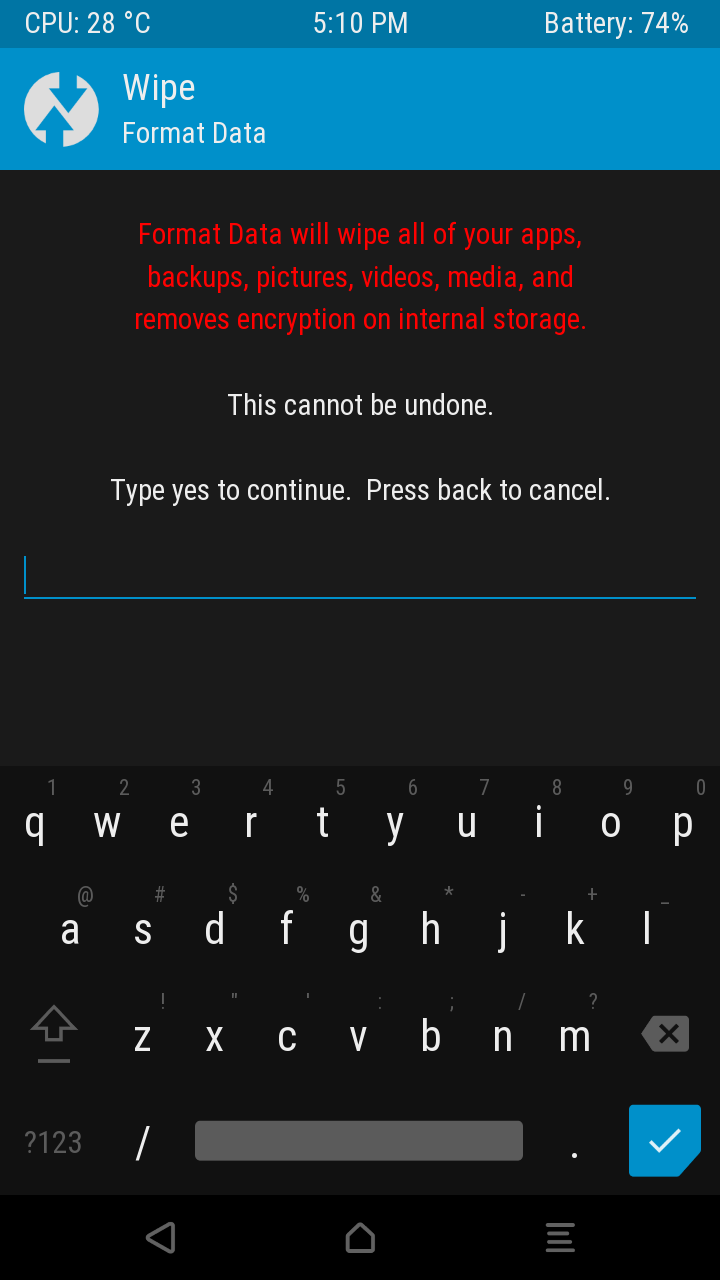
After flash system.img and rootfs.tar.gz don't forget to boot again to fastboot and flash hallium-boot.img:
fastboot flash boot halium-boot.img -
@bisaalz , I think You forgot:
fastboot flash boot halium-boot.img
-
@aceclan I did everything you said flash every thing still stuck at mi logo but other android custom boots but ubuntu never boots
-
Is it possible to build the boot image with anbox support?
-
@bisaalz Please try to flash LineageOS 14.1 (just that, don't install Ubuntu), and reboot.
If LineageOS 14 boots, can you try to install Ubuntu again? Perhaps this is needed first, I have not updated my device firmware for months now.
-
I don't know how to open the download page, where should I click to get this page
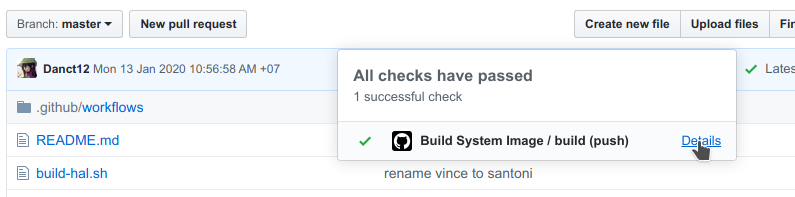
How can i get to the download link? -
@ub_santoni You should tap on green tick.
-
@alex000090 It's amazing, thank you
-
@Danct12 Can u give me lineage os 14.1 link
-
-
This post is deleted! -
Hi @Danct12
I followed your steps but I cannot get it working (as contrary to LOS 16).
Halium seems ok❯ fastboot boot ../../fastboot/imgs/halium-boot.img downloading 'boot.img'... OKAY [ 0.507s] booting... OKAY [ 0.792s] finished. total time: 1.299sUsing halium scirpt seems to work
❯./halium-install -p ut ../redmi_4/ubports-touch.rootfs-xenial-armhf.tar.gz ../redmi_4/system.img
...
* daemon started successfully
.halium-install-imgs.kdniI/rootfs.img: 1 file pushed. 29.4 MB/s (3221225472 bytes in 104.455s)
I:    Pushing android image to /data via ADB
.halium-install-imgs.kdniI/system.img: 1 file pushed. 29.2 MB/s (530046976 bytes in 17.321s)

real	2m4,878s
user	0m0,895s
sys	0m4,792s
I: Cleaning up
umount: .halium-install-rootfs.YfPsB: not mounted.
Reboot
dmesg -woutput[ 580.375260] usb 1-10: USB disconnect, device number 8 [ 591.295694] usb 1-10: new high-speed USB device number 9 using xhci_hcd [ 591.316082] usb 1-10: device descriptor read/8, error -32 [ 591.444080] usb 1-10: device descriptor read/8, error -32 [ 591.887680] usb 1-10: new high-speed USB device number 10 using xhci_hcd [ 591.908635] usb 1-10: New USB device found, idVendor=18d1, idProduct=d001, bcdDevice= 3.18 [ 591.908640] usb 1-10: New USB device strings: Mfr=1, Product=2, SerialNumber=3 [ 591.908643] usb 1-10: Product: Failed to boot [ 591.908646] usb 1-10: Manufacturer: Halium initrd [ 591.908648] usb 1-10: SerialNumber: halium-initrd [ 591.911580] rndis_host 1-10:1.0 usb0: register 'rndis_host' at usb-0000:00:14.0-10, RNDIS device, ce:bd:52:32:a7:cb [ 591.929671] rndis_host 1-10:1.0 enp0s20f0u10: renamed from usb0SSH does not seem to work (either by using connect script or manual setup)
./connect.py -p ssh -u phablet
* The device seems to be connected as enp0s20f0u10
* Connecting using ssh
ssh: connect to host 10.15.19.82 port 22: No route to host
Telnet is working though but:
cat /var/lib/lxc/android/rootfs/ueventd*.rc|grep ^/dev|sed -e 's/^\/dev\///'|awk '{printf "ACTION==\"add\", KERNEL==\"%s\", OWNER=\"%s\", GROUP=\"%s\", MODE=\"%s\"\n",$1,$3,$4,$2}' | sed -e 's/\r//' >
/usr/lib/lxc-android-config/70-[santoni].rules
cat: can't open '/var/lib/lxc/android/rootfs/ueventd*.rc': No such file or directory
/bin/sh: can't create /usr/lib/lxc-android-config/70-[santoni].rules: nonexistent directory
Additionaly
ls -la /var/
total 0
drwxr-xr-x    3 0        0               60 Jun  2 22:38 .
drwxr-xr-x   22 0        0              460 Jun  2 22:39 ..
drwxr-xr-x    2 0        0               40 Jun  2 22:38 lock


ls -la /lib/
total 144
drwxr-xr-x    7 0        0              180 Mar  6  2020 .
drwxr-xr-x   22 0        0              460 Jun  2 22:39 ..
drwxr-xr-x    2 0        0              740 Mar  6  2020 aarch64-linux-gnu
-rwxr-xr-x    1 0        0           144064 May  8  2016 klibc-l2KWxiQhsOhwWkxGl3jGkrDaJnQ.so
lrwxrwxrwx    1 0        0               28 Mar  6  2020 ld-linux-aarch64.so.1 -> aarch64-linux-gnu/ld-2.24.so
drwxr-xr-x    2 0        0               80 Mar  6  2020 modprobe.d
drwxr-xr-x    3 0        0               60 Mar  6  2020 modules
drwxr-xr-x    3 0        0               80 Mar  6  2020 systemd
drwxr-xr-x    3 0        0              100 Mar  6  2020 udev
Any ideas?
-
- sorry for mistake - the first one was
fastboot flash boot ../../fastboot/imgs/halium-boot.img -
@Danct12 all LOS 14.1 roms I found works. ( ROMs before official LOS) I have twrp 3.3.1, I formatted data as ext4. I have 3GB version of redmi 4x, my LCD display was changed once. My logs seems ok, but I am unable to get even telnet working. Other my halium 14.1 devices are working fine using this method (hammerhead and kenzo). I am not sure what else to do.
[dano@dano-80qd Downloads]$ ./halium-install/halium-install -p ut ubports-touch.rootfs-xenial-armhf.tar.gz system.img
[sudo] password for dano:
Debug: Chosen rootfs is ubports-touch.rootfs-xenial-armhf.tar.gz
Debug: Chosen android image is system.img
Debug: Chosen release is ut
Debug: Compress images before pushing: false

I: Writing rootfs into mountable image
I: Writing android image into mountable image
I: Running post installation tasks
enabling Mir ... [done]
enabling SSH ... [done]
Please enter a new password for the user 'phablet':
Enter new UNIX password:
Retype new UNIX password:
passwd: password updated successfully
I: Shrinking images
e2fsck 1.45.6 (20-Mar-2020)
resize2fs 1.45.6 (20-Mar-2020)
Resizing the filesystem on .halium-install-imgs.KFoU8/system.img to 129406 (4k) blocks.
Begin pass 2 (max = 32743)
Relocating blocks             XXXXXXXXXXXXXXXXXXXXXXXXXXXXXXXXXXXXXXXX
Begin pass 3 (max = 24)
Scanning inode table          XXXXXXXXXXXXXXXXXXXXXXXXXXXXXXXXXXXXXXXX
The filesystem on .halium-install-imgs.KFoU8/system.img is now 129406 (4k) blocks long.

I: Unmounting images
I: Pushing rootfs and android image to /data via ADB
I:    Pushing rootfs to /data via ADB
* daemon not running; starting now at tcp:5037
* daemon started successfully
.halium-install-imgs.KFoU8/rootfs.img: 1 file pushed, 0 skipped. 13.2 MB/s (3221225472 bytes in 233.033s)
I:    Pushing android image to /data via ADB
.halium-install-imgs.KFoU8/system.img: 1 file pushed, 0 skipped. 13.1 MB/s (530046976 bytes in 38.671s)

real	4m32,192s
user	0m0,484s
sys	0m4,332s
I: Cleaning up
umount: .halium-install-rootfs.ttgv0: not mounted.
[dano@dano-80qd Downloads]$ sudo fastboot  flash boot halium-boot.img
[sudo] password for dano:
Sending 'boot' (16084 KB)                          OKAY [  0.557s]
Writing 'boot'                                     OKAY [  0.137s]
Finished. Total time: 0.699s
[dano@dano-80qd Downloads]$ sudo fastboot reboot
Rebooting                                          OKAY [  0.000s]
Finished. Total time: 0.050s
[dano@dano-80qd halium-install]$ sudo dmesg -w
...
[15392.651927] usb 1-3: new high-speed USB device number 19 using xhci_hcd
[15392.669563] usb 1-3: New USB device found, idVendor=18d1, idProduct=d001, bcdDevice= 3.18
[15392.669569] usb 1-3: New USB device strings: Mfr=1, Product=2, SerialNumber=3
[15392.669573] usb 1-3: Product: Redmi 4
[15392.669576] usb 1-3: Manufacturer: Xiaomi
[15392.669579] usb 1-3: SerialNumber: 225ac30a7d04
[15400.207598] usb 1-3: USB disconnect, device number 19
//reboot from recovery to fastboot
[15400.531883] usb 1-3: new high-speed USB device number 20 using xhci_hcd
[15400.549566] usb 1-3: New USB device found, idVendor=18d1, idProduct=4ee2, bcdDevice= 3.18
[15400.549572] usb 1-3: New USB device strings: Mfr=1, Product=2, SerialNumber=3
[15400.549576] usb 1-3: Product: Redmi 4
[15400.549579] usb 1-3: Manufacturer: Xiaomi
[15400.549582] usb 1-3: SerialNumber: 225ac30a7d04
[15438.269896] usb 1-3: USB disconnect, device number 20
//reboot from fastboot to system(no other logs)
[15440.886720] audit: type=1100 audit(1585657060.387:1823): pid=46212 uid=1000 auid=1000 ses=2 msg='op=PAM:unix_chkpwd acct="dano" exe="/usr/bin/unix_chkpwd" hostname=? addr=? terminal=? res=success'
^C

Hello! It looks like you're interested in this conversation, but you don't have an account yet.
Getting fed up of having to scroll through the same posts each visit? When you register for an account, you'll always come back to exactly where you were before, and choose to be notified of new replies (either via email, or push notification). You'll also be able to save bookmarks and upvote posts to show your appreciation to other community members.
With your input, this post could be even better 💗
Register Login