Keyboard CTRL + Key
-
When in terminal I need to click CTRL+X (e.g. when quitting nano editor), how can I do this ?
In phosh I was able to create my own keyboard overlay, how is this handled on UBports (do I have to create my own overlay)?
There is only: CTRL+R CTRL+C CTRL+A CTRL+Z CTRL+D
-
Just have a look at the documentation chapter 4
BR
Pulsar33 -
Thanks for this very useful link ( I learned a few gestures
 )
)it now kind of works,
I need to select Nano 4 times then I get the desired control keys...
(might be a bug ?)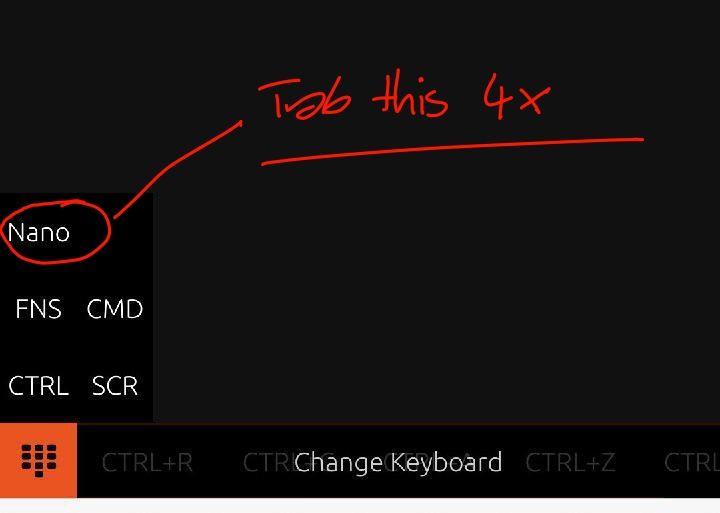
-
@magdesign Maybe you're not selecting it properly. Selecting is by pressing the action button and dragging directly over the nano text
-
you are totally right, the selection field is extremely small
(should be the whole line, not only the word "nano")
and due the fact that my thumb is hiding it, I never really selected it until the 4th move
-
@magdesign Yeah I agree, it should be under it not over it to select. PR is welcome

-
Thanks, I will try with my "hacking only" skillz


Hello! It looks like you're interested in this conversation, but you don't have an account yet.
Getting fed up of having to scroll through the same posts each visit? When you register for an account, you'll always come back to exactly where you were before, and choose to be notified of new replies (either via email, or push notification). You'll also be able to save bookmarks and upvote posts to show your appreciation to other community members.
With your input, this post could be even better 💗
Register Login