UBports Robot Logo UBports Forum
    • Categories
    • Recent
    • Tags
    • Popular
    • Users
    • Groups
    • Search
    • Register
    • Login

    Stop gallery auto scan

    Scheduled Pinned Locked Moved Solved Support
    13 Posts 4 Posters 1.8k Views 3 Watching
    Loading More Posts
    • Oldest to Newest
    • Newest to Oldest
    • Most Votes
      Reply
      • Reply as topic
      Log in to reply
      This topic has been deleted. Only users with topic management privileges can see it.
      • 0 Offline
        007fred50
        last edited by

        Hello,

        Is it posible to stop gallery scan in subfolders???
        I dont want all my photo to show up in gallery app.

        Thanks for your time

        Best regards
        007fred50

        AppLeeA 1 Reply Last reply Reply Quote 0
        • AppLeeA Offline
          AppLee @007fred50
          last edited by

          Hi @007fred50

          You can add a file called .nomedia in the folders you wish to exclude from the scan.
          There is no smarter way to achieve something similar to your request.

          0 1 Reply Last reply Reply Quote 1
          • 0 Offline
            007fred50 @AppLee
            last edited by

            @applee Thanks very much !

            AppLeeA 1 Reply Last reply Reply Quote 0
            • AppLeeA Offline
              AppLee @007fred50
              last edited by

              @007fred50

              You should test it and if it works for you then mark as solved.

              0 1 Reply Last reply Reply Quote 0
              • CiberSheepC CiberSheep moved this topic from General on
              • 0 Offline
                007fred50 @AppLee
                last edited by

                @applee Hello,

                I trying to create a file named: .nomedia inside my folder but still, it does search still

                D 1 Reply Last reply Reply Quote 0
                • D Offline
                  domubpkm @007fred50
                  last edited by domubpkm

                  @007fred50 It works but you must use UT TT to delete gallery data.

                  0 1 Reply Last reply Reply Quote 0
                  • 0 Offline
                    007fred50 @domubpkm
                    last edited by

                    @domubpkm how can i do that ?

                    D 1 Reply Last reply Reply Quote 0
                    • D Offline
                      domubpkm @007fred50
                      last edited by domubpkm

                      @007fred50

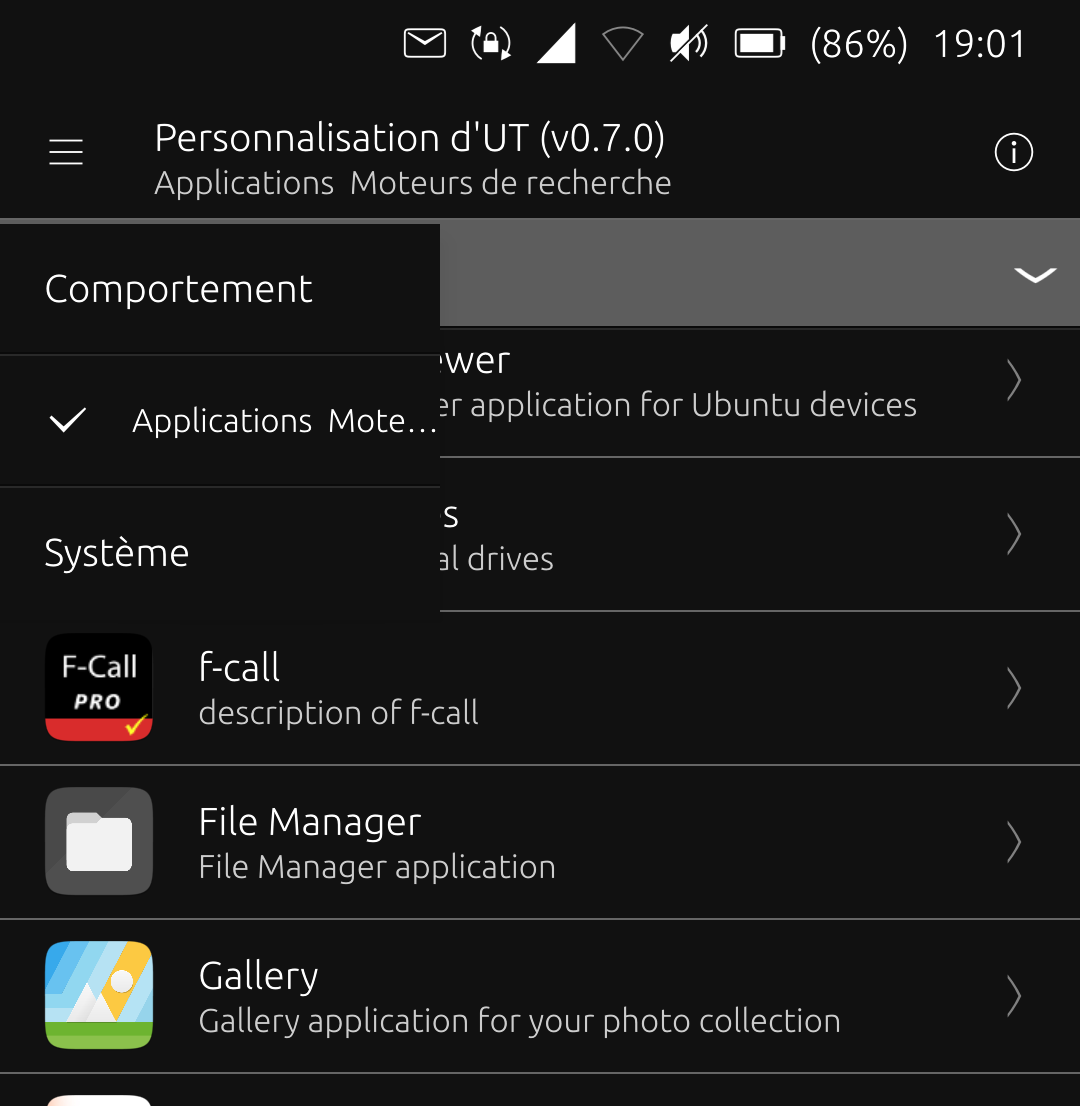
                      • UT Tweak tool in the OpenStore.
                      • Search engine apps
                      • Gallery
                      • Delete: choose data only.
                      0 1 Reply Last reply Reply Quote 2
                      • 0 Offline
                        007fred50 @domubpkm
                        last edited by 007fred50

                        @domubpkm inside the UT Tweak

                        Cant find some name (Search engine apps) or (gallery)

                        D 1 Reply Last reply Reply Quote 0
                        • D Offline
                          domubpkm @007fred50
                          last edited by

                          @007fred50 screenshot20220711_190154556.png

                          0 1 Reply Last reply Reply Quote 0
                          • 0 Offline
                            007fred50 @domubpkm
                            last edited by

                            @domubpkm it worked well 🙂

                            1 Reply Last reply Reply Quote 1
                            • 0 Offline
                              007fred50
                              last edited by

                              how can i change it to solved ?

                              IanI 1 Reply Last reply Reply Quote 1
                              • IanI Offline
                                Ian @007fred50
                                last edited by

                                @007fred50 Try this link....

                                https://forums.ubports.com/topic/6311/how-to-ask-a-question-and-then-mark-it-as-solved

                                1 Reply Last reply Reply Quote 1
                                • 0 007fred50 marked this topic as a question on
                                • 0 007fred50 has marked this topic as solved on

                                Hello! It looks like you're interested in this conversation, but you don't have an account yet.

                                Getting fed up of having to scroll through the same posts each visit? When you register for an account, you'll always come back to exactly where you were before, and choose to be notified of new replies (either via email, or push notification). You'll also be able to save bookmarks and upvote posts to show your appreciation to other community members.

                                With your input, this post could be even better 💗

                                Register Login
                                • First post
                                  Last post