UBports Robot Logo UBports Forum
    • Categories
    • Recent
    • Tags
    • Popular
    • Users
    • Groups
    • Search
    • Register
    • Login

    No send button

    Scheduled Pinned Locked Moved Solved Support
    14 Posts 8 Posters 2.7k Views 2 Watching
    Loading More Posts
    • Oldest to Newest
    • Newest to Oldest
    • Most Votes
    Reply
    • Reply as topic
    Log in to reply
    This topic has been deleted. Only users with topic management privileges can see it.
    • MoemM Offline
      Moem
      last edited by

      @triplemaya said in No send button:

      Why not google it!?

      Don't worry, no one will ask you that here.

      Is currently using an Op5t
      Also owns an Op1, a BQ E4.5 and an Xperia X, as well as a BQ tablet and a Pinetab2. Please, someone... make it stop.

      1 Reply Last reply Reply Quote 1
      • lduboeufL Offline
        lduboeuf @triplemaya
        last edited by lduboeuf

        @triplemaya Yes please take a screenshot if possible.
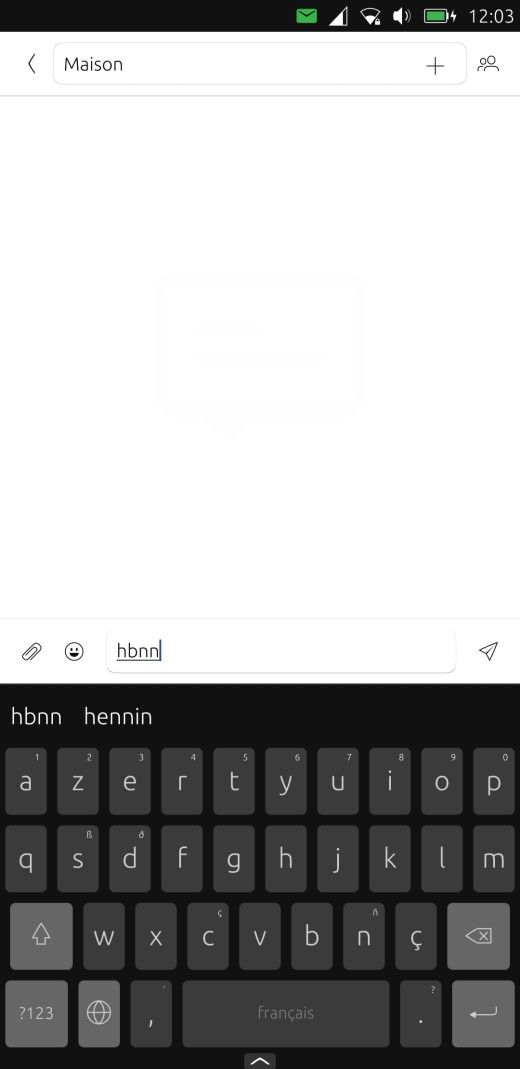
        The "send" icon on the right appear only if you start to type a message,

        e.g:
        screenshot20231023_120333855.jpg

        1 Reply Last reply Reply Quote 0
        • T Offline
          triplemaya
          last edited by

          Hi. Thanks everyone.
          Sorry not to respond earlier. Not getting emails for some reason. IMG_20231024_103358656.jpg
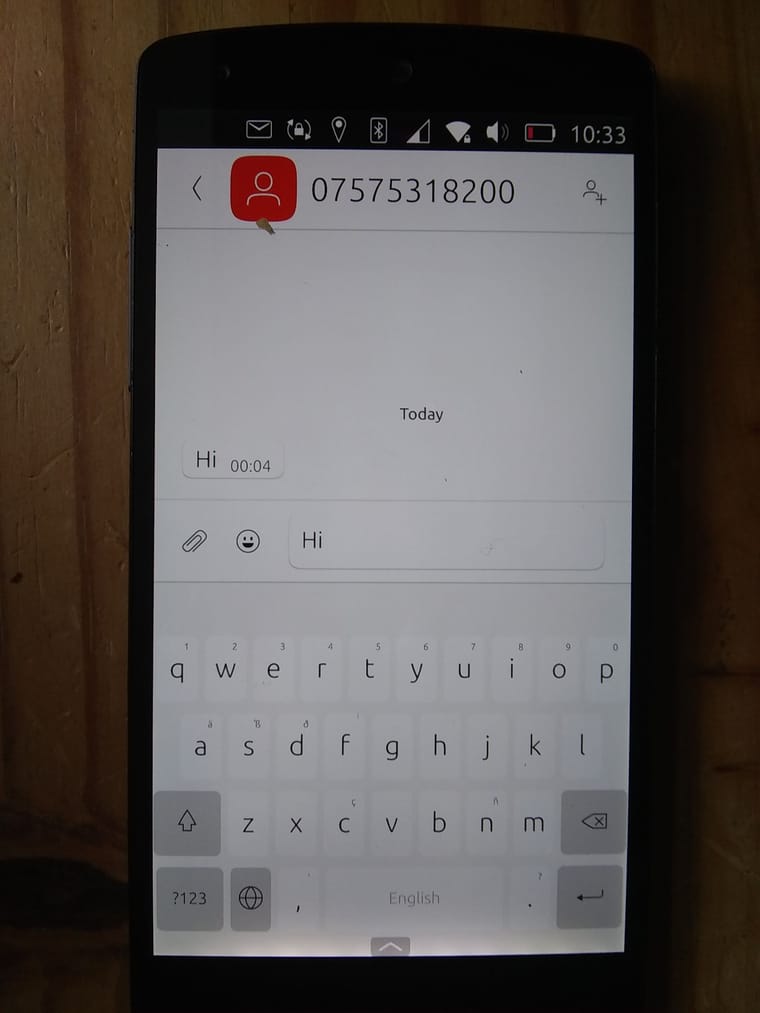
          Here is the image.
          Yes, I know my message was far too long. I posted first, then kept trying stuff and editing in my - lack of - progress. Cathartic rather than productive of course!! Coming out of Covid and just couuuuuuld no believe I was having the problem. Its a phone. The tech is mature! WTF!
          To reply to last message, no processes working in the background at all. New conversion. Still getting used to it. Totally love so many things about it.
          Uhoh. Long message again. Stopping now.

          T KenedaK 2 Replies Last reply Reply Quote 0
          • T Offline
            triplemaya @triplemaya
            last edited by

            @triplemaya
            Soooorteeed
            Rotaion lock on. Never thought.
            SOLVED.
            Do I feel an idiot.
            Thanks again everyone.

            lduboeufL 1 Reply Last reply Reply Quote 0
            • T triplemaya has marked this topic as solved on
            • lduboeufL Offline
              lduboeuf @triplemaya
              last edited by lduboeuf

              @triplemaya said in No send button:

              @triplemaya
              Soooorteeed
              Rotaion lock on. Never thought.
              SOLVED.
              Do I feel an idiot.
              Thanks again everyone.

              humm i don't understand how you fix it. What th rotation lock have to do with the send button not shown ?

              1 Reply Last reply Reply Quote 0
              • K Offline
                kugiigi
                last edited by

                What I see is that the app is cut off on the right side, most likely due to the big scaling. I'm not sure though why since I expect the app to just scale fine.

                lduboeufL 1 Reply Last reply Reply Quote 2
                • lduboeufL Offline
                  lduboeuf @kugiigi
                  last edited by lduboeuf

                  @kugiigi said in No send button:

                  What I see is that the app is cut off on the right side, most likely due to the big scaling. I'm not sure though why since I expect the app to just scale fine.

                  ah it makes sense then, i've just tested with the highest scale level ( via Tweak tool), and true no send button visible, only on landscape

                  @triplemaya could you file a bug here ? https://gitlab.com/ubports/development/core/messaging-app/-/issues
                  And precise the step to reproduce

                  1 Reply Last reply Reply Quote 1
                  • KenedaK Offline
                    Keneda @triplemaya
                    last edited by

                    @triplemaya
                    You should hide personal data such as phone numbers when putting screenshots on the internet.
                    You can edit your post with edited image.

                    2015-2023 : Meizu MX4 ☠️⚰️✝️
                    2023-2024 : Nexus 5 ☠️⚰️✝️
                    2024-***** : FPOS Fairphone 5
                    🇲🇫🇬🇧

                    T 1 Reply Last reply Reply Quote 0
                    • T Offline
                      triplemaya @Keneda
                      last edited by

                      @Keneda
                      Agreed

                      I cannot see how to edit this.

                      I also cannot see how to be notified of replies.

                      I am finding this forum spectacularly difficult to use!

                      LakotaubpL 1 Reply Last reply Reply Quote 0
                      • LakotaubpL Offline
                        Lakotaubp @triplemaya
                        last edited by

                        @triplemaya Tap on the three vertical dots on the bottom right.

                        1 Reply Last reply Reply Quote 0

                        Hello! It looks like you're interested in this conversation, but you don't have an account yet.

                        Getting fed up of having to scroll through the same posts each visit? When you register for an account, you'll always come back to exactly where you were before, and choose to be notified of new replies (either via email, or push notification). You'll also be able to save bookmarks and upvote posts to show your appreciation to other community members.

                        With your input, this post could be even better 💗

                        Register Login
                        • First post
                          Last post