Camera app cannot be installed
-
Weird, I have:
lrwxrwxrwx 1 root root 42 juin 15 06:07 camera.ubports -> /opt/click.ubuntu.com/camera.ubports/4.0.6/So basically there are two locations for the camera.
First in the preinstalled folder:
/usr/share/click/preinstalled/camera.ubports
The other in the regular folder:
/opt/click.ubuntu.com/camera.ubportsWhat I would do is copy the data from the preinstalled folder to the regular folder then reset the links pointing to the regular folder.
Reboot and see what it did... -
That does not work. Nothing is copied. Not even via the terminal. The error message -r not specified appears. However, the path to the destination is correct.
-
@Fish said in Camera app cannot be installed:
@AppLee I have tried changing the channels. Unfortunately, the camera app is still missing ... and cannot be installed. It almost looks like there are no more photos for me now...

I suppose that apart from changing them, you installed the downloaded image, right?
-
@Bolly Naturally. Otherwise there would be no point.

-
This morning I tried to see if a new installation (without ticking the ‘wipe userdata’ box) would be successful. Unfortunately, the camera app is still gone and can no longer be installed... I don't understand this anymore. What is the reason for this? Surely it must be possible to reinstall this app somehow? There must be some very strange bug behind it!
-
@Fish said in Camera app cannot be installed:
There must be some very strange bug behind it!
Not necessarily a bug.
What one cannot comprehend is not an anomaly.To understand better, you have to consider that core preinstalled apps have a particularity, they used to ship with the system image and could only be updated via a full system update.
Now they can also be updated through the open-store which is great but lead to some unexpected behavior with unplanned scenarios like removal of these apps.The error message -r not specified appears. However, the path to the destination is correct.
That's a weird error message.
And I guess it should be possible to copy the files, I would dig in this direction if I were you. -
@Fish said in Camera app cannot be installed:
The error message -r not specified appears. However, the path to the destination is correct.
What is the exact command that produces this error?
-
@AppLee The copying has now worked. Apparently I have to write “sudo” in front of everything. But that didn't help either.
Well, with the bug I also meant that the camera app somehow removed itself. It was simply no longer there after the restart. And now I can no longer install it. That's kind of annoying.
-
@Fish
Oh, I thought you purposedly removed the camera app to try to reinstall it.
Can you give us the exact command you typed? -
Im Verzeichnis /usr/share/click/preinstalled/camera.ubports
sudo cp -f -r camera.ubports /opt/click.ubuntu.com/camera.ubports -
@Fish I get:
cp: cannot stat 'camera.ubports': No such file or directorywhich is correct since there is no camera.ubports directory in the
/usr/share/click/preinstalled/camera.ubportsfolder, only4.6.0andcurrent, which is a symlink to4.6.0 -
@arubislander I have the camera.ubports directory in the /usr/share/click/preinstalled/camera.ubports folder. But there was none in /opt/click.ubuntu.com/camera.ubports, where AppLee's folder ist located.
-
@Fish So you have a /usr/share/click/preinstalled/camera.ubports/camera.ubports folder? That's not right, and might be at the root of this issue.
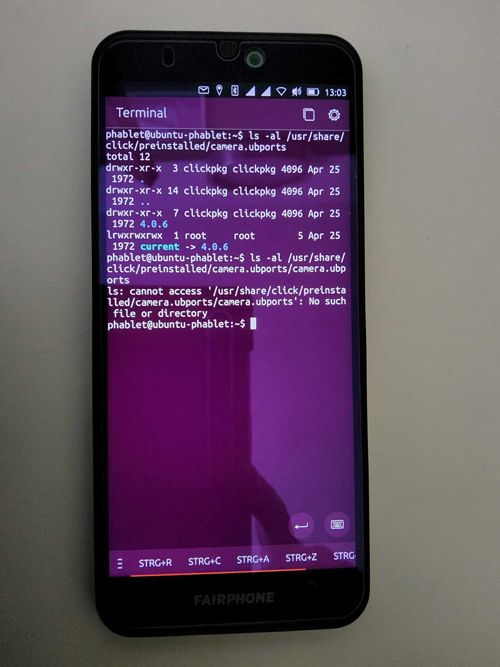
can you do a
ls -al /usr/share/click/preinstalled/camera.ubportsand then
ls -al /usr/share/click/preinstalled/camera.ubports/camera.ubportsand paste both results here?
-
-
@Fish said in Camera app cannot be installed:
I have the camera.ubports directory in the /usr/share/click/preinstalled/camera.ubports folder
So in fact you do not have a camera.ubports directory in the /usr/share/click/preinstalled/camera.ubports folder, but in the /usr/share/click/preinstalled folder.
Can you please go to your home folder and try:
sudo cp -R /usr/share/click/preinstalled/camera.ubports /opt/click.ubuntu.com/then if it is copied properly
sudo chown -R clickpkg:clickpkg /opt/click.ubuntu.com/camera.ubports -
@arubislander Mh... it looks like nothing is going to happen. It just appears again: phablet@ubuntu-phablet:~$
-
@Fish Yes, if the copying succeeds it doesn't give any feedback, but the folder should be there under
/usr/share/click/preinstalled/opt/click.ubuntu.com/. Have you checked? -
@arubislander Oh yes, it's there. I've just checked.
-
Unfortunately, this had no effect on the (non-)existence of the camera app...
So ... No solution in sight. Well. Maybe I'll think of something later. I'll leave the thread unsolved and if anyone else has an idea - always welcome. I'll check in from time to time. As long as there's no camera in the cell phone.
-
@Fish Sorry to be late to the party, and I haven´t read the whole thread... but I had a similar problem and these messages from @danfro fixed it for me:
Basically we need to get rid of everything named "camera" in /opt and /home
You could delete camera apps settings as well as the cache.
~/.config/camera.ubports
Not many settings there anyway. Although I do not really expect that to change much.And so I asked him, on your behalf, and he gave me this:
https://t.me/ut_troubleshooting/19





Hello! It looks like you're interested in this conversation, but you don't have an account yet.
Getting fed up of having to scroll through the same posts each visit? When you register for an account, you'll always come back to exactly where you were before, and choose to be notified of new replies (either via email, or push notification). You'll also be able to save bookmarks and upvote posts to show your appreciation to other community members.
With your input, this post could be even better 💗
Register Login