Signal UT: Signal-Desktop for Ubuntu Touch
-
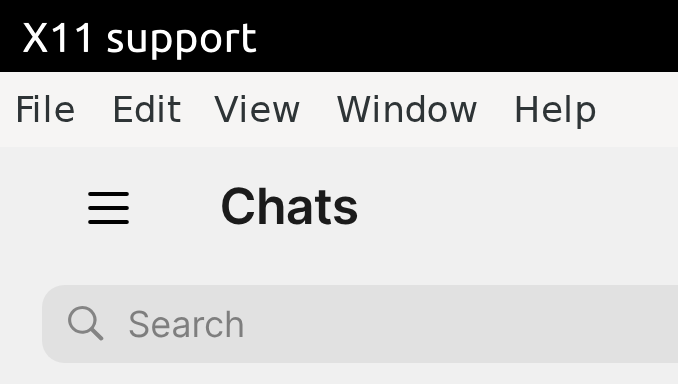
@pparent Thanks for getting back to me so fast! And thanks for providing the app! Pinning the app when I'm in System Settings - Security & Privacy - App permissions - Microphone doesn't make a difference. Exporting a file to the content hub can be done with opening File manager, selecting a file and then selecting "Open with another app" and then selecting Signal UT? That doesn't work either. Also when I rotate the screen I see "X11 support" on top on the left. With other apps this name on the top left corresponds with the actual name of the app.
-
@pparent I would also like to hide the top menu but I can't access File - Preferences - General - System - Hide menu bar. If I click on an item in the menu bar the app shifts a little but shows no dropdown entries.
-
@autostatic I also missed the fine print while installing Signal UT the first time. I solved this by removing the app and then reinstalling and pinning the icon while I was asked for permission during installation.
-
You can pin the app while you are exporting a file and while you're on the page to select an app to export to. Just swipe left at that moment, and you will see Signal is in the task bar, pin it then!
-
@pparent Thanks, but where can I export a file? Is "Open with another app" exporting? If I do this and swipe to the left I don't see a Signal UT icon, I get the app pager then. If I select Signal UT in the "Open with" window the X.Org logo appears again after a while. When I do this with Signal UT open it crashes by the way.
-
@Ida_ Thanks! But I also tried reinstalling which didn't make a difference. If I uninstall the app the Microphone permission gets removed but when I reinstall again I'm not being asked for granting permissions and the Microphone permission gets added automatically.
-
If I reinstall after having disabled Microphone permissions for Signal UT I don't get asked anything either.
-
@autostatic said in Signal UT: Signal-Desktop for Ubuntu Touch:
Thanks, but where can I export a file?
Well you go to a picture in on of your chats and click on the download icon, you should see a window with title "Export File" that appears, and with a grid of applications to open to image with (Signal will not be part of these apps, tipicaly you will have the Galery app, the file manager, ect....).
The X.Org logo won't disappear, nothing can be done about that now, but the Signal icon should appear in the left bar while you're choosing the app to export to, and at that moment you can pin it.
-
Ah thanks, silly me, I was actually trying to import a picture instead of exporting. I can pin the icon now but when I start Signal UT the X.Org logo appears again. If I then select the Signal UT icon the app starts a new instance and doesn't go back to the already opened app. I have to select the X.Org logo to go back to the already opened Signal UT app. So you can pin the icon and start the app with it but it doesn't allow you to take you back to the app if it's already open when you select it.
-
Solved by clicking on the kebab menu on the top left and then clicking on the cog on the bottom left. Then click General and tick "Hide menu bar" under System.
-
I just installed SignalUT on my X23, main client running on a seperate Android (e/os) phone.
For testing I used another signal account running on a Tablet.Thanks a lot @pparent for your work! Here is my feedback:
Text messaging works fine, everything gets delivered both ways, if one of the devices was offline temporarily, it will pick up the messages fine after coming online again.
The keyboard covers the texting area while typing, as was mentioned before, I believe.
Audio calling does work, mic ok, sound exits through the loudspeaker at the bottom, not the earpiece one. I cannot hang up on the X23, the red button does not react.
Video camera does not work.
Audio messages work perfectly both ways.
Sending pictures works as well.Altogether it does work much better than I expected from reading this thread. (I've been lurking and watching for a while now).
Thanks once more & greatings.
-
@vishcompany said in Signal UT: Signal-Desktop for Ubuntu Touch:
The keyboard covers the texting area while typing, as was mentioned before, I believe.
It should normally work well if you have the default settings on your phone (scaling ect...), at least it works on most phones, but next release will allow to make sure it displays well right on top of the keyboard in all cases, even if you have custom settings, as it will calibrate to real keyboard height at first launch.
-
@pparent sorry for crossposting, but did you notice the latest vulnerabilities in signal:
https://forum.sailfishos.org/t/whisperfish-the-unofficial-sailfishos-signal-client/3337/1630Thank you for your work.
-
Do you know Which verison of Signal-Desktop is vulnerable, and which one is patched?
I plan to release a new version of the app very soon, but If needed I can do just a version bumb tomorow to make sure the app is not vulnerable.
-
By safety measure I will make a release based on V8.2.0 tomorow
Edit: But it seems Signal-Desktop was safe from 7.74.x so the latest 5 version of Signal UT were already safe in regard to these vulnerabilities (i.e all the versions that I build myself from source, not sure if the snap binaries were safe back then when I used the snap binaries at first), specifically the current version 7.86.0-1 seems safe.
-
Signal UT 8.2.0-1 is available! The improvements are:
-Bump to version 8.2.0
-Calibrate keyboard height, to real height measured on first startAny feedback to confirm everything is working is welcome!
Your keyboard height problem should be solved on latest revision can you test?
-
Signal UT 8.2.0-1 is available! The improvements are:
-Bump to version 8.2.0
-Calibrate keyboard height, to real height measured on first startAny feedback to confirm everything is working is welcome!
Your keyboard height problem should be solved on latest revision can you test?
I just updated. The app starts but immediately closes/crashes. Don't see Signal Desktop load.
The only error I see in the service log is along the lines of
/utils/mic-permission-requester/Main.qml:68 Invalid property assignment: color expected.Edit: Happens after a reboot too, so not some lingering Electron process.
-
@projectmoon confirm on volla quintus with 24.04-1.2: app crashes immediately.
-
@projectmoon @messayisto
Ok small mistake sorry, I've published version 8.2.0-2 that should fix it. -
@projectmoon @messayisto
Ok small mistake sorry, I've published version 8.2.0-2 that should fix it.Working now. Thanks!



Hello! It looks like you're interested in this conversation, but you don't have an account yet.
Getting fed up of having to scroll through the same posts each visit? When you register for an account, you'll always come back to exactly where you were before, and choose to be notified of new replies (either via email, or push notification). You'll also be able to save bookmarks and upvote posts to show your appreciation to other community members.
With your input, this post could be even better 💗
Register Login