Tip: call a contact with one hand (secret UT key !)
-
Hello
following a recent discussion where I have argued that using a phone with one hand was not a generally useful feature, I'll make a little exception here

Since most people talk to a correspondant on their phone using one hand, it could be nice to call with one hand too. Unfortunately, this is not an easy thing to do because most of the time, calling is really calling a known correspondant where the number is not memorized, hence the use of the contacts application: and it's very difficult to press the very small icon amid 2 other small icons in the upper right of the screen while holding the phone with the left hand. Using first the contacts application is not a good workaround since selection of a correspondant displays it and it's then necessary to press the small button at the opposite side of the screen to go to the phone app.
Here is the trick (maybe everyone knows it already
) !
There ie a secret way to open the contacts application from the phone: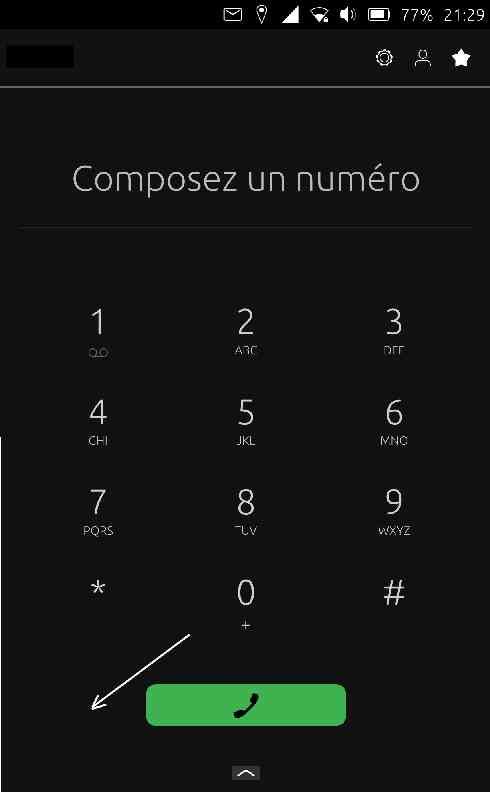
touching the area to the left of the main phone green button starts the contacts app, this area is a lot more easier to thumb while holding the phone with only the left hand. It's then possible to swipe the list with the thumb, press the appropriate contact and then the phone app comes back to focus with the right number ready to call.
Honestly this looks like a bug, but it's handy once it's known.
-
thank you, but i tried it...and it doesn't work (UT 20.04 - ota 11 one sony xperia X)
so, it is probably a bug... -
It works on Oneplus 5t (24.04)! Not that I ever use my phone one-handed, but it's a fun thing to know about.
-
@gpatel-fr
A kind of easter egg...
Funny!Thanks for sharing!
-
@gpatel-fr
oh funny!.
But seems buggy, it shows the contact profile even in edit mode on click, instead of filling the number -
@DJac said in Tip: call a contact with one hand (secret UT key !):
it is probably a bug.
I have not tracked when this feature was added.
The hidden button is exactly where the button to add a contact appears when the extra tiny '+' button under the '0' is pressed.
However, it's not behaving the same: when it's visible, the contacts app is entered in edit mode; when it's not, selecting a contact triggers a return to the phone app. It's as if it was intended to be displayed, but not having a different icon available and displaying the same icon in the 2 cases would be confusing, the approach has been to keep the button hidden - but still active because it's useful - even if one uses the phone with 2 hands because the button displayed at the top right, that does exactly the same thing, is also so small it's really difficult to use it.
-
@lduboeuf said in Tip: call a contact with one hand (secret UT key !):
it shows the contact profile even in edit mode on click, instead of filling the number
I think I understand what you mean, it seems that toucning the area above the hidden button triggers the add mode - the button with the character and a '+' is displayed in this case. However when it's not, pressing the icon or the name in the contacts list does fill the number for me.
-
LOL This is funny. This is definitely a bug and most likely I'm the culprit since I redesigned it. Seems like the add to contact buttion can still be clicked even when hidden, same with the delete button since I also get a haptic feedback from it.
BTW, if you're old enough, you can actually search for a contact using T9 typing which is awesome
@djac The redesigned phone app is only available in Noble so this bug/feature is not there in focal

-
@kugiigi
The new design is very nice, by the way. Thanks for this!

-
@kugiigi said in Tip: call a contact with one hand (secret UT key !):
This is definitely a bug
If you say so, however if I can insist, the phone would actually be more usable and intuitive if the icon for adding a contact could be copied, removing the '+' and left displayed by default. Going in the contacts app using the top right button feels cumbersome to me in comparison, needs attention to press the right button, easy when confortably sit at a desk, less so when walking in a street, half of the time I press the wrong button, or I need to stop walking and look carefully at the phone screen.
Unrelated: when displaying the recent calls list and selecting one (that's also an operation difficult to do with one hand BTW), the add to contact is then made visible and I don't see the logic why because if clicking it, the selected number is not proposed for a new contact.
My first intuition is that the add to contact (the character symbol with a '+') should be displayed only after pressed the '+' button. Minor gripe but this is a very important app for an object that is still often called a phone instead of a pocket computer.@kugiigi said in Tip: call a contact with one hand (secret UT key !):
if you're old enough, you can actually search for a contact using T9 typing
I never even noticed the letters below the numbers. Maybe it's because I have actually used an old school phone, with these things, it's enabled only in text fields, when composing a number to call, it does not work, typing a '3' produces a '3' and that's exactly what it is doing in the phone app - so if it's possible to use the phone keypad to search a contact, it's not obvious enough for me to use it even knowing now it's supposed to be possible !
To be complete, I have noticed that sometimes a contact list is displayed below the keypad but I have never found the magic wand that I used to display it without intending. If it was a desktop app at this point I'd press F1 to get online help... -
@gpatel-fr These are all valid ideas and bugs. File them in the repo and maybe someone will look into them. I'm just not sure about one-handed use. At the moment, the standard design guidelines aren't really prioritizing that.
I personally want them too and that's why in my apps, I have one-handed features such as the copy of OneUI's pulling down a list view But that won't be accepted in core apps
 As for the T9 typing, it is indeed not obvious. To be honest, not sure how to make it obvious. It is by the way not exactly T9 typing because it checks all the letters per number so you don't need to press them multiple times. It's actually cool
-
@kugiigi Wow! T9!
As somebody who still often "dials" a phone number, I always just figured those contact names that appeared as I started dialing were predictions based on the phone number.. but pretty bad predictions
Finally I understand! That seems like a really useful feature!
(also, I think T9 WAS the one where you only had to press each number a single time.)Kugiigi, it seems you did not create the (perhaps handy) bug. I have it in Focal, it's just in a different place - in line with where dialed numbers appear, left hand side. Again, it's the same place Create New Contact button will appear once something is dialed.
Languages: 🇬🇧 🇨🇦 🇫🇷
-
@wally Oh you are right. I thought T9 is what you call the old school way of typing on keypad phones
It is called multi-tap apparently which is kinda generic and boring LOL -
@kugiigi Thank you for your work on the redisgned app, by the way! Look forward to trying it when I make the switch to Noble!
-
@wally said in Tip: call a contact with one hand (secret UT key !):
As somebody who still often "dials" a phone number, I always just figured those contact names that appeared as I started dialing were predictions based on the phone number.. but pretty bad predictions
Finally I understand! That seems like a really useful feature!
(also, I think T9 WAS the one where you only had to press each number a single time.)As i did the T9 feature few years ago, i'm interested in what you mean by "pretty bad predictions" when typing numbers. Works well on my side when starting to dial for a number and/or for the letters. But may have some issue if e.g number is stored with a region prefix or not.
-
@lduboeuf said in Tip: call a contact with one hand (secret UT key !):
Works well on my side when starting to dial for a number and/or for the letters. But may have some issue if e.g number is stored with a region prefix or not.
ah it finally dawned on me. How to use the letter dialing: if you want to call someone whose name in your contacts is say 'fred idotme', press first 3 for f (3 is def) and then 7 for r (7 is pqrs) and the software will propose (among possibly other ones) the searched for contact. As was said I think in Tintin, it's obvious once you think of it. Ah the nostalgia of desktop software lost in the mists of time when there was a F1 key to get help.
Apart of this, yes it works pretty well except that of course if you are trying to search for a number, as in my country all portable number begin by either 06 or 07 it's not so useful. And as you say, if you use a prefix like the #31# that is used in my country to be able to call someone without revealing your own, using the real number does not lead for a prediction; that is, if the contact is #31#0102030405, typing 0102 does not display the contact even if it's the only one matching on the real number.
To be candid that's why I almost exclusively use the contacts list to call people -
@lduboeuf Pardon my miscommunication! I only thought the predictions were bad when I didn't understand that the T9 element was happening, and they seemed to come out of nowhere and not relate to anything. A laugh solely at my own ignorance
But I don't get any predictions based on phone number, whether I use the region prefix or not. All predictions that I see are T9 based.
Once I have entered the full phone number of a contact in the dialer, it displays the contact name. But that's clearly a different feature, as the contact name does not appear in a box like it does with predictions.
I can type all but the final digit, with or without regional code, without seeing a prediction based on phone number.
I thought it might relate to parentheses in phone numbers as displayed in Contacts, which is a regional custom here, but I've found contacts without parentheses and these don't come up either.
I've also just tried adding a nice Ciderie de Bretagne as a contact, rebooting, and dialing the number, both with and without the 33 - still no prediction based on number.Oneplus Nord N10, 20.04 OTA 11, Canada.
In any case, i love this T9 feature. Thank you!!
Languages: 🇬🇧 🇨🇦 🇫🇷
-
@wally said in Tip: call a contact with one hand (secret UT key !):
@lduboeuf Pardon my miscommunication! I only thought the predictions were bad when I didn't understand that the T9 element was happening, and they seemed to come out of nowhere and not relate to anything. A laugh solely at my own ignorance
But I don't get any predictions based on phone number, whether I use the region prefix or not. All predictions that I see are T9 based.
Once I have entered the full phone number of a contact in the dialer, it displays the contact name. But that's clearly a different feature, as the contact name does not appear in a box like it does with predictions.
I can type all but the final digit, with or without regional code, without seeing a prediction based on phone number.
I thought it might relate to parentheses in phone numbers as displayed in Contacts, which is a regional custom here, but I've found contacts without parentheses and these don't come up either.
I've also just tried adding a nice Ciderie de Bretagne as a contact, rebooting, and dialing the number, both with and without the 33 - still no prediction based on number.Oneplus Nord N10, 20.04 OTA 11, Canada.
In any case, i love this T9 feature. Thank you!!
ok, i will need to look at it then, because it works for me by either using a prefix '+33' or start with 06 or 07
-
@wally said in Tip: call a contact with one hand (secret UT key !):
20.04 OTA 11
under 24.04.1 I get
dpkg -l | grep dialer-app
ii  lomiri-dialer-app                             2.0.0+0~20250814161446.20+ubports~dev~1.gbp4bba62
I don't have access to a phone running Focal tp check it, but under
http://repo.ubports.com/dists/focal/main/binary-amd64/Packages
I see
Package: dialer-app
Priority: optional
Section: x11
Installed-Size: 1750
Maintainer: UBports Developers <devs@ubports.com>
Architecture: amd64
Version: 1.0.0+0~20241101095734.1+ubports20.04~1.gbpe21919
so are we speaking of the same thing ?
-
@gpatel-fr said in Tip: call a contact with one hand (secret UT key !):
Version: 1.0.0+0~20241101095734.1+ubports20.04~1.gbpe21919
I do get this exact output for version number as output to the grep command you gave. But my assumption, based on Lionel not mentioning the version, and based on the fact that I do see suggestions based on contact name, is that this was all introduced before 24.04.
@lduboeuf Your development time is valuable! Maybe let me ask around a bit first on Matrix/Telegram for other people to test and make sure it's not just me before you go spending time digging into it.
I have now tested on a broken old Oneplus 5 too, and it's the same for me there- perfect predictions based on T9 spelling contact names, but no predictions based on phone number.




Hello! It looks like you're interested in this conversation, but you don't have an account yet.
Getting fed up of having to scroll through the same posts each visit? When you register for an account, you'll always come back to exactly where you were before, and choose to be notified of new replies (either via email, or push notification). You'll also be able to save bookmarks and upvote posts to show your appreciation to other community members.
With your input, this post could be even better 💗
Register Login