Privacy and notifications on the locked screen
-
Hello all!
Happy user of UT on my Fairphone 2 for a while now, and I start to have some feedback and ideas on the user experience that I'd like to share, starting with this one.I'm torn between two desires that I cannot seem to concile:
- I want to avoid to have sensitive data readily available on my locked screen, especially the content of my notifications. I can do this by deactivating the top bar on the locked screen
- I like to listen to music and podcasts with my phone in my pocket (so locked), and to pause the playback rapidly. I can do this by activating the top bar on the locked screen and use the sound part
I have thought of several ways to handle it:
- have an option to hide the content of notifications
- allow for more granular control of the top bar on the lock screen (choose which section is available or not)
- have dedicated playback controls available on the lock screen
Funnily enough, while writing this I noticed that even when the top bar is deactivated on the lock screen, the content of the notification is displayed when it arrives, so it might be an argument for the first option.
Thanks everyone for all the work, I'm happy and proud to have UT on my phone

-
Hello and welcome
Let's see if this is suitable for you:
-
For the notifications, you can disable in System Setting > Notifications and select what type of notification you want to receive. You can disable the bubbles and notification center for say, Teleports and they will not be reachable from the indicators bar.
-
For the audio control, you can pull from audio to access volume and play pause for the apps that use MediaHub (Music, Podbird, and Flas for example).
-
-
@CiberSheep thanks!
It's a good compromise indeed, at the expense of being notified though (the envelope stays white and the LED is not flashing anymore). So I think there's still room for improvement, yet I'll see how's life without the constant attention disturbance that are notifications
-
I agree that the notifications setting can be improved. Simply disabling the indicators won't be enough because lost functionality is too much just to hide the notifications.
Anyway, I think notifications are becoming obsolete nowadays, people check their phone every 5 seconds anyway

-
@kugiigi said in Privacy and notifications on the locked screen:
Anyway, I think notifications are becoming obsolete nowadays, people check their phone every 5 seconds anyway
If we refer to "people" bad habits to build systems, we don't need privacy as most of them don't give a sh___ to let gafam know everything they do, yet we are here.
Don't kill notifications... :anguished_face:
-
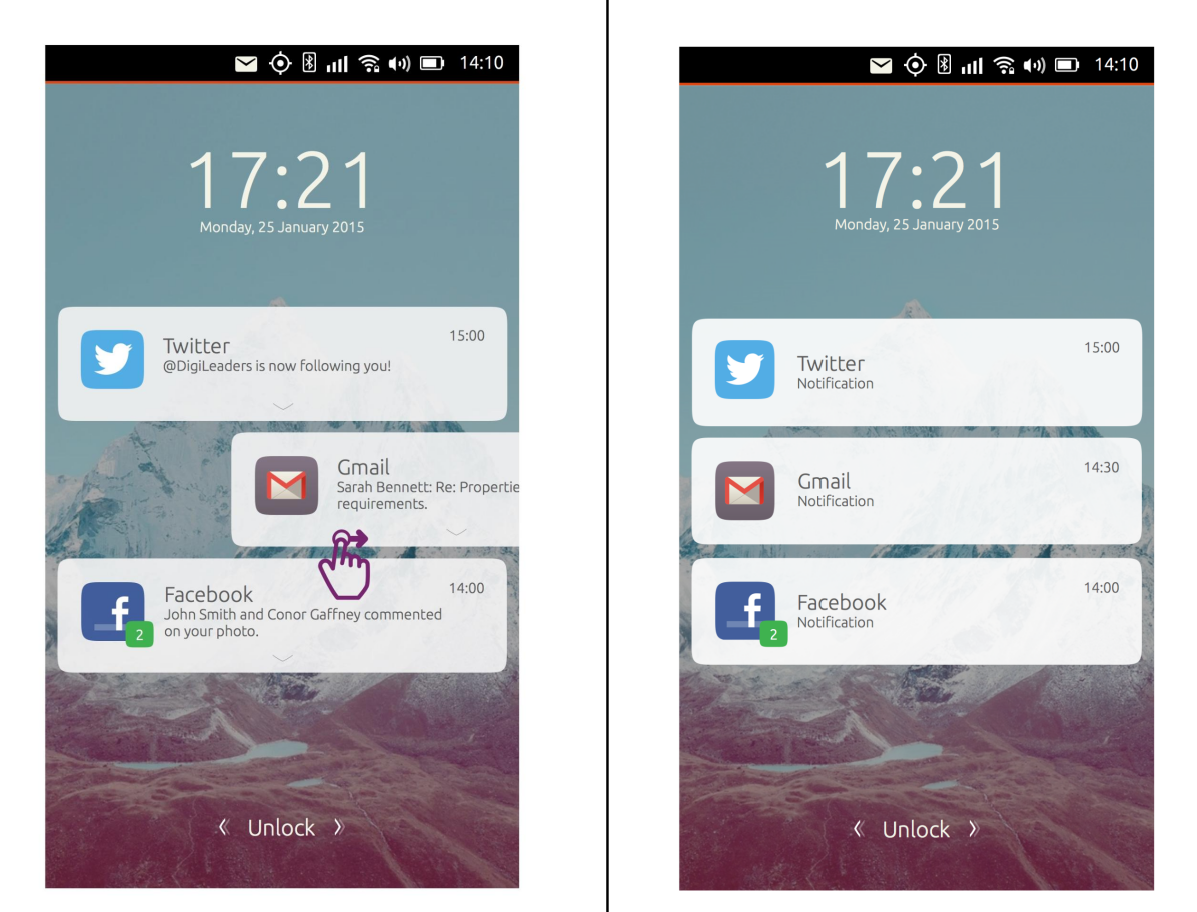
Theres an old canonical document for “private“ notifications, the notifications show on your welcome screen but it pretty much shows the app icon, the app name and says “you have a message” rather than the usual app icon, app name and “Kayle: So I heard about your doctors appointment”
ill have to find the doc I have it on my desktop somewhere.
-



Hello! It looks like you're interested in this conversation, but you don't have an account yet.
Getting fed up of having to scroll through the same posts each visit? When you register for an account, you'll always come back to exactly where you were before, and choose to be notified of new replies (either via email, or push notification). You'll also be able to save bookmarks and upvote posts to show your appreciation to other community members.
With your input, this post could be even better 💗
Register Login