Can't play webm video in Telegram. [Solved]
-
Hi.
I have audio+video for a short .webm video - I recorded it in VLC from a longer video. I'm using Debian 10 Stable on my PC.
I sent the video to someone on Telegram. They use Android. They could get audio but no video file. I presume a codes issue?
So I opened Teleports on my FP2 with UT. I clicked on the video - it downloaded it to somewhere but I can't find it. I installed UTmedia and hoped to click the video in Teleports and have an open with option - it only mentions in the Content Picker screen: File Manager, uText, OpenStore, PdfjsViewer. How can I view the video to see if the audio+video plays on my phone?Thanks.
-
@Opolork
The safest way I know to do that is:- In Teleports, choose File Manager
- Go to the Downloads directory and validate
- Open UTmedia and open the file using the File Manager
IDK if this kind of video file is supported but this way you'll know if it works
-
@AppLee Hi. I don't see the file in the Downloads folder - I also checked the Downloads folder of the SD Card. :confused_face:
How can you trust that an app really won't send some company your location data, when you tell it not to? The only way you can trust a program not to do something it isn't supposed to do is if it is free software. ~ RMS
-
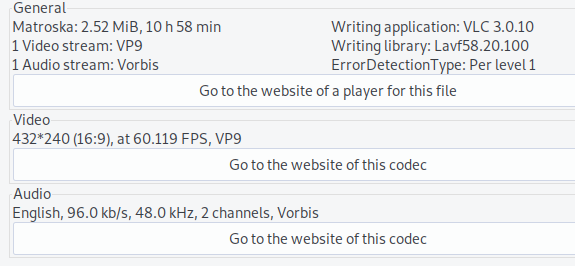
Media info (it's only about 1 minute long - not sure why is says almost 11 hours):
-
@Opolork
When you tap on the video in Teleports, you wrote that the content picker shows :
File Manager, uText, OpenStore, PdfjsViewerSelect the File Manager and goes to the Downloads directory.
Then you have to validate using the V shape "checker" to actually copy the file to this location.
Just after this you should be able to see the file in the folder.Have you done these steps correctly ?
-
@AppLee Ah, yes. I just noticed the check-mark now. Thanks, AP. I was able to play it in UTmedia (both audio and video).
:thumbs_up_light_skin_tone:

-
@Opolork
Glad to read it.Can you change the topic to "resolved" because I saw this kind of question several times now and it might help someone find the answer more easily
-
@AppLee said in Can't play webm video in Telegram.:
@Opolork
Glad to read it.Can you change the topic to "resolved" because I saw this kind of question several times now and it might help someone find the answer more easily
Do you mean add something like [Resolved] in the thread title? Or is there some mark solved option here?
-
@Opolork
Yes, adding resolved or solved to the title.
Thanks. -


Hello! It looks like you're interested in this conversation, but you don't have an account yet.
Getting fed up of having to scroll through the same posts each visit? When you register for an account, you'll always come back to exactly where you were before, and choose to be notified of new replies (either via email, or push notification). You'll also be able to save bookmarks and upvote posts to show your appreciation to other community members.
With your input, this post could be even better 💗
Register Login