Help needed to port qzxing to UT
-
I am currently working on porting my SFOS Scooter app to Ubuntu Touch, and I am basically done. The only feature which is missing is the scanning of QR codes.
In the app, I am using the awesome qzxing library, which allows to use video filters for QR code recognition. Unfortunately, on Ubuntu Touch, it will not work. I have reported the issue already here, but I'd like to get this over with, so I am asking for your help.
The core issue is, that
qzxingrelies on convertingQVideoFrameobjects toQImageby mapping the raw data into memory usingQVideoFrame::map. However, on Ubuntu Touch, this very function does not work, because the image is saved as OpenGL texture in the QT internals. The same is the case for e.g. Android, which is why there is suggested solutions which can be found on google.
However, I am unable to come up with a working solution, most likely because I am neither familiar with OpenGL, nor with image/video formats.I have asked for help already at stackoverflow and the qt forum, unfortunately no one answered yet.
I am aware that there is a QR code scanning app in the open store, and that I could copy the solution used in that app, however I'd like to stick with qzxing for two reasons:
- I find the use of video filters to be the more elegant solution
- I can maintain a somewhat compatibility to my SFOS app which helps keeping maintainance efforts low
So if anyone would volunteer to support or maybe knows the solution, please let me know. The relevant code parts would be here.
Maybe I am also missing the obvious, and qzxing can already be used in UT and I'm just missing something, in this case I would also extremely appreciate your help.
-
Hi @s710
First of all, thanks for the radio app. I'm currently testing/using it and it's great to be able to have access to my favorite radio on my phone.
IIRC, Dobey uses qzxing for authenticator-ng.
I'll take a look at his git and borrow some code.
https://gitlab.com/dobey/authenticator-ngI think what you're struggling with is pakaging the lib within your click package.
-
@applee Well, it compiles fine, and runs, however it will not detect anything. As reported in the github issue at qzxing, the lib will report the image buffer to be empty, and the reason for it is what I have described above.
Gonna check out authenticator-ng
[edit] as per https://gitlab.com/dobey/authenticator-ng/-/blob/trunk/src/qml/ScanPage.qml this app does not use a videofilter. Instead, images are taken every 250ms and then passed to qzxing.
This approach is what I wanted to avoid, but probably, it would be the most feasible solution right now, and I might go that route. Thanks for the hint!
-
Also, if you're into chats like Telegram, there's a group there for UT app developments (https://t.me/UbuntuAppDevEN). You may (or may not
 ) get faster and better answers there. You can also talk to the developer of authenticator-ng on his experience with qzxing and why he did his approach.
 -
@s710 said in Help needed to port qzxing to UT:
This approach is what I wanted to avoid, but probably, it would be the most feasible solution right now, and I might go that route. Thanks for the hint!
Yes. There are some devices which have issues using the
VideoFiltermethod, so I had to do the manual sampling that way instead.Looking at the issue you opened, it might be the same problem as I ran into which forced me to using the manual sampling. The issue is actually in the
qtubuntu-cameraQPA which we provide so thatQtCameraAPI can use the camera hardware via Android HAL. -
This is an interesting one.
QVideoFrame::mapis giving me these:OpenGL context is not current, cannot map memory.And when I try to use the
QOpenGLContext::currentContext()is doesn't work either. What is moreQOpenGLContext::functions()is killing my app (looks like bad memory access?) and that has probably something to do with the fact the context is not defined? I wish I knew more :(, but I also tried creating that context and it didn't have any impact.This is the minimalistic example just added to the Clickable C++ template that crashes for me:
#include <QGuiApplication>
#include <QQmlApplicationEngine>

#include <QOpenGLContext>
#include <QOpenGLFunctions>

int main(int argc, char* argv[])
{
    QGuiApplication app(argc, argv);
    QQmlApplicationEngine engine(QUrl("qrc:///Main.qml"));

    QOpenGLContext *ctx = QOpenGLContext::currentContext();
    QOpenGLFunctions *f = ctx->functions();

    return app.exec();
}
Any ideas what could be causing that? My attempts were so far quite futile too

Thanks a mil!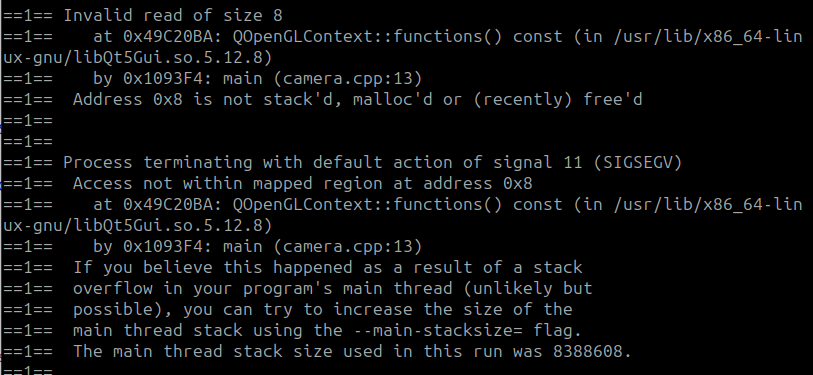
EDIT:
I later found out where theQVideoFrame::maperror is coming from:
https://gitlab.com/ubports/development/core/qtubuntu-camera/-/blob/main/src/aalvideorenderercontrol.cppAs well as how to initialize the OpenGLContext - see per post bellow.
-
Just to add to this. While I have not been able to actually process the
QVideoFrameyet (meaning I have not been able to covert properly toQImageas all I have is a black image using theQVideoFrame::mapor black image with some distortions using the alternateQOpenGLContextmethod outlined here - while it all says it is valid and not null :crying_face:), I have discovered that in order to use the OpenGL Context one can createQWindowand use its surface like so:Took me a while to figure out how to use it though as it didn't work for me and was crashing the app right on start when the code was part of a plugin (
QObject). Unfortunately I was not able to Google it properly (didn't bump into anything that would say that usage is incorect), however with some luck and a lot of trial and error I found out it works when one creates this in themain.cppfile and then simply replies on theQOpenGLContext::currentContext().And then considering
QVideoFrame::mapworks on UT as part of the Camera QML object I would presume both methods need to work somehow :(. I am just obviously not doing something properly as it is failing for me as described above ^.https://github.com/qt/qtmultimedia/blob/5.12/src/multimedia/video/qvideoframe.cpp#L1094



Hello! It looks like you're interested in this conversation, but you don't have an account yet.
Getting fed up of having to scroll through the same posts each visit? When you register for an account, you'll always come back to exactly where you were before, and choose to be notified of new replies (either via email, or push notification). You'll also be able to save bookmarks and upvote posts to show your appreciation to other community members.
With your input, this post could be even better 💗
Register Login