Disable Bluetooth from autostart
-
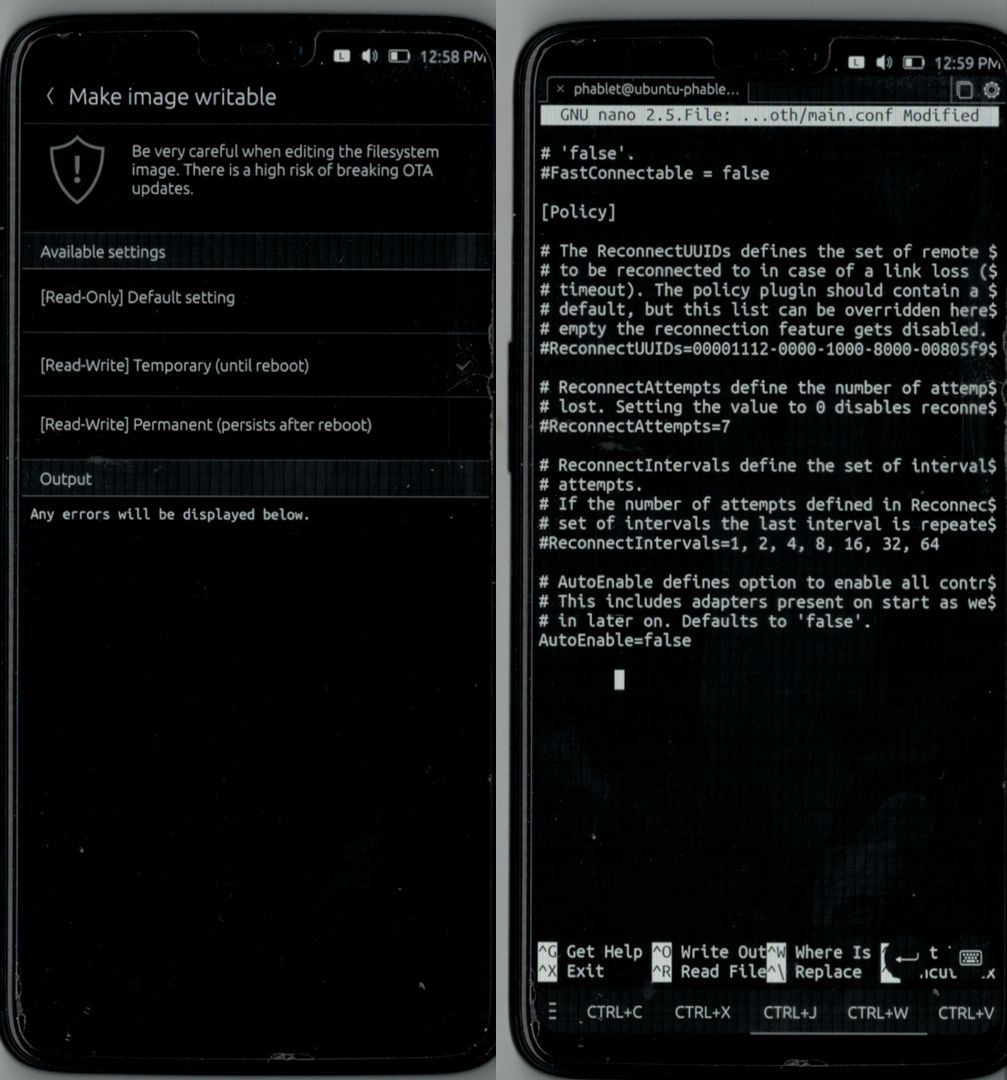
When booting / rebooting the phone, Bluetooth is always enabled.
If you want to disable this behaviour, do following:
1.) Open UT Tweak Tool
2.) go to System => make image writable => Temporary3.) Open a Terminal and type in:
sudo nano /etc/bluetooth/main.conf4.) Scroll down until you see:
AutoEnable=true5.) Change the line to:
AutoEnable=false6.) On the onscreen keyboard, select the Hamburger and select Nano,
then clickCTRL+Xand
Y + ENTERto confirm.
done, your Bluetooth will not come up on boot anymore, but you still can enable it in the menu.
-
@magdesign said in Disable Bluetooth from autostart:
When booting / rebooting the phone, Bluetooth is always enabled.
I don't have this behavior on MX4.
-
@keneda Nor me on Nexus 5.
-
@Keneda, @cliffcoggin
That's probably why it has been posted in the OnePlus 6/6T subforum
But that's good to know it IS device related (or maybe Halium related )
) -
It's probably something that should be logged and fixed since this isn't the default behavior in UT.
-
@applee said in Disable Bluetooth from autostart:
But that's good to know it IS device related (or maybe Halium related )
That's the intend of my post.



Hello! It looks like you're interested in this conversation, but you don't have an account yet.
Getting fed up of having to scroll through the same posts each visit? When you register for an account, you'll always come back to exactly where you were before, and choose to be notified of new replies (either via email, or push notification). You'll also be able to save bookmarks and upvote posts to show your appreciation to other community members.
With your input, this post could be even better 💗
Register Login