Alfred has enabled camera access through the Morph Browser. Video chat is enabled through this. When will this be implemented in UT? Great work, Alfred!
M
Offline
Best posts made by ma
-
RE: Ubuntu Touch Q&A 115 Is This Saturday At 19:00 UTC
-
RE: Wish list : which apps do you need?
This is my wish list:
-
sophisticated camera app (exposure correction, filter, spirit level, RAW files, image editing etc.)
-
extensive offline navigation app (I know there is pure maps)
-
Threema Messenger
-
Functionality of apps with locked screen (e.g. music, activity tracker). Activation perhaps via the UT Tweak Tool (like background suspension).
-
Alarm clock even when the phone is switched off.
-
-
RE: Most wanted features for Morph?
Privacy and security settings were great (e.g. cookie blocking, script blocking, tracker blocking).
-
RE: Issue installing 24.04
I reinstalled the update with the UBports installer again, then restarted the phone twice for testing, and the restart duration was normal. It looks to me like everything is working as expected now.
-
RE: tedit development and design discussion
Notes are always saved in .local/share/tedit.danfro. When you select "save as" you can only choose a name but no directory. That would be a nice option.
When you open a file via file manager which is stored in your home directory you can edit the file. But a copy will be saved in .local/share/tedit.danfro. The original file in your home directory is unchanged.
-
RE: Ubuntu Touch Q&A 65 This Saturday 14th December At 19:00 UTC
Q1: Is a solution being worked on for the OP3T camera (images cannot be saved)?
Q2: Is a translation of 64-bit apps being worked on?
-
RE: Axolotl - no contact import or creation possible
I had the same problem today. I could not add a new contact. As a result, I added the person (only the name and phone number) manually in the following file:
~/.config/textsecure.nanuc/registeredContacts.yml
-
RE: tedit development and design discussion
@danfro I really like the new design. Thanks for the great work!
-
RE: Ubuntu Touch Q&A Saturday 4th Of April At 19:00 UTC
The Volla Phone was announced for fall with two operating systems (UT and Volla OS - based on Andoid).
-
Will there be similar difficulties with the installation of UT as with other Android phones because the hardware was designed for an Android? Or will there not be such difficulties because the hardware was designed differently (like the Pine Phone)?
-
Will UT be the "original" or a modified version, as indicated in Q&A 63?
-
Latest posts made by ma
-
RE: tedit development and design discussion
@danfro Is there a way to sort the files by name again? And how are the sorted by now?
-
RE: tedit development and design discussion
@danfro Yes it works. Thanks for the quick response.
-
RE: tedit development and design discussion
Also the files are not sorted by name anymore.
-
RE: tedit development and design discussion
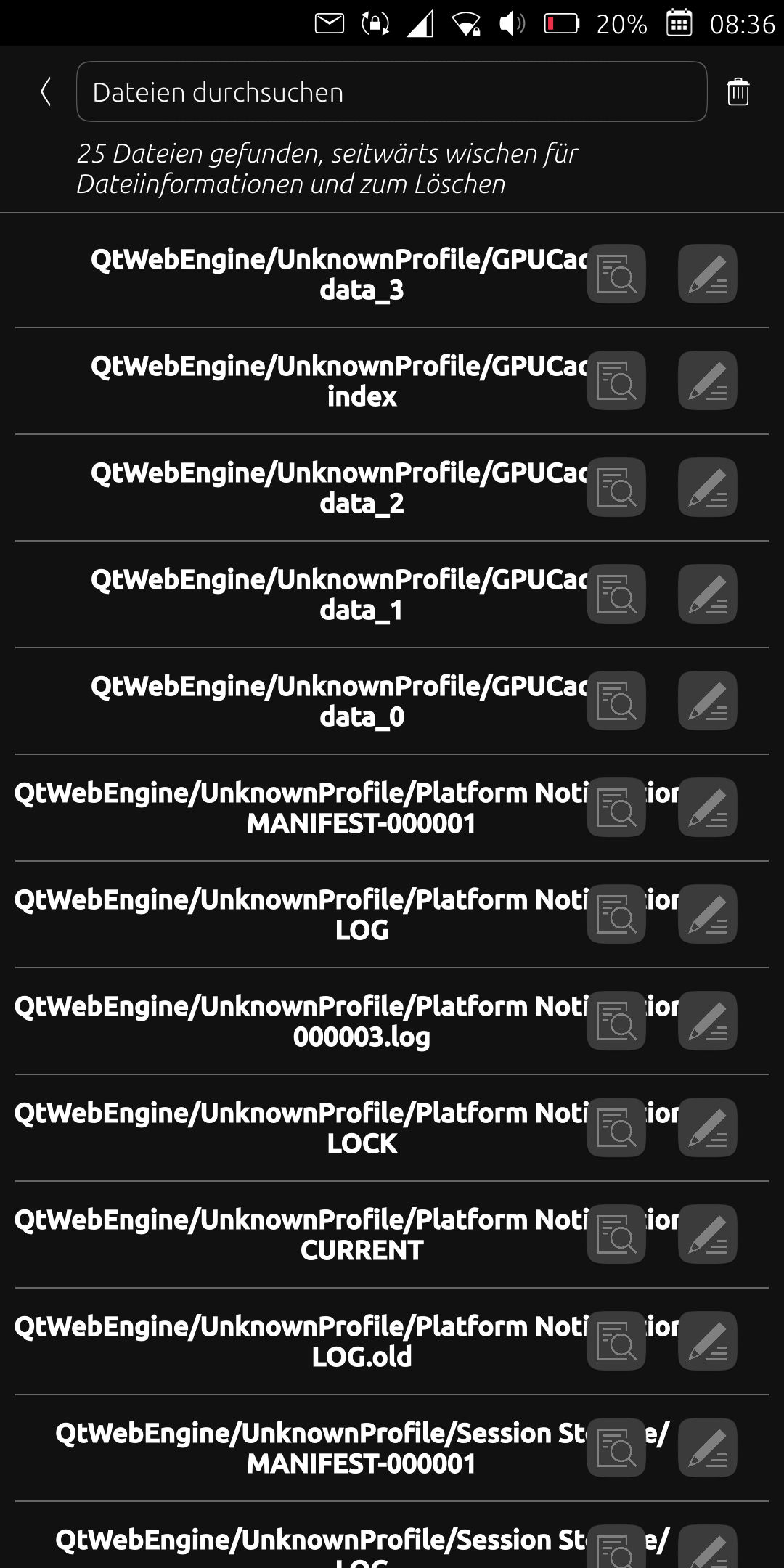
After I updated the app today, many files are listed under the "QtWebEngineUnknownProfile/..." path. Unfortunately, this is very confusing and I only want to see the files I created. What can I do about it? Simply delete the relevant files? Thanks
-
RE: No internet connection in Waydroid (OnePlus 5T)
@Moem Unfortunately, the situation is very frustrating for me because I haven't found a way to establish a reliable internet connection. I've tried a lot, a possible solution works once or twice and it happens that it doesn't work for several days. It's very annoying that I can only access my emails here because Dekko doesn't work for me.
Currently it sometimes works in the following way:
- Flight mode under UT
- Start Waydroid
- Kill all apps in Waydroid that want to establish an internet connection in the background (e.g. F-Droid, Signal)
- Start an internet connection in UT (e.g. use the browser)
- After a while a connection will be established in Waydroid.
-
RE: Waydroid won't start, says waydroid init requires root access...
Have you tried "sudo waydroid init -f"?
An internet connection is required.
-
RE: Mobile internet connection broken
The takeaway is that you should not change the DNS server for the mobile internet connection using nmcli.