-
I also ran into the installation hanging after clicking "Install," even with the latest version (0.1.21-beta AppImage) of the installer. I discovered the problem, in this case at least, concerned the installer's handling of adb and fastboot. The system is intended to operate whether they are installed or not. I had adb installed, but not fastboot. Unfortunately, the fallback appears to have failed because the "platform-tools" subdirectory tree it depends on (see src/utils.js:getFallbackPlatformTools) is missing. However, once I installed fastboot, the installation did not need to fall back and it worked just fine.
-
@advocatux Thanks! Migration is done, my phone is working perfectly, I migrated from AppImage installer a fantastic tool, I have all my data as it was before, many thanks to the team for their work, the installer and the OS are excellent!
-
@mika15 kudos! Enjoy your new UT device

-
Unfortunately, I can't update my Fairphone 2. I have tried the update on three different systems:
- macOS
The installer app asks in an infinite loop for the password. I have reproduced this error with a PIN and a password.

The first install didn't work either. It's a usb-c driver issue, I think.
- Neon
I managed the first installation in Neon. The installer couldn't update the device with the following error:

I also couldn't install the recent installer. Therefore I removed the files for the installer at /opt/ and /usr/share/applications with sudo. Then I tried the installation again, but nothing happens after entering the password.

- Windows 10
The installation app sais, that I have to reboot in bootloader but afterwards nothing happens. This application doesn't ask for a passwird.
Very frustrating user experience with UBPorts update!!
I have added some screenshots, but unfortunately they are not schon in the forum with the suggested syntax:
https://www.dropbox.com/s/0oy7f3j6m4ug3y/screenshot macOS.png?dl=0
https://www.dropbox.com/s/gi1gavtx9r34e2n/screenshot neon.png?dl=0
https://www.dropbox.com/s/cvr3d2u7vjp5jn3/Install screenshot.png?dl=0 -
@marc_aurel You may want to check the method described above with
system-image-cli- it is done from the phone terminal or from a computer logged into the phone via adb or ssh. -
@mihael This requires a setup for ssh, doesn't it?
It this instruction up to date? I'm not sure because of the path with the directory "phablet". I wouldn't call a FF2 a phablet.
-
@marc_aurel I don't remember if I did it this way but just connect a usb cable and then
adb shelland you are inside the phone from the computer. Or just type that command for the updatr within the phone terminal app - you don't even need a computer, just the phone connected to internet. -
@mihael Thanks, this works now.
Unfortunately the settings of the new UBports still doesn't offer custom text size. This is a problem for visual impaired people. Has someone an idea, whether whis is on the roadmap?
Dekko is not working any more. Has someone a recommendation for an email app?
-
@marc_aurel DEKKO beta is here:
-
@marc_aurel BTW the password is the one of your PC, not the phone...
-
Hi all, short question:
if I manually upgrade to OTA-4 following the described steps, will I lose my data and apps or will they remain intact on the device after the update? Thanks.
-
@gt you'll keep all your data as long as you don't check the
wipeoption.Anyhow, if your data is important for you, you should make a backup
-
@gt The apps that were not updated to 16.04 might( most likely) not work, data should stays intact.
-
Hello,
I tried to install 16.04 stable on FP2, with the method described above, but it failed. I did two attempt, both failed.
I have currently 15.04rc22 and I did what is described in this post:
[HowTo] [FP2] Update baseband & other firmware. Could it be the reason why it fail? or any idea?
In fact I see that it seems to be a known or similar bug described in ubports installer issues. But not clear if there is a workaround or not?The installer I used is
ubports-installer_0.1.21-beta_amd64.deb(running in Kubuntu 18.04).It starts correctly but then I have these screen:
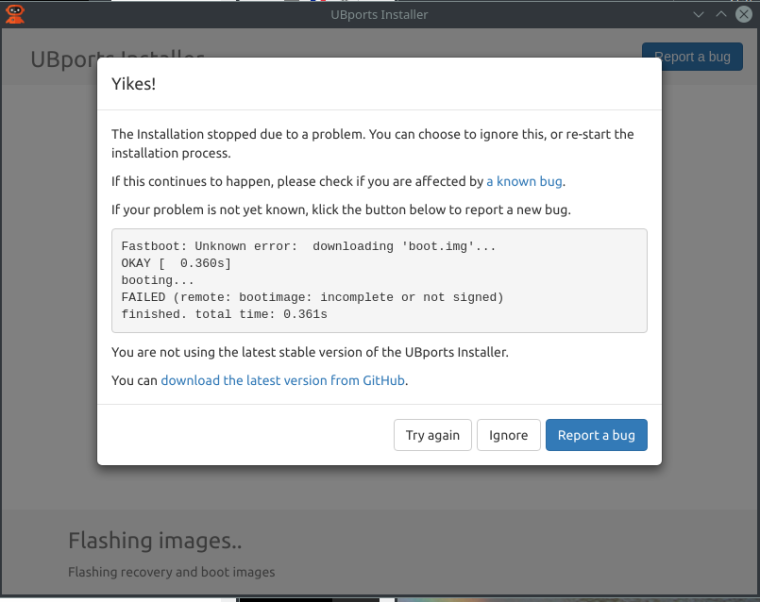
Then I close the installer. I have to remove the battery to restart the phone and it starts again with the 15.04rc22 (ouf!).
I have one change: the screen at the boot is new (Fairphone powered by UBports and no more android).Here is the full log:
me@mylaptop:~/Temp$ ubports-installer Pug interceptor registered successfully debug: Welcome to the party debug: Killing all running adb servers... debug: Using native platform tools! debug: Running platform tool exec cmd adb kill-server debug: debug: Running platform tool exec cmd adb -P 5038 kill-server debug: debug: adb shell: echo 1 debug: Running platform tool exec cmd adb -P 5038 shell echo 1 debug: Successfully downloaded devices list warn: Running latest stable version. debug: debug: adb shell: getprop ro.product.device debug: Running platform tool exec cmd adb -P 5038 shell getprop ro.product.device debug: debug: getprop: FP2 debug: adb shell: cat /etc/system-image/channel.ini debug: Running platform tool exec cmd adb -P 5038 shell cat /etc/system-image/channel.ini debug: debug: adb shell: echo 1 debug: Running platform tool exec cmd adb -P 5038 shell echo 1 debug: debug: reboot to bootloader debug: Running platform tool exec cmd adb -P 5038 reboot bootloader debug: debug: reboot to bootloader [DONE] err:null debug: checking password debug: correct password debug: fastboot: wait for device info: Download startCheck info: checked: recovery-FP2.img info: /home/me/.cache/ubports/images/FP2/recovery-FP2.img already exists with the expected checksum, so download will be skipped info: checked: splash-FP2.img info: /home/me/.cache/ubports/images/FP2/splash-FP2.img already exists with the expected checksum, so download will be skipped info: Download complete info: done downloading(once listener) debug: fastboot: flash; [{"url":"http://cdimage.ubports.com/devices/recovery-FP2.img","checksum":"534cc2da2add4a2bd8136b01069ed7dbe432076659fd4780910b6910b916f77b","type":"recovery","path":"/home/me/.cache/ubports/images/FP2"},{"type":"splash","url":"http://cdimage.ubports.com/devices/splash-FP2.img","checksum":"2bf76ec909af34d9896a954cd6c4ed5ad114d6053e59b7a856325b4fcfca43cd","path":"/home/me/.cache/ubports/images/FP2"}] info: Booting into recovery image... error: Devices: Error: Fastboot: Unknown error: downloading 'boot.img'... OKAY [ 0.360s] booting... FAILED (remote: bootimage: incomplete or not signed) finished. total time: 0.361s info: STARTING OVER debug: Welcome to the party debug: Killing all running adb servers... debug: Using native platform tools! debug: Running platform tool exec cmd adb kill-server debug: debug: Running platform tool exec cmd adb -P 5038 kill-server debug: debug: adb shell: echo 1 debug: Running platform tool exec cmd adb -P 5038 shell echo 1 debug: Successfully downloaded devices list warn: Running latest stable version. debug: message=Command failed: adb -P 5038 shell echo 1 error: no devices/emulators found , stack=Error: Command failed: adb -P 5038 shell echo 1 error: no devices/emulators found at ChildProcess.exithandler (child_process.js:282:12) at emitTwo (events.js:125:13) at ChildProcess.emit (events.js:213:7) at maybeClose (internal/child_process.js:921:16) at Socket.stream.socket.on (internal/child_process.js:348:11) at emitOne (events.js:115:13) at Socket.emit (events.js:210:7) at Pipe._handle.close [as _onclose] (net.js:549:12), killed=false, code=1, signal=null, cmd=adb -P 5038 shell echo 1 debug: adb shell: echo 1 debug: Running platform tool exec cmd adb -P 5038 shell echo 1 debug: message=Command failed: adb -P 5038 shell echo 1 error: no devices/emulators found , stack=Error: Command failed: adb -P 5038 shell echo 1 error: no devices/emulators found at ChildProcess.exithandler (child_process.js:282:12) at emitTwo (events.js:125:13) at ChildProcess.emit (events.js:213:7) at maybeClose (internal/child_process.js:921:16) at Socket.stream.socket.on (internal/child_process.js:348:11) at emitOne (events.js:115:13) at Socket.emit (events.js:210:7) at Pipe._handle.close [as _onclose] (net.js:549:12), killed=false, code=1, signal=null, cmd=adb -P 5038 shell echo 1 debug: adb shell: echo 1 debug: Running platform tool exec cmd adb -P 5038 shell echo 1 debug: message=Command failed: adb -P 5038 shell echo 1 error: no devices/emulators found , stack=Error: Command failed: adb -P 5038 shell echo 1 error: no devices/emulators found at ChildProcess.exithandler (child_process.js:282:12) at emitTwo (events.js:125:13) at ChildProcess.emit (events.js:213:7) at maybeClose (internal/child_process.js:921:16) at Socket.stream.socket.on (internal/child_process.js:348:11) at emitOne (events.js:115:13) at Socket.emit (events.js:210:7) at Pipe._handle.close [as _onclose] (net.js:549:12), killed=false, code=1, signal=null, cmd=adb -P 5038 shell echo 1 debug: adb shell: echo 1 debug: Running platform tool exec cmd adb -P 5038 shell echo 1 debug: message=Command failed: adb -P 5038 shell echo 1 error: no devices/emulators found , stack=Error: Command failed: adb -P 5038 shell echo 1 error: no devices/emulators found at ChildProcess.exithandler (child_process.js:282:12) at emitTwo (events.js:125:13) at ChildProcess.emit (events.js:213:7) at maybeClose (internal/child_process.js:921:16) at Socket.stream.socket.on (internal/child_process.js:348:11) at emitOne (events.js:115:13) at Socket.emit (events.js:210:7) at Pipe._handle.close [as _onclose] (net.js:549:12), killed=false, code=1, signal=null, cmd=adb -P 5038 shell echo 1 debug: adb shell: echo 1 debug: Running platform tool exec cmd adb -P 5038 shell echo 1 debug: message=Command failed: adb -P 5038 shell echo 1 error: no devices/emulators found , stack=Error: Command failed: adb -P 5038 shell echo 1 error: no devices/emulators found at ChildProcess.exithandler (child_process.js:282:12) at emitTwo (events.js:125:13) at ChildProcess.emit (events.js:213:7) at maybeClose (internal/child_process.js:921:16) at Socket.stream.socket.on (internal/child_process.js:348:11) at emitOne (events.js:115:13) at Socket.emit (events.js:210:7) at Pipe._handle.close [as _onclose] (net.js:549:12), killed=false, code=1, signal=null, cmd=adb -P 5038 shell echo 1 debug: adb shell: echo 1 debug: Running platform tool exec cmd adb -P 5038 shell echo 1 debug: message=Command failed: adb -P 5038 shell echo 1 error: no devices/emulators found , stack=Error: Command failed: adb -P 5038 shell echo 1 error: no devices/emulators found at ChildProcess.exithandler (child_process.js:282:12) at emitTwo (events.js:125:13) at ChildProcess.emit (events.js:213:7) at maybeClose (internal/child_process.js:921:16) at Socket.stream.socket.on (internal/child_process.js:348:11) at emitOne (events.js:115:13) at Socket.emit (events.js:210:7) at Pipe._handle.close [as _onclose] (net.js:549:12), killed=false, code=1, signal=null, cmd=adb -P 5038 shell echo 1 debug: adb shell: echo 1 debug: Running platform tool exec cmd adb -P 5038 shell echo 1 debug: message=Command failed: adb -P 5038 shell echo 1 error: no devices/emulators found , stack=Error: Command failed: adb -P 5038 shell echo 1 error: no devices/emulators found at ChildProcess.exithandler (child_process.js:282:12) at emitTwo (events.js:125:13) at ChildProcess.emit (events.js:213:7) at maybeClose (internal/child_process.js:921:16) at Socket.stream.socket.on (internal/child_process.js:348:11) at emitOne (events.js:115:13) at Socket.emit (events.js:210:7) at Pipe._handle.close [as _onclose] (net.js:549:12), killed=false, code=1, signal=null, cmd=adb -P 5038 shell echo 1 debug: adb shell: echo 1 debug: Running platform tool exec cmd adb -P 5038 shell echo 1 debug: message=Command failed: adb -P 5038 shell echo 1 error: no devices/emulators found , stack=Error: Command failed: adb -P 5038 shell echo 1 error: no devices/emulators found at ChildProcess.exithandler (child_process.js:282:12) at emitTwo (events.js:125:13) at ChildProcess.emit (events.js:213:7) at maybeClose (internal/child_process.js:921:16) at Socket.stream.socket.on (internal/child_process.js:348:11) at emitOne (events.js:115:13) at Socket.emit (events.js:210:7) at Pipe._handle.close [as _onclose] (net.js:549:12), killed=false, code=1, signal=null, cmd=adb -P 5038 shell echo 1 debug: adb shell: echo 1 debug: Running platform tool exec cmd adb -P 5038 shell echo 1 debug: message=Command failed: adb -P 5038 shell echo 1 error: no devices/emulators found , stack=Error: Command failed: adb -P 5038 shell echo 1 error: no devices/emulators found at ChildProcess.exithandler (child_process.js:282:12) at emitTwo (events.js:125:13) at ChildProcess.emit (events.js:213:7) at maybeClose (internal/child_process.js:921:16) at Socket.stream.socket.on (internal/child_process.js:348:11) at emitOne (events.js:115:13) at Socket.emit (events.js:210:7) at Pipe._handle.close [as _onclose] (net.js:549:12), killed=false, code=1, signal=null, cmd=adb -P 5038 shell echo 1 debug: Killing all running adb servers... debug: Using native platform tools! debug: Running platform tool exec cmd adb kill-server Good bye! debug: debug: Running platform tool exec cmd adb -P 5038 kill-server debug: me@mylaptop:~/Temp$ -
@ublublu @lionelb has reported success finally going from vivid to xenial on a FP2 using UBports Installer version 0.1.12-beta (YMMV).



Hello! It looks like you're interested in this conversation, but you don't have an account yet.
Getting fed up of having to scroll through the same posts each visit? When you register for an account, you'll always come back to exactly where you were before, and choose to be notified of new replies (either via email, or push notification). You'll also be able to save bookmarks and upvote posts to show your appreciation to other community members.
With your input, this post could be even better 💗
Register Login