UBports Robot Logo UBports Forum
    • Categories
    • Recent
    • Tags
    • Popular
    • Users
    • Groups
    • Search
    • Register
    • Login

    Customizing Icons

    Scheduled Pinned Locked Moved Google Pixel 3a/3a XL
    61 Posts 12 Posters 22.8k Views 4 Watching
    Loading More Posts
    • Oldest to Newest
    • Newest to Oldest
    • Most Votes
    Reply
    • Reply as topic
    Log in to reply
    This topic has been deleted. Only users with topic management privileges can see it.
    • ikozI Offline
      ikoz @Salah
      last edited by

      @Salah There are dozens of icon packs, inherited from the old app and renamed to adapt to changes as it hasn't been maintained for 4 years.

      May the source be with you

      SalahS 1 Reply Last reply Reply Quote 1
      • saveurlinuxS Offline
        saveurlinux @Salah
        last edited by

        @Salah with laucher modular you can add your own icon associated to an application, weblink, or terminal command

        SalahS 1 Reply Last reply Reply Quote 1
        • SalahS Offline
          Salah @ikoz
          last edited by

          @ikoz Thanks for your reply.

          If you go to icons folder, you well see several icon folder with icons including the main one which if officially used (suru) and they are not used.

          Thanks again 👍

          " Our Business, Is Life Itself,, "

          • Iphone X => Daily Use
          • Nokia N900 => Secondary Device for Experiments and Mods. LOVE THIS DEVICE...
          • Google Pixel 3a XL => Using This Device as Secondary Device -- UT 20.04 Version
          1 Reply Last reply Reply Quote 0
          • SalahS Offline
            Salah @saveurlinux
            last edited by

            @saveurlinux I will give it a try and see what can I do.

            Thanks for the top 👍 👍

            " Our Business, Is Life Itself,, "

            • Iphone X => Daily Use
            • Nokia N900 => Secondary Device for Experiments and Mods. LOVE THIS DEVICE...
            • Google Pixel 3a XL => Using This Device as Secondary Device -- UT 20.04 Version
            1 Reply Last reply Reply Quote 0
            • SalahS Offline
              Salah @ikoz
              last edited by

              @ikoz I have installed it, which apparently not available in Open Store.

              Is there any way I can Add my icons to this app !!

              Just asking.

              " Our Business, Is Life Itself,, "

              • Iphone X => Daily Use
              • Nokia N900 => Secondary Device for Experiments and Mods. LOVE THIS DEVICE...
              • Google Pixel 3a XL => Using This Device as Secondary Device -- UT 20.04 Version
              ikozI 1 Reply Last reply Reply Quote 0
              • ikozI Offline
                ikoz @Salah
                last edited by ikoz

                @Salah said in Customizing Icons:

                If you go to icons folder, you well see several icon folder with icons including the main one which if officially used (suru) and they are not used.

                These are available if you click on the top-left icon. Select one from the list

                Salah said in Customizing Icons:

                have installed it, which apparently not available in Open Store

                I submitted the app to the OpenStore, but I was suggested to rewrite the scripts so they don't require remounting the rootfs as read-write. I have made some progress, and the icon names had to be renamed. So the old versions don't work, unless it fetches the icons from a snapshot of a previous version. I can easily fix the hacky version temporary to work fully, but better way for the newer, cleaner method, which is WIP.

                Salah said in Customizing Icons:

                Is there any way I can Add my icons to this app !!

                Yes, you have to rename your icons to match the names of those in the repo. Put them in a folder. Then write that path (absolute path and the last /) in the text box below

                May the source be with you

                SalahS 1 Reply Last reply Reply Quote 2
                • SalahS Offline
                  Salah @ikoz
                  last edited by

                  @ikoz I have been trying to understand how to write the path, it did not work with me.

                  I have icon folder in my device. Therefore, could you please share with me what exactly to write in the path !

                  Thanks

                  " Our Business, Is Life Itself,, "

                  • Iphone X => Daily Use
                  • Nokia N900 => Secondary Device for Experiments and Mods. LOVE THIS DEVICE...
                  • Google Pixel 3a XL => Using This Device as Secondary Device -- UT 20.04 Version
                  ikozI 1 Reply Last reply Reply Quote 0
                  • ikozI Offline
                    ikoz @Salah
                    last edited by ikoz

                    @Salah
                    Use the .click built from the hacky-works branch (should be the latest artifact), then

                    1. Create your folder:
                      /home/phablet/Downloads/icons/
                    2. Rename your icons accordingly, must match the names here
                      Another way to get the names (even of the apps not already available):
                      Install an icon pack e.g., line, then:
                      ls /opt/click.ubuntu.com/icon-changer.ikozyris/current/assets/backup/
                      You should get something like this:
                    address-book-app.svg       logviewer.ruditimmer.png
                    calculator.ubports.svg     lomiri-system-settings.svg
                    calendar.ubports.png       mediaplayer-app.png
                    camera.ubports.png         messaging-app.svg
                    camera.ubports.svg         morph-browser.svg
                    ciborium.svg               music.ubports.svg
                    clock.ubports.svg          notes.ubports.svg
                    dialer-app.svg             openstore.openstore-team.svg
                    filemanager.ubports.svg    terminal.ubports.svg
                    gallery.ubports.svg        weather.ubports.svg
                    icon-changer.ikozyris.svg
                    

                    Your icons should match the name of each app.
                    Preferably, restore to defaults before installing your own, or copy the backup directory somewhere else.
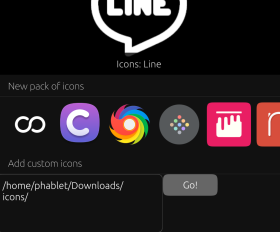
                    3. Type the path /home/phablet/Downloads/icons/ on the text box (with last /):
                    ad9699a0-a7d9-401b-b87d-2894d7177f6f-image.png
                    4. Press "Go!"

                    May the source be with you

                    SalahS 1 Reply Last reply Reply Quote 0
                    • SalahS Offline
                      Salah @ikoz
                      last edited by

                      @ikoz Did all that nothing happne. My folder name is UC even though I have inserted /home/phablet/Downloads/icons/UC.

                      Also typed /home/phablet/Downloads/icons/ and nothing happen

                      So any advice ?

                      " Our Business, Is Life Itself,, "

                      • Iphone X => Daily Use
                      • Nokia N900 => Secondary Device for Experiments and Mods. LOVE THIS DEVICE...
                      • Google Pixel 3a XL => Using This Device as Secondary Device -- UT 20.04 Version
                      ikozI 1 Reply Last reply Reply Quote 0
                      • ikozI Offline
                        ikoz @Salah
                        last edited by

                        @Salah You can replace the backup directory with your icons, and then "restore". Not the best way, but it works.

                        May the source be with you

                        SalahS 1 Reply Last reply Reply Quote 0
                        • SalahS Offline
                          Salah @ikoz
                          last edited by

                          @ikoz Hello again, I want to tell you that I have being trying to make this work so many times since yesterday till day and did not work. I really do not know why after putting the path is not functioning. Maybe from the program not letting any new icons to be deployed or something else.

                          Just for assurance.

                          Are you putting the path like this => /home/phablet/Downloads/icons/ or after => /icons/(Folder Name).

                          Can you make a screenshot from your device how it is written??

                          Thanks

                          " Our Business, Is Life Itself,, "

                          • Iphone X => Daily Use
                          • Nokia N900 => Secondary Device for Experiments and Mods. LOVE THIS DEVICE...
                          • Google Pixel 3a XL => Using This Device as Secondary Device -- UT 20.04 Version
                          ikozI 1 Reply Last reply Reply Quote 0
                          • SalahS Offline
                            Salah
                            last edited by

                            Just for asking.

                            Is there any way to change the dash (Ubuntu Logo) to other icons??

                            " Our Business, Is Life Itself,, "

                            • Iphone X => Daily Use
                            • Nokia N900 => Secondary Device for Experiments and Mods. LOVE THIS DEVICE...
                            • Google Pixel 3a XL => Using This Device as Secondary Device -- UT 20.04 Version
                            1 Reply Last reply Reply Quote 0
                            • ikozI Offline
                              ikoz @Salah
                              last edited by

                              @Salah
                              Sorry for the confusion, just tested and it works only if the path doesn't have a / at the end.
                              e.g. /home/phablet/Downloads/icons
                              The path can be anywhere you want, as the script is run with sudo.

                              Are you putting the path like this => /home/phablet/Downloads/icons/ or after => /icons/(Folder Name).

                              Do not enter any newline, it appears on a new line due to line wrapping

                              Is there any way to change the dash (Ubuntu Logo) to other icons??

                              Nothing I'm aware of. It could be somewhere on /usr/share/icons/suru/.

                              May the source be with you

                              SalahS 1 Reply Last reply Reply Quote 0
                              • SalahS Offline
                                Salah @ikoz
                                last edited by

                                @ikoz I have tried => /home/phablet/Downloads/icons and I have tried /home/phablet/Downloads/icons/UC.

                                Both did not work. I do not know why it is not working.

                                I have copied suru folder. Changed icon theme name and changed svg files with exact file name.

                                Nothing is happening.

                                " Our Business, Is Life Itself,, "

                                • Iphone X => Daily Use
                                • Nokia N900 => Secondary Device for Experiments and Mods. LOVE THIS DEVICE...
                                • Google Pixel 3a XL => Using This Device as Secondary Device -- UT 20.04 Version
                                ikozI 1 Reply Last reply Reply Quote 0
                                • ikozI Offline
                                  ikoz @Salah
                                  last edited by ikoz

                                  @Salah Are your icons in icons/ or UC/? The path can be anywhere, not just in Downloads and the icons must be like path/icon.svg.
                                  Did you try replacing the backup directory with your icons and click restore?
                                  Are you using the latest version?
                                  If you know some bash scripting you can see the script at: /opt/click.ubuntu.com/icon-changer.ikozyris/current/assets/customicon.sh.
                                  It must be ran from /opt/click.ubuntu.com/icon-changer.ikozyris/current/.

                                  May the source be with you

                                  SalahS IanI 2 Replies Last reply Reply Quote 1
                                  • SalahS Offline
                                    Salah @ikoz
                                    last edited by

                                    @ikoz I am using /home/phablet/Downloads/icons/UC

                                    Thats it and it is not working.

                                    What a I did actually is taking suru's folder and altered svg icons and png form sources and so.

                                    Renamed folder to UC including files inside and then sent a copy to my device in icons folder.

                                    So it is really frustrating and suppose to be easy.

                                    Even though I have tried Humanity icons which is already inside the device. Took the folder and put the path. Nothing Happen.

                                    Therefore, could you please give me a screen shot for a successful icons from your side. I want to see how did you put the path.

                                    Thanks for being patience.

                                    " Our Business, Is Life Itself,, "

                                    • Iphone X => Daily Use
                                    • Nokia N900 => Secondary Device for Experiments and Mods. LOVE THIS DEVICE...
                                    • Google Pixel 3a XL => Using This Device as Secondary Device -- UT 20.04 Version
                                    ikozI 1 Reply Last reply Reply Quote 0
                                    • IanI Offline
                                      Ian @ikoz
                                      last edited by

                                      @ikoz It might be worth confirming owners/groups and rwx of the icon folders and files.

                                      SalahS 1 Reply Last reply Reply Quote 1
                                      • SalahS Offline
                                        Salah @Ian
                                        last edited by

                                        @Ian Hello,

                                        I want to tell you that I have tried several times with different icons folder but nothing happens.

                                        I do not know what is wrong with this app and I think am going to give up trying for nothing.

                                        Hope on next update to facilitate changing icons.

                                        " Our Business, Is Life Itself,, "

                                        • Iphone X => Daily Use
                                        • Nokia N900 => Secondary Device for Experiments and Mods. LOVE THIS DEVICE...
                                        • Google Pixel 3a XL => Using This Device as Secondary Device -- UT 20.04 Version
                                        IanI 1 Reply Last reply Reply Quote 0
                                        • IanI Offline
                                          Ian @Salah
                                          last edited by Ian

                                          @Salah please wait for ikoz to confirm ownership and permissions of the files and folders before giving up.

                                          1 Reply Last reply Reply Quote 1
                                          • ikozI Offline
                                            ikoz @Salah
                                            last edited by ikoz

                                            @Salah Please try the latest version and send the logs.
                                            Alternatively, run the following script from /opt/click.ubuntu.com/icon-changer.ikozyris/current/ with parameter your icon path.

                                            #!/bin/bash
                                            
                                            echo "$1"
                                            pwd
                                            sudo mount -o rw,remount /
                                            
                                            echo "remounted as RW"
                                            
                                            list_icons=$(
                                            cd /usr/share/applications/ || exit
                                            grep -P "^Icon=.+(png|svg)$" *.desktop | sed 's/.desktop:Icon=/":"/;s/^/"/;s/$/",/'
                                            
                                            cd /home/phablet/.local/share/applications || exit
                                            grep -P "^Icon=.+(png|svg)$" *.desktop | sed 's/.desktop:Icon=/":"/;s/^/"/;s/$/",/'
                                            )
                                            
                                            echo "Got icons"
                                            
                                            mapfile -t list_icons_name < <(grep -Po '(?<=")[^"]+(?=":)' <<< "$list_icons")
                                            mapfile -t list_icons_path < <(grep -Po '(?<=:")[^"]+(?=")' <<< "$list_icons")
                                            
                                            echo "got names/paths"
                                            
                                            cd assets || exit
                                            
                                            # Create a backup directory of the original icons
                                            if [ ! -d "backup" ]; then
                                                mkdir backup
                                            fi
                                            
                                            # Loop for each installed app
                                            for index in ${!list_icons_name[*]}; do
                                                echo -e "\n Current file: $index"
                                                list_icons_ext=${list_icons_path[$index]##*.}
                                                list_icons_rename=${list_icons_name[$index]%%_*}
                                            
                                                # Copy the original files in the backup directory if they don't exist
                                                if [ ! -f "backup/$list_icons_rename.$list_icons_ext" ]; then
                                                    sudo cp "${list_icons_path[$index]}" "backup/$list_icons_rename.$list_icons_ext"
                                                fi
                                            
                                                echo "Checking $list_icons_rename.$list_icons_ext"
                                                # Copy the icons if they exist
                                                if [ -f "$1/$list_icons_rename.$list_icons_ext" ]; then
                                                    echo "Copying"
                                                    sudo cp -v "$1/$list_icons_rename.$list_icons_ext" "${list_icons_path[$index]}"
                                                fi
                                                cd ..
                                            done
                                            
                                            sudo mount -o ro,remount /


                                            @Ian said in Customizing Icons:

                                            It might be worth confirming owners/groups and rwx of the icon folders and files.

                                            Shouldn't be a problem as the script runs with sudo.


                                            Salah said in Customizing Icons:

                                            Hope on next update to facilitate changing icons.

                                            My current problem is that lomiri-app-launch doesn't read the .desktop files, but uses hard-coded desktop files from the click package,


                                            May the source be with you

                                            SalahS 1 Reply Last reply Reply Quote 1

                                            Hello! It looks like you're interested in this conversation, but you don't have an account yet.

                                            Getting fed up of having to scroll through the same posts each visit? When you register for an account, you'll always come back to exactly where you were before, and choose to be notified of new replies (either via email, or push notification). You'll also be able to save bookmarks and upvote posts to show your appreciation to other community members.

                                            With your input, this post could be even better 💗

                                            Register Login
                                            • First post
                                              Last post