Merezhyvo browser
-
version 0.4.2 has been released.
Added:
- UI translations for:
- Ukrainian
- French
- German
- Polish
- Tab search: quickly find an open tab by typing part of its title or URL.
- Address bar suggestions: as you type, the URL bar now searches your history and bookmarks and shows a list of previously visited or saved sites.
Fixed:
- Multiple issues with keyboard layouts in the integrated on-screen keyboard.
- Bug where some passwords were not saved correctly in the password manager.
- Various UI glitches and small visual inconsistencies.
- UI translations for:
-
@naz.R Hi. Thanks for your update. French keyboard ok now. But the keyboard issue i noticed isn't solved for me in this update (volla 22 last noble rc).
-
@domubpkm said in Merezhyvo browser:
@naz.R Hi. Thanks for your update. French keyboard ok now. But the keyboard issue i noticed isn't solved for me in this update (volla 22 last noble rc).
Could you please give me some more details about the issue then?
Is it only on DuckDuckGo? other inputs on other pages work well? Address field is ok?
Did you try to tap out of the input field and then tap into it again?
Or any other details about its behavior or your order of actions. -
@naz.R
Hello.
Thank you for this update.
The FR keyboard is working perfectly now.
Very impressive...
I really like this browser. -
@naz.R I haven't tried elsewhere but the procedure that works is as follows:
-
press a finger in the duckduck search zone: the outline of the zone is highlighted and the pointer flashes in it: this seems normal.
-
attempt to type text in the area: the outline is no longer highlighted, the pointer disappears from the area and no character is displayed in the area.
This procedure can be repeated. Bringing in the virtual keyboard and bringing it out by pressing your finger in the area is ok but that's all.
-
-
@Vlad-Nirky said in Merezhyvo browser:
@naz.R
Hello.
Thank you for this update.
The FR keyboard is working perfectly now.
Very impressive...
I really like this browser.thank you for your feedback,
and for additional confirming about FR keyboard,
because there is a feedback on the app's page in OpenStore from today where a guy complains about it again.
Unfortunately he doesn't write it here, so I cannot to be in contact with him. -
@domubpkm said in Merezhyvo browser:
@naz.R I haven't tried elsewhere but the procedure that works is as follows:
-
press a finger in the duckduck search zone: the outline of the zone is highlighted and the pointer flashes in it: this seems normal.
-
attempt to type text in the area: the outline is no longer highlighted, the pointer disappears from the area and no character is displayed in the area.
This procedure can be repeated. Bringing in the virtual keyboard and bringing it out by pressing your finger in the area is ok but that's all.
I hope I fixed this one too
Please update the app again til the version 0.4.2.1, it is on OpenStore now
-
-
@naz.R ..... YES it's fixed !
 thanks
-
-
@domubpkm @vlad-nirky
Guys, by any chance... may be some one of you knows a guy named Mathias?
May be somewhere in French UT Telegram group, or anyhow anywhere.
He complains in his review on FR keyboard and that he can't pin something, but I didn't get what exactly.
So, if you know him, could you please ask him to write here. I really would like to figure it out what issues are there and would like to fix them too.
Thanks -
@naz.R said in Merezhyvo browser:
knows a guy named Mathias?
Not me. But, if it is not him, another user of a Pixel 3a can give a feedback of this bug maybe..
-
@domubpkm said in Merezhyvo browser:
@naz.R said in Merezhyvo browser:
knows a guy named Mathias?
Not me. But, if it is not him, another user of a Pixel 3a can give a feedback of this bug maybe..
sure. Thanks for the reply, and for your review, buy the way
-
@naz.R said in Merezhyvo browser:
Thanks for the reply, and for your review, buy the way
You are welcome !
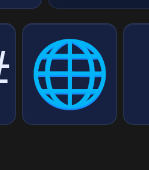
What should do this when we press it ?
-
@domubpkm said in Merezhyvo browser:
@naz.R said in Merezhyvo browser:
Thanks for the reply, and for your review, buy the way
You are welcome !
What should do this when we press it ?
it switches different language layouts it you choose several languages in the keyboard settings.
So you can choose to have FR and EN and this button will switch between them -
@naz.R ah ! ok. I put only french, so nothing happened ! Thought too it was maybe emojis.
-
@domubpkm said in Merezhyvo browser:
@naz.R ah ! ok. I put only french, so nothing happened ! Thought too it was maybe emojis.
yes, you just gave me the idea to hide it if user has only one language chosen. I always have several languages in all my keyboards, so even didn't think about the case when a user has only one.
emojis are in the pipeline, but not yet
there are so many thing to do -
@naz.R said in Merezhyvo browser:
so many thing to do
I want to believe you! In my opinion, securing the Internet is one of the first.
-
https://webglsamples.org/spacerocks/spacerocks.html
Webgl works in your browser but maybe not always very well. it depends on the web page.
The earth rotates in https://open-store.io/app/chromiumut.shapa but doesn't rotate in https://open-store.io/app/min.pparent @pparent
-
@domubpkm said in Merezhyvo browser:
The earth rotates in https://open-store.io/app/chromiumut.shapa but doesn't rotate in https://open-store.io/app/min.pparent @pparent
On my side the cube and the earth rotate similarly in the 2 browsers in https://get.webgl.org/ . You can also see "chrome://gpu" in the url bar.
Min and Chromium rely on X for now, so they can't be hardware accelerated with GlES. This is because with the old version of Mir the virtual keyboard is not supported outside of Qt. When Mir2.x is released, the plan is to migrate those ( and Signal Desktop and uWolf ) to Wayland so that they can be fully hardware accelerated, with virtual keyboard and more. But this might not be before another 6 month or more, I don't know how fast the system update will go.
-
@pparent said in Merezhyvo browser:
the earth rotate similarly
Yes, I can't see a difference between the 2 results myself - since both are based on a recent Chromium code base it would be surprising. I noticed also that it was not easy at all to differentiate between the 2 apps in the Lomiri switcher since they are called the same (X11 support), that's where Mir2 would be an improvement also - although I don't see why X11 applications should all be called the same nonetheless.


Hello! It looks like you're interested in this conversation, but you don't have an account yet.
Getting fed up of having to scroll through the same posts each visit? When you register for an account, you'll always come back to exactly where you were before, and choose to be notified of new replies (either via email, or push notification). You'll also be able to save bookmarks and upvote posts to show your appreciation to other community members.
With your input, this post could be even better 💗
Register Login