UBports Robot Logo UBports Forum
    • Categories
    • Recent
    • Tags
    • Popular
    • Users
    • Groups
    • Search
    • Register
    • Login

    Multimedia player

    Scheduled Pinned Locked Moved Solved Support
    24 Posts 7 Posters 3.7k Views 6 Watching
    Loading More Posts
    • Oldest to Newest
    • Newest to Oldest
    • Most Votes
    Reply
    • Reply as topic
    Log in to reply
    This topic has been deleted. Only users with topic management privileges can see it.
    • Vlad NirkyV Offline
      Vlad Nirky @domubpkm
      last edited by Vlad Nirky

      @domubpkm
      If you have waydroid installed, perhaps could you try (from F-Droid) VLC.
      I have tested on my phone with an avi file and i works really well while not working with the UBT media player.
      VLC is "special" and it comes with his own codecs and can play any file (or near).

      1 Reply Last reply Reply Quote 0
      • Vlad NirkyV Offline
        Vlad Nirky @AmauryDBZ
        last edited by Vlad Nirky

        @AmauryDBZ
        Codec is the way the file has been digitized..
        Coder decoder
        Right clic on file / properties
        You should have something like this
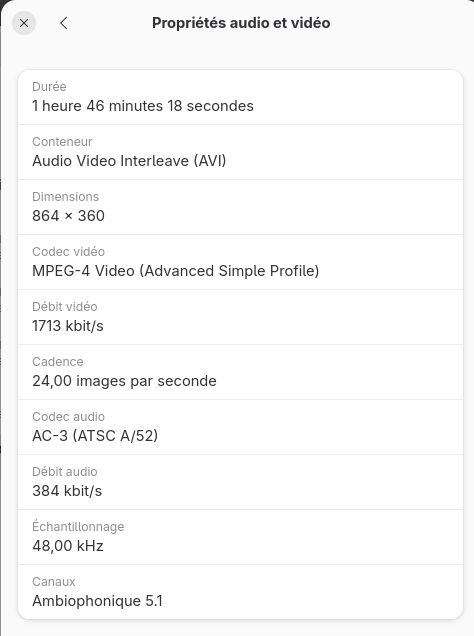
        52a7803b-53e6-4966-8e4a-5945c50e7240-image.png
        AVI and MKV are containers.
        There are codecs for video and audio parts of the film.
        To transpose this in file process, if you compress a file with arj, you'll have to uncompress with arj. same as tgz, zip, 7z...

        1 Reply Last reply Reply Quote 0
        • Vlad NirkyV Offline
          Vlad Nirky @domubpkm
          last edited by Vlad Nirky

          @domubpkm
          If you try waydroid, you can use waydroid helper from appstore to install.
          Use the F-Droid repository and install VLC

          70a080f6-c9b9-4f19-8989-d4e76c05e56b-image.png
          You'll have to copy your avi file in /home/phablet/.local/share/waydroid/data/media/0/Download/ for example.
          for this, use a terminal
          come in root mode: sudo su
          and cp [youfilewithpath] /home/phablet/.local/share/waydroid/data/media/0/Download/
          Of course, it's not supported by Ubuntu Touch community, just a work around to get it working...

          A 1 Reply Last reply Reply Quote 0
          • A Offline
            AmauryDBZ @Vlad Nirky
            last edited by

            @Vlad-Nirky thanks !
            Yes I've thought of vlc but waydroid with convergence isn't good.
            I didn't found any snap also for vlc.

            D 1 Reply Last reply Reply Quote 0
            • D Offline
              domubpkm @AmauryDBZ
              last edited by

              @AmauryDBZ you can try too the xenial package https://open-store.io/app/uvideo.pavelprosto . Maybe it works on focal i don't know.

              A 1 Reply Last reply Reply Quote 0
              • A Offline
                AmauryDBZ @domubpkm
                last edited by

                @domubpkm thanks, doesn't work with .avi

                1 Reply Last reply Reply Quote 0
                • BollyB Offline
                  Bolly
                  last edited by Bolly

                  hello @AmauryDBZ ,

                  What I do is to convert the video on a pc with ffmpeg.

                  ffmpeg -i input.mp4 output.mp4
                  #or
                  ffmpeg -i input.mkv output.mkv
                  #or
                  ffmpeg -i input.avi output.avi
                  

                  It is a long process.

                  15-25: BQ Aquaris E4.5 Ubuntu edition ☠️?
                  23-25: BQ Aquaris E5 HD ☠️?
                  16-Now (Daily use) : BQ Aquaris M10 FHD Betatester
                  20-Now: PinePhone Braveheart & CE UBports

                  (Family/Daily use)

                  20-Now: Vollaphone Noble
                  22-Now: Vollaphone22 Noble

                  A 1 Reply Last reply Reply Quote 0
                  • A Offline
                    AmauryDBZ @Bolly
                    last edited by

                    @Bolly yes thanks ! This exactly what I did, and it worked 👍
                    I've tried to install ffmpeg on UT to be 'autonomous' with snap but didn't worked

                    D 1 Reply Last reply Reply Quote 1
                    • A AmauryDBZ has marked this topic as solved on
                    • D Offline
                      domubpkm @AmauryDBZ
                      last edited by

                      @AmauryDBZ ffmpeg should worked thru libertine
                      https://forums.ubports.com/post/80595

                      C 1 Reply Last reply Reply Quote 1
                      • C Offline
                        Charly @domubpkm
                        last edited by

                        @domubpkm

                        I use mpv in libertine and it works really good.

                        Greetings
                        Charly

                        UT 24.04 on Volla X23

                        1 Reply Last reply Reply Quote 1

                        Hello! It looks like you're interested in this conversation, but you don't have an account yet.

                        Getting fed up of having to scroll through the same posts each visit? When you register for an account, you'll always come back to exactly where you were before, and choose to be notified of new replies (either via email, or push notification). You'll also be able to save bookmarks and upvote posts to show your appreciation to other community members.

                        With your input, this post could be even better 💗

                        Register Login
                        • First post
                          Last post
