UBports Robot Logo UBports Forum
    • 版面
    • 最新
    • 標籤
    • 熱門
    • 使用者
    • 群組
    • 搜尋
    • 註冊
    • 登入

    New Comer Guide to UTouch

    已排程 已置頂 已鎖定 已移動 Design
    63 貼文 13 Posters 23.1k 瀏覽 5 Watching
    正在載入更多貼文
    • 從舊到新
    • 從新到舊
    • 最多點贊
      回覆
      • 在新貼文中回覆
      登入後回覆
      此主題已被刪除。只有擁有主題管理權限的使用者可以查看。
      • C 離線
        cliffcoggin @CiberSheep
        最後由 編輯

        @CiberSheep said in New Comer Guide to UTouch:

        @cliffcoggin said in New Comer Guide to UTouch:

        Additional punctuation marks are accessible on the keyboard by long press on comma (,) and full stop (.)

        I would say: Long tap on any key with additional characters

        True, but the additional characters on the comma and full stop are almost invisible compared to those on other keys. I thought at first they were specks of dirt on the screen.

        1 條回覆 最後回覆 回覆 引用 0
        • KaizenK 離線
          Kaizen
          最後由 編輯

          Great Idea! It is vital to set goals first, like who is going to watch it, when, where, those things also essential for user journey—creating these kinds of assets highly impotent to the community and one of my priorities. Once you finish with the research, I can help turn it to good looking storyboard, then it would be much easier to convert it to a video or some kind of animation.

          Good luck with the process, let me know how I can assist (I'm at GMT+3) @kaizennn on telegram

          1 條回覆 最後回覆 回覆 引用 1
          • KaizenK 離線
            Kaizen @AppLee
            最後由 編輯

            @AppLee Not practical, use this instead https://www.sketch.com/s/21be7a9a-e57a-4b82-b5e8-a2aac22c119c
            Also, tell me what you need. I will provide more relevant stuff for your project 😉

            AppLeeA 1 條回覆 最後回覆 回覆 引用 1
            • AppLeeA 離線
              AppLee @Kaizen
              最後由 AppLee 編輯

              @Kaizen said in New Comer Guide to UTouch:

              use this instead

              That is very nice, thanks. Better than snapshots IMHO
              @C0n57an71n what do you think ?

              ? 1 條回覆 最後回覆 回覆 引用 0
              • ? 離線
                舊使用者 @AppLee
                最後由 編輯

                @AppLee I will have a look today when I'm in front of the laptop and see how user friendly it is. If manageable, then why not?

                1 條回覆 最後回覆 回覆 引用 0
                • CiberSheepC 離線
                  CiberSheep
                  最後由 編輯

                  I have summarized (I hope all) here

                  https://pad.ubports.com/p/FAQ_and_How_to

                  Another planet, another time, another universe!

                  ? C 2 條回覆 最後回覆 回覆 引用 1
                  • 3 離線
                    3T_Ed
                    最後由 編輯

                    Users of phones with physical buttons are able to launch the sidebar by tapping right button.

                    Critics are the true Positives | OnePlus 3T, Lumia 950

                    1 條回覆 最後回覆 回覆 引用 0
                    • 3 離線
                      3T_Ed
                      最後由 編輯

                      Depending on the definition of 'hidden featured' worth mentioning is the ability to use alternative launchers like Launcher Modular, opening a new world of organizing and customization apps, widgets, Newsfeeder, etc. at your fingertips

                      Critics are the true Positives | OnePlus 3T, Lumia 950

                      CiberSheepC 1 條回覆 最後回覆 回覆 引用 0
                      • CiberSheepC 離線
                        CiberSheep @3T_Ed
                        最後由 編輯

                        @3T_Ed I think we should stick to basic OS features.
                        Unconfined apps should not be addressed to new user (that's why I didn't include UT Tweak Tool). Apps that can break the system should not be promoted here

                        Another planet, another time, another universe!

                        3 1 條回覆 最後回覆 回覆 引用 1
                        • 3 離線
                          3T_Ed @CiberSheep
                          最後由 編輯

                          @CiberSheep said in New Comer Guide to UTouch:

                          @3T_Ed I think we should stick to basic OS features.

                          Agreed 👍

                          Critics are the true Positives | OnePlus 3T, Lumia 950

                          1 條回覆 最後回覆 回覆 引用 0
                          • 3 離線
                            3T_Ed
                            最後由 編輯

                            Section Safety/Security/(non)tracking
                            Morph browser (standard browser) allows you to open in private modus by default (settings-privacy&permissions-tick 'open in privacy mode')

                            In browser, tap bottom bar, this will allow you to open multiple windows (+add private tab), switch between them and have an overview of all open tabs at a glance

                            Critics are the true Positives | OnePlus 3T, Lumia 950

                            1 條回覆 最後回覆 回覆 引用 0
                            • ? 離線
                              舊使用者 @CiberSheep
                              最後由 編輯

                              @CiberSheep Super! Thanks for the extra stuff that you added.

                              1 條回覆 最後回覆 回覆 引用 0
                              • C 離線
                                cliffcoggin @CiberSheep
                                最後由 編輯

                                @CiberSheep said in New Comer Guide to UTouch:

                                Some blogs might be well readings

                                Thank you for those links which provide a lot of useful information. It's unfortunate that they seem to be buried somewhere in the blog pages, and even though I now know they are there I still can not find them if I start from the home page of the website. Perhaps the solution to the problem newcomers like me face in finding information is a redesign of the menu structure of the website.

                                ? 1 條回覆 最後回覆 回覆 引用 1
                                • ? 離線
                                  舊使用者 @cliffcoggin
                                  最後由 編輯

                                  @cliffcoggin Yeah, I'm still finding almost everyday new aspects, both about where you can find information and UT in itself.
                                  Welcome to the club!

                                  1 條回覆 最後回覆 回覆 引用 0
                                  • ? 離線
                                    舊使用者
                                    最後由 舊使用者 編輯

                                    Webp(12).net-resizeimage.jpg

                                    KEYBOARD (OSK)

                                    You can hide the keyboard by swiping it with a gesture downwards.

                                    1 條回覆 最後回覆 回覆 引用 0
                                    • R 離線
                                      Rondarius
                                      最後由 Rondarius 編輯

                                      Morph browser: Instead of taping the three horizontal lines when changing category in the forum, from the middle of the screen swipe to the right to bring up the category tab, this works on other forums too. While logged in to the forum, from the middle of the screen swipe to the left to bring up the chats tab(speech bubble).

                                      4 Google Pixel 3A
                                      1 Google Nexus 6P
                                      2 Google Nexus 5
                                      2 Pinephones
                                      2 Sony Xperia X

                                      1 條回覆 最後回覆 回覆 引用 0
                                      • R 離線
                                        Rondarius
                                        最後由 Rondarius 編輯

                                        To make a quick reply on a message: tap the envelope in the indicator(top bar) bar when it turned green. Tap on the message that you want to reply on and a message field and osk will appear. Tap on the message itself and not the pen with lines, the pen with lines will launch the message app. Write the message and tap the green send button. This can be done while the screen lock is activated.

                                        4 Google Pixel 3A
                                        1 Google Nexus 6P
                                        2 Google Nexus 5
                                        2 Pinephones
                                        2 Sony Xperia X

                                        1 條回覆 最後回覆 回覆 引用 0
                                        • ? 離線
                                          舊使用者
                                          最後由 舊使用者 編輯

                                          Webp(9).net-resizeimage.png

                                          Webp(11).net-resizeimage.png

                                          Webp(10).net-resizeimage.png

                                          #Sprint
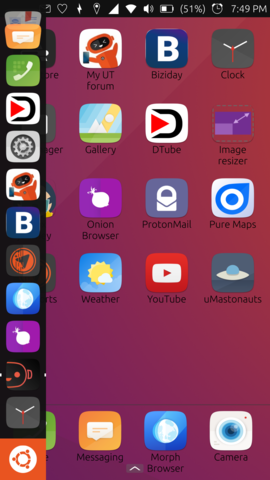
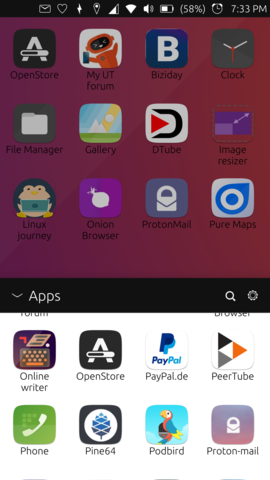
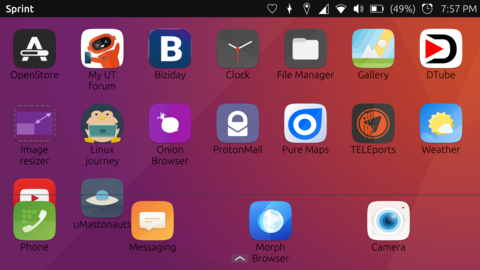
                                          You can change the aspect of the apps layout by using Sprint and it's available in OpenStore; is the icon right above the Clock app from the launcher, on the first image. Sprint behaves like any other app and you can open/close it as you wish. It will retain your desktop app layout even when closed.
                                          To add apps to your desktop, just slide up the bottom arrow, long press the wished app, choose grid, adjust the possition on the screen.
                                          It works on landscape mode as well.

                                          Note: From my tests on Nexus5, you cannot fill the bottom line with apps and you can't have more than one window.

                                          CiberSheepC 1 條回覆 最後回覆 回覆 引用 0
                                          • CiberSheepC 離線
                                            CiberSheep @訪客
                                            最後由 編輯

                                            @C0n57an71n We shouldn't promote experimental / unconfined apps.

                                            Specially if they change the use of the UI. Is better that new comers learn how to use Ubuntu Touch properly first.

                                            Another planet, another time, another universe!

                                            ? 1 條回覆 最後回覆 回覆 引用 0
                                            • ? 離線
                                              舊使用者 @CiberSheep
                                              最後由 編輯

                                              @CiberSheep Idk... It's a grey zone... Probably you are right and we should stick to the core apps since so will avoid discussions like: why that guys app is promoted and mine not, etc. I'll leave this one here, just in case a newcommer doesn't know that he has this option. Plus, I don't think UBports is responsible for apps that are not in the core so that will leave the app developer responsible for it.


                                              1 條回覆 最後回覆 回覆 引用 0
                                              • 第一個貼文
                                                最後的貼文