-
@unisuperbox sound issue not solved RC 11 on Volla.
-
@keneda What device is this morph freezing issue on? And how can I replicate it?
-
@dobey
I'm on MX4, this issue is not related to RC OTA 16, it is there since longer (maybe since i switched from canonical OTA-15 to ubp OTA-12).That's linked to some gesture i do on screen, i'll try to see exactly when it occurs and reproduce it so i can give you the exact step to replicate.
-
Ok so i "ran" some tests.
I think, maybe, issue can occur only on website that have a menu you can open in morph in right panel, from right edge of the screen.I ran on ubports site, go to a thread where you can scroll.
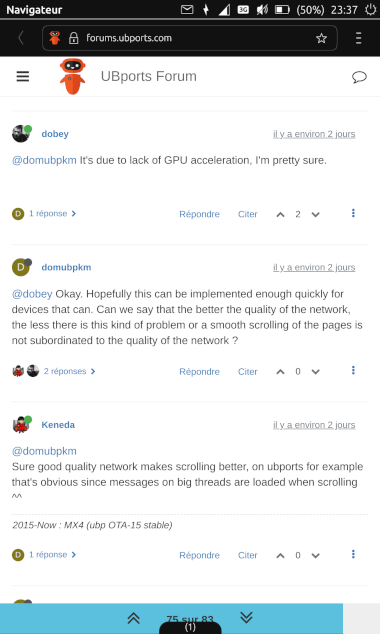
Start to pull out right panel from morph.
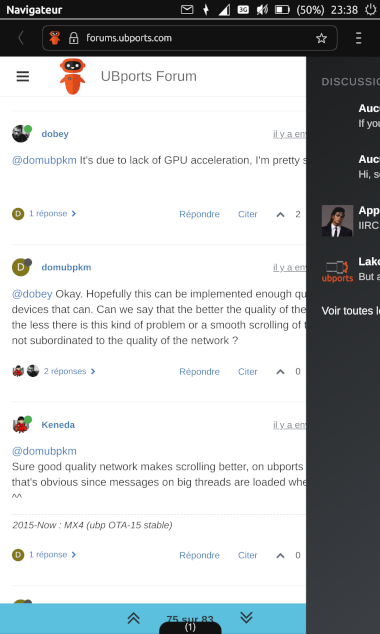
Release.
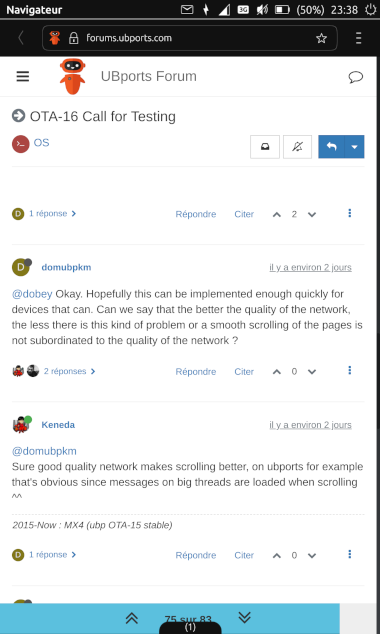
I just saw that when it's freezed, you still see a line from right edge, like if the panel was not properly back in.
Only pulling it back out make morph act normal again.
The issue doesn't occur everytime pulling right panel, never encountered issue like that with left panel.
-
@unisuperbox Rotation doesn't seem to work on OPO with RC/W10. I've checked rotation lock and restarted the device. Unfortunately, I don't know if rotation ever worked before on this device. According to device page rotation should work. Can anybody confirm?
-
@padu Yes, screen rotation works for me on OpO. And I'm on the RC channel and on W10....

-
@moem OK, thanks.
-
@moem Powering the device down and on again brought rotation back. Thanks for the prompt reply!
-
-
@padu There have always been problems with rotation on the OPO, often randomly in my experience. Restarting the phone should solve the problem when it occurs.
-
I went through the remaining QA flagged topics (~ https://github.com/orgs/ubports/projects/25), or at least those my knowledge and device allowed me to test, and added my findings for RC 2021-W10 and Nexus 5 in the according Github threads. All seems more or less fine.
Some oddities I encountered turned out to be present already in OTA-15 (System Settings freeze when resetting Launcher, Morph pop-up dialogs out of screen) and some I could not reproduce so far (my home Wifi network temporarily not showing up in, and the Telephone app freezing once at call hang-up).
I would like to share these 3 things though:
-
after upgrading from OTA-15 to 2021-W10, my GhostCloud app somehow lost my NextCloud account details (~ "No account available yet. Please add an account to continue.). Indeed, strangely my NextCloud account wasn't in my System accounts (could it be it wasn't there before?). Adding it did not change the GhostCloud message however. And, even more strangely, when moving back to OTA-15 my GhostCloud app disappeared from the Launcher, and I can't even find it again in OpenStore... I must be missing something (sleep?)...
-
When connecting my phone to an external monitor through Slimport, and then disconnecting, the indicator menu icons got stretched out (and only restarting could change this). This doesn't happen on OTA-15.
-
Switching back to the stable channel and pausing the Ubuntu Touch v13 download, I afterwards didn't manage to continue the download (pause button was greyed out and update was shown as "0 bytes of 452.0 MB"). To continue the download, deleting cache+config+data of System Settings app was needed (in UT Tweak Tool). This doesn't happen when I pause the RC 2021-W10 from within OTA-15.
-
-
- Ghostcloud was recenntly updated to use online accounts from the system instead of specific to the app so your issue is probably because of that. The new update seems to require the new framework in OTA-16 too so it won't work on OTA-15 and won't be even shown in the store because it can't handle that situation properly yet.
- That is what I experienced on my Nexus 5 too. Seems to be related to the Qt upgrade. I can't remember though if I already logged an issue

- There are many issues in the update page so I would think that's just one of them and not really a regression.
-
@kugiigi Same with me re: GhostCloud (on a Fairphone 2). The account is not recognized, by no means. But without being able to connect my ownCloud account this OS is simply useless for me...
-
@unaegeli This topic is out of date OTA-17 https://ubports.com/blog/1/post/3755 been released. I have Ghostcloud working on my OP 3.
-
@lakotaubp It still does not run as it should. I cannot define an account for GhostClowd, it will not recognize them.
And as I said: without this option, ubports is completely useless for me.
I slowly but surely will switch to iPhone where things are running properly...
-
Hi @unaegeli, thanks for your feedback. This forum thread was for OTA-16. OTA-17 is out now, and it sounds like you might need to seek help from the app's developer rather than from me.
You can find support information for most Ubuntu Touch apps on their OpenStore page: https://open-store.io/app/me.fredl.ghostcloud
Thanks again for your feedback. Since OTA-16 is long out, I'm going to lock this thread.