UBports Robot Logo UBports Forum
    • Categories
    • Recent
    • Tags
    • Popular
    • Users
    • Groups
    • Search
    • Register
    • Login

    Ubuntu Touch Programming Course

    Scheduled Pinned Locked Moved App Development
    documentationubuntu touch
    113 Posts 27 Posters 98.1k Views 12 Watching
    Loading More Posts
    • Oldest to Newest
    • Newest to Oldest
    • Most Votes
      Reply
      • Reply as topic
      Log in to reply
      This topic has been deleted. Only users with topic management privileges can see it.
      • HendriXXXH Offline
        HendriXXX
        last edited by

        Thanks @mimecar, I tried your install steps, but it still didn't work.

        BUT
        I managed to find actual cause of the problem.. it was permission problem. "unix.socket" file was owned by root. So I changed file ownership to lxd and it works.

        sami@acer1:~$ ls -la /var/lib/lxd/unix.socket
        srw-rw---- 1 root root 0 marra 13 12:37 /var/lib/lxd/unix.socket
        sami@acer1:~$ sudo chown lxd:lxd /var/lib/lxd/unix.socket
        sami@acer1:~$ ls -la /var/lib/lxd/unix.socket
        srw-rw---- 1 lxd lxd 0 marra 13 12:37 /var/lib/lxd/unix.socket
        

        Hope this helps if someone else has same problem someday.. 🙂

        1 Reply Last reply Reply Quote 1
        • mimecarM Offline
          mimecar
          last edited by

          Thank you for answering @fulvio. I hope to move on to UBports firmware today.

          @HendriXXX , I will add your answer to the course. Thank you for sharing the solution.

          The Telegram group link of the course is now fixed (previously expired from time to time).

          1 Reply Last reply Reply Quote 0
          • mimecarM Offline
            mimecar
            last edited by

            Good afternoon

            I just published the December course chapter. In this issue, @fulvio 's example application continues. Based on the temperature recorder, the possibility of displaying temperatures on a graph is added.

            The concepts are more advanced than those seen in the normal course. For this reason, it is necessary to have a solid base of QML, JavaScript and SQLite. If you have any questions you can ask in the forum.

            I was planning to publish more content. There is a translation that I have to revise and publish, but for reasons of time I will publish it in January. There are some surprises in the inkwell, but at the moment I won't give any more details.

            • https://www.gitbook.com/book/mimecar/ubuntu-touch-programming-course/details
            • https://github.com/mimecar
            1 Reply Last reply Reply Quote 0
            • mimecarM Offline
              mimecar
              last edited by mimecar

              Good afternoon.

              I've posted a new course block. While the previous blocks worked with the Ubuntu Touch SDK, native applications will be programmed in this block on the desktop. There is also a new application that I hope you will be interested in programming.
              https://mimecar.gitbooks.io/ubuntu-touch-programming-course/content/en/chapter-06.html

              This month I hope to publish more content I have pending. I will inform you about the news in this forum thread.
              https://www.gitbook.com/book/mimecar/ubuntu-touch-programming-course/details

              1 Reply Last reply Reply Quote 2
              • N Offline
                Nithin
                last edited by

                I am trying to follow the tutorial here and managed to install the new Ubuntu Sdk. When I run or build the app i get the following messages

                in Issues> error: There was a error in the device detection of desktop, no IP address was returned.
                in application output> Application failed to start: No private key file given.

                Couldnt find the solution anywhere to this. Does anyone know what is happening here.

                1 Reply Last reply Reply Quote -1
                • mimecarM Offline
                  mimecar
                  last edited by

                  Hi @Nithin,

                  On the Devices tab, have you configured the ports and the SSH connection?

                  1 Reply Last reply Reply Quote 0
                  • N Offline
                    Nithin
                    last edited by

                    HI mimecar, Thanks a lot for the help. I am running Kubuntu, and not Ubuntu. Should that be a problem?
                    This is how my devices tab looks like
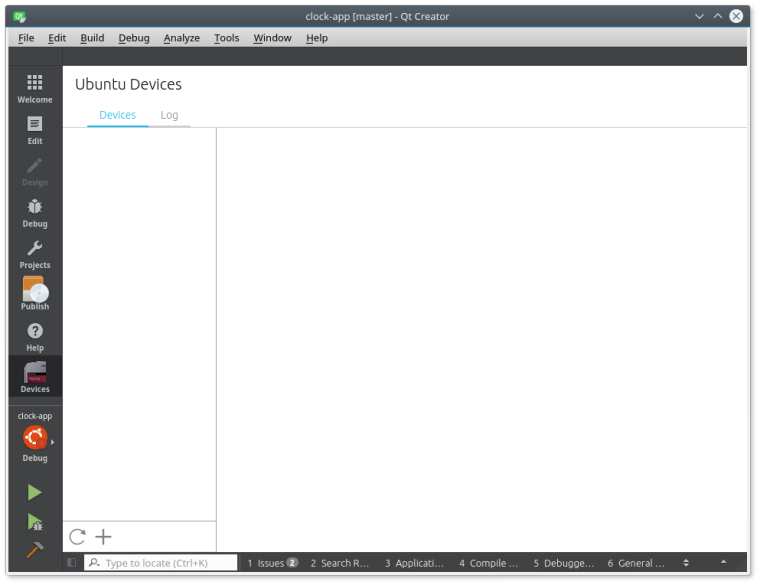
                    0_1517946583070_32c560b4-92f9-47c8-910e-88f28dc41634-image.png
                    0_1517946598491_c056bed5-84c4-4daf-b88b-cdeafff9f7db-image.png
                    Also this
                    0_1517946984981_b05f661e-2532-4a63-b344-a25578f68fbe-image.png

                    mimecarM 1 Reply Last reply Reply Quote 0
                    • mimecarM Offline
                      mimecar @Nithin
                      last edited by

                      @nithin, Have you done all the steps in the "Running the Application on a Real Device" section?
                      https://mimecar.gitbooks.io/ubuntu-touch-programming-course/content/en/chapter-02.html

                      On the screen of Ubuntu devices you should get your phone.

                      1 Reply Last reply Reply Quote 0
                      • N Offline
                        Nithin
                        last edited by Nithin

                        Not yet I was still trying to run it on my desktop. When that didn't work i didn't try running it on my Phone. The "Running on your device" section comes after that.

                        1 Reply Last reply Reply Quote 0
                        • N Offline
                          Nithin
                          last edited by Nithin

                          Tried running it on the device. after activating developer mode, the SSH notification doesn't appear at all. Also i tried installing Ubuntu sdk again. At the step

                          sudo apt-get install ubuntu-sdk

                          i get the following error

                          The following packages have unmet dependencies:
                          ubuntu-sdk : Depends: ubuntu-sdk-libs-dev but it is not going to be installed
                          E: Unable to correct problems, you have held broken packages.

                          1 Reply Last reply Reply Quote 0
                          • N Offline
                            Nithin
                            last edited by

                            Assuming Kubuntu being a possible cause for the problem, I decided to try it out on Kde Neon and Ubuntu. Kde Neon again seemed to have the same problem of not wanting to install dependencies. So then I Installed Ubuntu and tried the same on it. only to encounter some other errors, here are a few ones.

                            during

                            sudo lxd init
                            in the question on default storage back-end to use, Ubuntu wouldn't take zfs for an option for some reason.
                            so had to then use the command
                            sudo add-apt-repository ppa:ubuntu-lxc/lxd-stable
                            this doesnt work either. instead one has to use
                            sudo add-apt-repository ppa:ubuntu-lxc/stable

                            After this there was no zfs option available at all.
                            so had to use this

                            sudo apt install -t xenial-backports lxd lxd-client

                            after all of this i am back to the same problem which i faced in the first step.

                            I am trying to follow the tutorial here and managed to install the new Ubuntu Sdk. When I run or build the app i get the following messages

                            in Issues> error: There was a error in the device detection of desktop, no IP address was returned.
                            in application output> Application failed to start: No private key file given.

                            As a last step will try compiling the clock app as mentioned in the Readme.Developers.

                            T 1 Reply Last reply Reply Quote 1
                            • mimecarM Offline
                              mimecar
                              last edited by

                              Good evening.

                              I have uploaded the translation of the chapter "Formatting label and events". I'll upload the source code next week. I have another collaboration from Fulvio pending and I hope to upload it next week.
                              https://mimecar.gitbooks.io/ubuntu-touch-programming-course/content/en/chapter-04-s03.html

                              Pulsar33P 2 Replies Last reply Reply Quote 2
                              • T Offline
                                Talkless @Nithin
                                last edited by Talkless

                                @nithin said in Ubuntu Touch Programming Course:

                                After this there was no zfs option available at all.
                                so had to use this

                                sudo apt install -t xenial-backports lxd lxd-client

                                Thanks! Using lxd from xenial-backports helped to overcome that Creating the bridge failed with: not implemented issue.

                                It would be nice to have this hint in Course.

                                Volla Phone X

                                1 Reply Last reply Reply Quote 0
                                • Pulsar33P Offline
                                  Pulsar33 @mimecar
                                  last edited by

                                  @mimecar : following you.
                                  Thanks for your work !
                                  Pulsar33

                                  Aquaris BQ E5 HD UBports OTA-25 (currently testing features)
                                  Aquaris BQ E5 HD Ubuntu Edition Canonical OTA-15 (last Canonical version, daily use)
                                  Raspberry Pi 4 B - 4 GB & 8 GB with various OS and Desktops (UBports not OK)

                                  1 Reply Last reply Reply Quote 0
                                  • Pulsar33P Offline
                                    Pulsar33 @TischlerWilly
                                    last edited by Pulsar33

                                    @tischlerwilly @mimecar : Error No Storage Pool Found
                                    As said by tischlerwilly, I have the same error when installing the developper kits :

                                    No storage pool found
                                    I'm also using MINT 18(.3) 64bits. Did you find the solution, please ?
                                    Best regards
                                    Pulsar33

                                    Oooops ! See below ...

                                    Aquaris BQ E5 HD UBports OTA-25 (currently testing features)
                                    Aquaris BQ E5 HD Ubuntu Edition Canonical OTA-15 (last Canonical version, daily use)
                                    Raspberry Pi 4 B - 4 GB & 8 GB with various OS and Desktops (UBports not OK)

                                    1 Reply Last reply Reply Quote 0
                                    • Pulsar33P Offline
                                      Pulsar33
                                      last edited by

                                      @mimecar @HendriXXX @TischlerWilly :

                                      Hello,
                                      Sorry, I've discovered that when I search for something with CTRL-F in a long thread with Firefox, the process doesn't see all the content. So at the beginning of the thread, searching for "pool", I found only the posts of TischlerWilly and mimecar but no complete answer.
                                      This is why I thought there was no answer ...
                                      If I go at the end of the thread, I find the answers of HendriXXX and mimecar, so I'll give a try to the solution and report here how it goes.
                                      Have a nice day
                                      Pulsar33

                                      Aquaris BQ E5 HD UBports OTA-25 (currently testing features)
                                      Aquaris BQ E5 HD Ubuntu Edition Canonical OTA-15 (last Canonical version, daily use)
                                      Raspberry Pi 4 B - 4 GB & 8 GB with various OS and Desktops (UBports not OK)

                                      1 Reply Last reply Reply Quote 0
                                      • Pulsar33P Offline
                                        Pulsar33 @mimecar
                                        last edited by

                                        @mimecar said in Ubuntu Touch Programming Course:

                                        • sudo add-apt-repository ppa:ubuntu-lxc/lxd-stable

                                        This command returned an error. I tried this instead :

                                        • sudo add-apt-repository ppa:ubuntu-lxc/stable

                                        I hope it was the good choice. Next I followed the proposal of HendriXXX :

                                        • sudo chown lxd:lxd /var/lib/lxd/unix.socket

                                        All the process worked and my kits are created now.
                                        However, I didn't see the error "container is faulty"
                                        Proceeding to the next steps ...
                                        Best regards
                                        Pulsar33

                                        Aquaris BQ E5 HD UBports OTA-25 (currently testing features)
                                        Aquaris BQ E5 HD Ubuntu Edition Canonical OTA-15 (last Canonical version, daily use)
                                        Raspberry Pi 4 B - 4 GB & 8 GB with various OS and Desktops (UBports not OK)

                                        1 Reply Last reply Reply Quote 1
                                        • gsilvaptG Offline
                                          gsilvapt
                                          last edited by

                                          This may seem off-topic, but way a custom PPA when LXC and LXD are available in the repositories?

                                          1 Reply Last reply Reply Quote 0
                                          • Pulsar33P Offline
                                            Pulsar33 @mimecar
                                            last edited by Pulsar33

                                            @mimecar : Hello
                                            I've been able to generate Hello Word and Calculator applications.
                                            All is perfectly clear and well explained. Thank you !

                                            However, I'm facing three errors as described below. Maybe are they due to the same reason.

                                            • When I create a project, only 14.10 or 14.04 options are available :
                                              Only 14.10

                                            • If I check the kits in Compile & Execute, I see a warning about path not matching :
                                              Path not matching

                                            • Moreover, each time I launch Qt Creator, an update is proposed for each kit and errors occur.
                                              Showing details, several tranfers are not available and tasks end with errors:

                                            Ign http://archive.ubuntu.com vivid-security/restricted Translation-en
                                            Ign http://archive.ubuntu.com vivid-security/universe Translation-en
                                            Err http://archive.ubuntu.com vivid/main Sources 404 Not Found [IP: 91.189.88.161 80]
                                            Err http://archive.ubuntu.com vivid/restricted Sources 404 Not Found [IP: 91.189.88.161 80]
                                            Err http://archive.ubuntu.com vivid/universe Sources 404 Not Found [IP: 91.189.88.161 80]
                                            Err http://archive.ubuntu.com vivid/multiverse Sources 404 Not Found [IP: 91.189.88.161 80]
                                            Err http://archive.ubuntu.com vivid/main amd64 Packages 404 Not Found [IP: 91.189.88.161 80]
                                            [...]
                                            Err http://archive.ubuntu.com vivid-security/multiverse amd64 Packages 404 Not Found [IP: 91.189.88.161 80]
                                            W: Failed to fetch http://archive.ubuntu.com/ubuntu/dists/vivid/main/source/Sources 404 Not Found [IP: 91.189.88.161 80]
                                            W: Failed to fetch http://archive.ubuntu.com/ubuntu/dists/vivid/restricted/source/Sources 404 Not Found [IP: 91.189.88.161 80]
                                            W: Failed to fetch http://archive.ubuntu.com/ubuntu/dists/vivid/universe/source/Sources 404 Not Found [IP: 91.189.88.161 80]
                                            W: Failed to fetch http://archive.ubuntu.com/ubuntu/dists/vivid/multiverse/source/Sources 404 Not Found [IP: 91.189.88.161 80]
                                            [...]
                                            W: Failed to fetch http://archive.ubuntu.com/ubuntu/dists/vivid-security/multiverse/binary-amd64/Packages 404 Not Found [IP: 91.189.88.161 80]
                                            E: Some index files failed to download. They have been ignored, or old ones used instead.
                                            ---Task exited with errors, please check the output---

                                            As far as ipvoid knows, the faulty IP is :
                                            IP Address: 91.189.88.161
                                            Hostname: keeton.canonical.com
                                            Organization: Canonical Group Limited
                                            ASN: AS41231 Canonical Group Limited
                                            Continent: Europe (EU)
                                            Country: United Kingdom (GB)
                                            Latitude\Longitude: 51.5142 / -0.0931
                                            Region: England
                                            City: London

                                            It seems that this must be solved to continue learning how to create my own applications. Have you a solution please ?
                                            Have a nice day.
                                            Pulsar33

                                            Aquaris BQ E5 HD UBports OTA-25 (currently testing features)
                                            Aquaris BQ E5 HD Ubuntu Edition Canonical OTA-15 (last Canonical version, daily use)
                                            Raspberry Pi 4 B - 4 GB & 8 GB with various OS and Desktops (UBports not OK)

                                            advocatuxA 1 Reply Last reply Reply Quote 0
                                            • advocatuxA Offline
                                              advocatux @Pulsar33
                                              last edited by

                                              @pulsar33 Vivid reached End of Life in February 4, 2016. You need to replace all the archive.ubuntu.com with old-releases.ubuntu.com in your sources.list

                                              Pulsar33P 1 Reply Last reply Reply Quote 1

                                              Hello! It looks like you're interested in this conversation, but you don't have an account yet.

                                              Getting fed up of having to scroll through the same posts each visit? When you register for an account, you'll always come back to exactly where you were before, and choose to be notified of new replies (either via email, or push notification). You'll also be able to save bookmarks and upvote posts to show your appreciation to other community members.

                                              With your input, this post could be even better 💗

                                              Register Login
                                              • First post
                                                Last post