UBports Robot Logo UBports Forum
    • Categories
    • Recent
    • Tags
    • Popular
    • Users
    • Groups
    • Search
    • Register
    • Login

    Dekko 2 account settings

    Scheduled Pinned Locked Moved Support
    27 Posts 5 Posters 7.8k Views 4 Watching
    Loading More Posts
    • Oldest to Newest
    • Newest to Oldest
    • Most Votes
      Reply
      • Reply as topic
      Log in to reply
      This topic has been deleted. Only users with topic management privileges can see it.
      • G Offline
        gdegrez @guru
        last edited by

        @guru Well, I could find the file for my first identity, but that includes no info on the outgoing and ingoing mail servers. And I couldn't find the files for the 2 other identities.

        No way to set up my account on the exchange server. All attemps unsuccesful 😞

        BQ Aquaris M10 FHD

        G 1 Reply Last reply Reply Quote 0
        • G Offline
          guru @gdegrez
          last edited by

          I spent some time glancing through the sources but could not find the way the account setup is written.

          It's a pitty that the original developer can not help for whatever reason and no one else is giving a talk or a workshop, for example via webEx, to get others to speed.

          LakotaubpL 1 Reply Last reply Reply Quote 0
          • LakotaubpL Offline
            Lakotaubp @guru
            last edited by

            @guru Maybe you missed this but plans are underway for Dekko2 with a hackathon next weekend https://forums.ubports.com/topic/2645/dekko2-hackathon-one-week-to-go

            G 1 Reply Last reply Reply Quote 1
            • G Offline
              guru @Lakotaubp
              last edited by

              I've heard about it , but did not see any agenda or content. Will this be recorded or live streamed. My problem is, that I have had already compromised my participation in a Ramadama in an association and would need (for me) good reasons to cancel this.

              1 Reply Last reply Reply Quote 0
              • D Offline
                domubpkm
                last edited by domubpkm

                For info, seen on gitlab, we can see dekko 2 issues which should be addressed during hackaton :
                For example :
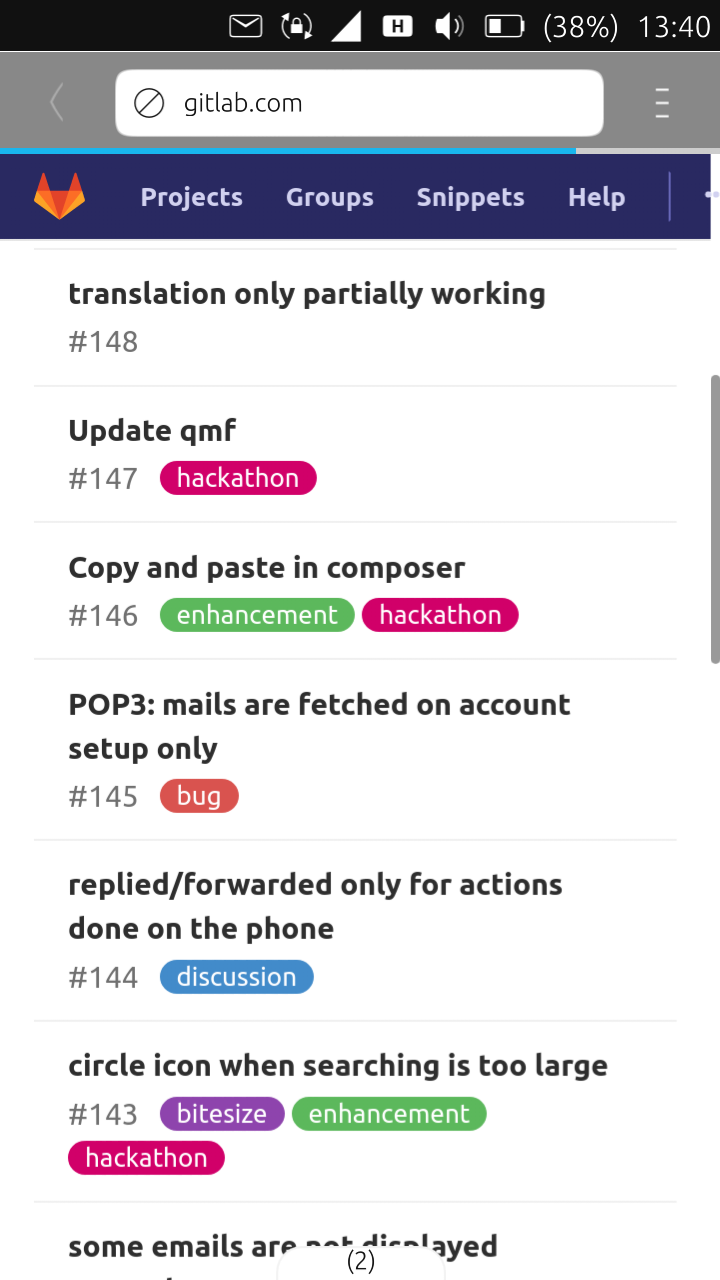
                screenshot20190427_134045182.png

                1 Reply Last reply Reply Quote 0
                • H Offline
                  hummlbach
                  last edited by

                  Please keep in mind: that doesn't mean all of them will be fixed. Just created a board and suggested some issues. 'Even if we only got a handful finished, I would be happy.' (thx Nicholas for lenting me your words ^^)

                  G 1 Reply Last reply Reply Quote 0
                  • G Offline
                    guru @hummlbach
                    last edited by

                    Apart of fixing certain issues, what IMHO is most necessary is an architecture overview of the dekko processes/threads (as a schema) and of the source tree where's what piece of code. Is this planned?

                    1 Reply Last reply Reply Quote 0
                    • G Offline
                      gdegrez @guru
                      last edited by

                      @guru
                      With Thunderbird on Ubuntu 16.04LTS, there's an add-on to connect to MS Exchange servers, with which I could connect successfully. Now, I see that the server ID includes the ews path, of the form exchange.company.com/ews/something.aswx
                      I didn't try yet with Dekko2, do you think that might work?

                      BQ Aquaris M10 FHD

                      G 1 Reply Last reply Reply Quote 0
                      • G Offline
                        guru @gdegrez
                        last edited by

                        No idea. Is this something via evolution backend? I do connect to my Exchange mailbox via IMAP and SMTP which works fine, appart of calendar invitations. Sorry, but I'm not a M$ expert.

                        1 Reply Last reply Reply Quote 0
                        • G Offline
                          gdegrez @guru
                          last edited by

                          @guru said in Dekko 2 account settings:

                          I connect to Microsofts servers via IMAP and SMTP to read my mails of my company Exchange server. The connect details are:

                          imaps://username@company.com@pod51010.outlook.com/INBOX
                          smtp://username@company.com@pod51010.outlook.com:587
                          

                          Hi, I come back to your previous message. Are you connecting to the Exchange server with Dekko2, or with the web browser? If it is with Dekko2, I guess that the ingoing mail settings should be:
                          Server name: pod51010.outlook.com
                          Username: username@company.com
                          Port: (443 ?)
                          Security: SSL/TLS ?

                          And, as far as the outgoing mail settings are concerned,
                          Server name: pod51010.outlook.com
                          Username: username@company.com
                          Port: 587
                          Security: SSL/TLS

                          Is this correct?

                          BQ Aquaris M10 FHD

                          G 1 Reply Last reply Reply Quote 0
                          • G Offline
                            guru @gdegrez
                            last edited by

                            @gdegrez said in Dekko 2 account settings:
                            Incomming:

                            Server name: pod51010.outlook.com
                            ok
                            Username: username@company.com
                            ok
                            Port: (443 ?)
                            993
                            Security: SSL/TLS ?
                            Force encryption (SSL/TLS)
                            Authentication PLAIN

                            Outgoing

                            Server name: pod51010.outlook.com
                            ok
                            Username: username@company.com
                            ok
                            Port: 587
                            ok
                            Security: SSL/TLS
                            Encryption: Use encryption (STARTTLS)
                            Authentication: LOGIN
                            Autheticate from server capabilities: ok
                            Allow untrusted certificates: ok

                            HIH

                            G G 2 Replies Last reply Reply Quote 0
                            • G Offline
                              gdegrez @guru
                              last edited by

                              @guru
                              Well, I enventually succeeded to connect to the account (although I had tried the same config. before without success).
                              But I just get the list of messages but the messages are empty (except for attachments) 😞

                              BQ Aquaris M10 FHD

                              1 Reply Last reply Reply Quote 0
                              • G Offline
                                guru
                                last edited by

                                What have you configured in Display Settings?

                                1 Reply Last reply Reply Quote 0
                                • G Offline
                                  guru @guru
                                  last edited by

                                  @guru said in Dekko 2 account settings:

                                  @gdegrez said in Dekko 2 account settings:
                                  Incomming:

                                  Server name: pod51010.outlook.com
                                  ok
                                  Username: username@company.com
                                  ok
                                  Port: (443 ?)
                                  993
                                  Security: SSL/TLS ?
                                  Force encryption (SSL/TLS)
                                  Authentication PLAIN

                                  Outgoing

                                  Server name: pod51010.outlook.com
                                  ok
                                  Username: username@company.com
                                  ok
                                  Port: 587
                                  ok
                                  Security: SSL/TLS
                                  Encryption: Use encryption (STARTTLS)
                                  Authentication: LOGIN
                                  Autheticate from server capabilities: ok
                                  Allow untrusted certificates: ok

                                  HIH

                                  The same config works in my BQ M10FHD with the old Dekko.

                                  1 Reply Last reply Reply Quote 0

                                  Hello! It looks like you're interested in this conversation, but you don't have an account yet.

                                  Getting fed up of having to scroll through the same posts each visit? When you register for an account, you'll always come back to exactly where you were before, and choose to be notified of new replies (either via email, or push notification). You'll also be able to save bookmarks and upvote posts to show your appreciation to other community members.

                                  With your input, this post could be even better 💗

                                  Register Login
                                  • First post
                                    Last post