As far as I know, Waydroid is simply not ready yet to run on the Plinius. Just be patient a bit more, it will come with further updates.
J
Offline
Posts
-
RE: I need someone to help me out.
-
Open Webber shortcuts with Qt6-Morph
I am trying to open Webber shortcuts with Qt6-Morph by editing the Exec line of the .desktop file.
I created a Webber short cut to Bluesky which can't be opened by classic Morph.
The Exec part is
Exec=aa-exec-click -p bsky-app-102d5057422da177.webber_bsky-app-102d5057422da177_1.0.0 -- webapp-container --webappUrlPatterns='https?://bsky.app/*,https?://*.bsky.app/*' --store-session-cookies --enable-media-hub-audio --enable-back-forward https://bsky.app/feedsThe Exec part of Qt6 Morph itself is
Exec=aa-exec-click -p morph-browser-qt6.ubports_morph-browser_1.99.4 -- wrapper ./morph-browser %uWhat needs to be replaced in the upper Exec with what from the lower Exec to make this work?
-
RE: ubuntu touch 24.04 on volla tablet with keyboard:mice buttons not working
Confirming.
Before the update, these things worked fine. Is there a way to roll back?
-
RE: How to manage "Places"
"Places" case solved. What I obeserved in short:
At startup, "Places" is created and provides shortcuts to standard folders (immutable): Home, Documents, Downloads, Music, Pictures, Video, Network and Root folder. These folders can't be deleted from there (no trash can symbol).
This list is expandable with any folder. These are removable, too (trash can symbol on swipe right)."Music" folder was deleted (accidently, I didn't realize at first). "Places" tried to provide a link to this non-existent folder which ended up with a ".".
"Music" folder was recreated and appeared at the bottom of the "Places" list while "." still existed.
After a reboot, "Places" got organized again (or rebuild by scratch). "Music" folder could be referenced again and "Places" was rebuilt as intensioned and looks normal again.
No "." for a folder that could not be found.Sorry for causing this confusion and any inconvenience. It happens, when you're chronically overworked.
-
RE: How to manage "Places"
@gpatel-fr both not available.
Swiping right is possible, but the trash can symbol does not appear. Just nothing happens.
Honestly the Add-button you screenshotted just was not there...
Apparently I had deleted the Music-folder by accident which left a "." in Places.
In the meanwhile the Add-Button reappeared (I have no idea why) and I was able to re-create and re-add the Music folder to Places. But it's at the bottom and the "." is still there.
I just need to tidy that up, now...
-
How to manage "Places"
Hello,
device and OS first: Volla Phone X on UT 24.04-1.3 stable.
I probably have a simple little problem (I had this before upgrading the OS so it's not due to the OS version):
When tapping on the menu in the upper left in the file manager you get to "Places". I've got a file there (instead of the "Music"-folder) I want to remove since it doesn't belong there. How do I get rid of that file that is unfortunately named "."? I can't see any sub-menu or similar to do so.Earlier, after e.g. a folder has been selected, there was a button to add it to "Places" to get faster access. I still see this on my other device. This button also has gone on my Volla X. Therefore, I can't add "Music" to "Places" again. How could I correct this? Should I reinstall the file manager? How to do so, since it's a pre-installed app?
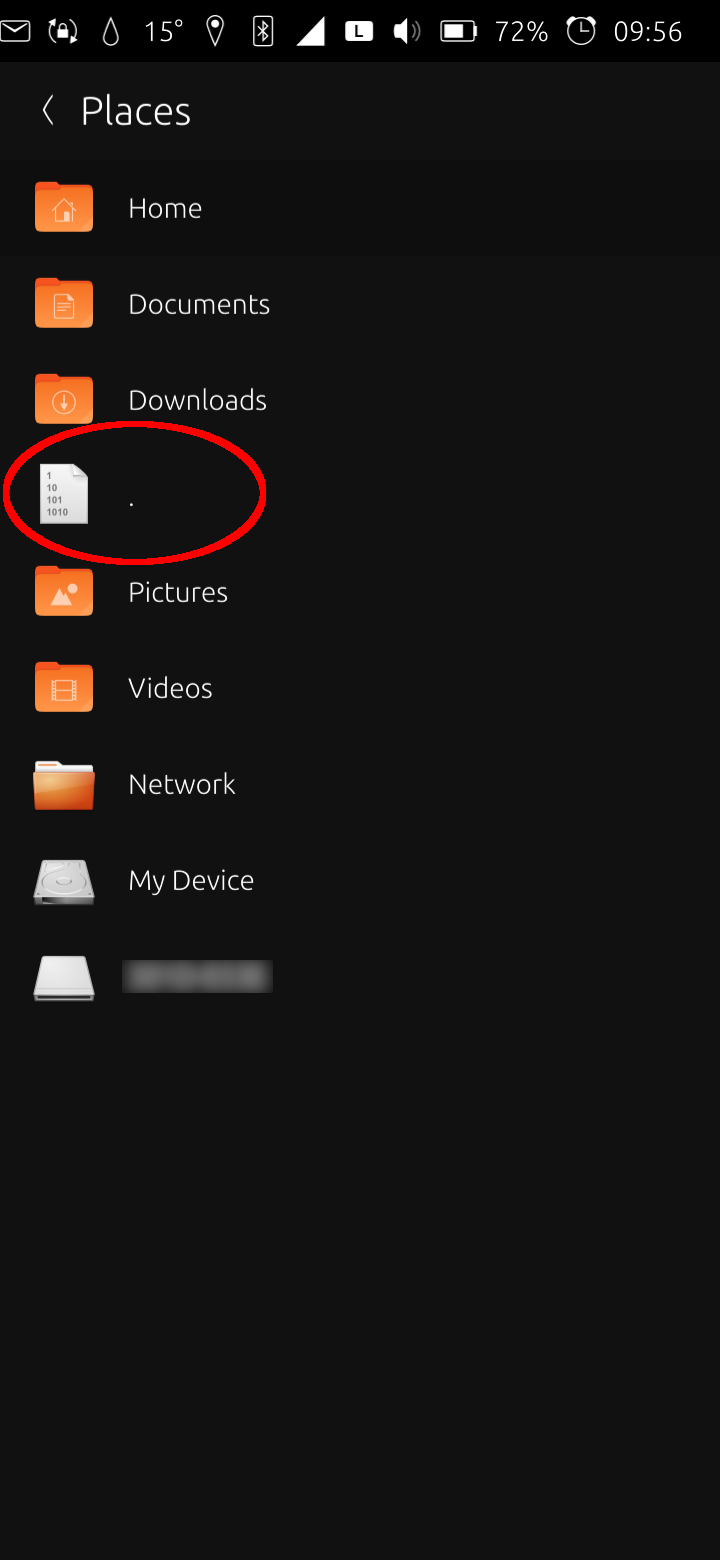
Thank you!
-
RE: Bug: data mobile interface looses ip
I just read through this post and want to add that lately, I have that exact issue on my Volla X (24.04-1.2 stable).
I'll test the script and report back.In my case this goes hand in hand with not being able to receive calls. I can initiate calls, but it takes around a minute until a call is established (until the ring sound).
-
RE: Webber - Bluesky as web app not working
@Moem I mixed that up, sorry. Bluesky was meant. Post is corrected.
-
RE: Webber - Bluesky as web app not working
@gpatel-fr Alright, thanks, that's umderstandable. I'll wait then, till Morph Qt6 becomes standard.
-
Webber - Bluesky as web app not working
Volla Phone X - UT 24.04-1.2 stable
I am trying to create a Bluesky web app with Webber. URL is simply https://bsky.app/.
The app is created but after launching it it stays at the logo/icon screen forever.I had never issues with Webber, yet. It created web apps from pretty much every URL...
Is there something special about this URL? Is it my system? Maybe someone else tried this and has a hiint...
-
RE: ..i decided im going to build my own UT phone
You could catch on here: https://github.com/SPIRIT-org/SPIRIT
-
RE: Snap apps - Scaling
@gpatel-fr I feared you'd say that. But I thought I ask anyway. Nevertheless, thank you so much! Yet, that helped me a lot.
-
RE: Snap apps - Scaling
@gpatel-fr The typo seems to have resulted from typing too quickly when I wrote this.
$ GDK_DPI_SCALE=2 snap run gimpdid solve half of the problem. All fonts are accordingly bigger and very good to read. Thank you for this!
However, all Buttons with their symbols on them (e.g. tool selection, layer selection,...) stay tiny.
Is there way to tweak this, too?Maybe the terminal output is any help?
$ snap run gimp (gimp:5667): Gdk-WARNING **: 17:13:55.133: Failed to read portal settings: GDBus.Error:org.freedesktop.DBus.Error.ServiceUnknown: The name org.freedesktop.portal.Desktop was not provided by any .service files (gimp:5667): dbind-WARNING **: 17:13:55.167: AT-SPI: Error retrieving accessibility bus address: org.freedesktop.DBus.Error.ServiceUnknown: The name org.a11y.Bus was not provided by any .service files set device 'Wayland Touch' to mode: disabled set device 'Wayland Pointer' to mode: disabled (gimp:5667): IBUS-WARNING **: 17:13:59.655: Failed to mkdir /home/phablet/snap/gimp/557/.config/ibus/bus: Not a directory (gimp:5667): GLib-GIO-WARNING **: 17:13:59.662: Error creating IO channel for /proc/self/mountinfo: Permission denied (g-file-error-quark, 2) (gimp:5667): Gdk-WARNING **: 17:14:00.405: Server is missing xdg_foreign support gimp_widget_set_handle_on_mapped: gdk_wayland_window_export_handle() failed. It will not be possible to set windows in other processes as transient to this display shell. (gimp:5667): Gdk-WARNING **: 17:14:00.406: Server is missing xdg_foreign support gimp_widget_set_handle_on_mapped: gdk_wayland_window_export_handle() failed. It will not be possible to set windows in other processes as transient to this display shell. (gimp:5667): Gdk-CRITICAL **: 17:14:06.972: gdk_wayland_window_unexport_handle: assertion 'impl->display_server.xdg_exported_v2 || impl->display_server.xdg_exported_v1' failed -
Snap apps - Scaling
Hi,
I'm running UT (24.04-1.2) natively on a Volla Tablet (no dual boot).
I installed some snap apps like Gimp and LibreOffice. They work great with one exception:The workspace scales to a normal size and works perfectly. But the menu bar as well as all menus around the work area (where you choose e.g. tools in Gimp or fonts or text styling in LibreOffice) are tiny and it's hard to work with.
I tried different UI settings from within the apps (like screen resolution in DPI from Gimp settings) without any effect.
I tried to tweak that with UT Tweak Tool without success.
I tried to run these apps from terminal with settings like
$ GDK_SCALE=2 GDK_DPI_SCCALE=0.75 snap run gimpand
$ snap connect gimp:gtk-3-themes :gtk-3-themesAlso no success.
Is there any way to tweak this? Thank you!!!
-
Noble bluetooth issues
I have experienced issues on my Quintus:
The bluetooth gui does not see my headsets when searching for devices. But I can directly pair them using bluetoothctl and their hardware identifier.
After having done this, they seem to stay saved in the list of paired devices, since they auto connect from then on.
Yet, the quintus does never show the headsets in the GUI (one are Volla buds, the other is no name).
The Pinetime in contrary works without issues and is always visible in the list.I can't remember having these issues before which makes me think that is connected to Noble.
My phone is running UT natively, no dual boot.Maybe this can be added to observations made on Noble that might be addresed at some point.
-
Noble bluetooth issues
I have experienced issues on my Volla Phone:
Bluetooth works normal at first. But when no audio is streamed for some time (e.g. your local playlist is over), the phone turns bluetooth off. When I turn it back on, I can't connect to the headsets again (tried with Volla Buds and a no name headset). I have to reboot the device to make bluetooth work again.
It looks like the GUI switch indicates bluetooth is enabled but I think it's not.I can't remember having these issues before. Therefore I think it's a Noble issue.
My phone is running UT natively, no dual boot.Maybe this can be added to observations made on Noble that might be addresed at some point.
-
RE: Ubuntu touch auf volla tablet
Libertine funktioniert meines Wissens auf Noble nicht zwingend richtig. Du hast nativ Snap Support, also Anwendungen wie Libre Office, Gimp usw. kannst du direkt als Snap installieren.
Die Menüs sind sehr klein, aber die Arbeitsbereiche skalieren normal, man kann ganz gut damit arbeiten.
Soviel im Moment von meiner Seite...EDIT: Dual Boot funktioniert meines Wissens nach nur mit Volla OS, von dem aus man mit dem Volla Boot Manager UT als Zweitsystem einrichten kann, nicht umgekehrt
-
RE: VP22 Upgrade from 24.04-1.0 to 24.04-1.1 failed
For me it also feels more performant. That's great!
A big THANK YOU to the dev team!
-
RE: VP22 Upgrade from 24.04-1.0 to 24.04-1.1 failed
@pparent said in VP22 Upgrade from 24.04-1.0 to 24.04-1.1 failed:
Does that work without having developer options enabled?
Normally yes, it's unrelated if we're talking about Ubuntu Touch developer mode.
Have you tried to boot with long push on "power" and "volume up" buttons at the same time, until you see a "Recovery Menu", then select the first option "Boot recovery", then connect it in USB to the installer? For me it is detected by the installer only this way.
Thank's for reporting this bug, I'm honestly a bit cautious about upgrading my own VollaPhone 22, since there were similar reports in pre-release, and apparently still now. Anyone can report it the upgrade worked for them?
Thank you so much, that worked.
The installer recognised the phone as Volla Phone 22 (mimameid) again, immediatly. Flashing went smooth, without problems and Yumi was normal sized again during installation (I don't know if that matters or is of any interest).
My Volla Phone 22 is on 24.04-1.1 stable now, too. -
VP22 Upgrade from 24.04-1.0 to 24.04-1.1 failed
While this went smooth on my Volla Phone and Volla Phone X, the upgrade from 24.04-1.0 to 24.04-1.1 failed on my Volla Phone 22.
I'm on stable channel and startet the upgrade process from the updater in the settings.
It rebooted and the normal update applying screen showed (Yumi was tiny compared to the other phones).
It rebooted again and got stuck at the Volla logo. After an hour I turned it off because it got pretty warm.
Now, after turning it on, I see the Volla logo and then the screen starts flickering and nothing else happens.What am I supposed to do now?
I had issues with this phone before, Volla support helped me to solve. Since then, the installer doesn't recognise the phone as Volla Phone 22 any more.
Nevertheless, that was in 16.04 times and all upgrades (to 20.04, to 24.04 and those in between) went yet smooth since then...
So in case of using the installer I have to choose it manually...Should I try the installer?
Does that work without having developer options enabled?Thanks in advance!