I found a newer tool named SP Flsh Tool here:
https://spflashtools.com/
which is running.
I'm just trying to figure out how it works.
I found a newer tool named SP Flsh Tool here:
https://spflashtools.com/
which is running.
I'm just trying to figure out how it works.
Trying to flash Android 11 stock firmware following the instructions on https://devices.ubuntu-touch.io/device/amar-row-wifi/release/noble/
However, SP Flash Tool for Linux (v. 5.1916 = latest) is complaining
:./flash_tool: error while loading shared libraries: libpng12.so.0: cannot open shared object file: No such file or directory
All I can find on my sytem is
libpng16.so.16 -> libpng16.so.16.43.0
Is there a way to flash A11 manually? Or any workaround?
TIA!
I had another try after uninstalling and reinstalling uAdBlockNG and creating symlinks like this:
root@ubuntu-phablet:/etc# ls -l hosts*
lrwxrwxrwx 1 root root 29 Feb 26 16:49 hosts -> /home/phablet/Downloads/hosts
lrwxrwxrwx 1 root root 39 Feb 26 16:07 hosts.blocklist -> /home/phablet/Downloads/hosts.blocklist
[...]
and it worked out fine! I must have made a mistake before when creating the symlinks.
Thanks for your help!
@mihael
Thanks for that tip. Unfortunately it didn't work out.
Logs read:
100% 5,90M=21s
[25.02.26 23:17] 2026-02-25 23:17:43 (1,90 MB/s) - ‘/etc/hosts.blocklist’ saved [41546183/41546183]
[25.02.26 23:17] pam_unix(sudo:session): session closed for user root
[25.02.26 23:17] qml: next cp /etc/hosts /etc/hosts.without-adblock
[25.02.26 23:17] phablet : PWD=/opt/click.ubuntu.com/uadblockng.liohmoeller/1.1 ; USER=root ; COMMAND=/usr/bin/cp /etc/hosts /etc/hosts.without-adblock
[25.02.26 23:17] pam_unix(sudo:session): session opened for user root(uid=0) by phablet(uid=32011)
[25.02.26 23:17] pam_unix(sudo:session): session closed for user root
[25.02.26 23:17] qml: next cp /etc/hosts.blocklist /etc/hosts
[25.02.26 23:17] phablet : PWD=/opt/click.ubuntu.com/uadblockng.liohmoeller/1.1 ; USER=root ; COMMAND=/usr/bin/cp /etc/hosts.blocklist /etc/hosts
[25.02.26 23:17] pam_unix(sudo:session): session opened for user root(uid=0) by phablet(uid=32011)
[25.02.26 23:17] cp: error writing '/etc/hosts': No space left on device
[25.02.26 23:17] pam_unix(sudo:session): session closed for user root
[...]
I even added two symlinks for /etc/hosts
and /etc/hosts.without-adblock targeting /home/phablet/Downloads. No success, however.
Too bad. I consider it a PITA on the small display of my device.
Thanks for your replies anyway.
Mozilla Firefox 148.0 on my Linux PC.
@gpatel-fr
Even creating an issue is impossible:
Error
Unable to create issue.
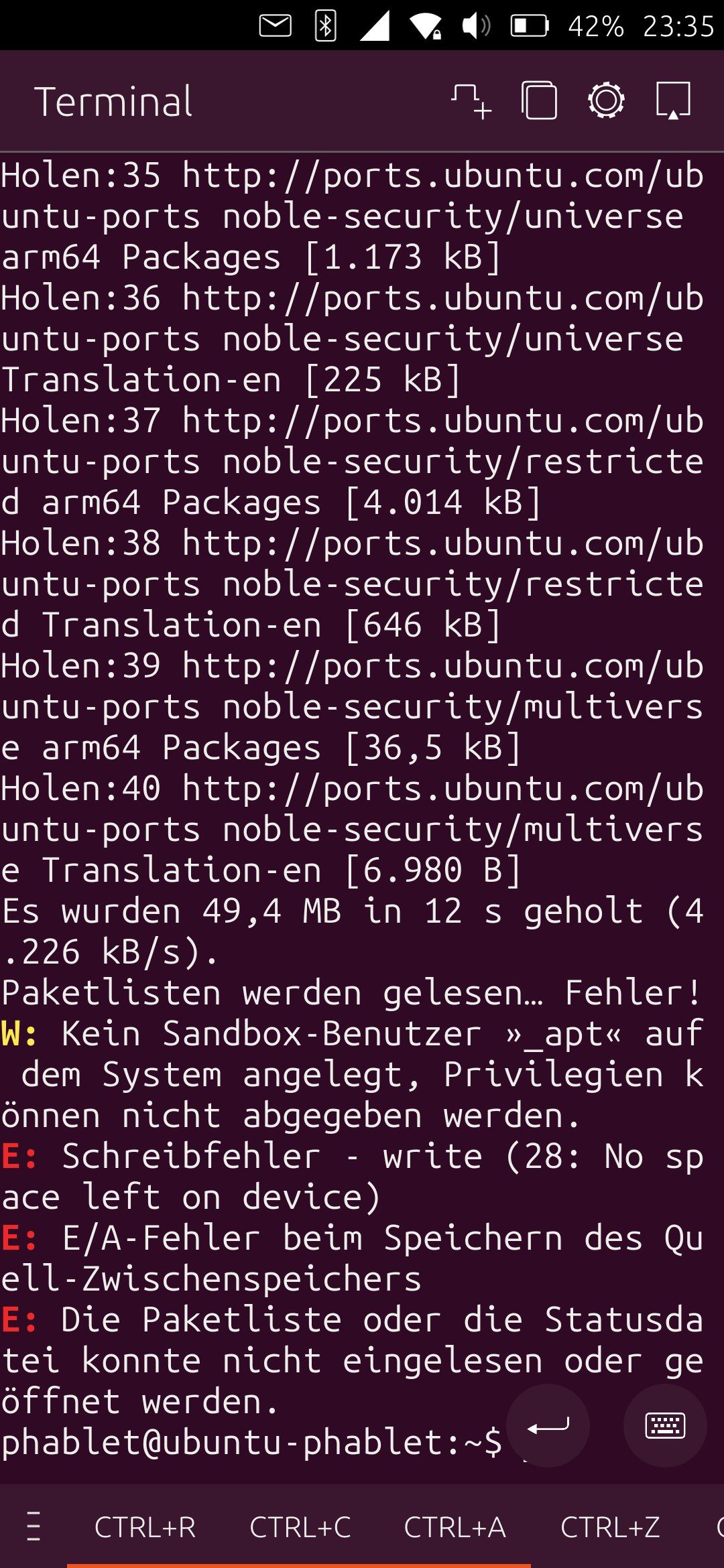
Ever since upgrading to 24.04:
When enabling the app it gives the message "Error".
The last lines of the log read:
25.02.26 10:25] Cannot write to ‘/etc/hosts.blocklist’ (Success).
[25.02.26 10:25] pam_unix(sudo:session): session closed for user root
[25.02.26 10:25] file:///opt/click.ubuntu.com/uadblockng.liohmoeller/1.1/share/qml/uAdBlockNG/Main.qml:146:13: QML Column: Cannot specify top, bottom, verticalCenter, fill or centerIn anchors for items inside Column. Column will not function.
Same issue is reported on OpenStore but on https://github.com/LiohMoeller/uAdBlockNG/issues there is no issues mentioned.
Am I missing something? Is there a workaround?
TIA!
@MrT10001
Thanks for your response.
It's a bit confusing that the ubports installer suggests to install 24.04.
Did you happen to check ubuntu_updater.log?
After installing 24.04 via ubports installer the file Recovery/Advanced/View logs/cache/ubuntu_updater.log ends:
Applying update: device-4399...298.tar.xz
tar: write error: No space left on device
Is that a known problem? Is there any workaround?
Thanks in advance!
@MrT10001
Somehow I saw your post after posting mine. Didn't want to patronise you.
@floxicus
it says "Do fastboot oem unlock-go".
So I would do
fastboot oem unlock-go
Or
fastboot flashing lock_critical
HTH
@MrT10001
Found it. It's the Sapot browser - don't know why.
Every other app gives sufficient sound, including the Morph browser.
"Man findet es immer da, wo man zuletzt sucht" - German saying, meaning "you always find it where you are looking last" (deepl).
Thanks again.
@MrT10001
I encountered the same problem with ear buds - loud on my x605f but low on the x306f. Therefore it's not about the speakers.
I will reinstall UT and try again.
Thanks again!
@MrT10001
Thanks for your reply.
Volume is clearly lower than X605F.
Volume buttons seem to work fine. They increase to a (not sufficient) maximum an decrease to zero. The blue indicator on the display works fine, too.
No problems with the Power button.
Has been like this from the beginning. Updates did not help.
Hello everyone, the volume is very low. uVolMan does not help. Any ideas?
TIA
I will mark this as "solved" though the "problem" wasn't a problem and didn't need to be solved. Sorry for the fuss.
@Luksus
Ah I see - the error occurs on every device. I wasn't aware of that. Thanks!
After installing UT using the ubports-installer Waydroid won't start up. It's stuck in the splash screen (blue circle rotating).
Logs give the above message.
It was the same problem before when I installed manually.
https://docs.waydro.id/debugging/troubleshooting says "Install pyclip". But pyclip is not provided bei UT (according to apt search pyclip).
I'm wondering if the problem is actually Waydroid related because I haven't encountered this on any of my devices so far.
Or is there some kind of x306f/Waydroid incompatibility?
Any ideas anyone?
TIA