I wanna go home
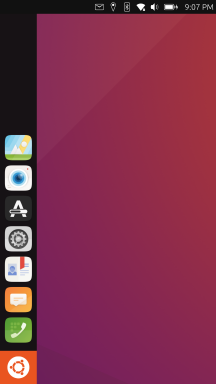
-
@dobey said in I wanna go home:
Simply because you personally don't use something, or that you aren't aware of a capability of the OS, doesn't mean others use it or it doesn't or shouldn't exist.
You can apply this to home/desktop like feature on uTouch

-
@Keneda If we had infinite teams of infinite monkeys working on the project, then we could have every possible bit be configurable to satisfy every infinite person.
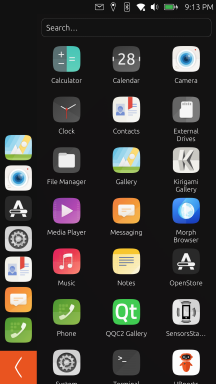
IMO, there are much more important problems to solve with UT, to make it usable. Also, the goal of UT isn't to have configurable things for every possibility and every user. It's to make informed and opinionated decisions on the design aspect to build something different and better suited for converged usage. It's understandable that people find something new and don't know how to react. But posting screenshots of GNOME (which by the way, does not have a home screen, and in fact no longer has icons on background), random Android manufacturer gesture configs, or random things from behance posts, isn't the best way to get a point across, nor will it solve anything, especially when there is no clear connection between said screenshots and the text in the post.
That means every pet feature that anyone wants to see may not be suitable, and may end up not being included, because it conflicts with those design goals.
-
Mobile UI isn't an easy problem to solve, which is why you're seeing some many - often conflicting - positions and requests. I have only been involved since the covid outbreak, and was able to daily-drive both options. My preference: the drawer. That said, there are positives from the other option as well.
I do believe, however, that my mobile phone shouldn't necessarily have the same interface and interaction as my desktop.
-
Hello
Just a simple remainder :
Feature Request : slide-show background #1359
Best Regards
Pulsar33 -
Here is a new home to experiment, thanks to Pavel Prosto.
https://open-store.io/app/uhome.pavelprosto -
 A AppLee referenced this topic on
-
When these "modern" OS-es start, the clean desktop is shown,
meaning the user knows it is there, and for some reason the starting state is off limits if there is one or more programs open.elementaryOS also does this.
Even the keyboard shortcut to show the desktop is removed.
The section isn't even there anymore.Would be interesting to see what kind of problems people think they are solving by implementing this.
It is 100% against convention of anyone touching a computer or device the last 30 years.
The upside seems to be not accidentally minimizing something you are working on.It is also not how the system the user is familiar with and is using has functioned in the past. For my own sake I will say this makes me think of something I know I can use, into something where I think I can't figure it out and no change was needed.
And no, it just isn't possible anymore. No explanation.The mind compartmentalizes information in structural hierarchies, and the spatial awareness to keep track of this is something you can do with cognition, but the ability to look at a clean slate actually has function.
It is the closest thing you get to seeing where your files are by default.Yes, that place someone decided no files are to be shown,
before they decided file hierarchy is something the user shouldn't do.There is a serenity to having just a clean slate to go back to.
It is as familiar, and not having what you are doing visible on the screen is useful.It also has the benefit of vested interest and familiarity in that the user often changes the desktop. Thus making it their machine.
-
@UniSuperBox i know this is super old, but will a double tap on the ubuntu logo not suffice for going to background? its an action that exists both on desktop and mobile.
i do agree that even in 2026 the background doesn't have anything useful rn.
-
@ChromiumOS-Guy I think this is a good idea. I currently have showdesktop pinned to the menu bar. It being part of the OS would be great.
I'm open to it being some other action aswell tho. I was thinking a full swipe from left to right while the app menu was open, so the opposite to opening the taskswitcher?
Having used OS's both mobile and desktop that allow to go to the desktop, Ubuntu Touch feels very odd without it. -
@sixwheeledbeast a swipe from left to right opens the drawer, so i dont think making an action similar to it good (it also is the current action that happens when you do that) lomiri already has a lot of swipes, you swipe to go to drawer you swipe to close apps you swipe to switch to the app that you've used last (besides active app) and you swipe for the indicators.
thats why i think double tap on logo is good, you're not likely to do it by accident, tapping the logo while drawer is open already closes it, and this action in desktop mode should just toggle minimize to all windows.
either way this action cannot be a gesture because all direction are saturated with one or more gestures adding more we will be asking the user to be precise with finger movements, this means training muscle memory and paying attention. and that is a finite resource before the user snaps and quits on you this resource should be spent only when necessary.
-
Putting some widgets on the desktop would be cool. Even more cool if they are editable. Something similar to the ut launcher app, but simpler, would enhance the user experience, I think.
-
@projectmoon was thinking the same.
-
a swipe up in the switcher works smooth and efficient for me using ambot.
-
@nbdynl I use Ambot as well.
-
@nbdynl That sounds great.
Does it also work with no apps open tho?
Is this a MariKit or Lomiri Plus option? -
@sixwheeledbeast uh yes i guess, but you are already home then arent you

i think its the plus kit, not the basic one, and takes a littlebbit of time to setup correctly
-
Having a way to have no sidebar like the showdesktop app, maybe I see "home" differently. A blank space with only the top bar to distract me

-
@sixwheeledbeast
ahh i get what yoy mean, yes
that is possible in ambots settings, -
I think the whole UI has to be redesigned, but not in the same way as Android or IOS. Instead, a desktop OS approach just like on Linux, but compressed in a mobile format. That way the phone can be intuitive both when used as a phone and while docked.
So how to do that? Easy:
1. Make the dock behave as a desktop dock.
Instead of pinning apps there, make it show apps that are opened, just like on a desktop. That way you lose the whole "swipe up to check your open apps" thing while remaining intuitive to use. That doesn't necessarily mean you can't pin some apps there though, but it should be optional - just like on a desktop.
That way, clicking an app on the dock can maximize/minimize.2. Use the Ubuntu button as a start menu/app drawer button.
You click it and the app menu opens. It can be separated in sections depending on the type of apps too. Pretty much the same as on Linux Mint. Clicking the button again closes the "start menu".
3. Allow adding apps to the home screen, like on a regular desktop.
I don't know why this isn't a thing. This compensates the changes in the dock. Allow grouping apps in folders too, etc.
4. Move the status bar to the bottom of the screen.
That way you solve the problem with camera cutouts and align the concept well with the gestures I suggest.
4. Gestures:
- Left swipe to show dock in an app is a great choice.
- Right swipe is now free, because the dock shows all processes instead. It can be used to return to the desktop instead. Long swipe can kill the app.
- Down swipe can be used to open notifications.
- Up swipe can extend the status bar and extend into a control panel - WIFI, Bluetooth etc.
This solves your home screen dilemma and is a good way to improve the UI of the OS.
-
-
The Launcher/dock already works like that except minimizing by clicking on the foreground app
-
Not exactly sure if I understand this correctly but I think it does work like that already too. Which is actually used very rarely since you can just long swipe
-
This is something that may come in the future or maybe never. I think the higher priority is to improve the features in the app drawer.
-
I've never seen a phone shell that has a bottom status bar
I don't think that's a good idea and it doesn't really solve anything since the shell still needs to adjust things for the cutout, just on other components or even apps. -
I don't think gestures will ever change that much. It's already set and works well. Personally, bottom gesture should be free for context-based actions instead of being fixed into specific system actions.
-
-
@kugiigi I see, I haven't used UT in a few months, so I might've missed a few things.
In that case, my suggestions are to add minimizing to the apps on the side bar. This will solve the issue on going to the home screen quick.
If apps are allowed to be added to the desktop, that will make the home screen feel like one. It will also separate it from the side bar and the app drawer clearly.
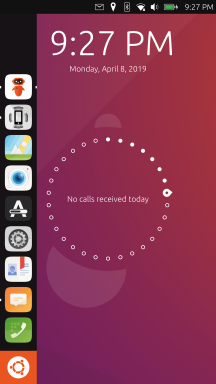
My suggestion for the lock screen is to make it look like it is on Android. It's simple and it works - a clock, date and notifications.
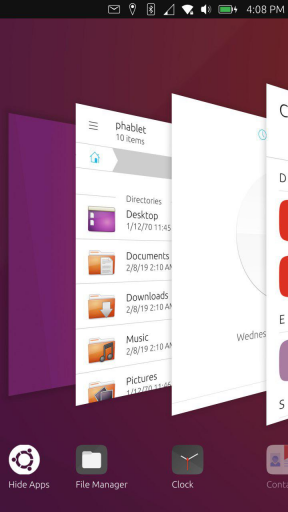
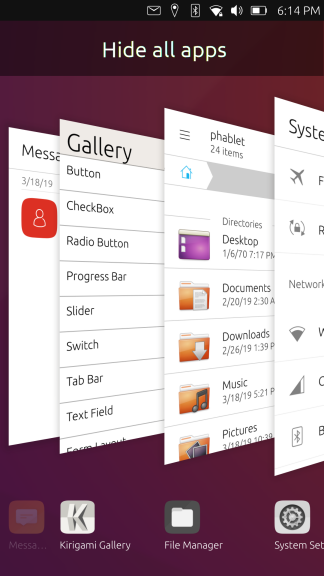
In addition, the background apps screen could be improved too. If its opened with a swipe up it would be more intuitive IMO. The layout could resemble the tab layout that Firefox on Android uses - simple 2x3 grid with an "x" above each app if you would like to close it. It wold be cool to show free/available ram at the bottom. Finally, a button to close all apps would be great.
That way you get:
- A task bar with opened apps, which allows you to quickly switch between them, or get to the desktop quickly.
- An app drawer.
- A desktop with apps of your choice functioning as a home screen.
- A "running apps" screen which allows you to manage/close apps.
One last idea:
If the "running apps" is a swipe up, then a swipe right could be used to quickly get back to the desktop too.






Hello! It looks like you're interested in this conversation, but you don't have an account yet.
Getting fed up of having to scroll through the same posts each visit? When you register for an account, you'll always come back to exactly where you were before, and choose to be notified of new replies (either via email, or push notification). You'll also be able to save bookmarks and upvote posts to show your appreciation to other community members.
With your input, this post could be even better 💗
Register Login