UBports Robot Logo UBports Forum
    • Categories
    • Recent
    • Tags
    • Popular
    • Users
    • Groups
    • Search
    • Register
    • Login

    How to set Desktop Mode off and make it stick?

    Scheduled Pinned Locked Moved Solved Lenovo Tab M10 X605F/L
    58 Posts 8 Posters 22.8k Views 3 Watching
    Loading More Posts
    • Oldest to Newest
    • Newest to Oldest
    • Most Votes
      Reply
      • Reply as topic
      Log in to reply
      This topic has been deleted. Only users with topic management privileges can see it.
      • Pulsar33P Offline
        Pulsar33 @dtarrant
        last edited by

        @dtarrant mispellings ...

        Use

        gsettings set com.canonical.Unity8 usage-mode Windowed
        gsettings set com.canonical.Unity8 launcher-width 6
        gsettings set com.canonical.Unity8 autohide-launcher true
        

        The opposite of Windowed is Staged

        BR
        Pulsar33

        Aquaris BQ E5 HD UBports OTA-25 (currently testing features)
        Aquaris BQ E5 HD Ubuntu Edition Canonical OTA-15 (last Canonical version, daily use)
        Raspberry Pi 4 B - 4 GB & 8 GB with various OS and Desktops (UBports not OK)

        D 3 Replies Last reply Reply Quote 3
        • D Offline
          dtarrant @Pulsar33
          last edited by

          @pulsar33
          Many thanks. I will try and let you know how it goes.

          1 Reply Last reply Reply Quote 0
          • D Offline
            dtarrant @Pulsar33
            last edited by

            @pulsar33 @kugiigi @danfro @Luksus @Fuseteam
            Brilliant! That worked!
            You've made me very happy.
            "If you know stuff, you can do stuff!" ☺

            1 Reply Last reply Reply Quote 1
            • D Offline
              dtarrant @kugiigi
              last edited by

              @kugiigi
              This looks interesting:
              I now know the correct gsettings command.
              I can access .config/upstart with file manager and currently this location is empty (no files).
              Please can you explain the format of the script I need to put here so the gsettings command is executed when I boot the tablet.
              Not sure if this is relevant, but I just noticed that file manager has an "open terminal here" option at .config/upstart/....

              KenedaK 1 Reply Last reply Reply Quote 0
              • KenedaK Offline
                Keneda @dtarrant
                last edited by Keneda

                @dtarrant said in How to set Desktop Mode off and make it stick?:

                Not sure if this is relevant, but I just noticed that file manager has an "open terminal here" option at .config/upstart/....

                It has this option in any folder.

                @dtarrant said in How to set Desktop Mode off and make it stick?:

                Please can you explain the format of the script I need to put here so the gsettings command is executed when I boot the tablet.

                See there .

                For instance, i assume you can call your file rotate-screen-fix.conf, put the right code to start script in it, and then create a rotate-screen-fix file in home folder and put the @Pulsar33 code above in it.

                2015-2023 : Meizu MX4 ☠️⚰️✝️
                2023-2024 : Nexus 5 ☠️⚰️✝️
                2024-***** : FPOS Fairphone 5
                🇲🇫🇬🇧

                1 Reply Last reply Reply Quote 1
                • D Offline
                  dtarrant @Pulsar33
                  last edited by

                  @pulsar33 @Keneda @kugiigi
                  Now I have confirmed the correct gsettings command to switch to staged mode, I need to arrange for it to be executed automatically when I boot the tablet.
                  I like Kugi's suggestion to use config/upstart/...
                  I have experimented with file manager which provides an easy way to created folders and files and also the facility to start a terminal wbich makes it possible to delete files and folders.
                  The problem I have is how best to add text (commands) to the empty file I created.
                  I have searched for a solution and some approaches seem over-complicated.
                  I would appreciate your suggestion please.

                  K 1 Reply Last reply Reply Quote 0
                  • K Offline
                    kugiigi @dtarrant
                    last edited by

                    @dtarrant You can use vi or nano via terminal. Or Seabass from the store for ease of use.

                    Here's a sample code that the tweak tool uses to set the scaling. Not sure if you can do the same of putting the command directly instead of creating a separate script.

                    start on starting dbus
                    exec initctl set-env --global GRID_UNIT_PX=28
                    

                    Here's another example of executing a script/bibary instead

                    start on started unity8
                    exec /opt/click.ubuntu.com/dekko2.dekkoproject/current/lib/aarch64-linux-gnu/bin/dekkod
                    
                    D 2 Replies Last reply Reply Quote 0
                    • D Offline
                      dtarrant @kugiigi
                      last edited by

                      @kugiigi
                      I like your previous suggestion of putting the gsettings command in ~/.config/upstart/....
                      For me, nano and vi look very tedious to learn and use.
                      After a quick play, Seabass2 looks much easier, so I will give that a try and let you know how I get on.
                      Watch this space!
                      In the words of Pete Juliano:
                      "If you know stuff, you can do stuff" ☺

                      1 Reply Last reply Reply Quote 0
                      • D Offline
                        dtarrant @kugiigi
                        last edited by

                        @kugiigi @Luksus
                        So I put the gsettings command in ~/.config/upstart/...
                        using Seabass2.
                        I did not succeed in making the tablet start in staged mode.
                        I did notice a few things:

                        1. My BQ M10 tablet file manager enables access to ~/.config but the TB-X605F does not.
                        2. Seabass2 can access ~/.config on the BQ, but not on the Lenovo.
                        3. Seabass2 was harder to use that I anticipated.
                        4. On the Lenovo, I had to use the command line to access ~/.config/upstart/... and add my gsettings command.
                          Next I will re-visit the other suggestions that have been offered and try a different approach.
                          It's worrying that the Lenovo behaves differently to the BQ.
                          Looks like the Lenovo may have some significant bugs.
                        LuksusL 1 Reply Last reply Reply Quote 0
                        • LuksusL Offline
                          Luksus @dtarrant
                          last edited by

                          @dtarrant Do you have set a lock-password (sudo-password) on the X605?

                          Devices: BQ e4.5, Fairphone 2, Fairphone 3, Lenovo X605F, Pinephone, Moto Z2 Force, OnePlus5T

                          D 1 Reply Last reply Reply Quote 0
                          • LakotaubpL Offline
                            Lakotaubp
                            last edited by

                            @Luksus just to let you know @dtarrant is having a problem logging in to answer your question (guessed it was this). We are trying to sort out the issue. Thanks.

                            1 Reply Last reply Reply Quote 0
                            • D Offline
                              dtarrant @Luksus
                              last edited by

                              @luksus @Lakotaubp
                              Sorry about the delay to reply. I had a problem logging in which took a while to fix. Anyhow, in answer to your question about having a passcode set, yes I did. I will explain further:

                              I have been using my BQ Aquaris M10 Ubuntu Edition as a reference. On this tablet, file manager can't see .config/etc until I unlock the 4-digit passcode, then it becomes accessible.

                              On my Lenovo TB-X605F, also using a 4-digit passcode, .config/etc was not accessible even after unlocking.
                              If I recall correctly, I couldn't access .config/etc with Seabass2 either, whilst it was possible from my BQ M10.

                              K 1 Reply Last reply Reply Quote 0
                              • K Offline
                                kugiigi @dtarrant
                                last edited by

                                @dtarrant That's really weird. Maybe the port has apparmor/permission issues?

                                LuksusL 1 Reply Last reply Reply Quote 1
                                • LuksusL Offline
                                  Luksus @kugiigi
                                  last edited by

                                  @kugiigi
                                  no there are no permission issues... I just tried it on my device.

                                  @dtarrant
                                  did you enable "show hidden files" in file-manager settings? Though that would not change the view in Seabass.

                                  Devices: BQ e4.5, Fairphone 2, Fairphone 3, Lenovo X605F, Pinephone, Moto Z2 Force, OnePlus5T

                                  D 1 Reply Last reply Reply Quote 0
                                  • D Offline
                                    dtarrant @Luksus
                                    last edited by dtarrant

                                    @luksus
                                    Regarding file-manager hidden files:
                                    I unlocked "restricted access" which gave me access to .config/upstart on the BQ, but on the Lenovo, did not.

                                    LuksusL 1 Reply Last reply Reply Quote 0
                                    • LuksusL Offline
                                      Luksus @dtarrant
                                      last edited by

                                      @dtarrant yes, I know what you mean. But initially hidden folders and files are 'hidden', so you additionally need to make them appear with the following setting (if you not already did it):
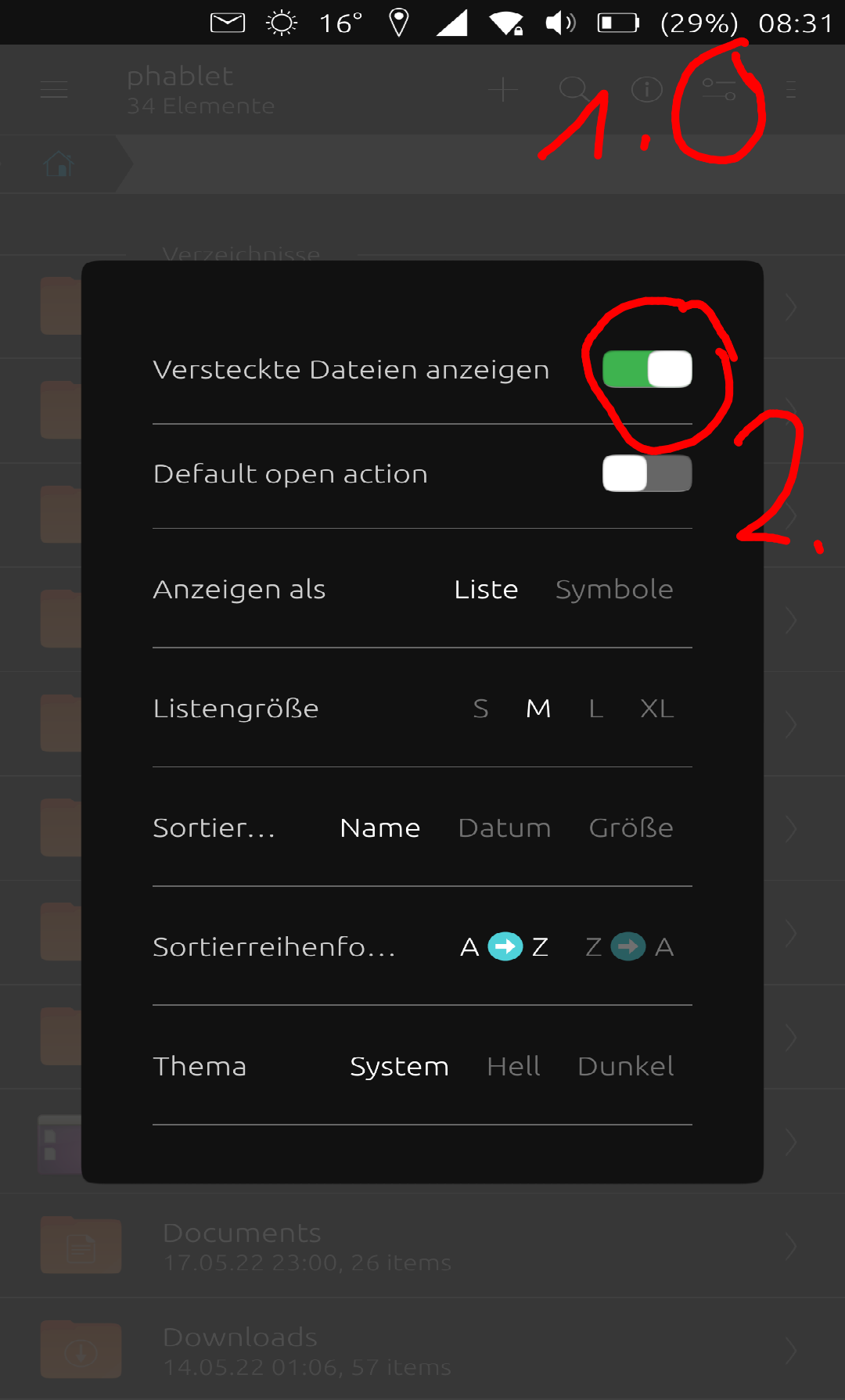
                                      2022-05-18T06:33:00.878Z.png

                                      Devices: BQ e4.5, Fairphone 2, Fairphone 3, Lenovo X605F, Pinephone, Moto Z2 Force, OnePlus5T

                                      D 1 Reply Last reply Reply Quote 0
                                      • D Offline
                                        dtarrant @Luksus
                                        last edited by

                                        @luksus
                                        I cannot find that settings screen on my Lenovo tablet.
                                        I have looked at file-manager settings and also system settings.
                                        Please can you explain exactly how to reach that page.

                                        KenedaK LuksusL 2 Replies Last reply Reply Quote 0
                                        • KenedaK Offline
                                          Keneda @dtarrant
                                          last edited by Keneda

                                          @dtarrant said in How to set Desktop Mode off and make it stick?:

                                          @luksus
                                          I cannot find that settings screen on my Lenovo tablet.
                                          I have looked at file-manager settings and also system settings.
                                          Please can you explain exactly how to reach that page.

                                          It's in file manager, check the "1" red circle in the @Luksus picture above, touch this icon on your file manager and it'll pop those settings.

                                          2015-2023 : Meizu MX4 ☠️⚰️✝️
                                          2023-2024 : Nexus 5 ☠️⚰️✝️
                                          2024-***** : FPOS Fairphone 5
                                          🇲🇫🇬🇧

                                          D 1 Reply Last reply Reply Quote 0
                                          • LuksusL Offline
                                            Luksus @dtarrant
                                            last edited by

                                            @dtarrant
                                            Video:
                                            https://drive.google.com/file/d/1S4q4MkoCAMyW63pyv2PkjZ0fdaXWYPFo/view?usp=sharing

                                            Devices: BQ e4.5, Fairphone 2, Fairphone 3, Lenovo X605F, Pinephone, Moto Z2 Force, OnePlus5T

                                            D 1 Reply Last reply Reply Quote 0
                                            • D Offline
                                              dtarrant @Keneda
                                              last edited by dtarrant

                                              @keneda @Luksus
                                              Brilliant! With the help of your diagram and the video, I am now able to display hidden files on the Lenovo tablet.
                                              I will now try to find a way to automate opening Lenovo in staged mode.

                                              D 1 Reply Last reply Reply Quote 0

                                              Hello! It looks like you're interested in this conversation, but you don't have an account yet.

                                              Getting fed up of having to scroll through the same posts each visit? When you register for an account, you'll always come back to exactly where you were before, and choose to be notified of new replies (either via email, or push notification). You'll also be able to save bookmarks and upvote posts to show your appreciation to other community members.

                                              With your input, this post could be even better 💗

                                              Register Login
                                              • First post
                                                Last post