UBports Robot Logo UBports Forum
    • Categories
    • Recent
    • Tags
    • Popular
    • Users
    • Groups
    • Search
    • Register
    • Login

    How to set Desktop Mode off and make it stick?

    Scheduled Pinned Locked Moved Solved Lenovo Tab M10 X605F/L
    58 Posts 8 Posters 22.8k Views 3 Watching
    Loading More Posts
    • Oldest to Newest
    • Newest to Oldest
    • Most Votes
      Reply
      • Reply as topic
      Log in to reply
      This topic has been deleted. Only users with topic management privileges can see it.
      • LakotaubpL Offline
        Lakotaubp
        last edited by

        @Luksus just to let you know @dtarrant is having a problem logging in to answer your question (guessed it was this). We are trying to sort out the issue. Thanks.

        1 Reply Last reply Reply Quote 0
        • D Offline
          dtarrant @Luksus
          last edited by

          @luksus @Lakotaubp
          Sorry about the delay to reply. I had a problem logging in which took a while to fix. Anyhow, in answer to your question about having a passcode set, yes I did. I will explain further:

          I have been using my BQ Aquaris M10 Ubuntu Edition as a reference. On this tablet, file manager can't see .config/etc until I unlock the 4-digit passcode, then it becomes accessible.

          On my Lenovo TB-X605F, also using a 4-digit passcode, .config/etc was not accessible even after unlocking.
          If I recall correctly, I couldn't access .config/etc with Seabass2 either, whilst it was possible from my BQ M10.

          K 1 Reply Last reply Reply Quote 0
          • K Offline
            kugiigi @dtarrant
            last edited by

            @dtarrant That's really weird. Maybe the port has apparmor/permission issues?

            LuksusL 1 Reply Last reply Reply Quote 1
            • LuksusL Offline
              Luksus @kugiigi
              last edited by

              @kugiigi
              no there are no permission issues... I just tried it on my device.

              @dtarrant
              did you enable "show hidden files" in file-manager settings? Though that would not change the view in Seabass.

              Devices: BQ e4.5, Fairphone 2, Fairphone 3, Lenovo X605F, Pinephone, Moto Z2 Force, OnePlus5T

              D 1 Reply Last reply Reply Quote 0
              • D Offline
                dtarrant @Luksus
                last edited by dtarrant

                @luksus
                Regarding file-manager hidden files:
                I unlocked "restricted access" which gave me access to .config/upstart on the BQ, but on the Lenovo, did not.

                LuksusL 1 Reply Last reply Reply Quote 0
                • LuksusL Offline
                  Luksus @dtarrant
                  last edited by

                  @dtarrant yes, I know what you mean. But initially hidden folders and files are 'hidden', so you additionally need to make them appear with the following setting (if you not already did it):
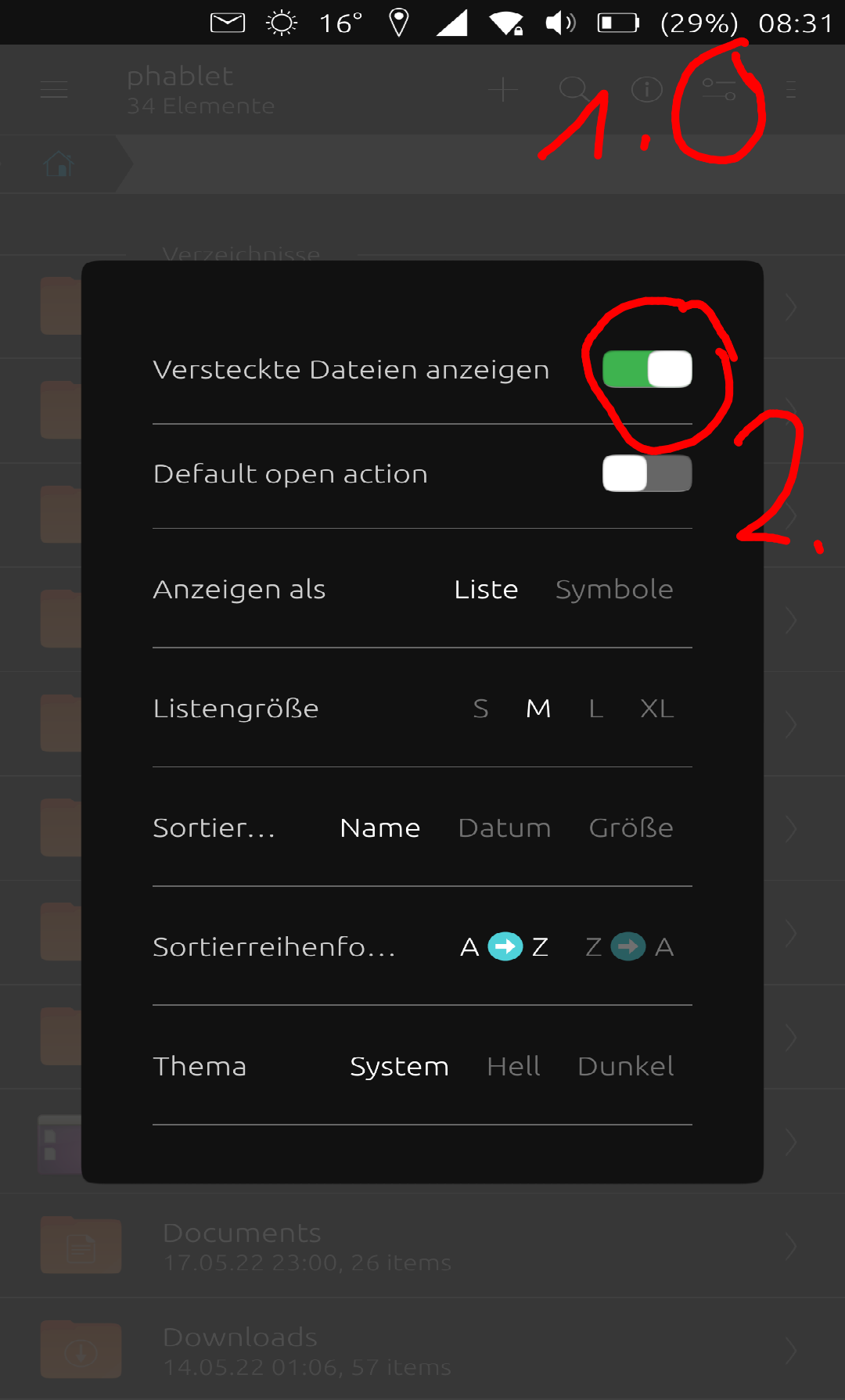
                  2022-05-18T06:33:00.878Z.png

                  Devices: BQ e4.5, Fairphone 2, Fairphone 3, Lenovo X605F, Pinephone, Moto Z2 Force, OnePlus5T

                  D 1 Reply Last reply Reply Quote 0
                  • D Offline
                    dtarrant @Luksus
                    last edited by

                    @luksus
                    I cannot find that settings screen on my Lenovo tablet.
                    I have looked at file-manager settings and also system settings.
                    Please can you explain exactly how to reach that page.

                    KenedaK LuksusL 2 Replies Last reply Reply Quote 0
                    • KenedaK Offline
                      Keneda @dtarrant
                      last edited by Keneda

                      @dtarrant said in How to set Desktop Mode off and make it stick?:

                      @luksus
                      I cannot find that settings screen on my Lenovo tablet.
                      I have looked at file-manager settings and also system settings.
                      Please can you explain exactly how to reach that page.

                      It's in file manager, check the "1" red circle in the @Luksus picture above, touch this icon on your file manager and it'll pop those settings.

                      2015-2023 : Meizu MX4 ☠️⚰️✝️
                      2023-2024 : Nexus 5 ☠️⚰️✝️
                      2024-***** : FPOS Fairphone 5
                      🇲🇫🇬🇧

                      D 1 Reply Last reply Reply Quote 0
                      • LuksusL Offline
                        Luksus @dtarrant
                        last edited by

                        @dtarrant
                        Video:
                        https://drive.google.com/file/d/1S4q4MkoCAMyW63pyv2PkjZ0fdaXWYPFo/view?usp=sharing

                        Devices: BQ e4.5, Fairphone 2, Fairphone 3, Lenovo X605F, Pinephone, Moto Z2 Force, OnePlus5T

                        D 1 Reply Last reply Reply Quote 0
                        • D Offline
                          dtarrant @Keneda
                          last edited by dtarrant

                          @keneda @Luksus
                          Brilliant! With the help of your diagram and the video, I am now able to display hidden files on the Lenovo tablet.
                          I will now try to find a way to automate opening Lenovo in staged mode.

                          D 1 Reply Last reply Reply Quote 0
                          • D Offline
                            dtarrant @dtarrant
                            last edited by

                            @Keneda @Luksus
                            Correction, intended to say " open Lenovo in staged mode"
                            Tried to edit but post wasn't updated, don't know why. Edit usually works for me.

                            KenedaK 1 Reply Last reply Reply Quote 0
                            • KenedaK Offline
                              Keneda @dtarrant
                              last edited by Keneda

                              @dtarrant
                              Did you erase your previous post on purpose ?
                              I can restore it if you want.

                              I can read in it "I will now try to find a way to automate opening Lenovo in staged mode"

                              2015-2023 : Meizu MX4 ☠️⚰️✝️
                              2023-2024 : Nexus 5 ☠️⚰️✝️
                              2024-***** : FPOS Fairphone 5
                              🇲🇫🇬🇧

                              D 1 Reply Last reply Reply Quote 0
                              • D Offline
                                dtarrant @Keneda
                                last edited by

                                @Keneda
                                Please restore it. Thanks

                                KenedaK 1 Reply Last reply Reply Quote 0
                                • KenedaK Offline
                                  Keneda @dtarrant
                                  last edited by

                                  @dtarrant
                                  Done ^^

                                  2015-2023 : Meizu MX4 ☠️⚰️✝️
                                  2023-2024 : Nexus 5 ☠️⚰️✝️
                                  2024-***** : FPOS Fairphone 5
                                  🇲🇫🇬🇧

                                  1 Reply Last reply Reply Quote 0
                                  • D Offline
                                    dtarrant @Luksus
                                    last edited by

                                    @luksus @Keneda @Lakotaubp
                                    With much help from community members, I have mastered the art of using file manager to access hidden folders and files.
                                    I now intend to attempt to create a staged mode startup file located in ~/.config/upstart
                                    I'll keep you posted.
                                    I may be gone a while!

                                    MrT10001M 1 Reply Last reply Reply Quote 0
                                    • MrT10001M Online
                                      MrT10001 @dtarrant
                                      last edited by

                                      @dtarrant I have been following your progress. I hope it works what you are doing. I have seen issues with read and write permissions on the file system, simple things like setting a background.

                                      Xiaomi Redmi Note 7.... And more...
                                      I have too many devices...

                                      D 1 Reply Last reply Reply Quote 0
                                      • D Offline
                                        dtarrant @MrT10001
                                        last edited by arubislander

                                        @mrt10001 @Luksus @Keneda @Pulsar33
                                        So, I created a startup file set-staged in ~/.config/upstart, closed the Lenovo, took a deep breath and powered back on.
                                        Sadly, it did not start in staged mode.
                                        Here is a listing of set-staged:

                                        start on started unity8
                                        exec gsettings set com.canonical.Unity8 usage-mode staged
                                        

                                        I'm a novice, so I won't be offended if someone points out my silly mistake.

                                        LuksusL 1 Reply Last reply Reply Quote 0
                                        • LuksusL Offline
                                          Luksus @dtarrant
                                          last edited by

                                          @dtarrant

                                          Staged should be written with capital "S", I think.

                                          start on started unity8
                                          exec gsettings set com.canonical.Unity8 usage-mode Staged
                                          

                                          But even then, it does not work on boot.
                                          The upstart file itself seems to be alright, since executing start set-staged in terminal works.

                                          So maybe the "start on" entry point is wrong... but I have no Idea what would be right.
                                          Maybe there are also execution permission issues.

                                          Devices: BQ e4.5, Fairphone 2, Fairphone 3, Lenovo X605F, Pinephone, Moto Z2 Force, OnePlus5T

                                          1 Reply Last reply Reply Quote 0
                                          • K Offline
                                            kugiigi
                                            last edited by

                                            Perhaps try this
                                            start on starting dbus
                                            That's what is used to set scaling from the tweal tool.

                                            D 2 Replies Last reply Reply Quote 0
                                            • D Offline
                                              dtarrant @kugiigi
                                              last edited by arubislander

                                              @kugiigi @Luksus @MrT10001
                                              Well I tried your suggestions and it still started in Desktop mode.
                                              Here's what I put into ~/.config/upstart:

                                              start on starting dbus
                                              exec gsettings set com.canonical.Unity8 usage-mode Staged
                                              

                                              Permissions have been mentioned as a possible issue.
                                              Does anyone have any advice to offer regarding permissions?
                                              (this post has been written and sent from my Lenovo tablet)

                                              1 Reply Last reply Reply Quote 0

                                              Hello! It looks like you're interested in this conversation, but you don't have an account yet.

                                              Getting fed up of having to scroll through the same posts each visit? When you register for an account, you'll always come back to exactly where you were before, and choose to be notified of new replies (either via email, or push notification). You'll also be able to save bookmarks and upvote posts to show your appreciation to other community members.

                                              With your input, this post could be even better 💗

                                              Register Login
                                              • First post
                                                Last post


