How to set Desktop Mode off and make it stick?
-
-
@luksus
Regarding file-manager hidden files:
I unlocked "restricted access" which gave me access to .config/upstart on the BQ, but on the Lenovo, did not. -
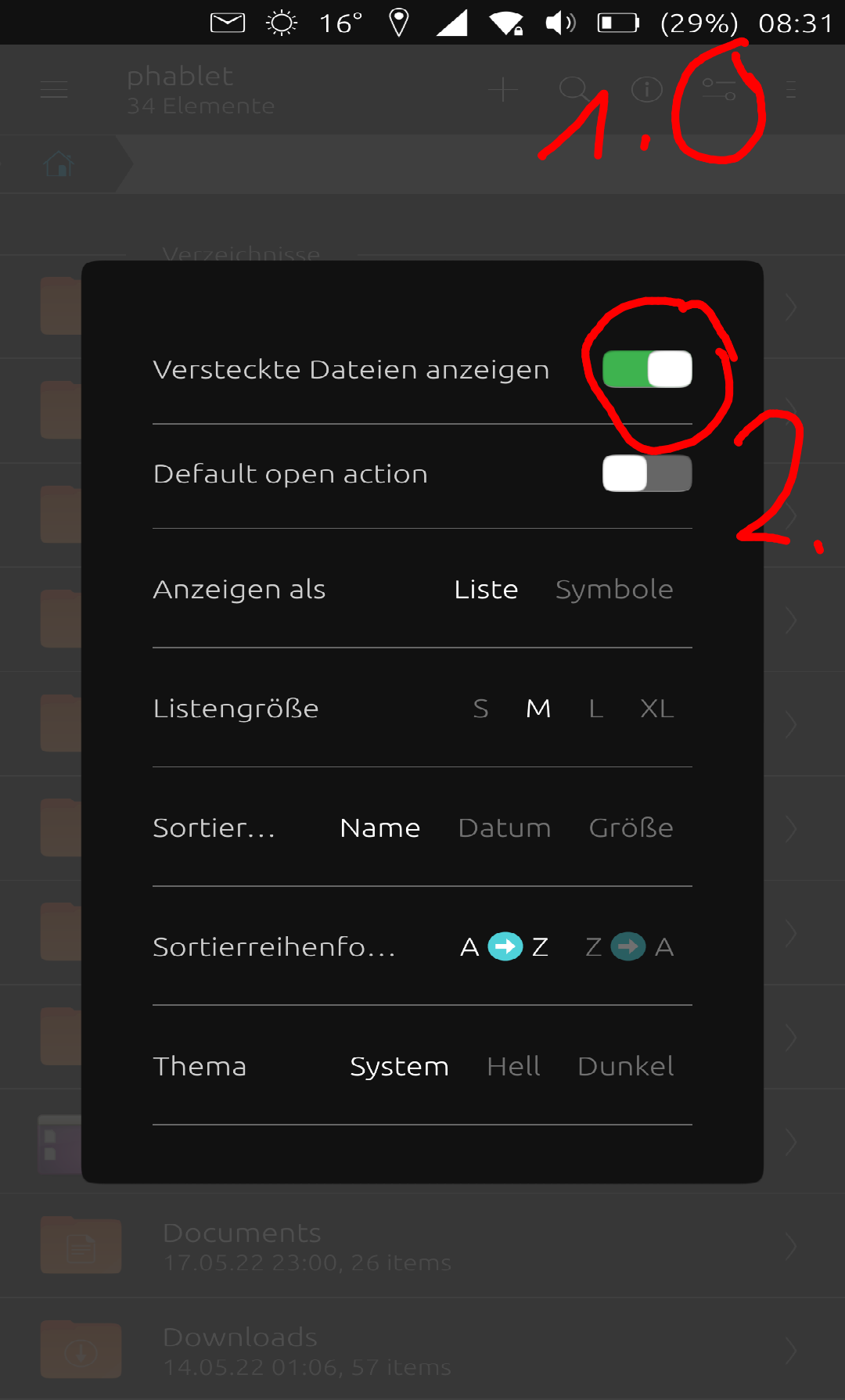
@dtarrant yes, I know what you mean. But initially hidden folders and files are 'hidden', so you additionally need to make them appear with the following setting (if you not already did it):
-
@luksus
I cannot find that settings screen on my Lenovo tablet.
I have looked at file-manager settings and also system settings.
Please can you explain exactly how to reach that page. -
@dtarrant said in How to set Desktop Mode off and make it stick?:
@luksus
I cannot find that settings screen on my Lenovo tablet.
I have looked at file-manager settings and also system settings.
Please can you explain exactly how to reach that page.It's in file manager, check the "1" red circle in the @Luksus picture above, touch this icon on your file manager and it'll pop those settings.
-
-
-
-
@dtarrant
Did you erase your previous post on purpose ?
I can restore it if you want.I can read in it "I will now try to find a way to automate opening Lenovo in staged mode"
-
@Keneda
Please restore it. Thanks -
@dtarrant
Done ^^ -
@luksus @Keneda @Lakotaubp
With much help from community members, I have mastered the art of using file manager to access hidden folders and files.
I now intend to attempt to create a staged mode startup file located in ~/.config/upstart
I'll keep you posted.
I may be gone a while! -
@dtarrant I have been following your progress. I hope it works what you are doing. I have seen issues with read and write permissions on the file system, simple things like setting a background.
-
@mrt10001 @Luksus @Keneda @Pulsar33
So, I created a startup file set-staged in ~/.config/upstart, closed the Lenovo, took a deep breath and powered back on.
Sadly, it did not start in staged mode.
Here is a listing of set-staged:start on started unity8 exec gsettings set com.canonical.Unity8 usage-mode stagedI'm a novice, so I won't be offended if someone points out my silly mistake.
-
Staged should be written with capital "S", I think.
start on started unity8
exec gsettings set com.canonical.Unity8 usage-mode Staged
But even then, it does not work on boot.
The upstart file itself seems to be alright, since executingstart set-stagedin terminal works.So maybe the "start on" entry point is wrong... but I have no Idea what would be right.
Maybe there are also execution permission issues. -
Perhaps try this
start on starting dbus
That's what is used to set scaling from the tweal tool. -
@kugiigi @Luksus @MrT10001
Well I tried your suggestions and it still started in Desktop mode.
Here's what I put into ~/.config/upstart:start on starting dbus exec gsettings set com.canonical.Unity8 usage-mode StagedPermissions have been mentioned as a possible issue.
Does anyone have any advice to offer regarding permissions?
(this post has been written and sent from my Lenovo tablet) -
Not sure how but maybe make it execute after Unity8 started. My guess is that Unity8 detects something that overrides the usage mode so changing it beforehand will be useless.
-
-
@dtarrant Enclose the text with "`" (the special type of single quote). For multiple lines, enclose them with triple of that character.



Hello! It looks like you're interested in this conversation, but you don't have an account yet.
Getting fed up of having to scroll through the same posts each visit? When you register for an account, you'll always come back to exactly where you were before, and choose to be notified of new replies (either via email, or push notification). You'll also be able to save bookmarks and upvote posts to show your appreciation to other community members.
With your input, this post could be even better 💗
Register Login