World

Topics from outside of this forum. Views and opinions represented here may not reflect those of this forum and its members.

A world of content at your fingertips…

Think of this as your global discovery feed. It brings together interesting discussions from across the web and other communities, all in one place.

While you can browse what's trending now, the best way to use this feed is to make it your own. By creating an account, you can follow specific creators and topics to filter out the noise and see only what matters to you.

Ready to dive in? Create an account to start following others, get notified when people reply to you, and save your favorite finds.

Register Login
  • hankschwieH

    Hi!
    After starting Waydroid, the keybord in UT is not usable anymore. It does not pop up as it is supposed to do when it is needed. Even in the terminal app it cannot be started. This does not change after stopping waydroid, either.
    (I'm using a fairphone 3, 24.04-1.x, daily).

    Inside the Waydroid container the android keyboard works as expected.

    Only solution so far is to restart the whole phone.

    Is there a way to start the from the terminal, so I could put the command in the bash history to be able to start it manually as a work-around?

    A bit at a loss ..
    hank


    @kugiigi Thanks, I'll give it a try. I found a rather crude way to restart the keyboard, using the Fcitx5 app I installed in an attempt to find an alternative keyboard. Fcitx5 isn't really reliable yet, but with it I was able to restore the default keyboard (restore button in the settings of the app), and that works fine. As to your guess: No, no external keyboard is detected, an no keyboard icon appears in the top bar. Only difference I notice is that the time display disappears in the top bar or shows a wrong time in UT, while in waydroid it is correct, but that's a different story...
  • costalesC

    Hi everyone!

    I migrated uNav to focal, but after enabling the GPS, if I enter into a QML dialog (Search or Settings) and exit, the UI is frozen. The bug comes from here.

    Any idea please? Thank you in advance!

    PS: How to reproduce:

    1. Open uNav in focal.
    2. Enable the GPS. (If I don't enable the GPS, the UI will not freeze).
    3. Click on Settings icon (top bar).
    4. Click on Back button (top bar).
    5. Bug: UI is frozen.

    The code I think is this one.


    read more →
    I tried to upgrade the QML libraries & openLayers to latest version, but uNav continues to freeze... This happens from focal.
  • S

    guys im considering start samsung galaxy tab a7 wifi codename: gta4lwifi actally i did select wrong device call poco m3 i will do twrp halium build btw this project ("actually i need install linux btw, and i need reset pc") i unlocked oem chipset is snapdragon 662 i will use source https://github.com/Matrixx-Devices/android_device_samsung_gta4l-common also https://www.gsmarena.com/samsung_galaxy_tab_a7_10_4_(2020)-10411.php same as poco m3 chip but it hard bc knox. i use android 12 and formatting leange os now.


    log.txt
  • DJacD

    Bonjour @pparent
    je ne parviens pas à connecter mon compte sur l application Blablacar. J utilise mon compte facebook pour cela : peut être que ce n est pas prevu ? a moins qu il soit possible de le faire avec une manip. spécifique ?


    @Keneda said: Je dis ça car ces infos intéressent peut-être donc des non-francophones Malheureusement y'a peu de chances que les non francophones viennent lire la section frenchy S'ils ne trouvent pas d'autres messages concernant BlaBlaCar, je crois que certains pourraient bien faire l'effort d'utiliser un traducteur en ligne. C'est le problème avec les sections dédiées à d'autres langues sur n'importe-quel forum : la dilution des infos. C'est un compromis mais il est bon de faciliter l'accès à qui n'oseraient pas poser une question autrement que dans sa langue natale.
  • developerbaymanD

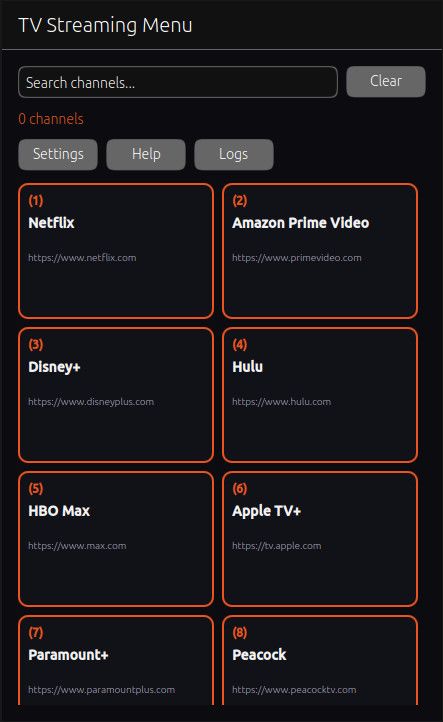
    5732a637-f237-4b59-bcc3-4850dc71a4a9-image.jpeg

    pretty straight forward

    uses chromium for the webview and DRM if available on your system im aware there is a installer for widevine but i never got it to work ...i dont have netflix so someone might need to test i know pluto tv works and some others you can add and remove channels as well

    source code:
    https://drive.google.com/file/d/1RhDu7PSk0WdJMsPnxBqfE-97RvxXtWpq/view?usp=sharing

    click:
    https://drive.google.com/file/d/1yXqyExqTFS-0AXL5oazRi6PgO9rzk6Yh/view?usp=sharing


  • N

    Please meet Merezhyvo – a new small browser for Ubuntu Touch.
    I first made it only for myself. Later I realised that I like using it, so now I want to share it with the community. Maybe it will be useful for someone else too.

    What is Merezhyvo?
    Merezhyvo (pronounced roughly “meh-REH-zhy-vo”) is a Chromium-based web browser built specifically for Ubuntu Touch. It is designed to feel native on both phones and in convergence / desktop mode, with strong privacy defaults and a clean UI.

    Privacy by design
    • No tracking, no analytics, no telemetry.
    • Local-only data: history, bookmarks, passwords, cookies and site data are stored locally inside the app sandbox.

    Key features
    • Ubuntu Touch–first, confined app (AppArmor). Predictable file access inside the sandbox.
    Convergent UI: phone + external display, with UI scaling and per-tab zoom (plus a default webview zoom setting).
    • Light and Dark themes.
    • Optional messenger panel (can be hidden) + security shield popup.
    • Localised UI: English, Ukrainian, French, German, Polish, Dutch, Spanish, Italian, Norwegian.

    Privacy & security tools
    • HTTPS certificate validation + shield indicator (white/yellow/red) and a site security popup.
    • HTTPS mode: Preferred / Strict + per-site exceptions.
    • Third-party cookies control + per-site exceptions.
    • Tracker & ads blocking with modes: Basic / Strict + per-site exceptions + per-site counters.
    • WebRTC privacy modes (allow / block / block with Tor).
    • Secure DNS (DNS-over-HTTPS) switcher with multiple providers and a custom endpoint (disabled automatically while Tor is enabled).
    • Tor integration (optional) with a simple toggle, “Keep Tor enabled”, and a Tor check tab. Tor and non-Tor browsing use separate storage partitions (no cookie/site-data crossover).

    Other features
    • Tab search and smart address bar suggestions (history + bookmarks).
    • Bookmarks manager with Netscape HTML import/export.
    • Local password manager protected by a master password + autofill (no clipboard).
    • Predictable downloads/uploads:
    – Downloads: ~/.local/share/merezhyvo.naz.r/mDownloads
    – Uploads/imports: ~/.local/share/merezhyvo.naz.r/mDocuments
    • Integrated on-screen keyboard with multiple layouts.

    Important notes / limitations
    • Merezhyvo uses Tor as an optional connection layer, but it is not the official Tor Browser and does not include all Tor Browser fingerprinting protections.
    • File access is limited to the sandbox folders (mDownloads/mDocuments); choosing arbitrary folders is not supported.
    • Camera, microphone, geolocation and push notifications are not available yet.
    • Landscape mode is not supported (Ubuntu Touch limitation).
    • Clipboard on Ubuntu Touch is split between sandboxes; copy/paste may be limited.

    What kind of feedback I’m looking for
    I am not looking for a list of “missing features” – I already know that many things are not implemented yet 🙂
    What would really help instead:
    1. Bug reports for the features that are already present.
    If something that should work in this MVP (basic browsing, tabs, downloads, file picker, bookmarks, password manager, Tor toggle, UI scaling, on-screen keyboard) behaves strangely or breaks, please tell me.
    2. UX feedback.
    Is the UI clear and easy to use? Are there any small but annoying problems in daily use? I have onlly one UT device, which is OP Nord n10, so I am sure how it looks only on this one device.
    3. Keyboard layouts: which languages first?
    The on-screen keyboard supports only some languages now. I would like to know which additional languages/layouts are the most important for you, so I can add them earlier.
    4. Would you actually use this browser?
    This project started as a personal tool for me. And for me it’s good enough already, it covers my personal needs. I want to understand if it is also useful for other people. Your feedback will help me decide if I should spend more time on Merezhyvo, or keep it as a small niche browser.

    How to get it:
    Merezhyvo is available on the OpenStore

    the code source


    read more →
    v 0.5.3 is live now Fixes: a bug preventing Master Password creation a few bugs of Bookmarks management a bug preventing keyboard to appear for capchas and iframes some other small keyboard fixes New / Improved: files downloads progress bar Updated Electron/Chromium engine updated Tor
  • E

    Brief Overview

    Country: US
    Carrier: T-Mobile
    OS: Ubuntu Touch 24.04-1.2
    VOLTE: Works
    5G Service: Works
    Calls In: Works
    Calls Out: Works
    Data: Works
    Note: Have not tested voice and data together.
    Text/SMS: Works
    Note: Need more testing to be sure of reliability.
    Screen Casting: Works
    Note: Not easy to navigate from the device.
    Email: Works
    WiFi Calling: Does not work without seeing the carrier service. The device works with cellular data turned off, but still within tower range, otherwise it will not work without it.


    @rocket2nfinity That's interesting. Thanks for the information.
  • I

    So I recently bought Pixel 3a to try the waters of Linux mobile. I installed UT first, but I wanted to try others as well so later installed postmarket OS. While I liked it, UT functioned bettet so got back to it. That's when the issues began.

    Now when I restart, it sometimes reboot but usually just shuts down. When it reboots (or I boot it up) it gets stuck in a loop:

    Boot -> google splash screen -> UT splash screen (rarely it doesn't even reach it and reboots after google screen) -> freezes (sometimes I get white screen or just flashes of white screen) - reboot - repeat.

    This gets way worse with Libertine set up - it goes through after a number of cycles, then just gives up and finally doesn't reboot and stays shut down. And when I have a package installed in Libertine (tried with Firefox) it feels like it gets worse still and I'm unable to get to login at all.

    Rebooting through recovery mode usually gets the device to fully boot up successfully. Did factory reset and also tried flashing UT again, issues persist.

    Not sure if relevant, but when I was flashing UT the second time around, the installer didn't register the device automatically, had to select manually.

    Weird thing is it worked fine the first time - but after I tried postmarketOS and went back again is when the trouble started. Not sure what I could've done wrong though and no idea how to troubleshoot. I'm pretty new to Linux, very much on a regular user level.


    @illi Good Detective Work, there! Thanks for reporting it.
  • RapidRotatorR

    I have an open source Bangle.js smart watch with assisted GPS. On a PostmarketOS phone I use geoclue with:

    [wifi]:
    enable=true
    url=https://beacondb.net/v1/geolocate
    

    in the settings to get fast WiFi-enabled GPS. So hence my question: why is badly perfoming GPS mentioned as a caveat with every phone, while this is perfectly possible to do in Linux?

    Is it simply that nobody had the time yet?


    read more →
    As an update, a draft MR was recently posted on Gitlab using the BeaconDB api (directly,not via Geoclue)
  • F

    Hi,

    so finally I've found cool app for annotating PDFs - Annotate. So I'm considering purchase of stylus.

    Apart of problem with finding compatible model (worknig in android) there is another - does stylus is supported by Ubuntu touch in lenovo m10 tablet?

    I've searched both this forum and Telegram channel without success.


    @hlbkv thanks, just a few moments after posting I realized that just a stick with small rubber point on top would suffice. Currently I'm using a pen with soft rubber at end (provided, I believe, for touch screens) but it is too big for making notes. I think I'll have to make a custom device. Anyways, thanks for reply.