World

Topics from outside of this forum. Views and opinions represented here may not reflect those of this forum and its members.

A world of content at your fingertips…

Think of this as your global discovery feed. It brings together interesting discussions from across the web and other communities, all in one place.

While you can browse what's trending now, the best way to use this feed is to make it your own. By creating an account, you can follow specific creators and topics to filter out the noise and see only what matters to you.

Ready to dive in? Create an account to start following others, get notified when people reply to you, and save your favorite finds.

Register Login
  • MrRoughwoodM

    Hi,

    The discovering of UT on a FP4 is a real 'rollercoaster' to me 🙂 I played around with the OpenStore apps, struggled with Libertine and Waydroid. It is 1 great candy store 🙂 Succeeded in configuring GhostCloud, failed with the keepass app.

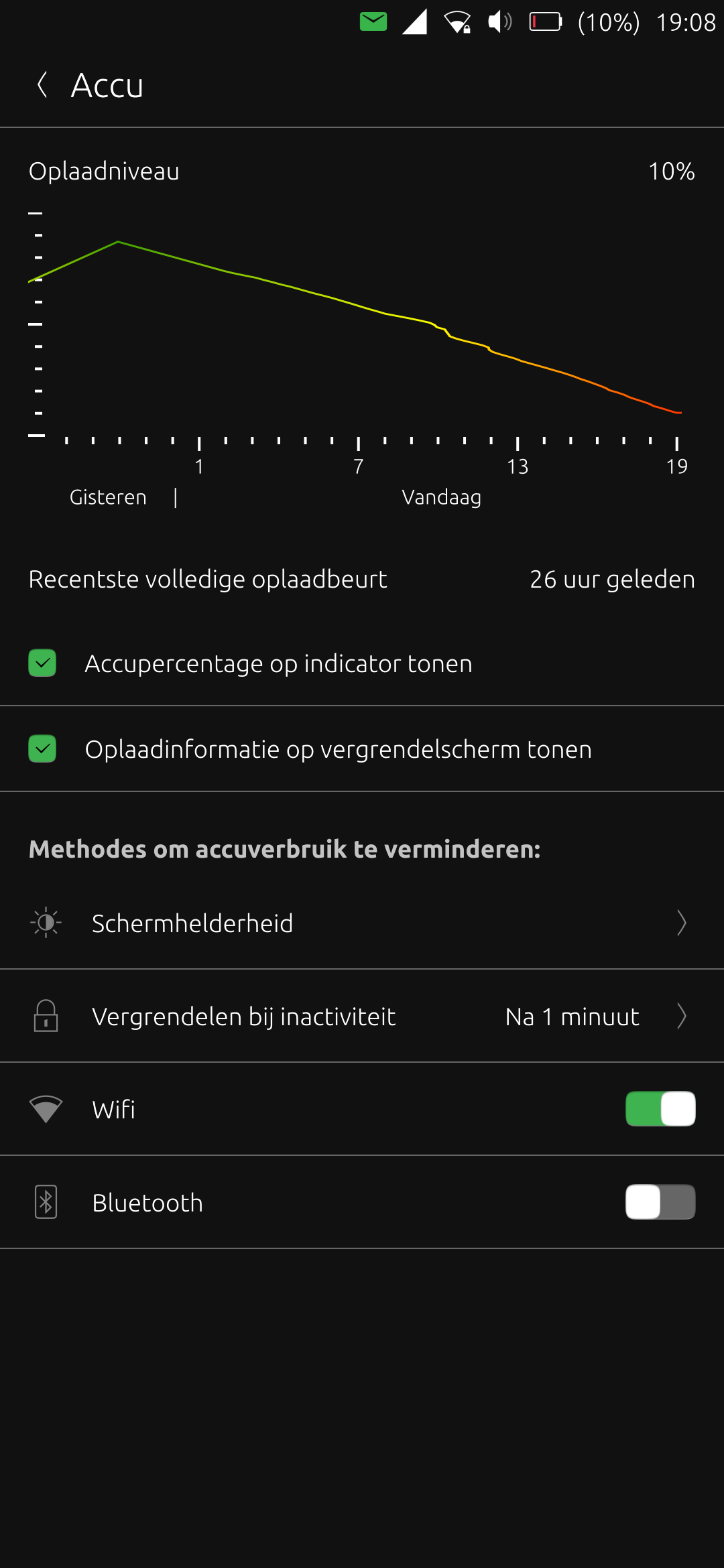
    I'm now curious of what should be normal battery usage in UT on a FP4. Normally I do not have GPS, Bluetooth, NFC, data connectivity active. When I go to bed, I turn off the wifi and have no opening apps. But I was supprised that the battery went from 87% to 59% in the morning. Is this normal behaviour?

    I looked, helped by the topics on this forum, to scaling_governor, which is on 'schedutil'. I think this night I will enable the 'flight mode' to check if this makes some difference.

    Cheers, Jan

    screenshot20250908_190848000.png


    read more →
    Hi there, is it supposed to look like this? I didn't use the phone throughout the day. Fairphone 4, 24.04-1.3 Thanks [image: 1778690699922-screenshot20260513_174305134.png]
  • O

    So I installed and tested UT on my FP4, and it just isn't quite for me yet. I was going to re-install the FP4 ROM as per Fairphone's instructions, however I can't get into fastboot mode from the bootloader.

    I use "volume up + power" key to get into UBports Recovery menu, then select Advanced > 'Enter fastboot'. But from there, the device just becomes unresponsive, and it isn't recognized by the Fairfphone flashing utility (using Windows). If I hold power button I get an active black screen, and device remains unrecognized by flashing utility.

    (Selecting "enable ADB" from the same menu gets me to a black screen with "ADB enabled", but again the flashing utility doesn't recognize the device.)

    Using the SDK Platform Tools in Windows, the device is recognized when UT is booted up but when I attempt to run "adb reboot bootloader" I get the error "Failed to write reboot parameter file" Permission denied". Developer Mode is enabled in UT.

    I'm at a loss here...any ideas on why I'm failing to get into fastboot?


    @MalocDegray said: Via the phone terminal like @tafitson recommended is possible, but the phone is no longer detected via adb via computer. When the device is in fasboot/bootloader mode it is never recognized via adb. You need to have fastboot installed and with that command it should be recognized.
  • A

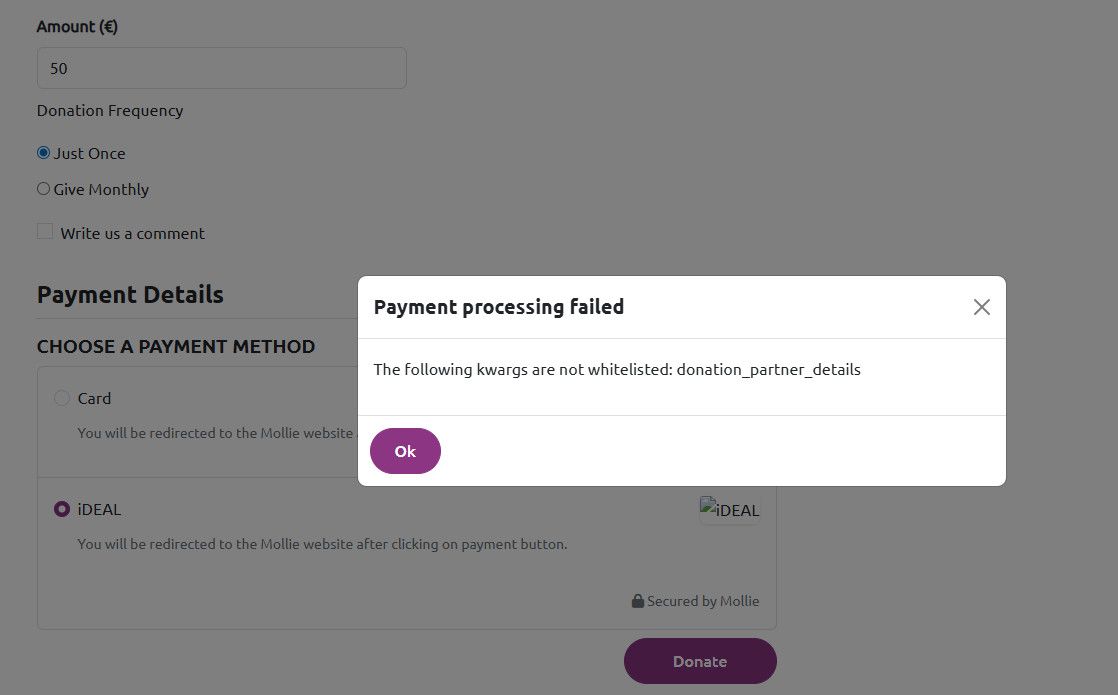
    Trying to donate via iDeal on ubports.com/donation/pay site, but website fails when pressing the Donate button with the message: Payment processing failed, The following kwargs are not whitelisted: donation_partner_details

    Tried Firefox and IE, but neither are working. No idea what else to try.

    see image:
    4b513fc9-ad80-4007-9d29-de90fbd8fe1b-image.jpeg


    @AdFundum yes, it was a bug! i reported it to the webmaster and it got fixed immediately
  • B

    Now I am using UT for few month as a daily device. Till voicemails are working on Signal, without waydroit, things went easier. But two issues I still have day for day, with makes things demanding.

    The microphone don't work anymore, after I switch few times from app to app. Nether for recording, nor Whats App or Signal.
    When I reboot the system, it works again till the next few switches.

    The second thing is, that the Network Connectivity jump, without doing anything, from the first to the second sim card (the second sim card is usable only for calls), and than there is no Connectivity.l.

    Have anybody an Idea what I can to?

    My device is a Xiaomi Poco X3 NFC


    read more →
    @bunt7 You can find a workaround script, for Network connectivity jump here: https://forums.ubports.com/post/95548
  • UBportsNewsU

    Ubuntu Touch Q&A 190

    Ubuntu Touch Q&A 190 is live this Saturday 16th May at 19:00 UTC on our YouTube channel: https://www.youtube.com/watch?v=OkOT9otE_AA

    We will cover all the latest news and development, and your questions and answers.

    Questions can be posted live during the show or using this Forum link for priority: https://forums.ubports.com/topic/12255/ubuntu-touch-q-a-190-call-for-questions.
    Please remember that questions on porting to device **** or its status, or questions on bugs will not be answered.

    UBports@telegram
    #ubports:matrix.org

    #UBports #UbuntuTouch #UBportsQandA #Lomiri #OTA12 #UTnoble #Ubuntu


  • P

    Hello everybody,

    has someone an example for a custom builder for a library? I tried to create an Test-App with my perl Efl binding (pELF) :beaming_face_with_smiling_eyes: (at the moment it is just an experiment whether it would be possible to write apps with enlightenment foundation libraries...)

    This is my clickable file as far:

    clickable_minimum_required: 8.0.0
    builder: pure-qml-cmake
    kill: qmlscene
    dependencies_target: 
        - "libefl-all-dev"
    libraries:
       pEFL:
           builder: custom
           build:
             - "perl ./Makefile.PL"
             - "make"
             - "make install"
    

    with clickable build --libs I get the following error:

    Can't open perl script "./Makefile.PL": No such file or directory
    Command exited with non-zero exit status 2, see above for details. This is most likely not a problem with Clickable.
    

    cd'ing into ./libs/pEFL (where I have the source of the perl module) doesn't work, too:

    bash: line 3: cd: ./libs/pEFL: No such file or directory
    Command exited with non-zero exit status 1, see above for details. This is most likely not a problem with Clickable.
    

    Thanks in advance for any help :love-you_gesture:
    Max


    Thank you very much for all the suggestions. As a first step, I’m now trying to get the elementary_config configuration program up and running. I have now compiled efl for this purpose in a Libertine container under the prefix /opt/click.ubuntu.com/pefl.maxperl/current and am trying to start the program as suggested using the shell script run_config.sh. This allowed me to resolve the error message regarding efreetd and the missing configuration Unfortunately, it still isn't working. Here's the error message I've been getting so far: ERR<90576>:elementary ../src/lib/elementary/elm_module.c:114 _elm_module_find_as() Failed to load elementary module: 'prefs_iface': No such file or directory ## Copy & Paste the below (until EOF) into a terminal, then hit Enter eina_btlog << EOF EOF ERR<90576>:eina_safety ../src/lib/ecore_evas/ecore_evas.c:3941 ecore_evas_software_x11_new() safety check failed: m == NULL ## Copy & Paste the below (until EOF) into a terminal, then hit Enter eina_btlog << EOF [...] EOF ERR<90576>:eina_safety ../src/lib/ecore_evas/ecore_evas.c:4056 ecore_evas_gl_x11_options_new() safety check failed: m == NULL ## Copy & Paste the below (until EOF) into a terminal, then hit Enter eina_btlog << EOF [...] EOF ERR<90576>:elementary ../src/lib/elementary/efl_ui_win.c:5572 _elm_win_finalize_internal() Cannot create window. ## Copy & Paste the below (until EOF) into a terminal, then hit Enter eina_btlog << EOF [...] EOF ERR<90576>:eo ../src/lib/eo/eo.c:1137 _efl_add_internal_end() Object of class 'Efl.Ui.Win_Legacy' - Not all of the object constructors have been executed. ## Copy & Paste the below (until EOF) into a terminal, then hit Enter eina_btlog << EOF [...] EOF ERR<90576>:ecore ../src/lib/ecore/ecore.c:796 _ecore_magic_fail() *** ECORE ERROR: Ecore Magic Check Failed!!! in: ecore_evas_callback_selection_changed_set() ## Copy & Paste the below (until EOF) into a terminal, then hit Enter eina_btlog << EOF [...] EOF ERR<90576>:ecore ../src/lib/ecore/ecore.c:798 _ecore_magic_fail() Input handle pointer is NULL! ## Copy & Paste the below (until EOF) into a terminal, then hit Enter eina_btlog << EOF [....] EOF ERR<90576>:ecore ../src/lib/ecore/ecore.c:796 _ecore_magic_fail() *** ECORE ERROR: Ecore Magic Check Failed!!! in: ecore_evas_callback_drop_drop_set() ## Copy & Paste the below (until EOF) into a terminal, then hit Enter eina_btlog << EOF [...] EOF ERR<90576>:ecore ../src/lib/ecore/ecore.c:798 _ecore_magic_fail() Input handle pointer is NULL! ## Copy & Paste the below (until EOF) into a terminal, then hit Enter eina_btlog << EOF [...] EOF ERR<90576>:ecore ../src/lib/ecore/ecore.c:796 _ecore_magic_fail() *** ECORE ERROR: Ecore Magic Check Failed!!! in: ecore_evas_callback_drop_motion_set() ## Copy & Paste the below (until EOF) into a terminal, then hit Enter eina_btlog << EOF [...] EOF ERR<90576>:ecore ../src/lib/ecore/ecore.c:798 _ecore_magic_fail() Input handle pointer is NULL! ## Copy & Paste the below (until EOF) into a terminal, then hit Enter eina_btlog << EOF [...] EOF ERR<90576>:ecore ../src/lib/ecore/ecore.c:796 _ecore_magic_fail() *** ECORE ERROR: Ecore Magic Check Failed!!! in: ecore_evas_callback_drop_state_changed_set() ## Copy & Paste the below (until EOF) into a terminal, then hit Enter eina_btlog << EOF [...] EOF ERR<90576>:ecore ../src/lib/ecore/ecore.c:798 _ecore_magic_fail() Input handle pointer is NULL! ## Copy & Paste the below (until EOF) into a terminal, then hit Enter eina_btlog << EOF [...] EOF ERR<90576>:evas_main ../src/lib/evas/canvas/evas_object_smart.c:746 _efl_canvas_group_efl_object_destructor() efl_canvas_group_del() was not called on this object: 0x40000000638f (Efl.Ui.Win_Legacy) ## Copy & Paste the below (until EOF) into a terminal, then hit Enter eina_btlog << EOF [...] EOF Maybe it's because EFL doesn't support Wayland? Or maybe EFL can't find the right display? Everything works perfectly in Libertine... Right now, I'm just at a loss... You can find the current status at https://github.com/MaxPerl/pefl.maxperl Thanks in advance, Max
  • P

    Hello

    I'm trying to revive the 'ubtd' app (Bluetooth file transfer) initially written by Michael Zanetti and Ian L., but I've hit a roadblock and I could use some guidance.

    I'm currently targetting UT 20.04 on a Pixel 3a.

    By default, the OBEX daemon doesn't run on the phone. A 'systemd' unit file is supposed to start it (/usr/lib/systemd/user/dbus-org.bluez.obex.service), but it is reported as "loaded / inactive (dead)" by 'systemctl' -- I'm not sure why as I was unable to find relevant log entries.

    I can manually start the OBEX daemon using the following command:

    $ systemctl --user start obex.service
    

    In this case, the 'obexd' daemon keeps running and uses the same command-line parameters as those specified for the D-Bus related service (obexd -P ftp,irmc,mas,pcsuite -r /home/phablet).

    Nonetheless, after pairing the phone with my laptop, when I start my app (the one that is supposed to receive incoming file transfers), I see the following messages in its log:

    [03/01/2026 12:25] creating agent on dbus
    [03/01/2026 12:25] registering agent
    [03/01/2026 12:25] registering agent on obexd-server
    [03/01/2026 12:25] Error registering agent for the default adapter: QDBusError("org.freedesktop.DBus.Error.ServiceUnknown", "The name org.bluez.obex was not provided by any .service files")
    

    For information, the obex.service unit file does expose "org.bluez.obex" as BusName, not as Name -- not sure how relevant that is.

    On its side, the OBEX daemon logs the following:

    [03/01/2026 12:25] CONNECT(0x0), <unknown>(0xff)
    [03/01/2026 12:25] CONNECT(0x0), <unknown>(0x0)
    [03/01/2026 12:25] PUT(0x2), <unknown>(0xff)
    [03/01/2026 12:25] PUT(0x2), Forbidden(0x43)
    [03/01/2026 12:25] DISCONNECT(0x1), <unknown>(0xff)
    [03/01/2026 12:25] DISCONNECT(0x1), Success(0x20)
    [03/01/2026 12:25] disconnected: Transport got disconnected
    

    So 'obexd' seems to receive the file sent by the laptop (from the point of view of the laptop, the transfer succeeds), but fails to hand it over to my app, which I guess makes sense as it failed to register itself with the daemon.

    Can anyone suggest a fix, further ways to troubleshoot or point me to relevant documentation?

    Thanks in advance.


    @gpatel-fr said: @domubpkm Well, if my calculation is correct that means about 2Mbits/s, it seems quite decent for Bluetooth. Agreed.
  • T

    Hello everyone

    I hope there are still active users around!

    I am new to Ubuntu touch coming from postmarketos. Very nice first impression.

    I had a hard way restoring OxygenOS 9 to my device but it worked. I then used the debian installer to install Ubuntu touch 20.04.

    Everything looked perfect and I was proud to give this new toy to my son. But then we made a test call and the phone rebooted. Another one and it switched off immediately.
    Then it worked but still made a bunch of random reboots.

    Is that a known issue with this phone?


    @rocket2nfinity said: @tidip https://t.me/ubports_op6 Joined, thanks
  • libremaxL

    This port was released in its first version in September 2025 but remained somewhat under the radar.

    Now, the Nothing Phone 1 is integrated into ubports-installer and receives OTA updates via UBports servers.
    There is only one update channel at the moment for UT Noble 24.04-1.1, the ‘daily’ channel. There is no “RC” channel or ‘Stable’ channel yet.
    (24.04-2.x daily channel is also available.)

    Also missing is a description sheet in https://devices.ubuntu-touch.io/ to complete the picture.
    However, information on hardware support is available here:
    https://gitlab.com/ubports/porting/community-ports/android11/nothing-phone-1/nothing-spacewar

    There is not much missing in that matter.
    The display only supports 60Hz (not 90Hz or 120Hz, mainly useful for video games), which is not really a problem under UT, as video games are not a frequent use case.
    It should also be noted that VoLTE has not been tested but ‘should work’ (according to "Nonta72" , who made the porting).

    As for the installation procedure, all you need is:

    1. on the Nothing Phone 1, the unlocked bootloader + a ‘stock’ version (provided by the manufacturer) 13 or 15 of Android,
    2. fastboot and adb on the computer that will run the UBports installer

    (Source of this information:
    https://xdaforums.com/t/rom-linux-ubuntu-touch-for-nothing-phone-1-waydroid-android-13-included.4758279/)

    A device with hardware performance similar to the Fairphone 5 according to benchmarks, which therefore probably offers a very solid user experience under Ubuntu Touch.
    Though probably no possibility to use an external display with a wired connection given USB Type-C 2.0, OTG.

    Thank Nonta72 for your contribution!


    read more →
    @brenno.almeida For sure!
  • J

    I replaced the display on my 3a XL. I have no touch controls. I'm assuming there's a driver for the display missing. It's from INCELL. Any chance someone could point me in the right direction?


    @MrT10001 actually it work's on UT, just not very well on the right edge, but does not work at all on droidian. I've already had to go back to android once because, shame on me, I did not fully read the instructions. I may give that a try. Just fun for me to mess with. I appreciate the info.
  • developerbaymanD

    b5052f47-3ac2-4b70-b967-db38934ef3fa-image.jpeg

    da86e32f-832a-4611-a031-bea9e7c76772-image.jpeg

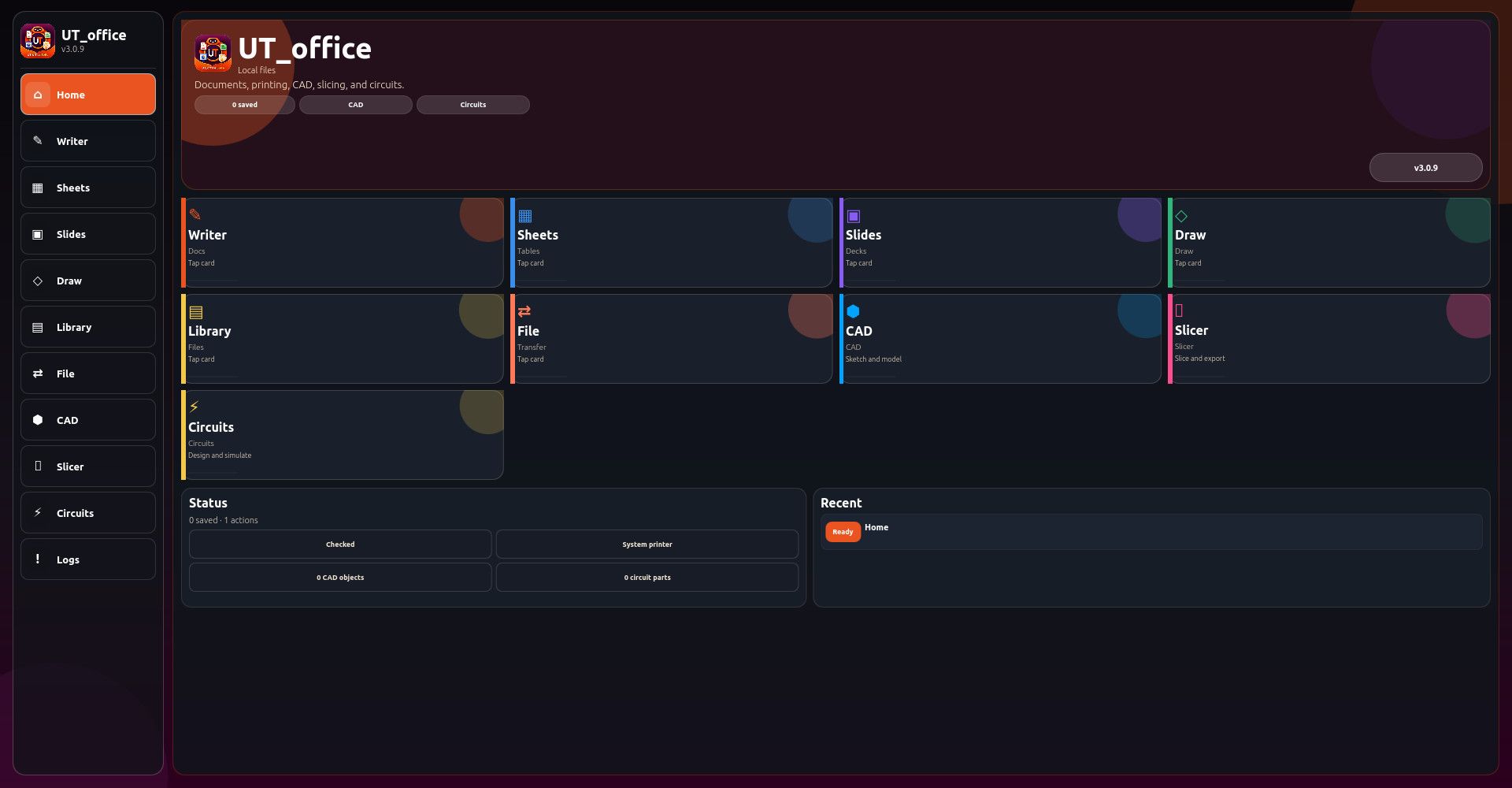
    say hello to UT_office suite ....i would like to make it UT's premiere office program suite?? meant to be on par with and far exceed typical office program suites all rolled into a nice clickable app fully responsive and taking advantage of desktop convergence ....still alot of work to do yet much testing needed

    Local-first office suite for Ubuntu Touch
    Writer for rich-text documents
    Writer formatting tools: headings, bold, italic, lists, tables, quotes, dividers, checklists, code blocks, signatures
    Writer templates: report, meeting notes, letter, project document, appendix
    Writer tools: find/replace, outline, statistics, reading time, word frequency, cleanup, case conversion
    Writer exports: text, Markdown, HTML, JSON
    Spreadsheet editor with editable cell grid
    Spreadsheet formulas and recalculation
    Spreadsheet range tools, fill down, sorting, locking, frozen headers
    Spreadsheet templates: budget, calendar, inventory, profit/loss
    Spreadsheet reports: stats, formula map, validation, charts
    Spreadsheet exports: CSV, TSV, HTML, JSON
    Slides editor with deck, slide, and notes support
    Slide layouts: title, two-column, quote, blank, agenda, closing
    Slide themes and aspect ratio options
    Slide thumbnails, presenter tools, timing plan, notes export
    Slide exports: outline, Markdown, HTML, JSON, SVG/handout-style previews
    Drawing workspace with shape tools
    Freehand drawing with pencil mode
    Eraser and selection modes
    Shape tools: rectangle, ellipse, diamond, note, connector
    Drawing alignment, layering, duplication, grouping, snap grid, multi-select
    Flowchart, org chart, grid, and wireframe drawing templates
    Drawing exports: SVG, transparent SVG, HTML, JSON
    Document library for saved Writer, Sheet, Slides, Draw, CAD, and Circuit files
    Library search, filters, sorting, pinning, duplicate, trash, restore, and permanent delete
    File Center for import/export workflows
    Universal search across documents and commands
    Print-ready HTML package generation
    Print job ticket and printer setup notes
    Workspace backup and restore-preview tools
    Version history and manual checkpoints
    Recovery snapshots and recovery restore
    CAD workspace for simple 2D/3D design
    3D primitives: cube, cylinder, sphere
    CAD sketch tools: rectangle, circle, line, extrude
    CAD object editing: move, resize, rotate, duplicate, center, snap, mirror, delete
    CAD helpers: electronics enclosure, bracket, grid plate, vent slots, standoff pattern, mounting holes
    CAD validation: dimensions, fit report, mesh quality, printability checks, design checklist
    CAD exports: JSON, STL preview, OBJ preview, OpenSCAD, project packet
    Separate 3D Slicer workspace
    Prusa-style slicer workflow for print preparation
    Slicer settings for printer, filament, layer height, nozzle, temperatures, infill, shells, speeds, cooling, supports, adhesion, seam, retraction
    Slicer material presets: PLA, PETG, ABS, TPU
    Slicer print presets: draft, detail, strength
    Slicer preview modes and layer planning
    Slice/preflight reports
    G-code preview/export
    Material usage estimates: filament length, mass, spool remaining
    Cost estimates: material, electricity, total consumables
    Slicer bed map and print bundle export
    Electronics CAD / circuit designer workspace
    Circuit components: voltage source, ground, resistor, LED, switch, capacitor, diode, potentiometer, transistor placeholder, probe, IC placeholder
    Drag-and-place circuit components
    Wire start/connect tools and auto-wire
    Schematic and PCB-style modes
    Real-time circuit simulation toggle
    Animated signal-flow/voltage-current feedback
    Circuit reports: simulation report, electrical check, trace report, breadboard plan
    Circuit exports: JSON, SVG, netlist, SPICE-style report, BOM
    Circuit templates: LED resistor circuit, voltage divider, RC timer
    Command palette for quick tool access
    Diagnostics and health-check reports
    UI audit and package checks
    Safe defaults and settings backup
    Responsive UI for phone and desktop layouts
    Horizontal scrolling ribbons and overflow popup menus for dense toolsets
    LocalStorage-based offline data storage
    Ubuntu Touch Click package structure with release/audit scripts

    Local-first office suite for Ubuntu Touch
    Writer for rich-text documents
    Writer formatting tools: headings, bold, italic, lists, tables, quotes, dividers, checklists, code blocks, signatures
    Writer templates: report, meeting notes, letter, project document, appendix
    Writer tools: find/replace, outline, statistics, reading time, word frequency, cleanup, case conversion
    Writer exports: text, Markdown, HTML, JSON
    Spreadsheet editor with editable cell grid
    Spreadsheet formulas and recalculation
    Spreadsheet range tools, fill down, sorting, locking, frozen headers
    Spreadsheet templates: budget, calendar, inventory, profit/loss
    Spreadsheet reports: stats, formula map, validation, charts
    Spreadsheet exports: CSV, TSV, HTML, JSON
    Slides editor with deck, slide, and notes support
    Slide layouts: title, two-column, quote, blank, agenda, closing
    Slide themes and aspect ratio options
    Slide thumbnails, presenter tools, timing plan, notes export
    Slide exports: outline, Markdown, HTML, JSON, SVG/handout-style previews
    Drawing workspace with shape tools
    Freehand drawing with pencil mode
    Eraser and selection modes
    Shape tools: rectangle, ellipse, diamond, note, connector
    Drawing alignment, layering, duplication, grouping, snap grid, multi-select
    Flowchart, org chart, grid, and wireframe drawing templates
    Drawing exports: SVG, transparent SVG, HTML, JSON
    Document library for saved Writer, Sheet, Slides, Draw, CAD, and Circuit files
    Library search, filters, sorting, pinning, duplicate, trash, restore, and permanent delete
    File Center for import/export workflows
    Universal search across documents and commands
    Print-ready HTML package generation
    Print job ticket and printer setup notes
    Workspace backup and restore-preview tools
    Version history and manual checkpoints
    Recovery snapshots and recovery restore
    CAD workspace for simple 2D/3D design
    3D primitives: cube, cylinder, sphere
    CAD sketch tools: rectangle, circle, line, extrude
    CAD object editing: move, resize, rotate, duplicate, center, snap, mirror, delete
    CAD helpers: electronics enclosure, bracket, grid plate, vent slots, standoff pattern, mounting holes
    CAD validation: dimensions, fit report, mesh quality, printability checks, design checklist
    CAD exports: JSON, STL preview, OBJ preview, OpenSCAD, project packet
    Separate 3D Slicer workspace
    Prusa-style slicer workflow for print preparation
    Slicer settings for printer, filament, layer height, nozzle, temperatures, infill, shells, speeds, cooling, supports, adhesion, seam, retraction
    Slicer material presets: PLA, PETG, ABS, TPU
    Slicer print presets: draft, detail, strength
    Slicer preview modes and layer planning
    Slice/preflight reports
    G-code preview/export
    Material usage estimates: filament length, mass, spool remaining
    Cost estimates: material, electricity, total consumables
    Slicer bed map and print bundle export
    Electronics CAD / circuit designer workspace
    Circuit components: voltage source, ground, resistor, LED, switch, capacitor, diode, potentiometer, transistor placeholder, probe, IC placeholder
    Drag-and-place circuit components
    Wire start/connect tools and auto-wire
    Schematic and PCB-style modes
    Real-time circuit simulation toggle
    Animated signal-flow/voltage-current feedback
    Circuit reports: simulation report, electrical check, trace report, breadboard plan
    Circuit exports: JSON, SVG, netlist, SPICE-style report, BOM
    Circuit templates: LED resistor circuit, voltage divider, RC timer
    Command palette for quick tool access
    Diagnostics and health-check reports
    UI audit and package checks
    Safe defaults and settings backup
    Session handoff report for continuing development in a new chat/session
    Responsive UI for phone and desktop layouts
    Horizontal scrolling ribbons and overflow popup menus for dense toolsets
    LocalStorage-based offline data storage
    Ubuntu Touch Click package structure with release/audit scripts

    click:
    https://drive.google.com/file/d/1cqYdIjnXoPLKdF3jwEPiUT1k7DOmrfeo/view?usp=sharing


    i think the last thing im gonna drop is "game native" im trying to port the latest version to UT as well so we can play our steam games ....after that i think ill start at the beginning and start refining everything starting with python deploy ....then openstore ....hopefully i gain some feedback by then so i can get all the bugs ....my problem is time ....i get something running i swipe around a little ....i dont have a use or need at the moment so im like "seems to work" then see something shiny over there and go do that .....if i get game native to work well people will prob want to starst porting UT to much higher end devices ....i dont think my phone has the power .....but i wanna play helldivers 2 on my phone someday
  • MoemM

    Ik heb het zelf heel makkelijk: bankzaken doe ik op mijn laptop, niet op mijn foon. Maar velen van ons willen/moeten wel eens iets financieels doen of regelen via de smartphone. Het lijkt me nuttig om hier ervaringen te verzamelen zoda we weten wat er mogelijk is en waar de struikelblokken zitten, en de geitenpaadjes.

    Ik heb bijvoorbeeld van @adelaar gehoord dat je de bank-app van Triodos in Waydroid kunt gebruiken. Nuttige informatie! Wie volgt? Ik ga de meldingen hier verzamelen.

    Deze banken hebben een app waarvan is gemeld dat die werkt in Waydroid:

    • Triodos (NL)
    • Crelan (BE)
    • ASN (NL)
    • ABN AMRO (NL) met MicroG

    read more →
    @Moem ABN AMRO works fine in Waydroid + microG, with root even (although I have it hidden from Magisk).
  • UBportsNewsU

    Bump your Version

    Morph Qt 6 Version Bump is now available in the OpenStore.
    Though not yet perfect if your're on 24.04 it's more than worth a try. Enjoy!

    https://open-store.io/app/morph-browser-qt6.ubports

    #Morph #UbuntuTouch #UBports #OpenStore


    read more →
    @UBportsNews Thanks for this upgrade, it's greatly appreciated!
  • developerbaymanD

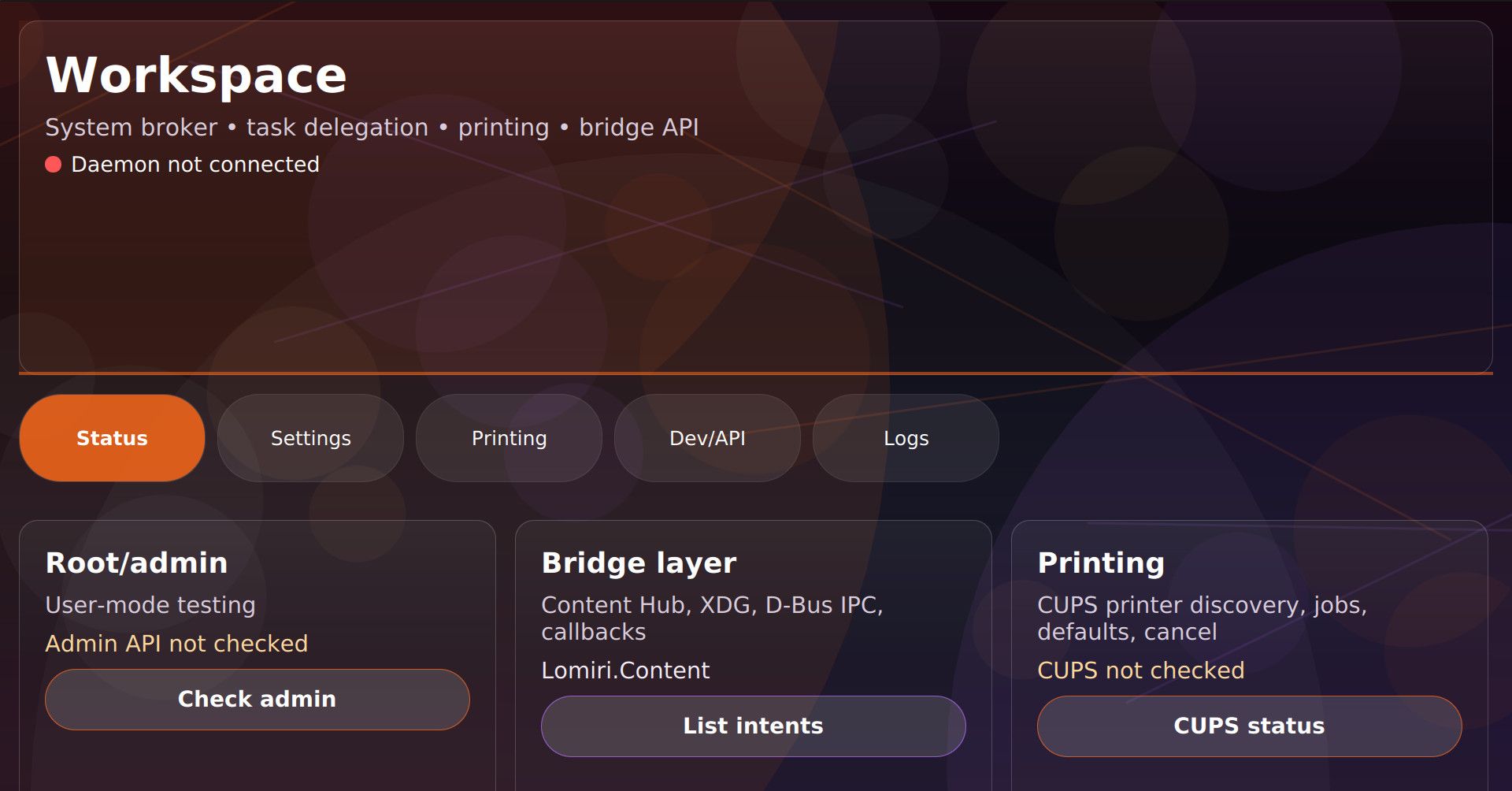
    Workspace for Ubuntu Touch
    System control hub for Ubuntu Touch
    App-to-app bridge for sharing files, links, tasks, and actions
    Content Hub replacement and compatibility layer
    Supports older Ubuntu.Content flows
    Supports newer Lomiri.Content flows
    Handles source, destination, and share transfers
    Local REST API for developers
    D-Bus IPC support for confined apps
    XDG link and file handling
    Auto-fill API support
    Background task delegation
    Task queue and status tracking
    Bridge callbacks for app events
    Local service registry
    File broker for passing files between apps
    Notification bridge
    CUPS printer support
    Printer listing
    Add IPP / IPP Everywhere printers
    Set default printer
    Print local files
    View print jobs
    Cancel print jobs
    Root/admin mode for system-level features
    Root-mode install and uninstall scripts
    Systemd daemon support
    Localhost-only API by default
    API token helper
    Developer/API tab with copy-and-paste examples
    Built-in API usage instructions
    QML client example
    JavaScript client example
    Python client example
    Bash client example
    C++ client example
    Command-line control tool
    System health check tools
    API test scripts
    CUPS test scripts
    Logs view
    Settings panel
    Status dashboard
    Phone-friendly layout
    Desktop/convergence layout
    Scrollable mobile navigation
    Large touch-friendly menu
    Transparent glass tiles
    Animated background
    Ubuntu Touch dark/orange/purple theme
    Designed for advanced Ubuntu Touch users, developers, and port builders
    Built as an unconfined/admin-oriented utility app
    Intended to fill missing Ubuntu Touch system, sharing, printing, and background-task features

    9b5f0380-afc8-4273-ba19-0e3ac6b7129e-image.jpeg

    update i thought it needed more user feedback when activating stuff ....if you tried this try it again old one v1.15 to v1.17 ....everything should actually work now because the internal diagnostics say so

    source:
    https://drive.google.com/file/d/1aescDICpCDdSLExGpRApQtLPIqxwAVl3/view?usp=sharing

    click:
    https://drive.google.com/file/d/1Gbn53vDKmmggsiDluUGMVSqqtsql_nKX/view?usp=sharing


    @libremax said: The printing system is not included in the Ubuntu Touch images due to a lack of space for the root filesystem on many device models. Work is currently underway to be able to increase the size of the rootfs. Is there a way to determine if my device (Nord N10 5G) might have enough space for larger root filesystem ?
  • Y

    @adorsaz Alright, y'all. I have fought since December, when it all of a sudden just clicked that I all at once, am on a countdown, because I was google-naive, all 25 years, plus I thought well, they got it, so I'll use what's there. Not noticing, cause my eyes were wide shut. Ao, now I dig through cobbwebs of a very minimal computer science base in my head, but whatever, right? We built it in Jr. High, so here goe's nothing. First long trip around probably since cillege. Four months of Verizon sandbagging me on a bootloader unlock code, to finally had driven them crazy enough, I guess I finally got the truth. Now, we got like 140 days on the countdown, and I was more googled in, than I'd ever dreamed, or known. Welp, now I'm back to Jr. High level brains, when I leaerned all of thia with gopher. Here's my plea. I don't script well, but I can read one, decently. It's thw knowing of the when's and the where's. I haven't had any mobile data I pay for on this, but just got it last week. It will ring and call out, but the data stays down, unless om wifi. Y'all should know, at tge last minute, and with nothing to unlock to start with, I jist took the next step too, in the purchase for the sake of time and a ton of what=if's, knowing this is where I stay now, as long as it will just continue to work. Being entirely away from Google has given me no greater of a feeling, since I made it under the wire, but if anyone, no matter who reads this, might be able to help me port in, where I can get some data. I also can't send or receive any pictures, under any circumstances. I will need help, even with this terminal. Maybe I'm ONLY SO USED TO Termux, or just get lost because phablet is already connected? I've inherited above my head, willingly; because I have faith, and I'm not bowing no man! Even if I get called an idiot here. I'll eun, limping, as stay with google. They lied to me, for 25 years and I never even had a clue. Just business to them, ia the end of now, most of our live's, that have waited to see if anything is even gonna bw worrh the having, now. I know this will likely be the lasr of the internet for me. I'll just forget thw whole deal. Home phone is already being installed on Monday. Just grateful, I'm not young. I wouldn't know how to do any if life, without the demon box leading their way. No coding agents, either. I am the DI (dumb intelligence, still beats fake, in life, but not in performance). I didn't degoogle, just to ask something else to do something for me. I appreciate the open source program so much I was only even on a plan once, ever. My first time. Apple 3gs. Hated the proprietorship manning uo to 16 hours on dial up with that thing corded to itunes for 16 hours somw days. It nwver left the computer. So, since the ipod touch, I've alwaya sat up my own phone. I newd a step by step roadmap, or someone to back and forth with me, to port mine the rest if the way, in. Finding you guy's, Google also makes impossible to even do. The very page I'm typing on right now, wouldn't even come up, in the old phone. Those arw my only two lags, and on the whim I tiok, just becauae I was born here. I know how crooked red all white, so you can see right through everything, and the blue, will soon be green, or green will be added. The writing is already on the wall, to me. I fought ti be able to find you people to trust, and sillicone valley satan don't even let those devices access like ubports.com Phamtombot or something will always come along. Disable it as many times as it take's. Sorry it's long windy, and fullbof typos, but if I could get stronger service, I think this is what it needs. It wouldn't even ring until 2 days ago. No clue. Startes working after a week out if nowhere, on it's own. I was grateful. Taking what I can get. It won't be easy, but we're a different brees anyway, I guess. Evwryine else is all telling me ro leave stuff alone. They really kniw what they're doing. I'm like, EXACTLY! So, now I have to go pull out what I learned early 90's in Jr. HIGH. Hey. It's progress for me, the minute I hit tge send button, now. Thanks, ALL!!!!


    read more →
    @Keneda Sometimes, such severe restrictions can also lead to a huge surge in innovation and creativity.
  • Vlad NirkyV

    Hello all.

    When i launch clickable build, now, this error is returned.
    Someone who know how to fix it?

    clickable build
    Building app
    Trying to pull docker.io/clickable/amd64-utnext-amd64:latest...
    Getting image source signatures
    Copying blob 65d4a342afc6 skipped: already exists
    Copying blob 2726e237d1a3 skipped: already exists
    Copying blob ef1511aff115 skipped: already exists
    Copying blob a97a4c8acde7 skipped: already exists
    Copying blob 4ad0091c00a8 skipped: already exists
    Copying blob 3f90e7b1c343 done |
    Copying blob 5d1434f01f5d skipped: already exists
    Copying blob ce6145f1a750 skipped: already exists
    Copying blob fdc55cec6c2e done |
    Copying blob 7b414aa65691 skipped: already exists
    Copying blob 816505108b6f done |
    Copying blob 4f4fb700ef54 done |
    Copying blob 21c6e27aaaf0 done |
    Copying blob d2570c8e4d29 done |
    Copying blob f080f8c5d6c5 done |
    Copying blob e40658b5df2f done |
    Error: writing blob: adding layer with blob "sha256:fdc55cec6c2e2a040e9852da37324fc6b556e9296863ed812c43724073d8e5bc"/""/"sha256:e9c55a7c1ba23a626b05a9d5c619d85fa9072441be6816632284998fd1019ba9": unpacking failed (error: exit status 1; output: container ID 32011 cannot be mapped to a host ID)
    Command exited with non-zero exit status 125, see above for details. This is most likely not a problem with Clickable.


    Thanks! I dived into the issue a bit more, and it seems like the problem lies in the default mapping in /etc/subuid file. The first OS regular user created usually has the assignment 100000:65536 in /etc/subuid. I decided to assign the values (231072:65536) from the user that succeed with the podman pull command to the user with previous 100000:65536. With the new values, podman (and therefore, clickman) runs without issues. I don't see any conflict on the default range assigned, but definitely that new assignment seems to fix it. Hope it helps for those that run into it
  • danfroD

    For the installer for Ubuntu Touch to work successfully, it is essential that the version of the original operating system for which the port was created is installed. This depends on the device, but should be specified on the device's page. This is usually not the latest version available! For the Oneplus5(T), for example, this is version OxygenOS 10.0.1, and for the OP8T it is 11.0.13.13.

    Note: There might not be an image available for the exact version you need. Then pick the one below that comes closest. Install that and then update via system updates to the required version.

    If you are lucky, you can use the downgrade wizard integrated in OOS. To do this, download the appropriate file and proceed as follows:

    • Settings
    • About device
    • Info box with version information -> three dots menu
    • Local installation
    • Select file

    Let's be realistic. Life rarely does us this favour. 🙂
    Here is the second method using MSMDownloadTool.

    Requirements:

    • PC with Windows 10/11 and administrator permissions
    • adb and fastboot installed (e.g. in the terminal via `winget install Google.PlatformTools)
    • Required image for OxygenOS (zip) including MSMDownloadTool v4 downloaded
    • OP8T, others?: info about the RAM type DDR4 or DDR5 (usually DDR4), shown e.g. with the app Device Info HW

    Note: There is a pure Linux way to flash an image with so-called flash-all.sh scripts. However, I have not tried this and it is only intended for experienced users who know which file needs to be flashed to which partition. This is the, um, simple version... 😉

    The OSS image (zip file) usually contains the MSMDownloadTool in the correct version to install the right OS version. With this proceed as follows:

    • plug in your device
    • head for windows system updates and check optional updates, there should be a qualcom driver update, might need a search
    • open a terminal, check your device is recognized with adb devices, then enter EDL mode either with adb reboot edl or manually:
      • power-off your device completely
      • unplug the device from the computer
      • press & hold both Volume down + Volume Up, keep holding them
      • connect the device to your computer
    • now start the MSMDownloadtool as admin
    • your device should be recognised and marked as connected
    • select your version (EU, Global, India)
    • select the ram type (DDR4 or DDR5)
    • press start
    • now download and installation should start
    • once the process has finished, the phone automatically reboots (the entry becomes green earlier, wait for reboot)
    • after the reboot go to system updates and make sure to upgrade to required version of OxygenOS

    Now proceed as usual:

    • enable developer tools, enable oem unlocking (may need wifi or mobile data to be on)
    • boot the device into fastboot mode via adb reboot fastboot or manually:
      • unplug device
      • shut down device
      • a) press & hold Volume Up, Volume Down, and Power keys together
      • b) press and hold Volume Down and Power, after vibration let power key go, in the boot menu select language, select advanced, select boot to fastboot
    • when in fastboot mode (NOT fastbootd!), plug the device in your machine, run fastboot devices to check that your device is recognized and ready to go, then run fastboot flashing unlock
    • on screen select "unlock bootloader" and confirm with power button

    Note: There is also fastboot oem unlock. According to web sources, that may do exactly the same, but may also behave different depending on the manufacturer.

    • wipe data partition to format it as ext4 to remove android encryption either via boot menu (boot into boot menu, select advanced, reboot recovery), advanced, wipe or by booting into fastbootd mode (aka bootloader ) and running fastboot format:ext4 userdata
    • run the installer

    Fingers crossed you now get a nice Oneplus device with Ubuntu Touch installed.

    Falls hier jemand landet, der nicht so gut Englisch kann, eine deutsche Version dieser Anleitung gibt es hier: https://forums.ubports.com/post/91507.


    @danfro That's a shame, it seemed like a good 'new' device for the list.
  • danfroD

    Anleitung getestet mit OP8T. Andere Modelle können leicht abweichende Vorgehensweisen erfordern.

    Für den erfolgreichen Einsatz des Installers für Ubuntu Touch ist es zwingend erforderlich, dass die Version des ursprünglichen Betriebssystems installiert ist, für die der Port erstellt wurde. Diese hängt vom Gerät ab, sollte aber auf der Seite des Geräts angegeben sein. Dies ist im Regelfall nicht die neueste verfügbare Version! Für das Oneplus5(T) ist das z.B. die Version OxygenOS 10.0.1, für das OP8T ist es 11.0.13.13.

    Hinweis: Es kann sein, dass kein Image für die genaue benötigte Version verfügbar ist. Dann das nächst niedrigste Image installieren und über die Systemaktualisierung auf die benötigte Version aktualisieren.

    Wenn man ganz viel Glück hat, kann der in OOS integrierte Downgrade Assistent genutzt werden. Dazu die entsprechende Datei herunterladen und wie folgt vorgehen:

    • Einstellungen
    • Über das Gerät
    • Infobox mit der Versionsinfo -> drei Punkte Menu
    • lokale Installation
    • Datei auswählen

    Seien wir realistisch. Das Leben tut uns selten diesen Gefallen. 🙂
    Hier der zweite Weg per MSMDownloadTool.

    Voraussetzungen:

    • PC mit Windows 10/11 und Administratorrechten
    • adb und fastboot installiert (z.B. im Terminal per winget install Google.PlatformTools)
    • erforderliches Image für OxygenOS (zip) inklusive des MSMDownloadTools v4 heruntergeladen
    • OP8T, andere?: Kenntnis des Ram Typs DDR4 oder DDR5 (meist DDR4), kann herausgefunden werden mit Device Info HW

    Hinweis: Es gibt eine reine Linuxversion mit sog. flash-all.sh Skripten. Diese habe ich aber nicht probiert und ist nur für erfahrene Nutzer gedacht, die wissen welche Datei auf welche Partition geflasht werden muss. Das hier ist die ähm einfache Variante... 😉

    In dem Image steckt in der Regel die "richtige" Version des MSMDownloadTools drin, die die korrekte Version installiert.
    Damit wie folgt vorgehen:

    • stecke das Gerät per USB Kabel in den Rechner
    • gehe in die Systemeinstellungen und aktivere optionale Updates und prüfe auf neue Updates, jetzt sollte ein optionales Qualcom Treiber Update verfügbar sein (falls nicht schon installiert)
    • bringe das Gerät in den EDL Modus, entweder per adb mit adb reboot edl oder manuell:
      • Gerät komplett ausschalten
      • Gerät vom Rechner abziehen
      • Vol + und Vol - drücken und gedrückt halten
      • verbinde das Gerät mit dem Rechner
      • das Gerät sollte jetzt im EDL Modus sein, auch wenn am Bildschirm nix zu erkennen ist, der bleibt schwarz
    • starte jetzt das MSMDownloadTool als Administrator (Rechtsklick -> Ausführen als Administrator)
      • das Gerät sollte als connected angezeigt werden, falls nicht, ist es evtl. doch nicht im EDL Modus -> das nochmal machen
      • wähle die Version aus (EU, Global, India)
      • wähle ggf. den Ram-Typ aus, am OP8T kann das DDR4 oder DDR5 sein)
      • drücke auf Start, der Prozess sollte jetzt losgehen
      • warte solange bis das Gerät neu startet, auch wenn der Eintrag davor schon grün geworden ist
      • überprüfe in den Einstellungen die Version, aktualisiere ggf. auf die benötigte Version

    Fertig. Jetzt sollte die richtige Version installiert sein.
    Ab hier wie sonst auch

    • Entwickleroptionen aktivieren (unter System 7 mal auf die Build-Nummer tippen)
    • OEM Entsperrung erlauben (in den Entwickleroptionen, braucht Internetverbindung per WLAN oder mobile Daten)
    • den Bootloader entsperren
      • in fastboot Modus gehen, nicht fastbootd z.B. per adb reboot fastboot oder manuell
        • Gerät abziehen
        • Gerät ausschalten
        • a) Vol + drücken und halten, Einschalttaste drücken und halten bis das Gerät vibriert nur diese dann loslassen
        • b) Vol + und Vol - und Einschalttaste alle zusammen gedrückt halten bis das Gerät vibriert dann nur Einschalttaste loslassen
        • im Bootmenü fastboot auswählen (English wählen -> advanced -> boot to fastboot)
      • mit fastboot flashing unlock den Bootloader entsperren, hier muss am Gerät eine Bestätigung erfolgen (beim OP8T waren die Optionen genau falsch dargestellt, also ggf. nochmal machen), danach sollte ein Erfolgsmeldung erscheinen
      • es gibt zwar auch fastboot oem unlock, das sollte eigentlich das gleiche tun, macht es aber im Einzelfall nicht
    • die Nutzerpartition formatieren damit die Geräteverschlüsselung gelöscht wird, sonst geht die Installation nicht
      !Dadurch werden alle Daten gelöscht. Vorher sichern falls noch etwas benötigt wird.
      • per Terminal mit fastboot format:ext4 userdata
      • Bootmenü aufrufen wie oben beschrieben
      • in Recovery booten (advanced -> reboot to recovery)
      • advanced -> wipe
    • den Installer starten

    So, ich hoffe ich habe keine wichtigen Schritte vergessen. Viel Erfolg!


    Nur als Info. Aktuell ist der OP8T port "auf Eis gelegt". Der lief zwar recht gut unter Focal, aber machte echte Problem mit Noble. Da Focal quasi vom Tisch ist, macht es wenig Sinn einen Port dafür offiziell zu veröffentlichen, der nicht zukunftsfähig ist.
  • R

    Hello everyone. I have never reflashed phones. But i want to install ubuntu touch to my OnePlus 6T. I have OnePlus A6010 with android 11 (Oxygen Os v 11.1.2.2). I read that I can easily downgrade to Android 9 using this file: "Fulldowngrade_wipe_18801_181024_2027_user_MP2_release.zip", but I cant find it. All links that contained the file are unavailable at 05.2026. Where can I find this file, and what should I do if I can't find it?
    I don't want to brick my phone. Also, what should I do if I bricked my phone?
    Is this something that can be easily fixed?
    Sorry for a lot of questions I'm newbie in this


    @ResuWen Check the end of this thread on XDA-Developers forum. There is a media fire link that works.
  • developerbaymanD

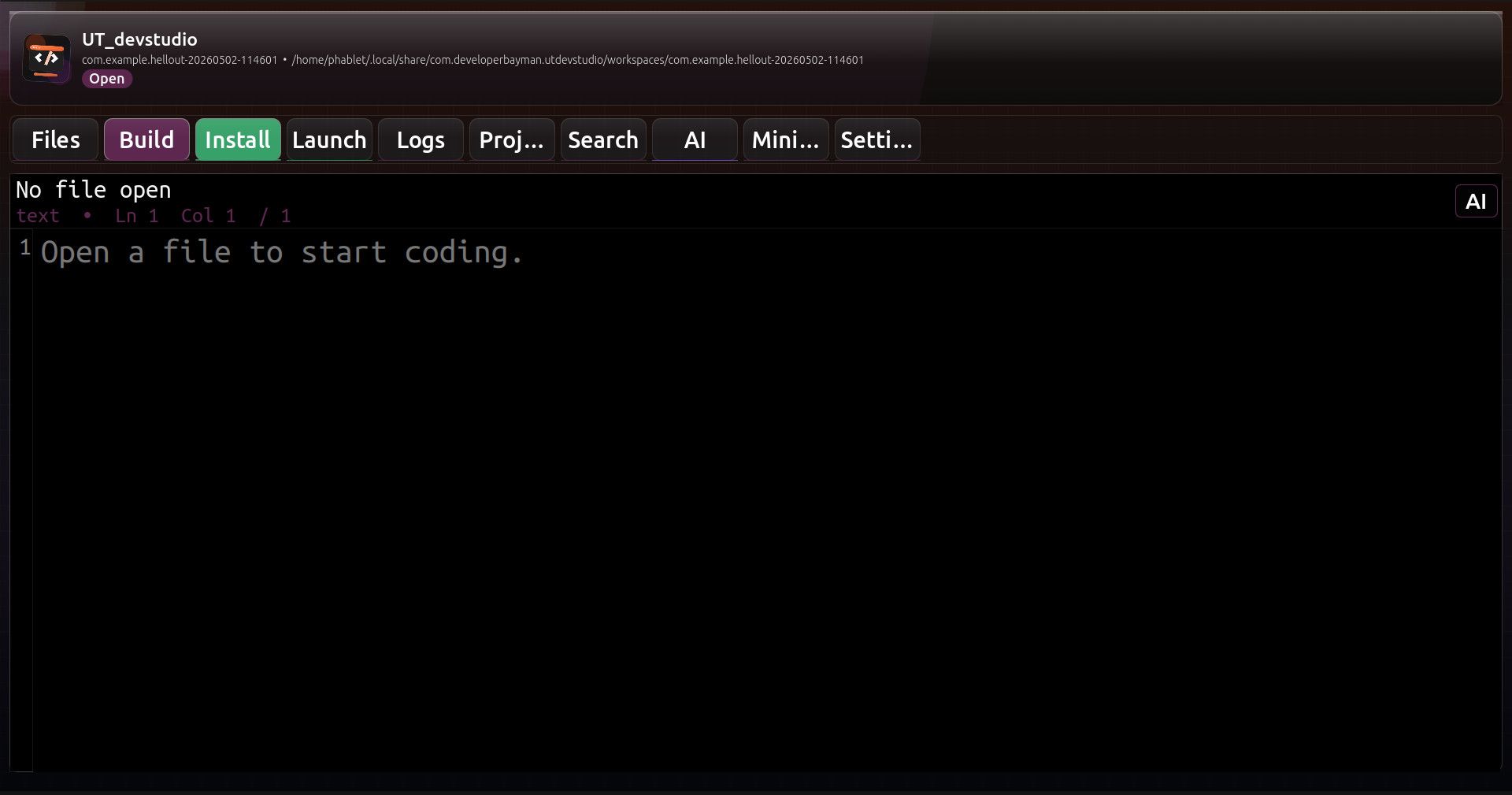
    prob a little early yet but here is UT_devstudio a complete on device UT IDE with ollama integration

    9180c5dc-9d91-4eab-b9f5-8fa8caa94504-image.jpeg

    expect bugs .....i have not been feeling well lately

    source:
    https://drive.google.com/file/d/1PUy608m4Zr_n96wgPLiTgNFqWCRkb9JZ/view?usp=drive_link

    click:
    https://drive.google.com/file/d/1EJeNrrBdmFZAXQ3FRsECxlEzuTYDBVDX/view?usp=drive_link


    heads up i forgot to re-enable some of the build chains during debugging so this is broken till i post the update