We need a new categorie for the new Volla Plinius phone. Currently the most recent phone / most recent category in this forum is Volla/Quintus
World
Topics from outside of this forum. Views and opinions represented here may not reflect those of this forum and its members.
-
Koloběžky, kola, EUC, skateboardy a zkušenosti s nimi
-
I'm Nick, and I like to tinker with Linux stuff. I'll bumble through distro reviews, tutorials, and general helpful tidbits and impressions on Linux desktop environments, applications, and news. You might see a bit of Linux gaming here and there, and some more personal opinion pieces, but in the end, it's more or less all about Linux and FOSS ! If you want to stay up to snuff, follow me on Mastodon: https://mastodon.social/@thelinuxEXP If you can, consider supporting the channel here: https://www.patreon.com/thelinuxexperiment
-
-
🕹️ Du wolltest immer schon mehr über das Betriebssystem Linux lernen, hast bisher aber bisher nicht den richtigen Einstieg gefunden? Dann bist Du hier genau richtig. Ich erkläre Dir die Grundlagen auf eine unterhaltsame Weise und Du kannst das, was ich Dir zeige, gleich selbst bei Dir ausprobieren.
-
Community about running GNU/Linux on phones. Projects like Ubuntu Touch, Plasma Mobile, PostmarketOS, Mobian etc. Either on former Android phones or hardware like the PinePhone.
Related communities:
See also:
Related chats:
-
The Discussion on Linux-based Phones.
**Benefits**:- Hardware freedom. - Perfect operating-system competition. - Full utilization of specs. - Phone lifespan raises to 10+ years. - Less e-waste.
**Linux Mobile Distros**:- Ubuntu Touch - Sailfish - FuriOS - Postmarket OS - Mobian - Pure OS - Plasma Mobile - LuneOS - openSUSE Mobile - Nemomobile - Droidian - Mobile NixOS - ExpidusOS - Maemo Leste - Manjaro Arm - Tizen - WebOS
**Linux Mobile Hardware**:- Fairphone 5 - Volla Phone - PinePhone - FLX1 - Librem 5
⚙️Contribute- Ubuntu Touch - Sailfish OS - FuriOS - Postmarket OS - Mobian - Manjaro Arm - Nemo Mobile - Plasma Mobile - LuneOS - Maemo Leste - Librephone
🧼Go Clean From the Duopoly:- !deapple@piefed.social - !deGoogle@lemmy.ca
💻Related Communities:- !linux@programming.dev - !librephone@programming.dev - !alpinelinux@lemmy.ca - !linux4noobs@programming.dev - !linuxvr@lemmy.ca - !privacy@programming.dev
📰News:- Linux Phone Apps - Linux on Mobile
💬Messager:- !matrix@programming.dev - !simplex@programming.dev
⌚️Watch:- !asteroidos@piefed.social - !pinetime@programming.dev
-
A community for discussion about Mozilla Firefox.
-
Welcome to Funhole! The first and only hole on SDF exclusively for fun content! Are you a content creator? Then come post your content and join the fun!
-
Hi There, I am Franzo, a musician, programmer and FOSS Software/Gaming Enthusiast. I'll play Opensource Games here every week and play/spectate tournaments as well! (LIVESTREAMS: https://video.hardlimit.com/w/oNhei3W9ER6se1G7vZXmTx BACKUP: https://peer.madiator.cloud/w/uL7HZJiR5HvKfv4vWP3pec ) Get the latest news here: https://mastodon.social/@opensourcegaming If you want to join my matrix space here is the link: https://matrix.to/#/#osg:matrix.org You can join the stream chat from the livestream or from there. Or, if you prefer, you can join from the irc room on the FGD network (#osg-stream on irc.freegamedev.net); SCHEDULE: - SATURDAY/SUNDAY : 21:15 (🇪🇺 CET ) - 19:15 (🌍 UTC)
A world of content at your fingertips…
Think of this as your global discovery feed. It brings together interesting discussions from across the web and other communities, all in one place.
While you can browse what's trending now, the best way to use this feed is to make it your own. By creating an account, you can follow specific creators and topics to filter out the noise and see only what matters to you.
Ready to dive in? Create an account to start following others, get notified when people reply to you, and save your favorite finds.
Register Login-
Hey I tried brave browser and freetube snaps avalibale on open store they work almost flawless but since they are desktop apps they don't have on screen keyboard
Is there eny way to add on screen keyboard or a workaroun?
-
Hello everyone.
We are pleased to announce that Ubuntu Touch 24.04-2.0 Beta is now available for testing! Ubuntu Touch 24.04-2.0 is slated for release on 13 July 2026. Before then, we need to make sure it's ready to go.
Notable features in this release are:
- Updated browser engine for Morph Browser
- Ubuntu Touch can now avoid notches and rounded corners (currently configured for FP4, FP5, Volla Phone Quintus, Volla Phone Plinius)
- Screenshot editor
More info about these features are available on our blog.
Unfortunately, because of the system storage space limitation, we're unable to provide Ubuntu Touch 24.04-2.0 to all of currently supported devices. We have divided devices into 3 groups:
- Devices we're confident will not have a problem with system storage space (or have the problem resolved). These devices are:
- F(x)tec Pro1X
- Fairphone 4
- Fairphone 5
- Lenovo Tab M10 HD 2nd Gen WiFi / LTE
- Nothing Phone (1)
- Sony Xperia X
- Volla Phone
- Volla Phone X
- Volla Phone 22
- Volla Phone X23
- Volla Phone Quintus
- Volla Phone Plinius
- Volla Tablet
- Rabbit R1
- Xiaomi Poco X3
- Zinwa Q25
To receive Ubuntu Touch 24.04-2.0 Beta on these devices, switch your device to Release Candidate channel, then run the following command in Terminal app or via ADB/SSH:
gsettings set io.ubuntu-touch.system-settings.update offer-development-release trueAfterwards, head to System Settings -> Updates, and you should be offered to upgrade to Ubuntu Touch 24.04-2.0 Beta.
- Devices that are known not to work. These devices are:
- Oneplus Nord N10 5G
- OnePlus Nord N100
- OnePlus 5
- OnePlus 5T
- OnePlus 6
- OnePlus 6T
- Fairphone 3 and 3+
- Google Pixel 3a and 3a XL
- Xiaomi Poco M2 Pro
- Xiaomi Redmi Note 9 Pro (Global)
- Xiaomi Redmi Note 9S/9 Pro (India)
- Xiaomi Redmi Note 9 Pro Max
For these devices, we've stopped updates flowing into the daily channel to avoid bricking those devices. If you follow the above instructions while you're on 24.04-1.x Release Candidate channel, you won't be offered to upgrade to 24.04-2.x Beta. However, if you're on 24.04-1.x Daily channel, you may still be offered to upgrade to 24.04-2.x daily images. Do not upgrade, as 1.) this is the older image before we include the new Qt 6-based Morph Browser, and 2.) you will not be able to upgrade to the new daily image once it's available.
If your devices are in this list and you're already on 24.04-2.x Daily channel, I recommends you to use UBports Installer to downgrade to 24.04-1.x images and wait for your port to receive 24.04-2.x updates again. This can be done without losing data.
- Devices that are not in either of the list above. We don't have enough information to determine if they'll work on 24.04-2.x, so we need testing from you. To do so, make sure you're on a spare device, then follow the same instructions above but switch to Daily channel instead of Release Candidate channel. The possible results are:
- Your device upgrade successfully. In such case, congratulations, your device should be working with 24.04-2.x. Please report back to us, and we'll enable your device to receive 24.04-2.0 RC and 24.04-2.0, or if not possible in time, for 24.04-2.1 or subsequent releases.
- Your device fails to upgrade. In such case, please use UBports Installer to restore 24.04-1.x on your device, and then also report to us to disable updates to these devices too.
I know that these instructions are long and unwieldy, but this is due to the special transition that needs to happen for the inclusion of Qt 6-based Morph Browser with upgraded Chromium. We truly appreciate all testing. Please don't hesitate to reply below with any questions you have.
read more →Not sure if already reported issue, but. After taking the screenshot, the screenshot editor is shown, where I can edit or share the image. However, this window is higher (like z-index) than the volume-control popup, and I assume it’s the same for notifications too. So when I change the volume while I’m on this screenshot editor screen, I can’t see the current volume status. -
Bonjour @pparent
je ne parviens pas à connecter mon compte sur l application Blablacar. J utilise mon compte facebook pour cela : peut être que ce n est pas prevu ? a moins qu il soit possible de le faire avec une manip. spécifique ?
-
lomiri-location-service GPS reliability patches (navius branch, v3.4.1+navius5)
While building Navius (a GPS navigator for Ubuntu Touch) I ran into several GPS reliability issues in
lomiri-location-service, particularly on devices that run Waydroid alongside UT.I have collected the fixes in a branch called navius (currently at navius5). All patches are tested on a Xiaomi Redmi Note 9 Pro (HALIUM_10, arm64) running Ubuntu Touch Noble (24.04), but they address generic race conditions and watchdog issues that should benefit any device.
I would like to share them here and eventually propose the relevant ones upstream.
Bugs fixed
1. Waydroid GPS callback race → SIGSEGV
navius1On HALIUM_10, Waydroid and Ubuntu Touch both access the GPS HAL via
host_hwbinder. Waydroid can callregister_callbacks()at any time; that function doesu_hardware_gps_delete()+u_hardware_gps_new(). If a GPS callback fires between those two calls it dereferences the freed handle — SIGSEGV, daemon crash.Fix:
std::shared_mutex callback_mutexinImpl. All seven GPS callbacks hold a shared lock (run concurrently with each other).register_callbacks()holds an exclusive lock only while deleting/installing the handle — callbacks complete first, then the swap happens safely.2. EDEADLK at service start
navius1The initial mutex fix held the exclusive lock across the whole delete → new sequence.
u_hardware_gps_new()fireson_set_capabilitiessynchronously on the calling thread, which tries to take a shared lock on the same mutex: EDEADLK, daemon aborts at start-up.Fix: Three-phase lock:
- Exclusive lock → delete old handle → release.
- Create new handle without any lock (re-entrant callbacks are now safe).
- Exclusive lock → install new handle → dispatch position mode → release.
3.
start_positioning()blocking the daemon forevernavius2start_positioning()was called from a D-Bus handler thread. Its internalQEventLoopblocked that thread indefinitely. LLS started, satellites were tracked, but no position fix ever arrived.Fix:
start_positioning()dispatched to the main thread viaQt::QueuedConnection/QMetaObject::invokeMethod.4. GPS stops after Waydroid closes and never restarts
navius4When Waydroid shuts down it calls
u_hardware_gps_stop()on the shared HAL, halting GPS globally. LLS's handle remained valid so it never detected the stall — GPS frozen until LLS was manually restarted.Fix — watchdog thread: a detached thread ticks every 5 s and reads
last_gps_ms(updated byon_location_updateandon_sv_status_update). If no GPS data for 10 s, it re-runsregister_callbacks()and restarts the chipset automatically.5. No fixes despite 37+ satellites in view
navius4dispatch_updated_modes_to_driver()(which sends the position mode to the chipset viau_hardware_gps_set_position_mode()) was called inregister_callbacks()but not in the fast path insidestart_positioning(). The chipset tracked satellites but never computed fixes.Fix: call
dispatch_updated_modes_to_driver()beforeu_hardware_gps_start()in the fast path.Result after navius4: Waydroid and Ubuntu Touch GPS now work simultaneously. After Waydroid opens and steals the HAL, the watchdog reclaims callbacks within 10 s; accuracy converges to ~4 m while Waydroid keeps positioning.
Feature additions
GetVisibleSpaceVehiclesD-Bus methodnavius2QML clients that cannot subscribe to D-Bus property-change signals have no way to get a satellite snapshot without keeping a persistent session. Added a synchronous method and read-only property
VisibleSpaceVehiclesto the service interface:dbus-send --system --dest=com.lomiri.location.Service \ --print-reply \ /com/lomiri/location/Service \ com.lomiri.location.Service.Interface.GetVisibleSpaceVehiclesCompile-time debug traces (
LLS_DEBUG)navius5All GPS trace logging is gated behind
LLS_DEBUG(defaultfalse) ininclude/…/lls_trace.h. Zero runtime cost when disabled; set totrueand rebuild for full per-fix traces in journald.
Build & install
The branch ships a
build-deb.shscript that produces a.debinside an isolated Docker container (Ubuntu 24.04 + UBports repo). No host modifications needed. Requires Docker on an ARM64 host.git clone https://github.com/woodyst/lomiri-location-service -b navius cd lomiri-location-service bash build-deb.sh # output to ./debs/# Deploy to device scp debs/liblomiri-location-service3_*_arm64.deb phablet@<device>:/tmp/ ssh root@<device> "mount -o remount,rw / && \ dpkg -i /tmp/liblomiri-location-service3_*_arm64.deb && \ systemctl restart lomiri-location-service"
Upstream proposal
I intend to open two MRs on gitlab.com/ubports/…/lomiri-location-service:
MR What Status MR 1 Bug fix: mutex/EDEADLK race in register_callbacks()Ready to propose MR 2 Feature: GetVisibleSpaceVehiclesD-Bus methodReady, needs API discussion — Watchdog thread, LLS_DEBUG, build script Navius-specific; not proposing upstream Before opening the MRs I wanted to share the work here and get feedback, especially on whether there is already upstream work addressing the Waydroid race condition or the
GetVisibleSpaceVehiclesAPI.Any review or testing on other devices is very welcome. Full patch documentation: doc/navius-patches.md.
-
Hi everyone!
I'm happy to announce Navius GPS, a full-featured GPS navigator I've been building
for Ubuntu Touch over the past months. It's now available on the OpenStore! https://open-store.io/app/navius.woodyst
What it does:
- Turn-by-turn voice navigation with three TTS engines (Piper neural, Mimic HTS, PicoTTS)
- Community alerts: traffic, speed cameras, police, accidents — with voting to confirm or dismiss
- Music player — import tracks via Content Hub, plays during navigation, automatic volume ducking when TTS speaks. Supports mp3, ogg, flac, m4a, opus and more
- Fuel prices in real time (Spain: official MINETUR API; other countries via OSM)
- Vector maps with MapLibre GL — satellite view, 3D buildings, customisable styles
- High-precision GPS with dead-reckoning and interpolation up to 30 Hz
- Predicted traffic integrated in route calculation
- Multi-destination planning, favourites, 50-destination history
- POI search: petrol stations with price, parking, restaurants, hospitals and more
- GPS track recording with GPX export and route simulation
- Offline capable with OSM Scout Server detection
Routing is powered by Valhalla with planet-scale OSM data. Maps use MapLibre GL
with tiles from our own server.The app is fully open source (GPL-3.0):
https://github.com/woodyst/naviusMore info and screenshots:
https://www.egpsistemas.com/site/naviusI'd love to hear your feedback — bug reports and suggestions very welcome via GitHub issues
or right here in this thread!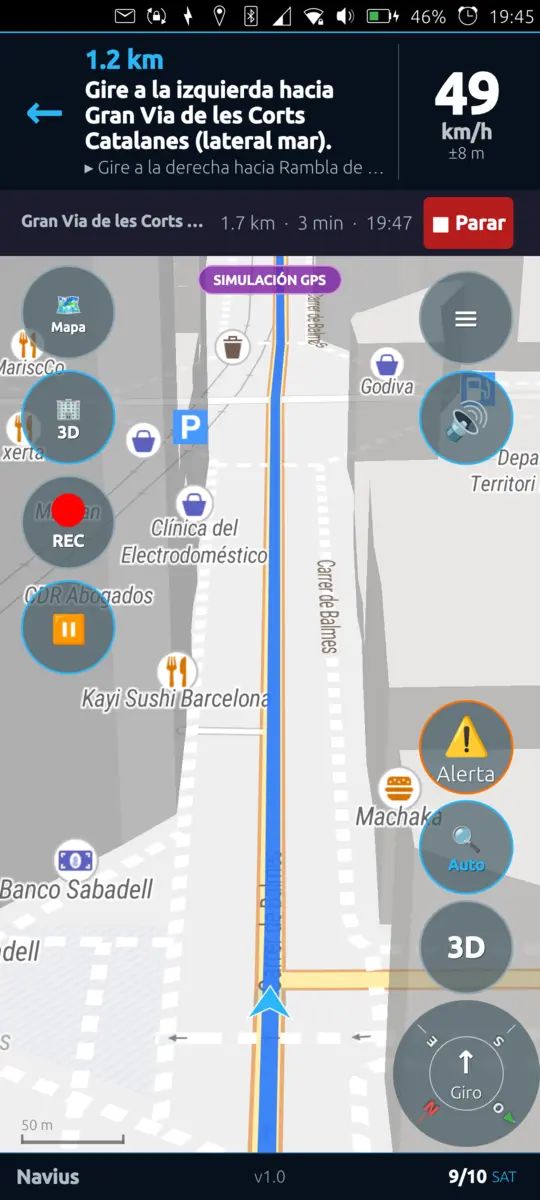
-
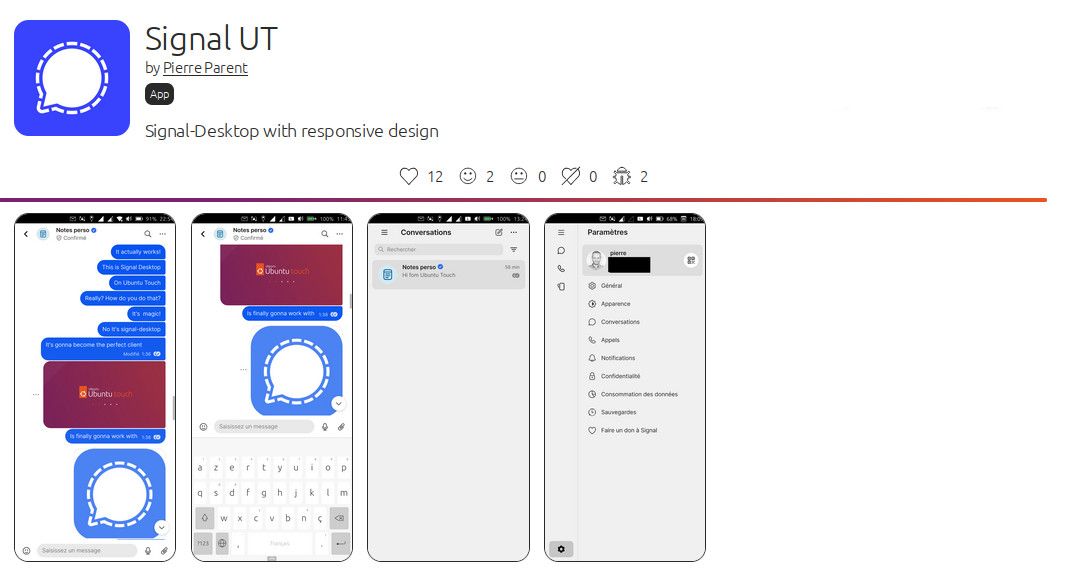
Edit: Signal Ut is available on the OpenStore

The following is the first post of the topic and is now outdated, read the latest posts for latest news
I'm building a new application for the openstore: Signal UT, which will be a custom version of signal-desktop for Ubuntu Touch. I've already succeeded to build an initial .click package of signal-desktop for Ubuntu Touch with basic tweaking to have a more acceptable scale and have the keyboard working. I've made scripts to build it automatically. Currently it is based on a reuse of the binaries from https://snapcraft.io/signal-desktop . But it does not require to use snap to work, it's a standalone click package (that we'll be able to publish openstore later).
https://github.com/pparent76/SignalUT
The app is currently not responsive (but I plan to work on it):
- You can reduce the left menu to it's minimal size, as a temporary workaround
- The keyboard will display on top of the textedit, so you won't see what you type
- [EDIT] Somehow the "enter" and "back" buttons of the keyboard do not work after starting the app, but locking and unlocking the phone with Signal in foreground will solve it. (Probably and Xmir problem)
- You should be able to fine tune zoom by plugin in a keyboard and use the shortcuts Ctrl+= & Ctrl+- (untested)
But it is already usable to consult messages, and send small messages (in a sub-optimal way)
What also works or kind of works:
- Sending Audio messages, and listening to them (seems to work quite well)
- Audio calls (and it's possible to see video from the other person but internal camera does not work), call quality untested.
- Receiving non-Ut desktop notifications when keeping app in background (even when the phone is suspended)
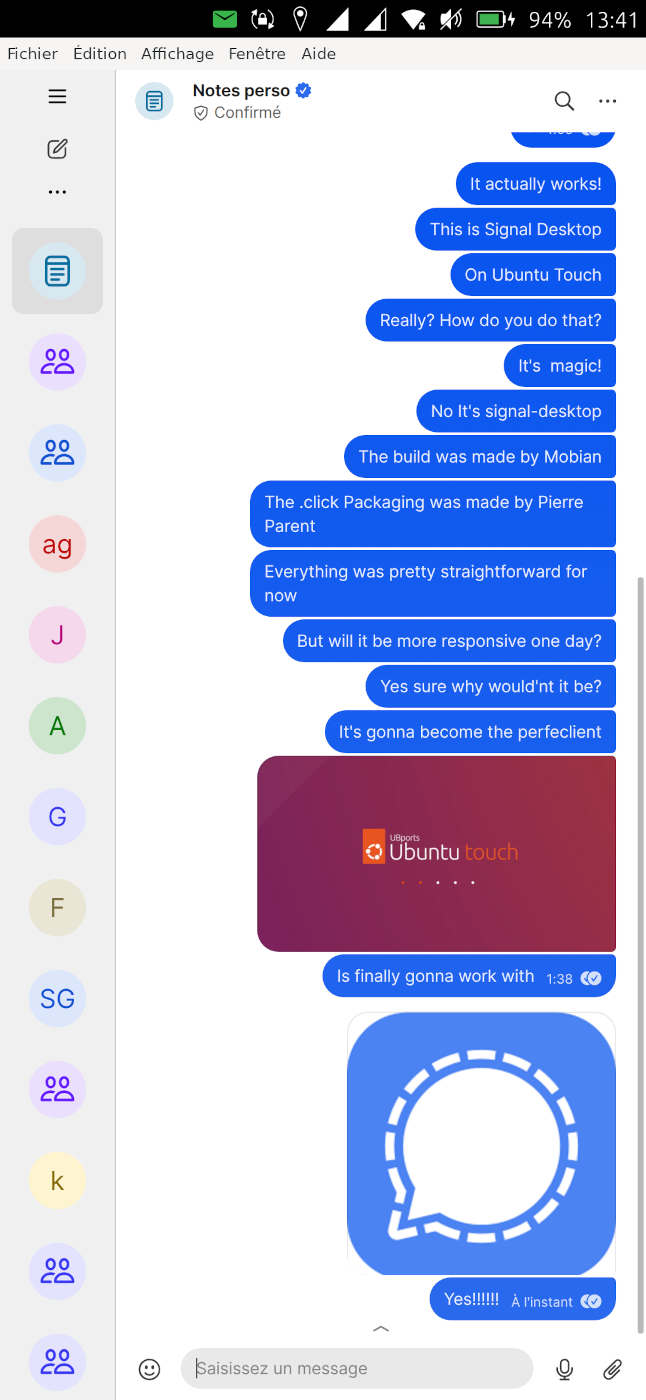
WARNING: This is experimental, use at your own risks. The app currently needs to run unconfined. It contains binaries, that are free software but that I've not compiled personally (coming from snapcraft.io ) and that I have not checked. I do not take responsibility in case of any problem
Knowing that, if you want to be a tester, I'd be glad to get feedback from testers to know if it runs on other phones. So you will find a pre-built .click package here ( ONLY RUN ON NOBLE (24.04) ) :
https://github.com/pparent76/SignalUT/releases/tag/FirstRelease
-
I have used linux since 2016, but never on a phone till now, seeing that Volla phones come with linux I kept an eye on the lineup as I didn't see anything that screamed perfect for my usecases.
Then the Plinius is released, it has everything I want from a phone, everything, and it comes with something that I love (linux), but I live in a country that is extremely dependent on some android apps such as BankID (thanks scandinavia), I have gotten BankID to work on both GrapheneOS and /e/OS so Ubuntu Touch wasn't a problem for me (I thought) because of waydroid.
As long as I can get waydroid, I can get my essential apps for day to day in this dystopian digital society.
I have never used debian/ubuntu (only fedora and arch based distros) before so I read the Ubuntu Touch pamphlet that came with my brand new Volla Plinius to figure out how to get waydroid working, it said to use waydroid helper.
I turn on my phone and immediately update everything, then I go to open store and download waydroid helper, I press install and wait, nothing is happening, it is just there infinitely, it says preparing to download image but nothing is happening.
I do some research, I find this forum, some guys says it can take up to an hour, another person reports it took him a whole two hours, I put it on and wait an hour, it doesn't work, it still says "preparing to download image", I then continue to wait two hours and still nothing, I then decide to let it run overnight and wait a full 8 hours while sleeping, nothing again.
I then check the documentation which gives me different directions than the pamphlet that my phone came with, I write "waydroid init" into my terminal, I get root error so I instead write "sudo waydroid init" and I get that it failed tp get vendor OTA ID, with a specific Halium 14 json version of waydroid.
I end up doing even more research and find out that I can manually download waydroid and do sudo waydroid init -f and it should use the manually downloaded image instead.
That's when I learn that the latest waydroid version available on sourceforge is Halium 13, I think back to when I tried to use the terminal and it said halium_14.json so I research and according to my research halium 13 is not compatible with halium 14 devices, so there is seemingly not even a point in me using the halium 13 waydroid image as it won't work according to both google and duckduckgo.
So now I am just lost, is there no solutions to my predicament?
-
Hello,
I just wanted to share that I'm not a big fan of snaps in the open-store, especially how it is currently done.
Most snap apps are not currently usable on a phone screen ( scaling problem, no OSK, no integration with contentHUB, no integration with URLdispatcher, interface designed exclusively for desktop, ect...)
I think it can be a bit confusing to list them for newcomers especially because:
-
Some snap apps, that are not usable at all on a phone screen, often get higher in the search results than some apps developed specifically for Ubuntu Touch, that have multiple positive reviews, and match completely the search terms. Sometimes there really are a lot of snap apps, I think this can mislead completely a newcomer to test a bunch of non-working snap apps, instead of testing working apps developed specifically for UT.
-
There is a mention of "Snap application" but this is a small text that does not allow to distinguish rapidly and visually.
Overall I think it makes things more messy and harder to find an app that works for your need. I think overall it might give to a newcomer the image of a mostly non-functional apps store.
Example:
You type "pdf" many snaps unusable on a phone are displayed before "Annotate" or "Document Viewer"
You type "Whatsapp" many snap unusable on a phone are displayed before "Whatsnew"
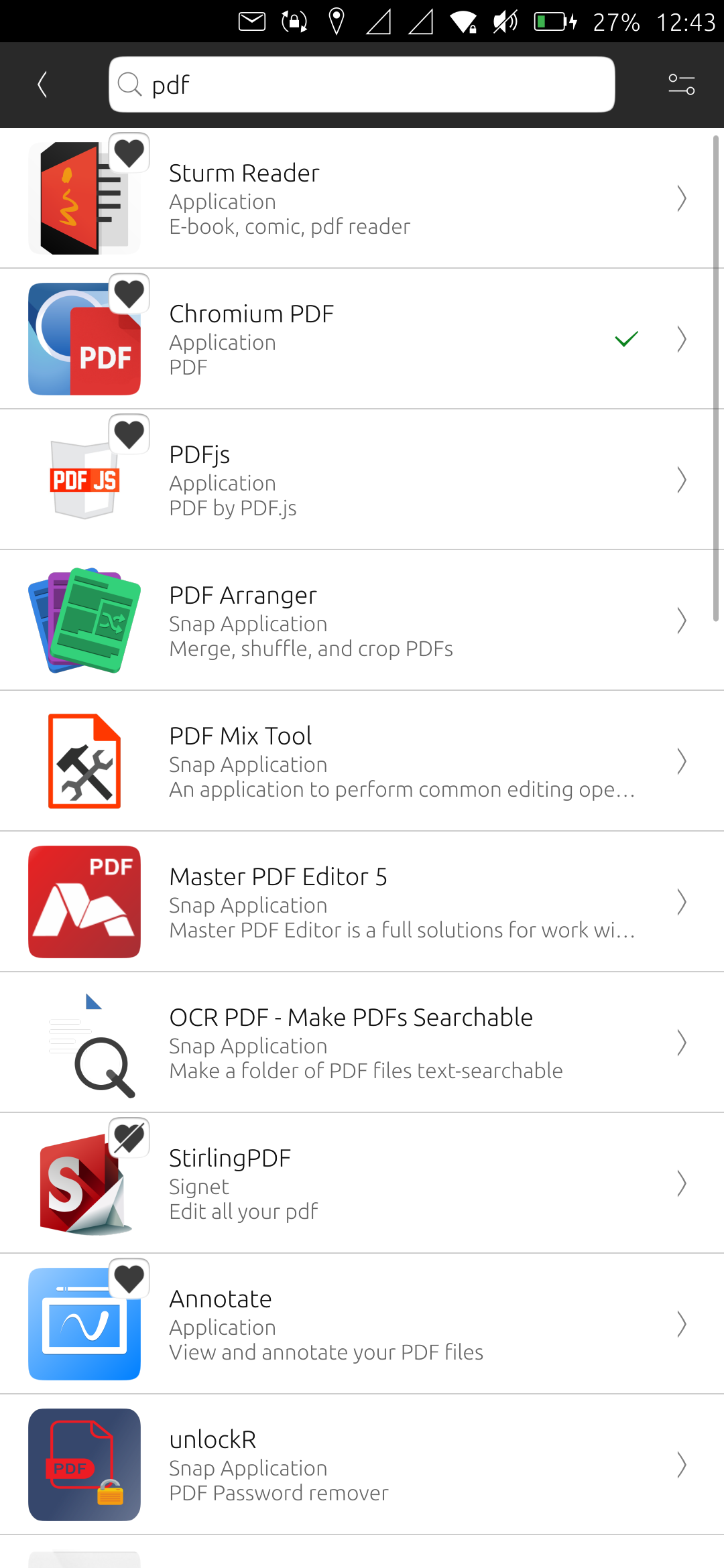
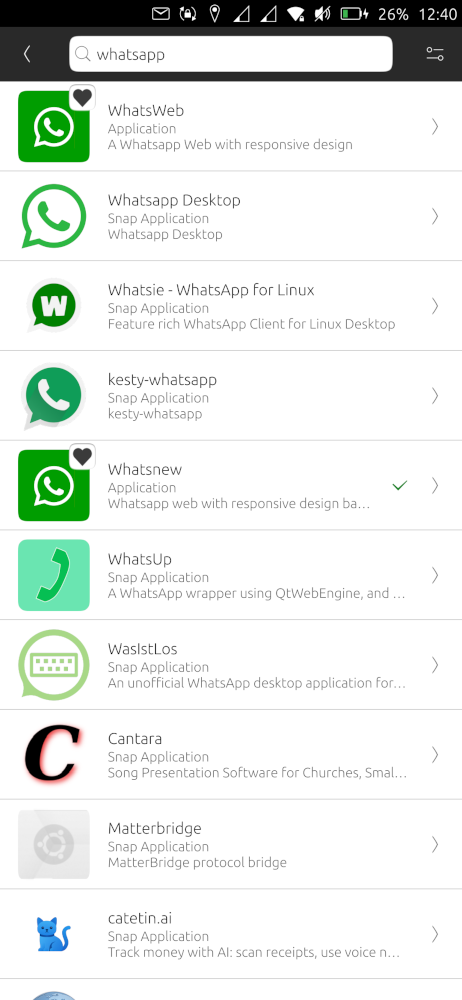
@kugiigi @pparent I think snaps should be turned on by default, but only ones verified to work properly with Ubuntu Touch. Then a setting to turn on showing results from all snaps, if user desires. Of course, this requires someone to go curate snaps.... So in the mean time, maybe changing how the results are displayed + opt-in setting is better. -
-
[Original title: Whatslectron: Whatsapp Web with Electron. ]
Hello everyone.
These days Whatsapp seems to have made a major update of its "Whatsapp Web".
This has positive and negative implications:
*Positive: calls are now available in Whatsapp web (you may need to join beta to have it)
*Negative: Whatsweb seems broken, it takes a lot of CPU and crashes, it seems inherent to Chromium 87 we'll see if it gets corrected.In the meantime I have published an application that allows to use Whatsapp web in a newer web engine through an Electron application. This will hopefully allow to enable calls.
https://open-store.io/app/whatslectron.pparent
Here are the current features:
- Audio calls, but audio quality may vary ( you currently need to enable "Beta" in whatsapp web to have calls )
- Sending and receiving text messages
- Notifications when keeping the app open
- Import / Export attachments via ContentHub
- Sending and Receiving audio messages
- Open URL externally via URLdispatcher
As this is early version there will probably be some small bugs. (Always try to restart or retry in case of a bug ). The application should benefit a lot from upgrade to Mir2.x when it happens.
Do not hesitate to post some feedback.
-
Hello
I'm trying to revive the 'ubtd' app (Bluetooth file transfer) initially written by Michael Zanetti and Ian L., but I've hit a roadblock and I could use some guidance.
I'm currently targetting UT 20.04 on a Pixel 3a.
By default, the OBEX daemon doesn't run on the phone. A 'systemd' unit file is supposed to start it (
/usr/lib/systemd/user/dbus-org.bluez.obex.service), but it is reported as "loaded / inactive (dead)" by 'systemctl' -- I'm not sure why as I was unable to find relevant log entries.I can manually start the OBEX daemon using the following command:
$ systemctl --user start obex.serviceIn this case, the 'obexd' daemon keeps running and uses the same command-line parameters as those specified for the D-Bus related service (
obexd -P ftp,irmc,mas,pcsuite -r /home/phablet).Nonetheless, after pairing the phone with my laptop, when I start my app (the one that is supposed to receive incoming file transfers), I see the following messages in its log:
[03/01/2026 12:25] creating agent on dbus
[03/01/2026 12:25] registering agent
[03/01/2026 12:25] registering agent on obexd-server
[03/01/2026 12:25] Error registering agent for the default adapter: QDBusError("org.freedesktop.DBus.Error.ServiceUnknown", "The name org.bluez.obex was not provided by any .service files")
For information, the
obex.serviceunit file does expose "org.bluez.obex" as BusName, not as Name -- not sure how relevant that is.On its side, the OBEX daemon logs the following:
[03/01/2026 12:25] CONNECT(0x0), <unknown>(0xff)
[03/01/2026 12:25] CONNECT(0x0), <unknown>(0x0)
[03/01/2026 12:25] PUT(0x2), <unknown>(0xff)
[03/01/2026 12:25] PUT(0x2), Forbidden(0x43)
[03/01/2026 12:25] DISCONNECT(0x1), <unknown>(0xff)
[03/01/2026 12:25] DISCONNECT(0x1), Success(0x20)
[03/01/2026 12:25] disconnected: Transport got disconnected
So 'obexd' seems to receive the file sent by the laptop (from the point of view of the laptop, the transfer succeeds), but fails to hand it over to my app, which I guess makes sense as it failed to register itself with the daemon.
Can anyone suggest a fix, further ways to troubleshoot or point me to relevant documentation?
Thanks in advance.
-
I am trying to install apps but app installer gives me error: "installer keeps crashing". I am using 1+ 6t. I had apps instaled in the past and it worked fine. I reinstalled waydroid with no luck. I think it is a permission problem, because I have been messing up with home folder permissions.
Any ideas?
-
Ubuntu Touch Q&A 193 is live this Saturday 27th June at the usual time of 19:00 UTC.
Before then, if you have any questions on or about Ubuntu Touch and UBports please post them below and we will do our best to answer them in the Q&A.Remember that questions on porting to device **** or its status, and questions on bugs, will not be answered.
-
When I use the connection to the internet via cellular data, then switch off the cellular data and then try to connect to the internet via WIFI, very often the list of available WIFIs is empty.
The only thing that helps is to restart the Volla Quintus. When I switch on the WIFI directly after the restart I see all available WIFIs and can connect to my own WIFI without problems.
I already created a ticket in gitlab for this:
https://gitlab.com/ubports/development/ubuntu-touch/-/work_items/2334Does anybody else have this problem? Or, is there a workaround for this?
-
Hello,
I have a Oneplus Nord N10 5G (Billie) that @messayisto gave me.
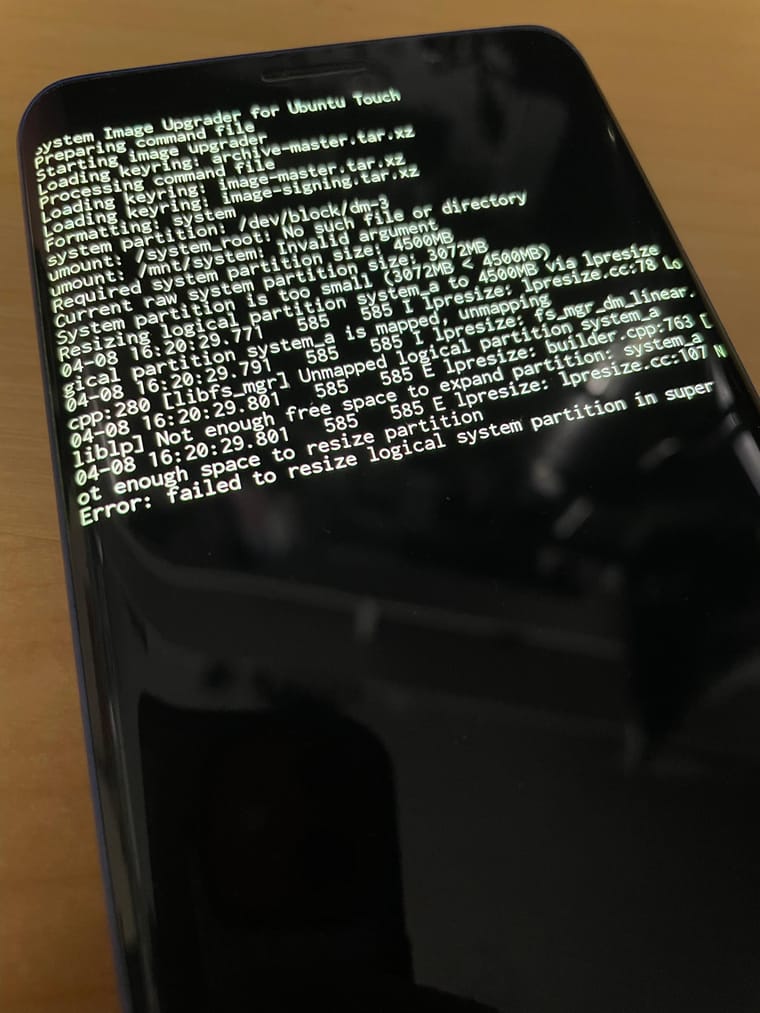
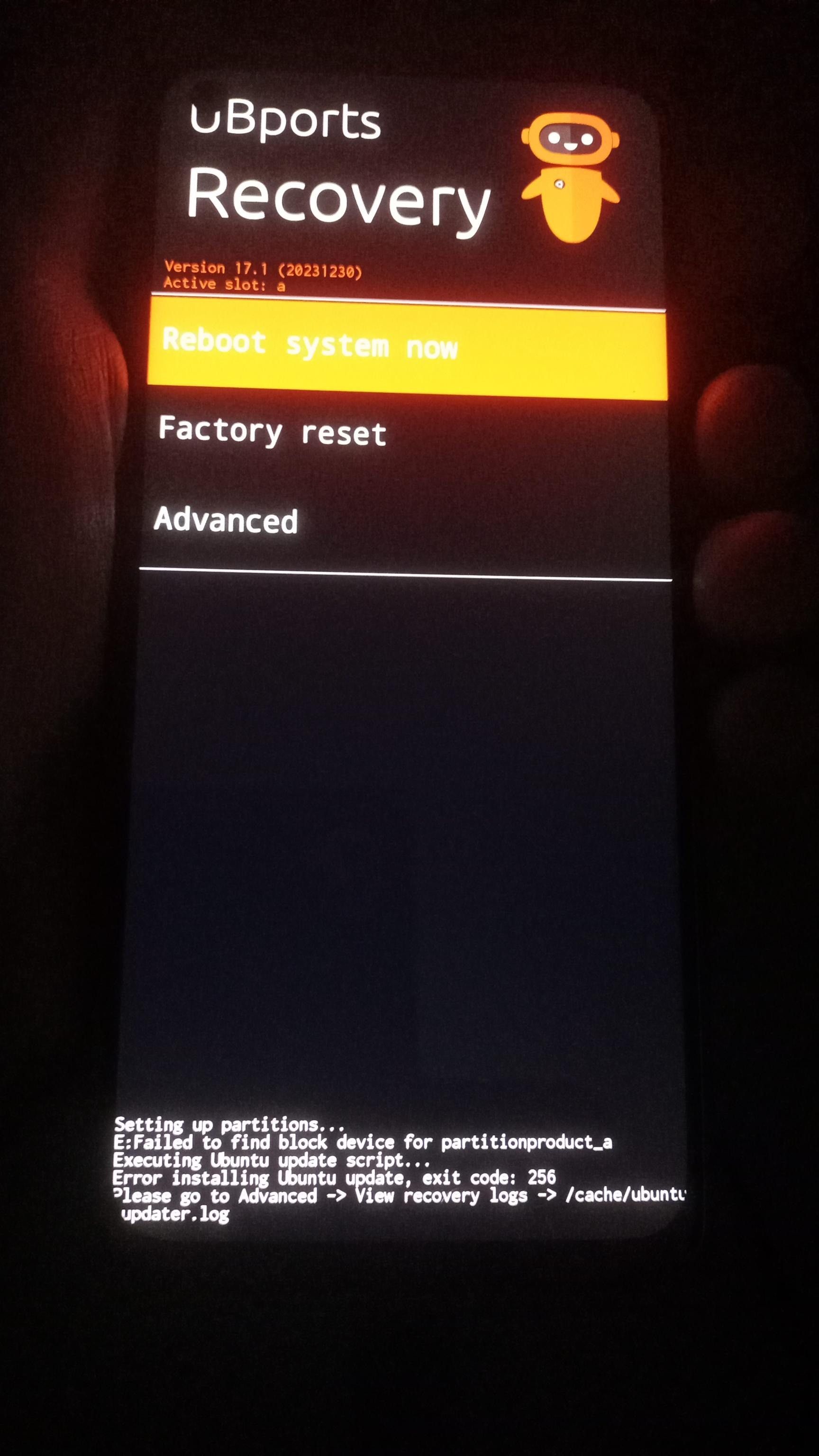
It initially had 24.04-2.x, but I had to install 24.04-1.x to make some tests, and I cannot install 24.04-2.x again. I always get this errer message when installing.Any advice?
-
@YamiYukiSenpai I'm not sure what's causing it because I know someone where the root was successfully resized on this device. I have 2 Pro1-X and my 6GB variant is the one that has this issue so far. My other one is still in 24.04-1.3 so haven't tried. All I remember is that I initially flashed this one the old manual way because it wasn't in the installer yet. -
Deze chatapps kunnen nou net de apps zijn die je zoekt als je overstapt. Deze lijst is niet compleet, vul gerust aan met je eigen favorieten!
DeltaTouch
https://open-store.io/app/deltatouch.lotharkettererEen verdraaid goede UT-versie van DeltaChat. Loopt in de pas met het origineel. Decentraal en versleuteld. Kan zelfs probleemloos gebruikt worden voor videochat!
TELEports
https://open-store.io/app/teleports.ubportsEigen UT-versie van Telegram, gemaakt met medewerking van Telegram. Mist nog wat features, maar is simpel en betrouwbaar.
Signal UT
https://open-store.io/app/signalut.pparentPrima werkende UT-versie van Signal voor Desktop. Heeft wel ergens een echte Signal voor mobiel nodig. Bijvoorbeeld eentje in Waydroid, die dan heel af en toe even aan moet.
Cinny UT
https://open-store.io/app/cinny.danfroGoede en complete client voor Matrix.
WhatsNew
https://open-store.io/app/whatslectron.pparentWebversie van Whatsapp. Ik heb hem nooit geprobeerd maar ik zet hem erbij voor de volledigheid.
@arubislander said: De medewerking die Telegram heeft verleend was dat ze de push service van Canonical, die wij hebben geërfd, hebben geïmplementeerd. Ah! Okay, dat verschil is met mijn kennisniveau wat vaagjes. In elk geval hebben ze een vorm van medewerking verleend, wat meer is dan we van Signal kunnen zeggen. Dank je voor de correctie! -
Live discussion at: xmpp:livewire@conference.agnos.is?join
For the past ~2 months, I have been hacking away at making a native XMPP client for Ubuntu Touch. When @brenno.almeida released Greenline, the opportunity was too good to pass up. There exists an XMPP client called Libervia (formerly known as Salut a Toi) that works as a background daemon, and thus could fit pretty much straight into the existing architecture of Greenline.
Many experiments later,
we now have Greenline but yellowthe internals have been completely redone in an unholy abomination of Rust (of course) and Python (because Libervia is written in Python). It's a fully confined app that supports most modern XMPP basics, with a few features that still need to be implemented (e.g. reactions).The client is considered to be in alpha state, but is available on the OpenStore for testing. I consider it functional enough for daily use, but with rough edges. This thread is a discussion/support thread for the app. More specific bug reports should be filed at the git repository: https://git.agnos.is/projectmoon/livewire
You can find it on the OpenStore. I expect a handful of updates in the next days/weeks to address the most glaring bugs, and then to work on proper push notification support, which will be its own interesting journey.
read more →@sixwheeledbeast images not sending is a known issue as of yesterday. It appears to be working in OMEMO chats though. As for messages missing, it m @DerekZoZo said in Waydroid on Volla Phone Plinius.: @Ida_ Does the google free version of waydroid come with MicroG cause you can make MicroG report it is running a different OS, this fixes BankID, that's what I did on /e/OS. Doesn't come with other but can be installed. It has to be dropped in some system directory under waydroid so the Android container recognizes it as a system privileged app. -
In efforts of updating device information on devices.ubuntu-touch.io, I'd like to know what all changes have fp3 users seen in focal and noble (in context to the listings on the main website). Is there anything that used to work but doesn't anymore? Or something that works now which didn't previously? Also is volte working?
thankss!
- xcx
read more →@sm-xcx I just updated from 16.04 to 24.04 today. The one thing that sticks out to me is that it shows zero signal strength for both VOLTE signal and Wi-Fi signal. As soon as I make a phone call some signal strength appears (but I think it is switching to 2G). Wi-Fi is odd too: it might show zero signal strength, but when I go to Wi-Fi settings and choose my home Wi-Fi network, the signal strength comes back. It is enough for me to wonder if it is using Wi-Fi, so I plugged in an ethernet adapter before accessing the internet. There was also a bit of sluggishness. I noticed it earlier when I went to System Settings, then System Information, then Check for Updates, then tried to return to System Settings, and the settings just froze. However, on subsequent tries it is working normally.